Federico Viticci

10804 posts on MacStories since April 2009

Federico is the founder and Editor-in-Chief of MacStories, where he writes about Apple with a focus on apps, developers, iPad, and iOS productivity. He founded MacStories in April 2009 and has been writing about Apple since. Federico is also the co-host of AppStories, a weekly podcast exploring the world of apps, Unwind, a fun exploration of media and more, and NPC: Next Portable Console, a show about portable gaming and the handheld revolution.

How Amazon’s Mac Download Store Works

Yesterday, Amazon launched a software store for Mac applications that, using the online retailer’s usual interface to browse and buy products, allows users to purchase apps and download them on their computers without waiting for a boxed copy to arrive. In what it sounded like Amazon’s response to the Mac App Store, which as of today counts thousands of apps available from all kinds of developers, we noted Amazon’s new store launched to roughly 250 titles, and didn’t allow independent developers to submit their apps for release, as the company apparently only worked with existing large sellers (like Adobe and Microsoft) to make their applications available digitally.

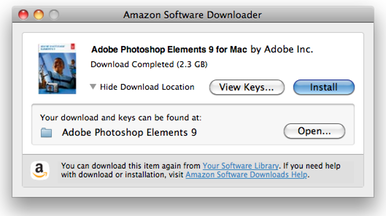
Whilst the initial impression was that Amazon’s store couldn’t compete with the ease of use of the Mac App Store but competition is always good (especially when it comes to software deals), Dan Frakes at Macworld took the Mac Download Store for a spin, and it turns out the download and installation process might be worse than expected. First off, Amazon lets you save a direct link for later in your software library, but what you get when you decide to get a new app onto your desktop is not a .dmg file or an .app – Amazon gives you an additional “app downloader” to download the actual app on your Mac:

This is where the process gets quite a bit less convenient than buying through the Mac App Store. The first thing you actually download is a small disk image (2.1MB in size, in my case) containing an application-specific [Software Name] Downloader program. Open this disk image, if your browser doesn’t mount the image automatically, and double-click the Amazon Software Downloader.app inside. After a few seconds, the Downloader program begins downloading the purchased software—not to your Downloads folder, or even to your Applications folder, but to a new folder on your Desktop.

There’s more. When trying to install Photoshop Elements with Amazon’s downloader, Frakes ended up with a new .dmg and he had to figure out by himself what to do with it:

I double-clicked the Adobe Photoshop Elements 9 item, expecting it to launch an installer, but it turns out that was just a folder with a custom icon. Inside that was Install.app (along with several folders named deploy, packages, and payloads). Double-clicking Install.app launched the Photoshop Elements installer, which prompted me to enter my 24-character license key, to sign up for an Adobe ID, and to choose which components of Photoshop Elements I wanted to install.

Obviously, it’s possible that Adobe chose a convoluted process and other apps will come with an easier installation method. However, the fact that a separate downloader needs to run in order to get the stuff you bought online seems to be the norm. Personally, I wasn’t really expecting Amazon’s new Mac store to offer the same experience of the Mac App Store (which, small bugs aside, truly is the best way to discover, install and recover Mac apps), but reading Dan’s article makes me wonder how many average and “geek” users will choose this over Apple’s own store or even a boxed copy just for some small discounts or the fact that you can pay with your existing Amazon account. Make sure to read the entire post to know more about the post-installation and, more importantly, how Amazon handles licenses and software keys on multiple computers.

Back to School Announcement at WWDC with Special iPad Discounts?

BGR reports one of Apple’s announcements at the upcoming WWDC will be about the Back to School 2011 program, which was initially rumored to launch this week. According to the website, this year’s Back to School will continue offering a free iPod touch to students who purchase a new Mac, although it’s possible that Apple will also kick off a new promotion with a $200 discount off an iPad following the purchase of a new Mac.

We have been told Apple will continue to offer educational discounts on computers and either a free iPod touch, or $229 towards the purchase of any other iPod. Our source also let us know that there might be something new in the works, as well… they heard that it’s possible Apple might offer students up to $200 off an iPad with the purchase of a new Mac.

The Back to School program has usually been announced in late May or early June. With the WWDC starting on June 6, the promotion could play nice with other major announcements such as Lion and iOS 5 made on stage. In the past years, Back to School allowed students to get a free 8 GB iPod touch, and the current family of iPod touches starts at $229 with the 8 GB model featuring the Retina Display and FaceTime camera. Apple’s push in the educational market was brought to the press’ attention again two weeks ago as the University of Delaware said an “Apple Store” would come on campus, enabling students to check out and buy products directly next to university’s library. With a wide selection of apps targeting students available on the App Store, $200 off an iPad combined with, for example, a MacBook Air indeed would be a good deal.


Spotify on the Back Burner as Labels Sign Deals for iCloud

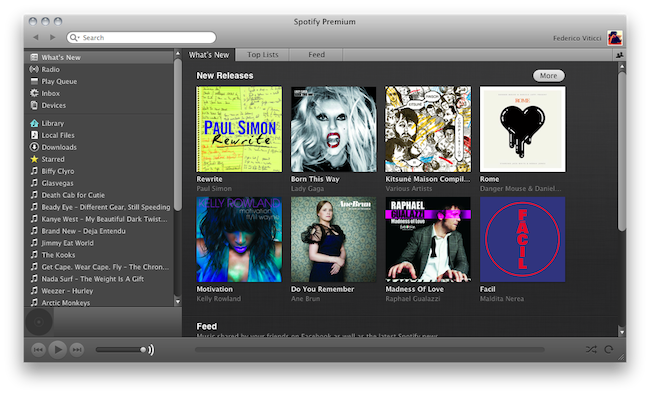
According to an article by Eliot Van Buskirk at Evolver.fm (republished by Gizmodo), US record labels are waiting for Apple’s rumored iCloud music service to launch publicly before closing the remaining deals that are preventing Spotify, a popular music streaming service, from launching in the United States. Several rumors claimed Apple is working on an online interface for iTunes to allow users to upload and stream their music collections from the cloud, with a report from last night suggesting Apple will adopt a system similar to Lala (which they acquired last year) to scan a user’s library and mirror songs to their servers, also offering subscriptions and possibility to get access to higher-quality versions of the same songs.

We heard an interesting theory the other day from a well-connected source: Record labels accustomed to receiving big checks from Apple want to give Steve Jobs and company a crack at offering a music subscription service to Americans before Spotify enters the ring, so they’ve been dragging their feet (i.e. demanding too-high payments) in their negotiations with Spotify, preventing it from launching here until after Apple’s cloud music service does.

Spotify has long been rumored to be getting ready for a US launch, though the European company never managed to ink the final deals with the Universal Music Group and Warner Music group. It was previously reported that Spotify had signed papers with Sony Music and EMI for a US launch, alongside the fact that record labels were demanding the adoption of premium subscriptions only, forcing Spotify to ditch their freemium model if they wanted to launch in the US. On the other hand, Apple is believed to be approaching the final stages of negotiation with Universal Music Group, as EMI, Sony and WMG are already on board for the iCloud announcement at WWDC. Others have also reported Apple will have to finalize deals with music publishers, besides labels, before launching any music service, with negotiations also quickly moving forward on that end.

Evolver’s article reminds of an old rumor that claimed Apple executives (including VP of Internet Services Eddy Cue) were pressuring labels to decline Spotify’s offers to prevent the European company from launching a freemium music service in the US. However, the new theory seems slightly different in the way the labels are willing to wait for Apple’s iCloud to become available before closing deals with Spotify. Spotify currently offers desktop and mobile applications to listen to an online music catalogue thanks to the deals the company has signed with European labels. Apple’s new service is rumored to offer a similar setup, with iOS devices capable of streaming music from the cloud and iTunes for Mac and Windows handling uploads and other functionalities.


Maps+ Enhances Google Maps On iOS

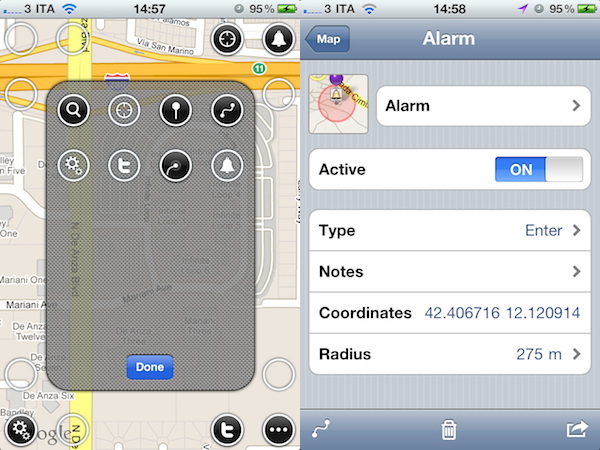
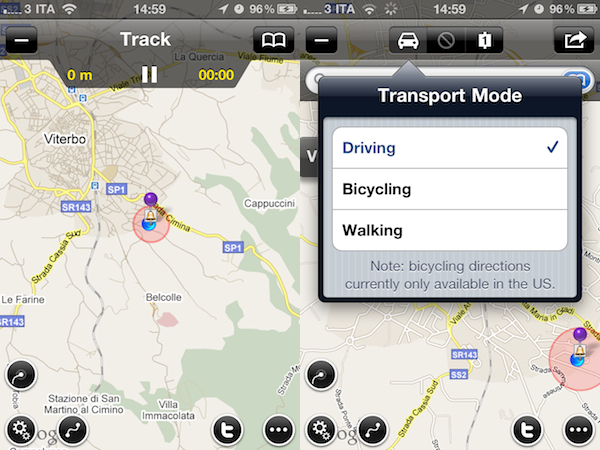
Maps+ by IZE, released earlier today in the App Store for iPhone and iPad, is a new free application that aims at enhancing the standard iOS map experience by plugging directly into Google Maps and adding several new features and interface improvements that turn the mapping software into a powerful location and social sharing tool. Maps+ supports Google Maps’ standard views (standard, satellite, hybrid, terrain) and allows you to quickly switch between them with a vertical three-finger swipe that may result unintuitive on the iPhone, but works really well on the iPad. What impressed me about Maps+ upon first launch is the way the app lets you customize the buttons that will overlay the standard map. From a translucent editing interface, you can drag buttons (settings, alarms, fetch position, Twitter, route and track) onto the map in pre-selected spots running along the top and the corners of the map screen.

Maps+ can get your current position, as well as search for specific addresses. Once you’ve found an address on Google Map, Maps+ can get you there with directions for driving, walking and bicycling (the selection happens from an iPad-like popover menu), give you different routes and check out the destination point in greater detail from a dedicated screen. Here, you can choose to “route here” or “drop pin”, add the place to your bookmarks, copy or mail the link and even export to GPX for viewing this information on your computer or other compatible apps. There’s more: you can use location-based alarms to be notified when you hit a place of particular interest and, if your device supports multitasking, alarm monitoring and (another feature of Maps) GPS track recording will work in the background. Among all the little additions to Google Maps and the functionalities you can check in the full app description on iTunes, one that really surprised me is Twitter integration within maps: thanks to Twitter’s geolocation support, once logged in with Maps+ you’ll be able to see your friends and people you follow on a Map, see who replied to you and where and even report spammers from Maps+. The developers describe it as a complete Twitter client, only displayed on a map.

Maps+ is free, but some features need to be unlocked at $2.99 via in-app purchase. Here’s what you get with the free edition:

  • Labels are limited to 1.
  • Pin bookmarks are limited to 3.
  • Route bookmarks are limited to 1.
  • Route transit points are limited to 2.
  • Track bookmarks are limited to 1.
  • Track recording is limited to 2 km.
  • Alarm bookmarks are limited to 1.
  • Importing bookmarks from GPX is disabled.
  • Logging in to Twitter is disabled.

If you’re serious about maps on your iOS device, forget the Google Maps webapp and Apple’s own application and go get Maps+ now. It’s powerful, well-designed, easy to use and Twitter integration adds a lot of value, and a welcome social aspect.


Ranky Shows Beautiful iOS & Mac App Store Rankings for Developers

If you’re an iOS or Mac developer, or you handle the marketing for a development studio that has apps on Apple’s App Store, you know the importance of checking rankings for your application on all the international App Stores. It doesn’t matter if your app is the next Angry Birds (probably not, though The Heist managed to take the #1 spot in the iPhone App Store after months of Rovio dominance) or something that will be fine sitting between the #20 and #100 positions, checking rankings by country and category is a common practice that helps you better understand how well an app is doing, where, and quite possibly also why.

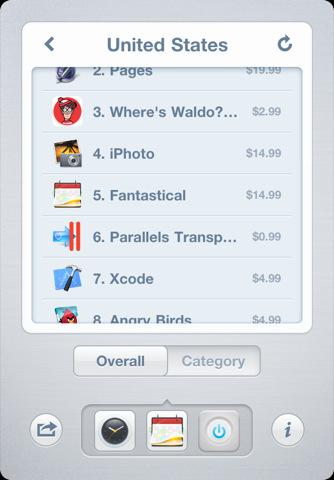
Ranky, a new app by Studio Dalton, wants to make the process of studying rankings extremely simple, focused and beautiful. The app provides real-time results for iOS and Mac App Store apps, a feature that’s surely welcome as it allows to check for any app distributed through Apple’s App Stores. Once you’ve entered any iPhone, iPad or Mac app to track, you’ll only have to select the countries you’re interested in to start analyzing the markets. After that, for each app you’ll get an overview by category or “overall” – the same applies if you filter down apps by country, you’ll get the same screen with “overall” and “category” screens to see how your app is performing. Ranky also comes with the possibility of displaying changes since the last time you checked the app, and email and Twitter sharing built-in.

With a beautiful interface and a simple, yet powerful feature set, Ranky is a neat little tool iOS and Mac devs should test right away. Go download the app here at $0.99.


Rumor: Apple Testing A5-powered MacBook Air

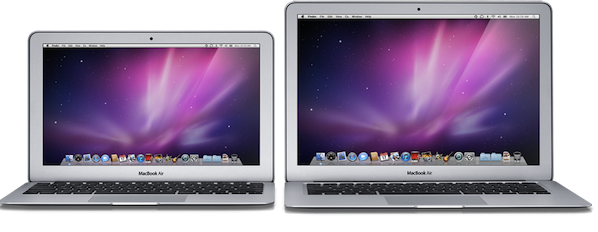
According to a new report by Japanese blog Macotakara, Apple is testing internally a new version of the MacBook Air powered by an ARM-based A5 processor and Thunderbolt connectivity. The website reports the machine is made by Quanta Computer, and this speculation comes amidst rumors of a MacBook Air refresh featuring Intel’s Sandy Bridge and Thunderbolt set for a June or July launch.

According to this source who saw live A5 MacBook Air actually, this test machine performed better than expected.

Though it’s not clear which Mac OS X or iOS is pre-installed on this A5 MacBook Air, iOS seems to have difficulty to use features of Thunderbolt without Finder. And even if Mac OS X is installed, developer should spend time to support A5 on Universal Binary Applications. As considering these situation, this A5 MacBook Air seems to be made just for experiment.

The shift to an ARM architecture on OS X would require Apple to rewrite parts of the operating system (though iOS, derived from OS X, runs on ARM chips) and, most of all, third-party developers to update their applications to be universal binaries capable of running both on Intel and ARM CPUs. This would be a resource and time consuming process according to many, similarly to when developers had to switch from PowerPC to Intel years ago, though a recent report claimed that Apple was willing to implement ARM on the desktop, perhaps also offering converting tools and other utilities to make the transition easier. Still, Macotakara seems to suggest this alleged A5-powered Air is being tested as an experiment, which, if true, wouldn’t come out at least until next year; the website correctly pinpointed many of the iPad 2 hardware and design features in the past months, offering credible mockups of the device ahead of its launch.


Echofon Releases Photofon: See Photos From Your Twitter Timeline

Released a few minutes ago in the App Store, Photofon is a new app by Echofon, makers of a popular Twitter client for Mac and iOS devices, that strips away all content from your Twitter timeline to display photos shared by people you follow. More often than not, especially if you follow hundreds of users, there’s a chance photos are skipped when checking out news on Twitter because either a) you don’t care about what people are eating or b) you’re just following that guy for the news he posts, and you don’t want to see his cat. For as much as we like cats (and puppies in general) here at MacStories, I agree that sometimes people I follow share photos I really don’t care about or don’t add anything to the experience of being on Twitter to discover interesting new content, and not kittens. But other times, these people share some beautiful iPhone photography that I don’t want to miss, yet I do because I don’t have a proper client that’s solely focused on media, rather than tweets.

Photofon is a Twitter client built around photos. Whether they’re shared on Instagram, img.ly, the omnipresent Twitpic, Flickr or yfrog (I haven’t been able to test other services), these photos will show up against a minimal dark background that doesn’t distract, and makes colors truly shine on the iPhone 4’s Retina Display. The original tweet is displayed alongside buttons to fave and retweet, so you won’t forget about sharing or saving that photo you really loved. Pinch and zoom gestures allow you to see a photo in greater detail, and pull-to-refresh at the top does just what you expect. I’ve noticed the app loaded around 30 photos from my timeline, and I’d definitely like to see a button to load more, because if I’m going to fire up a client only to see photos, I want to see them all.

Photofon is free and available here. It’s not universal, but it’s a neat way to check out Twitter’s photography on your iPhone without getting lost amidst news and trends.


OS X Lion Nearing Public Release?

According to a report from TUAW, Mac OS X Lion has gone “live for internal testing” at Apple last week. Whilst it’s not clear what that means, we assume Apple has begun widespread internal testing of a new build of the OS that’s nearing GM status. TUAW suggests Lion might see a public release at WWDC in two weeks, or at least sooner than previously expected considering many had pointed at Lion on track for a late July / August release:

This suggests the new OS might possibly ship as early as WWDC with an “available today” mention at the keynote – or it might not. But Lion is looking to be one step closer to availability for Apple customers.

The latest developer preview of OS X Lion brought minor graphical changes to apps Apple had already updated in previous DP builds, as well as tweaks and performance improvements to make the OS more stable and faster. Developer builds of Lion have been seeded through the Mac App Store with a redeem code system, though Apple is also believed to make the OS available on DVDs or portable USB keys for users with slow Internet connections, unable of downloading GBs of data from the Mac App Store.


iCloud Will Scan iTunes Libraries, “Mirror” Songs Online

In a post detailing the current state of cloud-based music services from Google and Amazon, Businessweek relays some information on Apple’s upcoming iCloud service, rumored to include streaming of iTunes collections to a variety of devices and computers and said to be formally introduced at the WWDC keynote on June 6. Similarly to a rumor posted a few months ago that indicated Apple was working on a solution to let users backup & upload their collections to the cloud directly from the desktop, Businessweek says “three people briefed on the talks” (between Apple and music labels) have suggested Apple will provide a scanning tool that quickly mirrors songs to iCloud’s servers, also offering a way to replace those songs with better-quality versions if quality is not deemed “good enough.”

Armed with licenses from the music labels and publishers, Apple will be able to scan customers’ digital music libraries in iTunes and quickly mirror their collections on its own servers, say three people briefed on the talks. If the sound quality of a particular song on a user’s hard drive isn’t good enough, Apple will be able to replace it with a higher-quality version. Users of the service will then be able to stream, whenever they want, their songs and albums directly to PCs, iPhones, iPads, and perhaps one day even cars.

Businessweek also briefly mentions Apple could use a subscription-based model to give users access to these functionalities and stream songs they purchased or uploaded. Whilst the general consensus among bloggers seems to be that Apple will either allow users to upload entire music collections or listen to songs they don’t own like Spotify enables subscribers to access the company’s online database with a subscription, the technical details on Apple’s iCloud service are still unclear. A patent design suggested Apple could make users sync small bits of music locally and fetch the rest online to avoid buffering between songs; others claimed it will be a simple system revolving around uploads and streaming like Amazon’s Cloud Player; several reports also pointed at Apple building a new service that combines subscriptions, partial uploads and scanning tools to reduce upload times on a user’s end. Businessweek seems to believe the latter option, with a subscription-based payment and a desktop utility that scans iTunes and somehow mirrors everything quickly to the cloud.