Federico Viticci

10804 posts on MacStories since April 2009

Federico is the founder and Editor-in-Chief of MacStories, where he writes about Apple with a focus on apps, developers, iPad, and iOS productivity. He founded MacStories in April 2009 and has been writing about Apple since. Federico is also the co-host of AppStories, a weekly podcast exploring the world of apps, Unwind, a fun exploration of media and more, and NPC: Next Portable Console, a show about portable gaming and the handheld revolution.

iPad & Tablets Bring 200,000 New Subscribers to WSJ

There’s been quite a debate around the implementation of Apple’s new subscription policy for publishers (we’ll see the real consequences in June) and the problems faced by newspapers and magazine apps for the iPad, which most of the time don’t offer anything users couldn’t find already for free online, or in previously released printed formats. The funny thing is, sometimes the digital version costs even more than print, has a clunky purchase and download system and less content than the magazine. Newspapers, on the other hand, offer less news at a slower rate than a website. For this reason publishers have struggled, and Apple hopes to invert the situation with an easy to use subscription system that’s the first step towards a wider adoption of magazines and newspapers for the tablet. But in the meantime, the Wall Street Journal reports some interesting numbers.

The publication announced they added 200,000 new subscribers from tablets like the iPad, Nook, Kindle and Android devices in the past year. Now I’m no WSJ insider, but I guess most of these subscribers come from the popular WSJ iPad app, which is available for free in the App Store and requires a login for paid subscribers.

The 200k figure is a combination of News Corp’s paid subscriber base on all tablet-size devices, including the iPad, Android tablets, the Kindle, and the Nook. In contrast, the print edition currently represents a circulation of approximately 1.6 million.

The company hasn’t provided numbers for smartphones. With the iPad and Kindle being the ideal reading devices for many, lower performances on iPhones and Android devices wouldn’t be a surprise at all. [via Electronista]
What’s New In iOS 4.3 for Apple TV

What’s New In iOS 4.3 for Apple TV

iLounge has posted its usual rundown of what’s new in the latest Apple TV software update, and this time it looks rather huge. One problem, though: why does Apple keep naming ATV software releases inconsistently with the rest of iOS devices? Internally the Apple TV displays “4.3”, but Apple calls it “4.2 software update”. This is beyond my understanding.

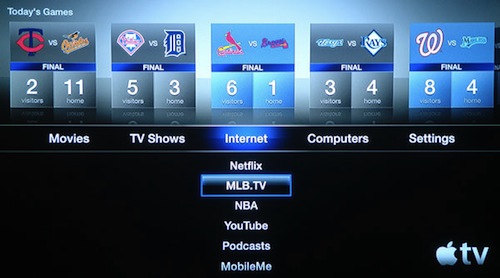
Anyway, the new sports applications baked into the ATV look great, especially the MLB.TV one with all those fancy graphics, interactive menus and HD video. I’m not baseball or basketball expert (but I like an NBA game every once in a while), but these apps seem really well done.

MLB.tv is available in all countries where iTunes Movie Rentals are offered, specifically the United States, Canada, Mexico, Australia, New Zealand, Austria, France, Germany, Ireland, Italy, Spain, Switzerland, the U.K. and Japan.

NBA League Pass on the Apple TV is available only in the United States. Although the NBA offers an International League Pass on its web site, this is different from the U.S. League Pass and cannot be used on the Apple TV—a U.S. League Pass account is required to login.

Together with the NBA and MLB.TV apps, a new redesigned keyboard with a “recent” option for quick input, new slideshows themes, time zone and HDMI output settings and the much-talked AirPlay support also made it into this update.

iOS 4.3 for Apple TV is a solid update. Check out the full roundup at iLounge.

Permalink

Instapaper 3.0 Is Out: You Can Now “Follow” Other Users

Instapaper, the most popular “read later” tool for the web, iOS and Kindle, received a major update a few minutes ago that brings it to version 3.0 and adds a whole social layer to the app. In Instapaper 3.0 you can now follow other Instapaper users to see the articles they “like” (a new name for “starring” an article). You can find friends via Facebook or Twitter through a simple login or directly from your local Address Book.

The app is faster with a new engine that finally grants perfect quality images, and you can now search all articles (the downloaded ones, at least) for title or content. Sharing to Twitter, Facebook, Pinboard, Tumblr and Evernote has also been implemented natively, to work offline as well. This is a great improvement over the previous versions that didn’t let you share articles that easily. I love this new feature.

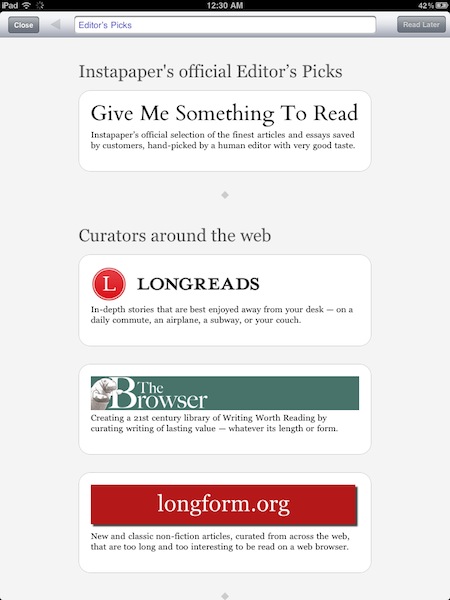
Other new functionalities include a “smart rotation lock” that can understand whether the change in rotation was accidental or not (it really seems to be working) and several new tweaks in the Preferences and bug fixes. Also, you can browse for articles in-app or choose from the Editor’s Picks recommended list of content.

The app also now has a completely rewritten web browser built in, so you can browse to any website, find the articles you want to read later, and save them directly from the app. And there’s a new Editors browser, featuring the best human curators on the web who recommend great articles for Instapaper reading.

With these great new additions, many customers won’t even need the bookmarklet anymore.

Instapaper 3.0 is a free update available here, and it’s a terrific new version you should go download right away. Check out more screenshots of the iPad version below. Read more


iOS 4.3 Is Jailbroken, Untethered [Video]

Well, that didn’t take long. iOS 4.3 was released yesterday and here comes the first video, courtesy of Daily iPhone Blog, that shows a jailbroken iPad running an untethered 4.3 jailbreak with Cydia installed and working. Build is the final one, iOS 4.3 8F190 and the video looks legit.

We don’t know when a proper jailbreak tool for iOS 4.3 will be released but it looks more like “soon” at this point. Check out the video below. Read more


Apple Rolls Out “Like” & “Post” to Ping for iOS 4.3 iPod App

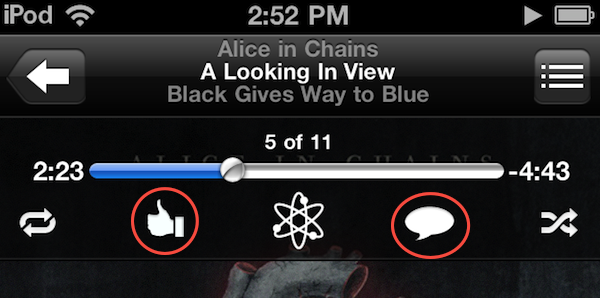
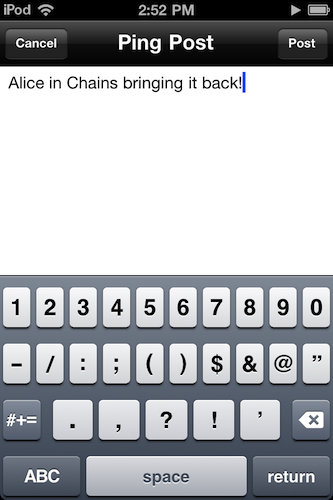
Announced yesterday but not enabled until a few hours ago, the iPod app on iOS 4.3 got two new features: you can now “like” songs and “post” them to Ping directly from the iPod app on iOS 4.3. We’re not sure right now whether this feature only works with tracks and albums purchased from the iTunes Store or music that matches the exact information stored in iTunes servers (try it with your Amazon MP3s, and let us know if it works), but as it stands now Apple has definitely updated the iPod app remotely to integrate the Ping functionality. It wasn’t there yesterday, and there it is now (see screenshots).

To like or post a song, Make sure to be signed into Ping from the iOS iTunes app. Open the iPod app, tap the artwork to bring up the top toolbar and check out the Ping icons. One is to like a song, one is to post it. Both will show up in your Ping activity stream, also accessible from the iOS iTunes app.

Update: it looks like the Ping buttons only appear in tracks purchased from the iTunes Store.


GarageBand for iPad Now Available

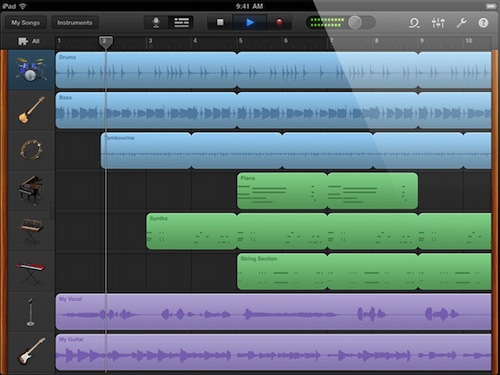
Following the release of iMovie for iPad, Apple also pulled the trigger on the second app unveiled at the March 2 event, GarageBand for iPad. The app is available now in the App Store at $4.99.

GarageBand for iPad features an intuitive interface depicting real music instruments you can play with your fingers and multitouch; with Smart Instruments, users who are not musicians but still want to play music can use the tools provided by the app to easily switch between chords and notes without actually having to precisely know music. For medium to advanced users, GarageBand offers a semi-professional music making and mixing environment with multi-track audio recording, exporting features, touch instruments with a realistic interface for drums, guitars, synthesizers, pianos and many more. GarageBand for iPad really is a full-functional port of the Mac version with the addition of multitouch that allows you, for example, to play instruments at different sensitivity levels thanks to the built-in support for pressure recognition through the accelerometer.

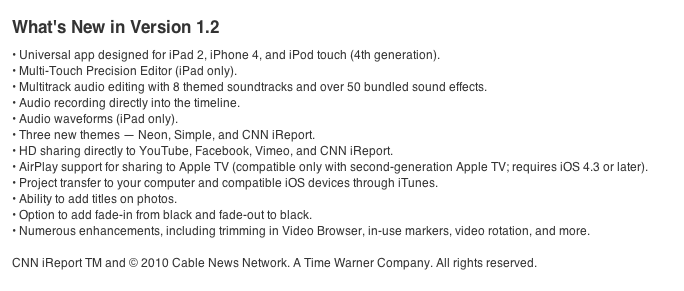
GarageBand looks like a must-have for iPad owners and an app that we’ll thoroughly test next week once we get our hands on the iPad 2. You can find it here at $4.99. Full changelog below. Read more


Apple Releases iMovie for iPad

As announced in a press releases earlier today, Apple has just released the new iMovie for iPad. It is available now in the App Store at $4.99 here. iMovie is a universal app for iPhone 4 and iPad 2, a free update for existing customers.

iMovie for iPad takes where the Mac and iPhone versions left off to bring a powerful yet easy to use movie editing experience to the iPad, deeply based on multitouch technology. Users of iMovie for iPad can easily import their photos shot on the iPad 2, or iPhone or iPod touch (or any other camera) through the Camera Connection Kit; movies recorded at 720p through the iPad 2’s back camera can be accessed from a Library popup menu to start editing right away. With a split-screen interface you can visualize the movie you’re editing in the top section, and manage or trim video and photo segments in the lower part of the iPad’s screen. You can pinch to zoom to additional parts of a video, use the precision editor to adjust videos with accuracy.

You can import songs from your iPod library to use for background audio, or use the built-in effects in iMovie. You can share videos on the web through Facebook, Youtube and a variety of other services, beam your creations to the Apple TV via AirPlay, or simply export to iTunes.

Go get the new iMovie 1.2 here. Read more


The iPad: Does It Need Programming Apps?

Many things have been said about the iPad as a content creation tool, rather than a device to consume media like music, movies and photos. In spite of the plethora of apps released in 2010 that proved you can actually do stuff on an iPad, at the iPad 2 event last week Steve Jobs himself wanted to remember the audience how the tablet is “no toy”, also thanks to the upcoming iMovie and GarageBand apps. But no matter how many apps allow you to produce and create original content using only your fingers and the virtual keyboard, there’s still a niche market Apple hasn’t addressed yet: coding apps. Read more


Developers Can Still Enable Multitasking Gestures in 4.3 Final with Xcode

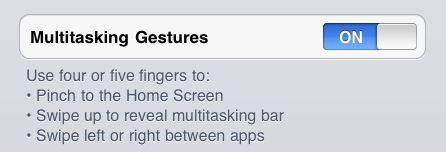
With the final release of iOS 4.3 final yesterday, several readers asked us whether or not Apple pulled the multitasking gestures that had been implemented in developer betas of iOS 4.3. As we noted in January, multitasking gestures for iPad were only meant for testing purposes so developers could test the integration of gestures in their apps. The feature needed to be activated with Xcode.

We received word from several developers that the multitasking gestures can still be enabled in the final version of iOS 4.3 (build 8F190, same as GM), but you will need Xcode and an Apple Developer account to register the device for development and activate the gestures panel in the iOS Settings app. Again, the process takes less than a minute and you can find the instructions here.

The gestures in iOS 4.3 final are the same of earlier betas:  four or five finger pinch to Home screen, swipe up to reveal the multitasking bar, swipe left or right to switch between apps. So if you have Xcode and a dev account, update your iPad to 4.3 final and you’ll still be able to activate gestures. [via RazorianFly]