Federico Viticci

10804 posts on MacStories since April 2009

Federico is the founder and Editor-in-Chief of MacStories, where he writes about Apple with a focus on apps, developers, iPad, and iOS productivity. He founded MacStories in April 2009 and has been writing about Apple since. Federico is also the co-host of AppStories, a weekly podcast exploring the world of apps, Unwind, a fun exploration of media and more, and NPC: Next Portable Console, a show about portable gaming and the handheld revolution.

Flipboard CEO Talks New Version, iPad 2

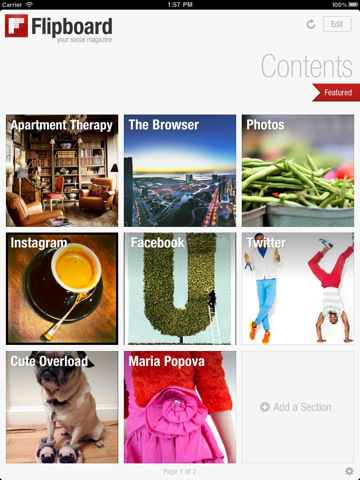
With the release of version 1.2 last night, the team at Flipboard has one again raised the bar for social magazines on the iPad. Flipboard 1.2, not different in the design from the previous iterations but richer in content,  manages to extend the platform’s capabilities beyond articles and status updates with Instagram integration. The coolest iPhone-only social network these days is now baked directly into Flipboard thanks to an API that allows you to browse photos, comment on them and like them, discover and follow users without leaving the app or jumping to Safari. Everything happens through Flipboard. Together with that, a new feature called “social search” lets you browse for any term or hashtag within an easy-to-use popup menu that aggregates content from a variety of sources like Facebook, Twitter and the aforementioned Instagram.

In an interview with Robert Scoble, Flipboard CEO Mike McCue confirms Social Search is the first example of the implementation of Ellerdale, a company Flipboard acquired last year to build a smart algorithm for aggregating and displaying relevant and personalized content. Whilst this “intelligent system” is still in the works, all the members of Ellerdale are now working at the Flipboard office and have shipped the very first feature last night, social search. It’s very cool in the way it catches tweets, photos, articles and status updates from social media, but it’s not intelligent yet. More will come in the next months, we’re sure.

McCue also gives a hint at advertising coming in future versions of Flipboard. Some fullscreen, elegant banners have already been implemented in the Flipboard-formatted version of SF Gate, and he says they’re indeed targeting for this kind of ads: beautiful photography, fast and lightweight. The opportunity for publishers to team up with Flipboard (like SF Gate) and set up iPad-optimized versions of their articles is also something McCue is heavily betting on. Last night, Flipboard rolled out integration with Wired and Pictory, too.

Last, Flipboard is going to take advantage of the iPad 2’s improved hardware with the possibility to create more than two pages in the main screen – currently a limitation of the iPad 1 hardware and memory constraints. With the iPad 2 coming out tomorrow, we can’t wait to see how Flipboard will benefit from faster processor, graphics and more RAM. As for the competition and all the tablets coming out this year, McCue says they’re just going to wait and see.

Check out the video below.
Read more

Apple Confirms: iPad 2 Online Sales Beginning At 1 AM PT Tomorrow

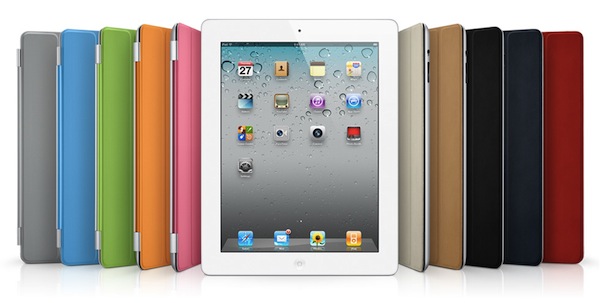
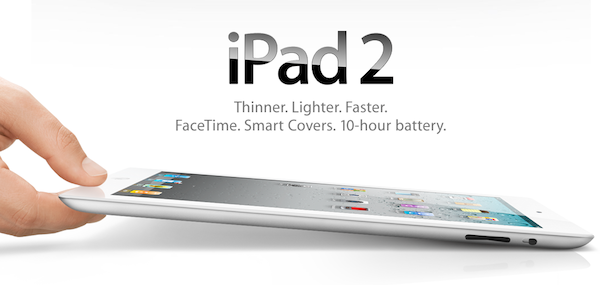
With a press release that went out a few minutes ago, Apple confirmed that the iPad 2 will go on sale tomorrow in the United States in all 236 Apple retail stores, plus AT&T, Best Buy, Target, Verizon Wireless, Walmart and select Apple Authorized Resellers. The good news is, if you’re willing to buy one online you’ll be able to starting 1 AM PT on the Apple online store:

Apple today announced that iPad 2, the next generation of its magical device for browsing the web, reading and sending email, enjoying photos, watching videos, listening to music, playing games, reading ebooks and much more, will be available tomorrow at 5 p.m. local time at all 236 Apple retail stores in the US and through the Apple Store® (www.apple.com) beginning at 1 a.m. PT.

If you’re going to get an iPad 2 at the retail store, however, Apple will offer a Personal Setup service for setting up email and iTunes accounts and learn the basics of the App Store with an Apple employee. It is unclear at this point how many units Best Buy, Walmart and Target will be provided, but previous speculation suggested Apple had to face shipment issues for an early March launch. Steve Jobs said at the iPad 2 event they were going to ship the new device “in volume” though, so it’s really impossible to provide an estimate of availability now. If you’re going to get in line tomorrow, send us pics and videos at our tips inbox.

Press release below.

Read more


Apple Sets Up Temporary Store in Austin for SXSW

The SXSW 2011 conference kicks off in Austin tomorrow, and the iPad 2 debuts in Apple Stores and authorized retails chains tomorrow at 5PM. Over the past weeks, I’ve read several blog posts and tweets from people attending SXSW this year unsure whether or not they should pull off the conference to stay home and buy an iPad 2, go to Austin and spend hours in line at the nearest Apple Store (thus missing SXSW events) or just go to Austin without getting an iPad 2. See, SXSW is a rather huge event where startups launch and geeks from all over the U.S. meet and the launch of the iPad 2 right in the middle of it could be a deal-breaker for many. Most of all because once you see some people at the conference with an iPad 2, if you’re an Apple geek you’re going to want one.

Apple thought about these issues as well, and in order to sell a truckloads of iPads to SXSW attendees they decided to set up a temporary store in downtown Austin. The plan came together quickly last Monday, when an Apple executive confirmed they wanted to set up a pop-up store for two weeks in the Scarbrough Building on Congress Avenue.

On Wednesday, construction workers were busy retrofitting the 5,000-square-foot space in the building, at Congress and West Sixth Street, that Apple will lease for two weeks. Black vinyl sheeting covered the windows fronting Congress.

The store will be ready tomorrow and we guess they’ll be selling a lot of iPads to people attending SXSW. That’s just a clever more and, although it won’t stay there for long, we’re sure the store in Austin will be a great experience for all those at SXSW willing to get their hands on the latest gadget from Cupertino. If you have photos of the new store, the Tips box in the sidebar is just a click away. [via Statesman]


Why Do Movie Trailers Debut on Apple.com?

Why Do Movie Trailers Debut on Apple.com?

If you’ve ever wondered why so many movie trailers become available on Apple’s website and not anywhere else, the answer is provided on Quora by a former Apple employee. It’s got Star Wars in it:

It started as a showcase for QuickTime, at the time of first launch we only had a handful of trailers and one or two studios. It was really the Phantom Menace trailer that put apple.com/trailers into the spotlight. Lucasfilm had posted a rather crappy trailer on their site, the team at Apple was appalled. Through DNS records, the web team at Apple managed to contact the Star Wars web team and set up a meeting. That single trailer showcased QuickTime’s quality over RealVideo by leaps and bounds, and quickly surpassed over 1 million downloads to become the most popular web video of the internet in that time.

He also mentions the Akamai distribution technology (a little startup at the time) made the difference when talking to movie executives and showing them the speed and reliability of Apple’s network. Plus, the webpage design is also pretty sweet these days. [via]

Permalink

Flipboard 1.2 Is Out: Instagram Integration, Faster, Search

A major new version of Flipboard, the social iPad magazine, was released a few minutes ago, and it’s a rather big update since the “iPad app of the year” was first released last summer. Flipboard 1.2, now available in the App Store, comes with ful Instagram integration to let users browse Instagram pictures as if they were flipping through a full-size photo album. It looks great on the iPad, photos are much bigger than the native iPhone Instagram app, and all of this has been achieved thanks to the Instagram API we covered a few times in the past.

Thanks to a new feature called “social search”, users can also browse for specific words and hashtags inside Flipboard. This was a much requested functionality that adds a lot of value to the app, which now can not only display content from your favorite online sources, but also search for relevant fresh one.

Flipboard 1.2 is faster thanks to a new backend engine, features a refresh button to check for new articles at any time without closing and restarting the app, has a Featured section at the top to browser editors’ picks. Again, another way to find great content you might like and read in Flipboard.

Flipboard 1.2 is available in the App Store here. In case you missed them, check out our previous reviews of the app here and here. Read more


Should You Buy a 3G iPad or Use Personal Hotspot?

Should You Buy a 3G iPad or Use Personal Hotspot?

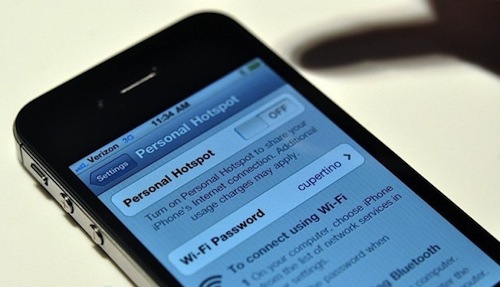
Jeff Carlson at Tidbits has a great piece about many iPhone and iPad owners’ recent question: should your next iPad be a 3G one, or can you just use Personal Hotspot through your iPhone? In short: it depends on how much data you use and how many devices you could be able to connect to the Personal Hotspot. But overall, the hotspot functionality of iOS 4.3 sounds like a great plan if you already have an iPhone and know you’ll be doing a lot of iPad 3G surfing.

So, in the end, the Personal Hotspot approach will be cheaper for AT&T users who use lots of data, and more expensive for those who can stay within the lowest limits. And it’s exactly the reverse for Verizon Wireless users, for whom the Personal Hotspot approach is slightly better for lower bandwidth users, but more expensive once you go beyond 2 GB of data.

Personally, I’ve grown accustomed to having an Internet-connected iPad whenever I need it, whether that’s on a familiar Wi-Fi network or taking advantage of near-ubiquitous 3G coverage (in Seattle, where AT&T’s coverage is generally good). As for ease of use, the fact that the iPad remembers the iPhone’s network password, and that the iPhone switches into Personal Hotspot mode easily, leads me to think that adding the extra step of enabling the hotspot wouldn’t be onerous.

From my experience with 3 Italia’s network, I can say my next iPad is going to be a WiFi-only one. The setup is easy and the iPad remembers the Personal Hotspot password, plus you can leave the hotspot set to “on” even when you’re not using so you won’t have to re-enable every single time. The iPhone won’t consume battery and everything will be left as it is. Personal Hotspot is just too good for me to ever want a 3G iPad.

Permalink

Angry Birds Seasons: St. Patrick’s Day Edition Now Available

Angry Birds Seasons: St. Patrick’s Day Edition Now Available

As previously reported, Rovio has finally released a new update for Angry Birds Seasons, which now comes themed for Ireland’s St. Patrick’s Day. The update features “green levels” (green is Ireland’s national color), 15 new levels, new achievements and more.

Have the Luck of the Irish and Go Green with this episode of Angry Birds Seasons: The St. Patrick’s Day Edition! After the love fest of Valentines, Angry Birds Seasons is back with the greenest update to date. May Irish eyes shine upon you and as usual Angry Birds gives the most generous updates of any app!

Oh, you can also send St. Patrick’s Day cards to your friends. Go grab the update here.

Permalink

Apple Releases iAd Producer 1.1, Updated for iOS 4.3

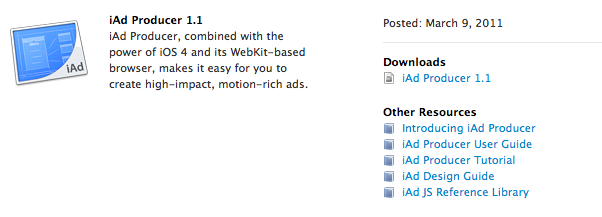
Together with the release of Xcode 4, now also available for non-registered iOS and Mac developers in the Mac App Store, Apple also pushed an update for iAd Producer, its iAd design and development software for OS X.

Version 1.1 (weighs in at 91 MB) brings iOS 4.3 compatibility and the possibility to create ads with multiple banners. As promised last year, the iPad is fully targeted in this release with fullscreen banners as well.

Full changelog:

  • Improved compatibility with version management systems
  • Creation of ads with multiple banners
  • Support for full-screen banners on iOS 4.3 devices
  • Importing and editing of custom JavaScript and CSS extensions
  • Improved stability and performance

iAd Producer is available in the iOS Dev Center.


Readability Launches Mobile Webapp with Full iOS Support, Offline Reading

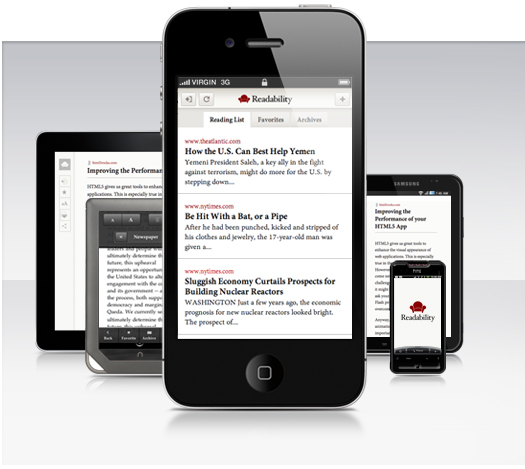
Web service Readability announced a few minutes ago that, with an iOS native application still waiting for Apple’s second review, they are rolling out today a full-featured, mobile optimized web version of their reading tool. To use the new Readability on your cellphone or tablet, just head over Readability.com with your browser and save the website to your homescreen. Readability’s new mobile app is indeed an HTML5-based application that runs on iOS, Android handsets & tablets and a plethora of other devices available in the market.

Underneath the hood is…the web. Readability for mobile is a web application specially fitted for mobile and tablet devices. It’s a great example of what can be achieved by building apps on the latest web technology.

A final thought regarding our iOS submission: our overarching goal is to deliver the best possible experience to users of Readability. We re-submitted the Readability app to Apple along with an appeal approximately two weeks ago. We haven’t heard back yet.

Readability made the rounds of the Internet a few weeks ago when they announced a completely revamped service (based on a revenue split model with publishers of content consumed through Readability) and went public with an open letter to Apple about the rejection of their official iOS client for iPhone and iPad, heavily based on Marco Arment’s Instapaper (Arment is also an advisor to the company). According to Readability, Apple rejected the app because of the lack of implementation of app subscriptions – the ones where Apple takes a 30% fee off every subscription processed inside an iOS application. The company didn’t understand the rejection as, in their own vision, Readability isn’t a publishing app but a web service that aggregates articles produced by others on the Internet.

Readability’s move to HTML5 is interesting because they’re proving they can have a reading platform that works on a variety of OSes without being forced to go through Apple’s approval process and subscription policies. They’re relying on the power of modern open web technologies to deploy a beautiful application that works anywhere, anytime thanks to offline reading support. An app that also lets you quickly paste URLs to read articles in an uncluttered, elegant view meant for mobile devices. The Readability webapp also senses your device’s orientation and changes the on-screen graphics accordingly for an optimized reading experience. We can’t wait to try it out tonight.

As the team stresses on the company’s blog, this app was put together in two weeks. While it’s still unclear whether the native iOS client will go through the App Store’s gate or not, cheers to Readability for delivering what the service’s users were waiting for. Read more