Federico Viticci

10804 posts on MacStories since April 2009

Federico is the founder and Editor-in-Chief of MacStories, where he writes about Apple with a focus on apps, developers, iPad, and iOS productivity. He founded MacStories in April 2009 and has been writing about Apple since. Federico is also the co-host of AppStories, a weekly podcast exploring the world of apps, Unwind, a fun exploration of media and more, and NPC: Next Portable Console, a show about portable gaming and the handheld revolution.

Unreal Development Kit For iOS Coming This Week

Unreal Development Kit For iOS Coming This Week

The Wall Street Journal is reporting that the UDK for iOS will be released for free on Thursday:

Epic Games is planning to release an updated version of its game-development tools, known as the Unreal Development Kit, to the public Thursday. The kit, which is free to download, will include new tools to create high-quality graphics and animations on iOS, effectively simplifying and speeding up the development processes for games. Epic doesn’t charge license fees to tinker with the kit nor to make free games. But, if developers want to sell their apps, they have to pay a $99 licensing fee and 25% royalties after the first $5,000 in sales.

“Apple’s App Store is the most vibrant market for mobile gaming,” said Epic co-founder Mark Rein. “If you’re going to make a game for a mobile device, and you want to make the most money, you’re nuts not to make it for iOS.

Rein also expressed his concerns about the Android platform, which doesn’t allow for apps larger than 50MB to be sold in the Marketplace and it’s too “fragmented” for game developers.

Permalink

Why The Mac Needs Cydia

There was a time when tweaking OS X was a mostly unknown practice not so many users were willing to dedicate their time to. Modding the basic functionalities and look of the Mac required you to delve deep into forums, tutorials, Terminal hacks, resource packages, manual installations, broken mods on each software update. Modders always had a hard time trying to figure out how to best hack the Mac to make it perform and look the way they wanted.

Cydia for iPhone changed that. The whole jailbreak community changed the approach to modding and hacking on Apple devices. By providing a unified experience that’s similar to the App Store model, but for tweaks, Cydia offers anyone the possibility to create something and release it publicly or privately for free. The “something” mentioned above is mostly made of tweaks, apps, themes and app mods Apple would never accept in its App Store. But that’s fine: Cydia was meant to provide a place for the stuff that couldn’t find its way past the app review team’s gates. A place that, together with the freedom of installations, also grants automatic updates, easy discovery and detailed information about what you’re going to put on your devices.

As you may know, Cydia had such a great run so far that its creator Jay Freeman, a.k.a. Saurik, developed a native version for jailbroken iPads and announced the acquisition of former competitor RockApp. With the help of members of the Dev Team, they updated Cydia in the past weeks to feel even better on the iPad, and eliminate some annoyances such as a laborious queue functionality. From several standpoints, Cydia is even more intuitive than Apple’s own Store. Read more


Google Voice App Now Works On The iPad and iPod Touch

One month after the release of the official Google Voice app in the App Store, here comes an updated version that works both on the iPad and iPod Touch. Announced by Google a few minutes ago, the new Google Voice app has been updated to work on non-iPhone devices allowing you to send and receive text messages. As you can guess, no – you can’t make cellular calls on the iPod Touch.

Still, the Google Voice team introduced a new functionality called Click2Call which lets you initiate calls with your phones. On your iPad or iPod Touch, tap on the “call” button and select which phone you want to ring. It’s a very easy way to let Google Voice call your phone and then connect the call to a contact’s number.

Among other improvements and bug fixes, text forwarding is now disabled by default when you activate push notifications so you don’t get multiple and annoying dialogue boxes. You can now set a “Do Not Disturb” status in the settings, access you Address Book contacts from a built-in Contacts tab, tap & hold on inbox messages to delete or archive. Nice. I’m pretty sure MacStories’ own Cody Fink (who’s a die-hard iPod Touch user) is going to love this.

Google Voice app is, as usual, free in the App Store.


A Beautiful Instagram Facelift

A Beautiful Instagram Facelift

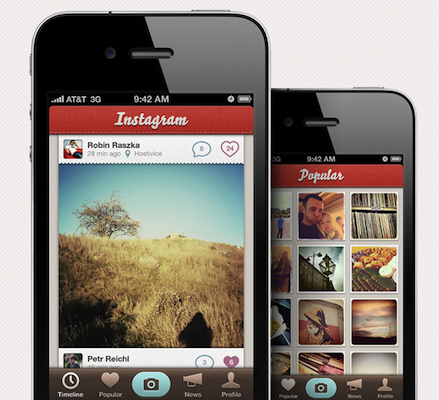
Instagram is one of the hottest photo sharing apps on the App Store right now but there’s one problem: it doesn’t look that great. At Tapmates, we take pride in our icons and user interfaces, so we decided to mock-up what it would look like if we made it.

The mockup surely sports some pretty pixels. Still, it breaks many of Apple’s interface guidelines, such as the camera button in the tab bar. Looks great nonetheless.

What do you think?

Permalink

Apple Releases “iTunes 12 Days of Christmas” App for iPhone and iPad

Yesterday we told you Apple re-launched the “iTunes 12 Days of Christmas” website in Europe for the 2010 holiday season. On the website, a banner suggested that an official iPhone app would come soon to let users receive push notifications for exclusive offers in the iTunes Store. The app is now available, it’s free and it runs both on the iPhone and iPad.

From December 26th until January 6th, Apple will give away a selection of books, apps, songs, movies and TV episodes for free. The app doesn’t show much right, except that it asks you for push notification authorization and it displays a countdown to the daily giveaway on screen.

The app is not available in the US Store, I downloaded my copy from the UK one. I guess it should be available in other European stores as well. If you have a UK account, you can go download the app hereRead more


iPad Portraits: The Woz

David Newman is one of the most talented artists that use the iPad as a canvas for their creations. We covered David’s impressive portraits before, but his latest is just too great and geeky to not deserve another spot here. I mean, it’s the Woz!

That’s right, a portrait of Steve Wozniak while using a MacBook with his custom white iPhone 4 sitting on a Glif. The portrait was entirely realized on an iPad and Steve set it as his new profile picture on Facebook. It can’t get any geekier than this.

Check out the animation video of the portrait below. As usual, Newman doesn’t disappoint.[via RazorianFly] Read more


CNN Releases Official iPad App

CNN released its first official app for the iPad earlier today, and it’s a solid first iteration on the tablet. It’s available now for free in the App Store.

The CNN app is meant to let you enjoy the full CNN experience with stories, insights and videos directly on your iPad. Being the iPad both a personal and communal device, the developers over at CNN thought it would be appropriate to build sharing features and a commenting system right into the app. You can share stories on Facebook and Twitter, send them via email, save a story for offline viewing (as you can guess, very useful on iPad WiFi devices). Read more


MobileMe Goes Down For Maintenance Tonight

MobileMe Goes Down For Maintenance Tonight

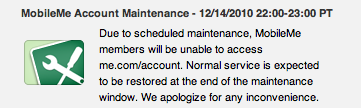
Apple has announced that MobileMe’s account page and sync services will be down for maintenance later today. MobileMe account will be down from 10 PM until 11 PM Pacific Time. MobileMe sync will be unavailable from 10 PM until midnight Pacific Time.

Due to scheduled maintenance, MobileMe members will be unable to access me.com/account.

Due to scheduled maintenance, some MobileMe members may be unable to sync between their computers, iPhone, iPad, and iPod touch or view their contacts and calendars at me.com.

Permalink

Fotopedia Heritage 3.0: Instant Slideshows, Suggestions, iOS 4.2 Support

Fotopedia Heritage is one of those iOS apps (universal, free) that keeps on getting better on each release. First they released a 1.0 version that aimed at becoming the digital encyclopedia for humanity. Version 2.0 added support for the Retina Display, 25,000 more photos and shuffle mode. Today, with the release of Fotopedia 3.0, the developers re-imagined the app from the ground up and redesigned the whole experience to make it more intuitive, fast and beautiful. Read more