Federico Viticci

10804 posts on MacStories since April 2009

Federico is the founder and Editor-in-Chief of MacStories, where he writes about Apple with a focus on apps, developers, iPad, and iOS productivity. He founded MacStories in April 2009 and has been writing about Apple since. Federico is also the co-host of AppStories, a weekly podcast exploring the world of apps, Unwind, a fun exploration of media and more, and NPC: Next Portable Console, a show about portable gaming and the handheld revolution.

Buddies for iPad Adds Facebook Chat

Buddies for Facebook is a neat app for the iPad we reviewed in November which provides a quick and easy way to check on your Facebook friends. With an interface based on a “split view” aimed at letting you navigate across all the sections of Facebook, there’s no doubt Buddies is one of the most curious and innovative way to use Facebook on the tablet.

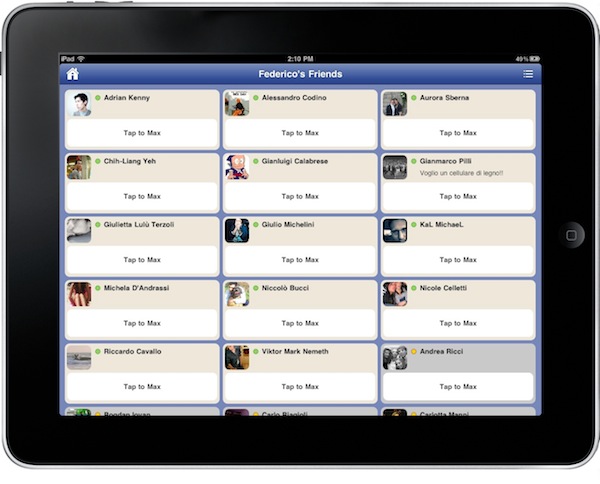
The latest 1.15 update, released last night, improves the app’s integration with Facebook by adding support for Chat. To access the chat interface, you have to tap on an icon in the upper right corner in the main page. The app will “rotate” its UI to accomodate a new page with all your online friends. To start chatting, you tap on a contact and tap again to initiate the conversation. That’s it. The app allows you to switch back and forth between your friends lists and it’s pretty fast at switching between the main screen and the chat UI, too.

At $2.99 in the App Store, Buddies may not have all the features of Friendly (which happens to have a free version available now) but it’s got the feel of something new and specifically geared towards iPad users. It’s not just a webpage wrapped around an app, it’s a native version of Facebook that now comes with Facebook Chat integration.

Give it a try.

More On Cydia For Mac

More On Cydia For Mac

Ok, so Cydia is coming to the Mac. But what will it bring to the OS X platform, which starting January 2011 will have not one, but two ways of installing software? Just as I assumed last week, it’ll bring easy installation of mods and tweaks without having to do those things manually, through the Terminal, and keep them updated after that. The unification of desktop hacks.

Chris Foresman over at Ars Technica reports:

Freeman created a new version of MobileSubstrate which has calls simply “CydiaSubstrate.” This new version can run on both iOS as well as Mac OS X on the desktop. “Just like you can make all these modifications on the iPhone, you can make these same modifications on the desktop,” Freeman said. “Until now, there has never been a way to easily install modifications to the system or third-party applications, as well as keep them updated.

True. Installing themes have been a complete mess (remember Magnifique?), not to mention those neat hacks and mods (to the Finder, for example) that magically disappear on every OS update. But there’s more:

CydiaSubstrate-based modifications can also target a particular application for modification, as well. “For instance, users that have jailbroken iPhones would like to have a modified version of iTunes that does not ask to update iOS when the device is plugged in, since the update might overwrite jailbreak modifications,” Freeman said. “Or perhaps you want to change the frequency that TimeMachine performs backups to something other than the stock settings. CydiaSubstrate makes this possible in an easy way that average users could install and update them.

This is exactly what tinkerers on OS X wanted, and needed. Cydia for Mac will simply be the iOS version brought to the desktop.

Back to the Mac.

Permalink

First (Public) Mac App Store Rejection?

First Mac App Store Rejection?

LittleIpsum is a neat utility for Mac OS X we covered a few months ago here. By sitting in the menubar, it allows you to quickly copy Loren Ipsum text to the clipboard. The developers tried to submit the app to Apple for Mac App Store approval, and it got rejected. Why?

LittleIpsum v1.1.1 has been officially denied at the Mac App store due to not meeting the following guideline:

2.8   Apps that are not very useful or do not provide any lasting entertainment value may be rejected.

I’m sure many applications have been rejected so far, but this is the first public post from a developer I’ve seen talking about it. Seems like it’s going to be a very different store than we first thought. [via]

Permalink

Notational Velocity Alt

Notational Velocity Alt

nvALT is a fork of the original Notational Velocity with some additional features and some interface modifications. It is a work in progress.

This fork by Brett Terpstra comes with widescreen layout, a shortcut to collapse the notes panel, Markdown, Textile and MultiMarkdown support, HTML source code tab in the Preview window. It’s really a highly customized version of the original NV, possibly inspired by Elastic Threads’ mod. The Preview window is amazingly useful.

Permalink

Trickle: The “Passive” Twitter App That’s Perfect On Your Desk

Twitter clients for iPhone and iPad, in spite of their substantial UI differences, are basically all geared towards the Twitter power user who wants to be able to do a lot of stuff with his Twitter timeline: check on users’ profiles, retweet, save to Instapaper, search, access lists, and so forth. Most Twitter clients for iOS are aimed at enabling you to enjoy the full Twitter experience.

Trickle, released a few days ago, is different. It runs on the iPhone and iPad as a universal app, but instead of bringing many of Twitter’s features to mobile devices, it focuses on turning your Apple device into a minimal, Helvetica-based, constantly up-to-date Twitter widget. Perfect for your desk, possibly with your iPhone or iPad in a dock. Read more


Toshiba Is Building A $1 Billion Factory To Make Apple Displays

Reuters is reporting that, according to the Nikkei business daily, Toshiba will build a $1.19 billion factory (that’s 100 billion yen) to make LCD panels, “mainly to supply to Apple Inc’s iPhones”.

The company’s wholly owned unit, Toshiba Mobile Display Co, will construct the facility in Ishikawa prefecture and the plant will churn out low-temperature polysilicon LCD panels, which allow for high-resolution images, the paper said.

Work on the plant will start by early next year, with the production due to begin in the second half of 2011, Nikkei said.

Could this mean that Apple is moving away from its current suppliers of LCD panels, or are they simply looking for other ways of getting the panels into the production chain? Reuters is reporting that Toshiba will “mainly” supply to Apple, which lead us to think that the manufacturer will also make displays for, say, Android or Windows Phone 7 devices.

So is Apple looking for exclusivity or just more manufacturers?


MacStories Giveaway: Win A Copy of Screens for iPhone & iPad

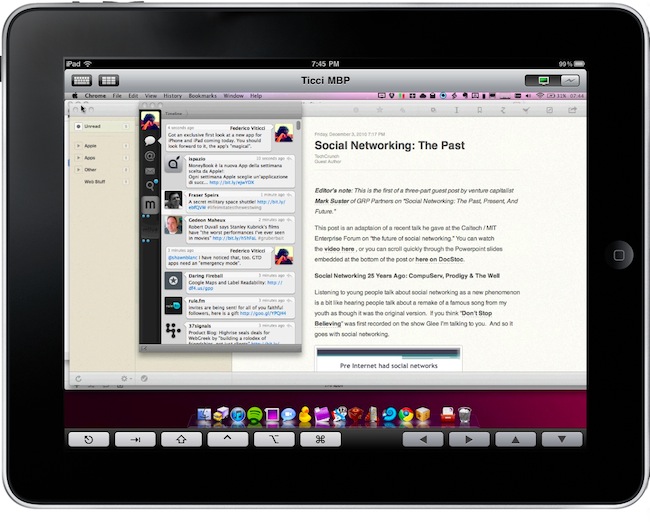
Screens is an excellent new VNC client by Edovia which, unlike other similar apps in the App Store, it’s not aimed at letting you move a cursor on your computer through the iPhone and iPad. It’s an app specifically meant to take advantage of the platform it runs on – iOS – so that you can actually touch your computer remotely.

From my review:

The “simple approach” doesn’t stop at touch controls, however. Once you’re controlling OS X on your device and you’d like to do some actual stuff with it, Screens offer two separate keyboards to execute most of the commands you know and love on the Mac. The first keyboard is a standard iOS keyboard with an additional bar on top which allows you to navigate using the arrow keys, or press Mac-only keys like Command and Control. Those buttons stay pressed until you tap on them again — useful. The second keyboard, though, is much more functional: it contains the same Mac-only and arrow keys on top, but there are no letters at the bottom. Instead, you get these “action buttons” that let you perform tasks that would require a series of taps and dialogue boxes instead. For instance, you can cut, copy, minimize, log out and activate Spolight with a single tap. Huge time saver.

We have 5 copies of Screens to give away to lucky MacStories readers. Check out the giveaway rules below (it ends tomorrow!), and if you can’t wait the app is available here. Read more


“iTunes 12 Days Of Christmas” Website Goes Live In Europe

Just like every year since 2008, Apple is having a special Christmas promotion on the iTunes Store. Ever day from December 26th to January 6th, users will be able to download a “fantastic selection of songs, music videos, apps, books, TV episodes and a film” completely for free on iTunes. This year’s “iTunes 12 Days Of Christmas” website went live in Europe a few hours.

You can check out the UK version (which was unavailable until today) here. Read more


Flipboard To Launch A Web App?

As spotted by The Next Web earlier today, the Flipboard team is hiring. Most specifically, the latest job openings on Flipboard’s website reveal that the company is looking for a “Designer-Web Developer” and a “Front-end Web Developer”, together with an additional iOS developer. Flipboard was named iPad App of the Year by Apple last week in the annual “iTunes Rewind” compilation.

The web developer Mike McCue’s startup is looking for should be able to “envision and design the future of reading content online” across “web and mobile”. Standard JavaScript, HTML, CSS, PHP and Photoshop skills are required for the front-end web developer opening.

A web version of Flipboard, in my opinion, would make a lot of sense, especially considering the availability of magazine and newspaper web apps in Google’s recently launched Chrome Web Store. Flipboard for the web would directly compete with the already popular paper.li service, which allows you to build digital newspapers around Twitter links and users. What’s for sure is that if this is true, if Flipboard’s really planning a full-featured web version, we won’t be seeing it until 2011. We’d also appreciate an iPhone version, a lot.