Rescheduling Reminders with the New ‘Edit Reminder’ Action in iOS 14.3 Beta
...

 Rescheduling Reminders with the New ‘Edit Reminder’ Action in iOS 14.3 Beta
 Juli Clover, writing at MacRumors about a tweak to Shortcuts in iOS 14.3 beta 2:
Apple in iOS 14.3 is streamlining the Home Screen customization process by simplifying the way that app shortcuts work. With the launch of iOS 14, users quickly discovered that Shortcuts could be used to replace traditional app icons to create an entirely customized Home Screen look.
Unfortunately, while these Home Screens created with Shortcuts looked fantastic, the experience was less than ideal because launching an app through shortcuts required the Shortcuts app to open briefly, slowing the app opening process. In iOS 14.3 beta 2, that’s no longer the case because shortcuts no longer have to route through the Shortcuts app.
As Reddit users discovered after installing yesterday’s beta, launching an app through Shortcuts on the Home Screen in iOS 14.3 pops up a banner at the top of the display, but the full Shortcuts app no longer opens, so there’s less of a delay when using a custom icon to launch apps.
When I covered the new Shortcuts widget in my review of iOS and iPadOS 14, I noted how disappointing it was that shortcuts added to the Home Screen as custom icons couldn’t take advantage of compact UI, which makes shortcuts dramatically faster to run. This single tweak has major implications for casual and power users alike, and it’s fascinating for a couple reasons.
First, it shows that Apple is very much aware of the fact that millions of people are personalizing their Home Screens with custom icons that are actually shortcuts based on an ‘Open App’ action. As of iOS 14.2, those custom icons don’t open the linked app directly: they take you to Shortcuts first, which then launches the app you need; it’s an annoying limitation, and it’s why I couldn’t get into customizing my Home Screen icons – when I tap a Safari icon, I want Safari to open immediately. With iOS 14.3, that’s going to be the case, and I have to assume Apple is doing this because of the popularity of this technique over the past few months. Even better, when folks who customized their Home Screens update their devices to iOS 14.3, all their custom icons will instantly switch over to the new direct-launching behavior – they won’t have to recreate those custom shortcuts from scratch.
Second, compact UI means that running shortcuts from the Home Screen as custom icons will once again be better than doing so via widgets. In iOS 14.3 beta 2, custom icons and widgets run shortcuts exactly the same way, except that you can place more custom shortcut icons on a single Home Screen page than widgets. I lamented the low information density of the Shortcuts widget in my iOS and iPadOS 14 review as well; with iOS 14.3, I’ll be able to place four custom shortcut icons in the same slot where a single Shortcuts widget would go, and I won’t have to sacrifice the convenience of compact UI. When it comes to custom shortcut icons that open apps, I just wish Apple would add an option to get rid of the confirmation banner that pops up every time you launch an app via a custom icon. Is that banner really necessary after you’ve launched that custom shortcut dozens of times?
I’ve updated both my iPhone and iPad to iOS 14.3 beta, and I guess I’ll have to spend some time rethinking my Home Screen (again) to include several MacStories Shortcuts Icons alongside app icons, replacing the Shortcuts widgets I added last month. This is going to be fun, and I hope Apple will continue to improve this feature with an option to disable the confirmation banner.
 macOS Big Sur: The MacStories Review
This week, Federico and John dive into John’s macOS Big Sur review to talk about Control Center, Notification Center and widgets, Mac Catalyst apps, Safari extensions, design, and even the upcoming M1 Macs.
App Debuts
iPad Features I’d Miss on an Apple Silicon Mac In December 2019, I published MusicBot, my all-in-one Apple Music shortcut to play music, get quick access to favorite albums and new releases, rediscover old gems in your music library, and lots more. MusicBot is one of the most complex shortcuts I’ve ever created and, along with Apple Frames, it’s among the shortcuts I use the most on a daily basis.
Over the past 11 months, MusicBot has been downloaded thousands of times from the MacStories Shortcuts Archive, and I’ve been saving a variety of ideas and user requests for features that would extend MusicBot’s capabilities and make it easier to use on iOS and iPadOS 14.
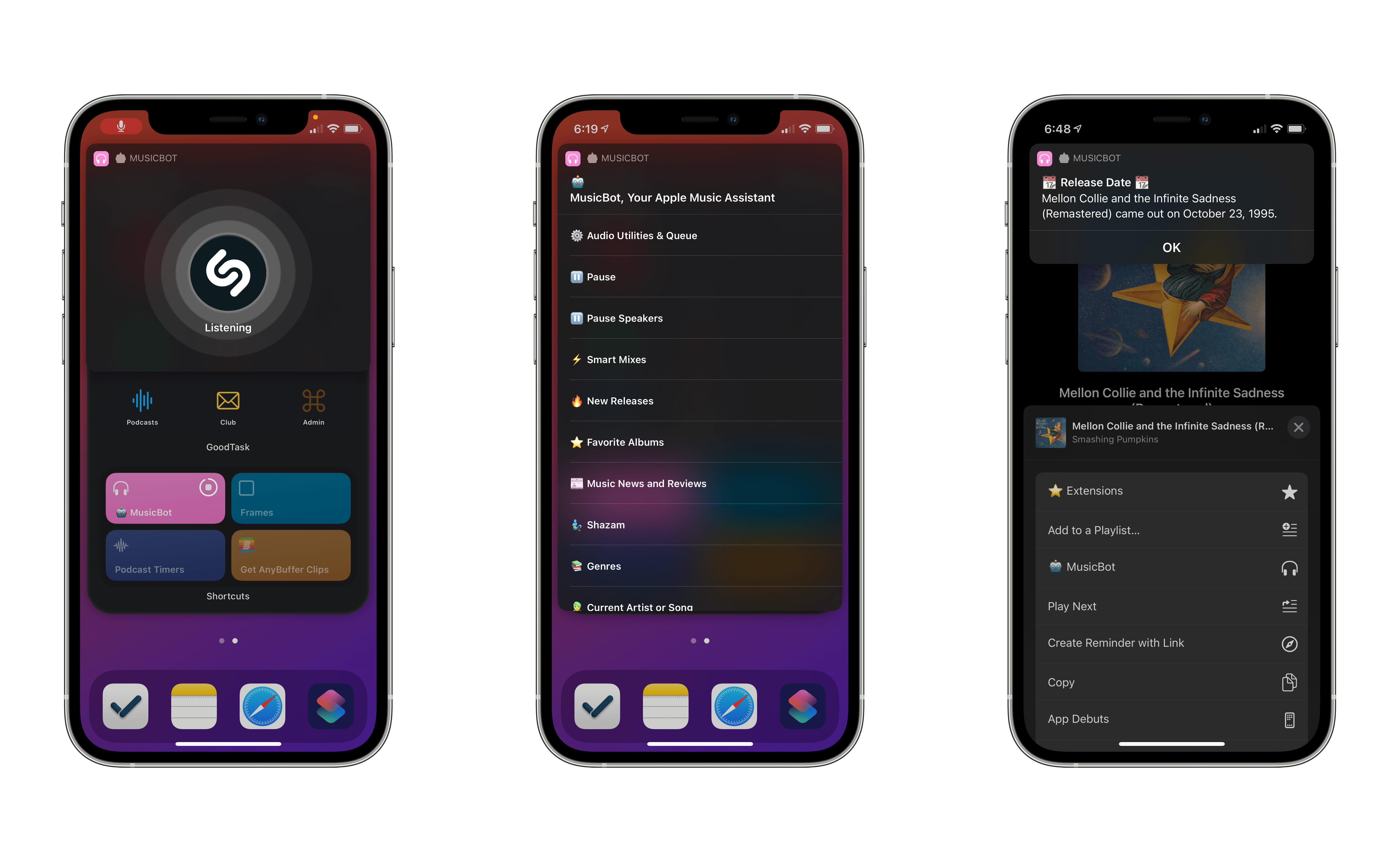
The result is MusicBot 1.1, the first substantial update to the original shortcut that introduces full support for iOS 14’s compact UI and Home Screen widgets, Shazam integration, the ability to read music news and check release dates inside MusicBot, plus other fixes and enhancements.
Let’s dive in.
iOS Apps We Want on the Mac
Member Requests
How Widgets Have Changed the Way We Use Our Devices  John
John