Posts in Linked

Apple Releases ‘Bulbs’ Video

Apple posted a video on YouTube promoting the new Touch Bar MacBook Pros. The video cuts frenetically between a long line of Edison bulbs exploding down a darkened street and into the countryside, and scenes of human inventions from the discovery of fire to a robot walking down a street. The spot concludes with ‘Ideas push the world forward,’ echoing the line ‘They push the human race forward’ from Apple’s famous 1997 ‘Crazy Ones’ ad.

The ad then cuts to the line ‘Introducing a tool for all the ideas to come.’ A MacBook Pro comes into view with an Edison bulb on the screen. A hand scrubs back and forth across a slider on the Touch Bar making the video of the exploding bulb fast forward and rewind. The video does a nice job demonstrating the marquee feature of the new MacBook Pros, but an even better job, through its use of pacing, music, and editing, of giving a sense of the speed at which technology advances in what feels like an oblique response to critics of the changes made to Apple’s laptop line.

Permalink

Apple Creates Special Swift Playgrounds Challenge for the ‘Hour of Code’

Apple has participated in Code.org’s Hour of Code challenge for the past three years. Apple announced today that it will participate again this year with a series of workshops for kids from December 5 - 11, 2016, which coincides with Computer Science Education Week.

Angela Ahrendts, Apple’s senior vice president of Retail had this to say:

Hour of Code embodies our vision for Apple stores as a place for the community to gather, learn and be entertained…. We’re proud to introduce the Swift Playgrounds app into the workshops and honored to again work side-by-side with Code.org on this incredibly important initiative. Hour of Code is one of the absolute highlights of the year for both our teams and the families that visit our stores.

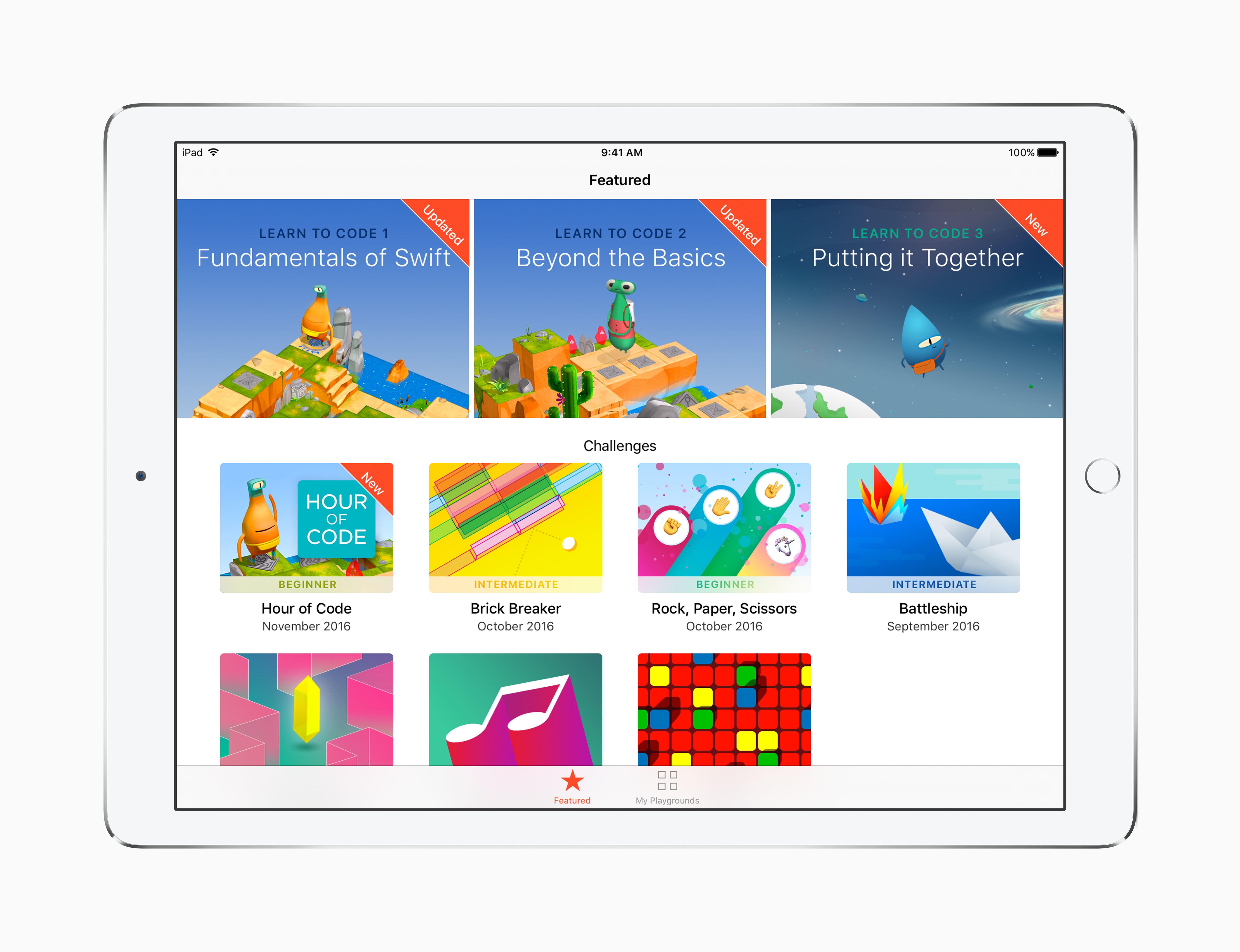
In addition to using Swift Playgrounds in the workshops for the first time, Apple is adding a new Hour of Code challenge to Swift Playgrounds called ‘Putting it Together.’ Apple’s press release explains that:

A new Hour of Code challenge in Swift Playgrounds makes it easy for anyone to set up their own one-hour coding event, and for those continuing to build their coding skills on iPad, Swift Playgrounds adds a new Learn to Code 3 set of lessons and a companion Teacher Guide.

Signup for the workshops is not yet live, but should be available here soon.

Permalink

Google Play Newsstand Redesigned

Google has been on a tear with new and updated iOS apps. The latest is a redesign of Google Play Newsstand, a free app for browsing news outlets and magazines similar to Apple News.

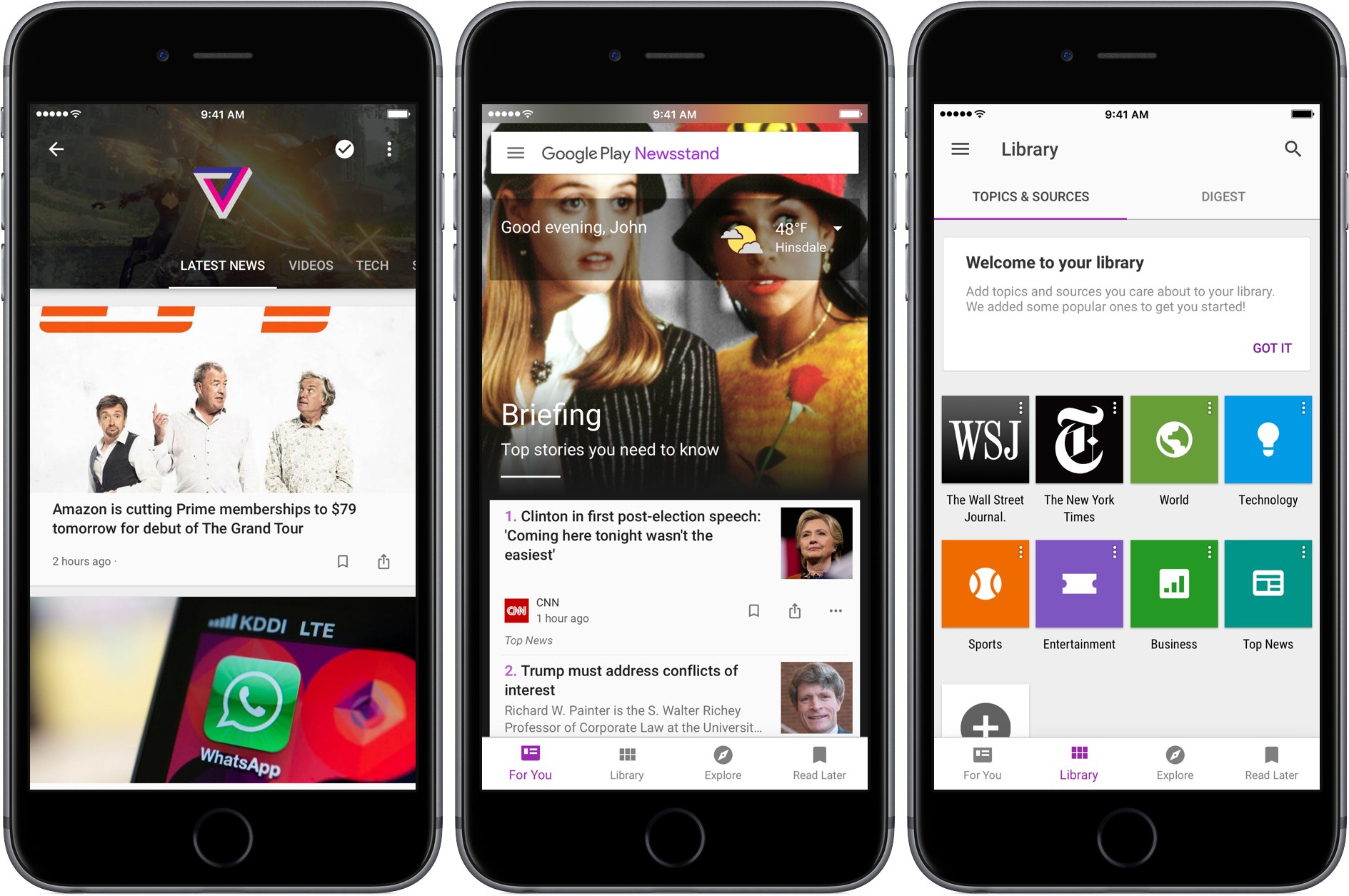
Blending a variety of national and local news with article recommendations based on your personal interests using machine learning, Newsstand creates a media-rich ‘For You’ page divided into two sections. The ‘Briefing’ includes a handful of what Google deems the most important and relevant stories to you. Below the Briefing is ‘Highlights,’ a longer list of articles culled from you favorite sources and topics. Each article in Highlights helpfully explains why it was suggested.

Tapping the three dot menu button below any article lets you hide stories from its source, have fewer articles of that type suggested (I took advantage of this immediately with CNN’s report on a Parmesan cheese recall), or jump directly to the source or topic of the article. I’ve found the last two options a great way to quickly build a database of topics and sources that I want to follow.

Newsstand is built on an AMP foundation:

We have improved our support for multimedia content building on the AMP support we launched earlier this year. Scroll through your feed, and you will see autoplay videos, easy podcast controls, and high-resolution, full-bleed images. Every story and topic in Newsstand now comes to life in a more engaging, beautiful presentation.

I’m not a fan of autoplay anything, but Newstand’s articles look terrific and load fast.

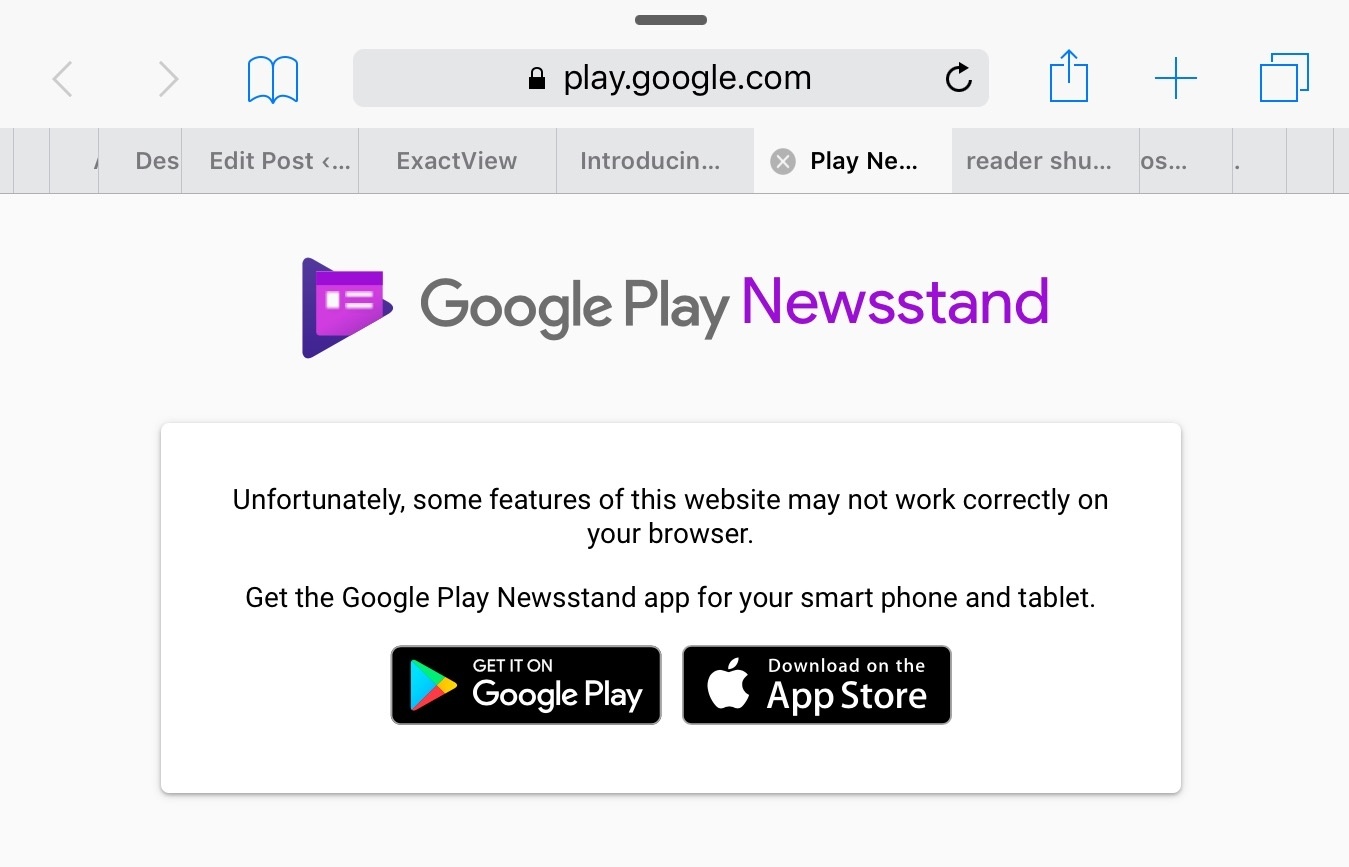
Finally, Google also touts Newsstand’s new web app as a way to access news wherever you are. It’s broad claim that needs to be qualified. The unstated assumption seems to be that the web app is for desktop use only because it doesn’t work on iOS even if you use Google’s Chrome browser. Moreover, on macOS, Newsstand doesn’t work with Safari, instead directing you to download Chrome.

Newsstand's web app does not work on Safari for iOS or macOS.

Newsstand’s web app does not work on Safari for iOS or macOS.

In some ways Google Play Newsstand feels like a modern implementation of Google Reader, which was shuttered in 2013 around the same time that Newsstand was introduced. I wonder how much better my recommendations would be if Newsstand had the benefit of all the years I used Google Reader. Maybe it does have access to that data, but using Newsstand feels too much like starting over for that to be the case. In any event, Google Play Newsstand is a worthy competitor to Apple News. Perhaps 2017 will see competition among news services similar to what we’ve seen with photo services this year.

Permalink

Sal Soghoian Leaves Apple

Sad news for the Mac automation community: Sal Soghoian, Product Manager of Automation Technologies since 1997, has left Apple. Details from Soghoian himself:

Q. I hear you no longer work for Apple; is that true?

A. Correct. I joined Apple in January of 1997, almost twenty years ago, because of my profound belief that “the power of the computer should reside in the hands of the one using it.” That credo remains my truth to this day. Recently, I was informed that my position as Product Manager of Automation Technologies was eliminated for business reasons. Consequently, I am no longer employed by Apple Inc. But, I still believe my credo to be as true today as ever.

Soghoian’s work on AppleScript and other macOS automation, scripting, and accessibility technologies has always been inspiring – we wouldn’t have apps like Workflow today hadn’t Soghoian pushed the boundaries of user automation at Apple.

I don’t know what this means for automation on macOS going forward, but it doesn’t feel like a good sign to me. I love his determination, though:

Q. Are you still upbeat about the future of user automation?

A. Absolutely. The need for user automation is a constant. I’ve seen the benefits and power of individuals being able to automate critical and repetitive tasks. Solution apps are great, emojis are fun, but there’s nothing like really great automation tools. I have faith in this community, and that makes me optimistic about what we can do together.

More than ever before, I’m going to keep an eye on Soghoian’s website and future projects.

See also: the transcript of Soghoian’s WWDC 2016 session on using macOS dictation to perform specific actions (unfortunately, Apple’s session video URL doesn’t seem to be working anymore).

Permalink

Connected, Episode 117: A Friend of Your Uncle of Your Cousin

This week, Stephen and Federico talk about Apple’s new book, the Touch Bar’s potential and Snapchat possibly paving the way for future Apple glasses.

On this week’s Connected, we also discussed rumors for upcoming iPad hardware refreshes and what Apple may be doing in AR. You can listen here.

Sponsored by:

  • Casper: Because everyone deserves a great night sleep. Get $50 off with the code ‘CONNECTED’
  • Mailroute: a secure, hosted email service for protection from viruses and spam. Get a free trial and 10% off, for the lifetime of your account.
Permalink

Apple’s App Store Cleanup Now Underway

Sarah Perez, writing for TechCrunch, on Apple’s previously announced App Store cleanup:

Earlier this year, Apple promised it would clean up its iOS App Store by removing outdated, abandoned apps, including those that no longer meet current guidelines or don’t function as intended. That great App Store purge now appears to be underway, according to new data from app intelligence firm Sensor Tower. The company found that app removals increased by 238 percent in October 2016, with mobile games seeing the most deletions.

And:

That seems to have changed in October, when 47,300 apps were removed from the App Store, Sensor Tower discovered.

And while it’s true that Apple does delete apps on a regular basis, this figure is around 3.4 times higher than the monthly average of 14,000 for the months of January through September. (See chart below).

I long wondered if Apple would provide alternative ways for developers to preserve their old games for posterity. The answer, sadly, is much simpler: if you don’t update your app, it’ll be removed. I’m afraid we’re going to lose some historic App Store titles because of this, but I also see why it’s good for the average customer and the right thing to do at this point.

Permalink

Twitter Announces New Steps to Combat Abuse

Twitter announced steps it has taken to curb abuse on its service. The first is an extension of the mute feature. The ability to mute an account has been available for a long time, but Twitter is adding the ability to mute keywords, phrases, and conversations in notifications. The feature will begin rolling out world-wide to all users ‘in the coming days.’

With respect to reporting abuse, Twitter says:

Our hateful conduct policy prohibits specific conduct that targets people on the basis of race, ethnicity, national origin, sexual orientation, gender, gender identity, religious affiliation, age, disability, or disease. Today we’re giving you a more direct way to report this type of conduct for yourself, or for others, whenever you see it happening. This will improve our ability to process these reports, which helps reduce the burden on the person experiencing the abuse, and helps to strengthen a culture of collective support on Twitter.

Finally on enforcement, Twitter reports that it has retrained its support teams, is instituting refresher training, and has introduced new internal tools and systems for combating abuse.

Permalink

Dissecting the Most Profitable iMessage Apps

Ariel Michaeli, writing on the appFigures blog:

When it comes to making money, users seem to be fine with paid apps. Unlike the iOS App Store, on the iMessage App Store only 7% of top grossing apps are free(mium). That’s just 13 apps!!!

The remaining 93% of apps (187, to be precise) cost between $0.99 and $4.99, with the majority (61%) having a price of $0.99 and 36% having a price of $1.99. The remaining 4 apps split between the other price tiers.

Monetizing upfront is great for developers because it’s simple and easy to implement, but it’s also a sign of a store that isn’t mature. If the iMessage App Store matures similarly to the iOS App Store—which is likely considering it’s the same audience and device—we’ll see a strong shift towards freemium. For now, developers should make the most out of it.

Speaking from personal experience, the iMessage App Store’s top charts are a constant source of discovery for new paid sticker packs from indie artists. These first numbers from September seem to be holding up so far.

Permalink

Take the Touch Bar For a Spin on Any Mac

Daniel Jalkut’s Red Sweater Software released a free Touch Bar simulator for the Mac. The app, Touché, generates a floating Touch Bar simulator on your Mac’s screen. Touché requires macOS 10.12.1 or later, but there’s a catch. Not all builds of 10.12.1 support the Touch Bar. If you download Touché and it tells you you need a more current version of Sierra, click the ‘More Info’ button to get a link to a version of macOS that works with Touché.

Although clicking a simulated Touch Bar is not the same experience as the real thing, I found it interesting to see what tools were available in Apple’s built-in apps like Pages, Numbers, and GarageBand and imagine what using the Touch Bar is like.

Touché is available from Red Sweater’s website as a free download.

Permalink