Posts in Linked

Uber Previews App Redesign that Adds Multiple Service Integrations

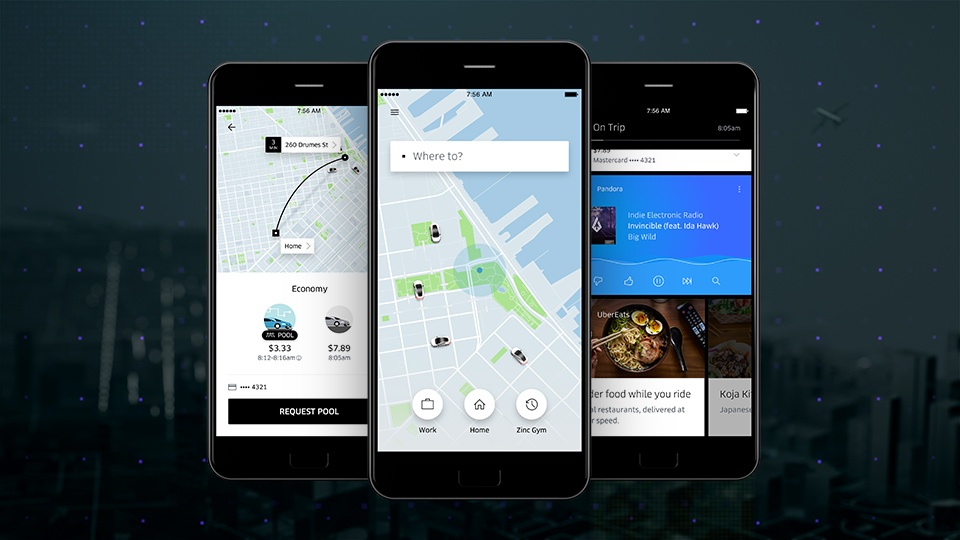
Over the next several weeks, Uber is rolling out a redesign of its ride-hailing app world-wide. The update integrates with your calendar and contacts allowing Uber to anticipate your destinations and locate your friends by allowing them to share their location through the app. According to Uber:

The new Uber app learns from your routines. So if you’re a frequent rider you’ll see “shortcuts” that predict where you could be headed. This means you can get moving with just one tap. Soon you’ll also be able to connect your calendar with Uber. Once you connect, your meetings and appointments will automatically appear as “shortcuts,” saving you the hassle of digging through another app to find the right address.

Uber has also redesigned how you pick your mode of transportation so you can price shop between uberX, uberPOOL, and UberBLACK. The app will integrate with several services too, so you can do things like check transit times and restaurant reviews, look up Foursquare tips for your destination, use exclusive Snapchat filters, order food from UberEATS, and play music in your car with Pandora.

Permalink

Phil Schiller Discusses the MacBook Pro

Apple Senior Vice President of Worldwide Marketing, Phil Schiller, sat down for an interview with The Independent after the October 27th Apple event to discuss the new MacBook Pro. Schiller and David Phelan of The Independent discussed a wide range of MacBook-related topics, including the evolution of Apple’s laptop lineup, why there is no touchscreen MacBook, and Siri on the Mac. What interested me most of all though, was Phelan’s two follow-up questions posed after the initial interview:

How would you describe the response to the new MacBook Pro?

There has certainly been a lot of passionate dialogue and debate about the new MacBook Pro! Many things have impressed people about it, and some have caused some controversy. I hope everyone gets a chance to try it for themselves and see how great the MacBook Pro is. It is a really big step forward and an example of how much we continue to invest in the Mac. We love the Mac and are as committed to it, in both desktops and notebooks, as we ever have been.

And we are proud to tell you that so far our online store has had more orders for the new MacBook Pro than any other pro notebook before. So there certainly are a lot of people as excited as we are about it.

Are you surprised by how vocal the critics have been?

To be fair it has been a bit of a surprise to me. But then, it shouldn’t be. I have never seen a great new Apple product that didn’t have its share of early criticism and debate — and that’s cool. We took a bold risk, and of course with every step forward there is also some change to deal with. Our customers are so passionate, which is amazing.

We care about what they love and what they are worried about. And it’s our job to help people through these changes. We know we made good decisions about what to build into the new MacBook Pro and that the result is the best notebook ever made, but it might not be right for everyone on day one. That’s okay, some people felt that way about the first iMac and that turned out pretty good.

Schiller’s message is clear. Apple took a risk with its new MacBook Pros, is confident in its decision, is committed to both desktops and laptops, and cares about its critics’ concerns. That said, by emphasizing that the MacBook Pro has had record online sales, Schiller is also suggesting that the MacBook Pro’s critics are a vocal minority.

Permalink

David Bowie Emojis Included in iOS 10.2 Beta

Sheldon Pearce, writing for Pitchfork:

The latest iOS update for iPhone will feature “male and female singer” emoji’s based on the cover of David Bowie’s 1973 album, Aladdin Sane, _The Sun_ reports. It is a part of a profession selection that includes firefighters, painters, doctors, scientists, pilots, and more. Take a look at the male and female singer emojis below via Emojipedia. iOS 10.2 also includes updated versions of previously released transportation and food emojis.

Great nod to Bowie. I love that Apple is including this in a keyboard millions of people will use every day.

Permalink

Twitter Automates Customer Service Direct Messages

Twitter revealed two new features for businesses that use direct messaging as a customer service channel – welcome messages and quick replies. Welcome messages are automated responses to customers who direct message companies. Quick replies present customers with a series of choices to reduce text input and, according to Twitter, are designed to work alongside welcome messages to speed up the customer service process.

Twitter’s Advertising Blog explains that:

These features are designed to help businesses create rich, responsive, full-service experiences that directly advance the work of customer service teams and open up new possibilities for how people engage with businesses on Twitter.

Permalink

Annotable Adds Wide Color Support and Haptic Feedback on iPhone 7

Nice update to Annotable, my favorite image annotation tool for iOS: the latest version has brought support for wide color (pictures you edit will be saved in wide color without changing their color profile back to sRGB) as well as haptic feedback on the iPhone 7.

The latter is one of the most interesting third-party implementations to date: both in the app and the Photos editing extension, Annotable will give you feedback when you snap to the edges of a picture, when an oval becomes perfectly circle or a line perfectly vertical/horizontal, or when you’ve zoomed an image to fit. That’s a clever way to augment the user experience without cluttering the interface with visual messages, and it’s line with Apple’s adoption of the Taptic Engine for system haptics as well.

Permalink

Craig Federighi on Why There Is No Touchscreen Mac

CNET spoke with Craig Federighi after last week’s keynote, and one of the questions they ask him is whether there will be a touchscreen Mac (around 2:30 in the video):

Craig Federighi: At Apple we build prototypes around all sorts of ideas. So we certainly explored the topic deeply many years ago and had working models, but we decided it really was a compromise. For a device you hold in your hand like a phone or tablet it is very natural to rest your hand on the tablet and work that way. We think touch is at its best and we wanted to build, and have built, a really deep experience around a multi-touch first user interface. Grafting touch onto something that was fundamentally designed around a precise pointer really compromises the experience.

Those were carefully chosen words by Federighi. He does not say that there won’t be a touchscreen Mac, instead he notes that the simple addition or “grafting” on of a touchscreen to the Mac would be a compromise. Importantly, the compromise that he refers to is not one related to ergonomics, but rather the fact that macOS is currently designed around an interaction model driven by a precise pointer.

I agree with Federighi. I certainly wouldn’t want to see a Mac with a touchscreen bolted on, with no adjustments to the UI of macOS. But as someone who regularly uses the iPad Pro in a laptop-esque configuration with the Smart Keyboard, I see the value in having a touchscreen on a Mac, provided that there are also UI changes to macOS. I don’t expect this any time soon, but I do think it will happen.

Permalink

Apple’s Willingness to Embrace Its Past

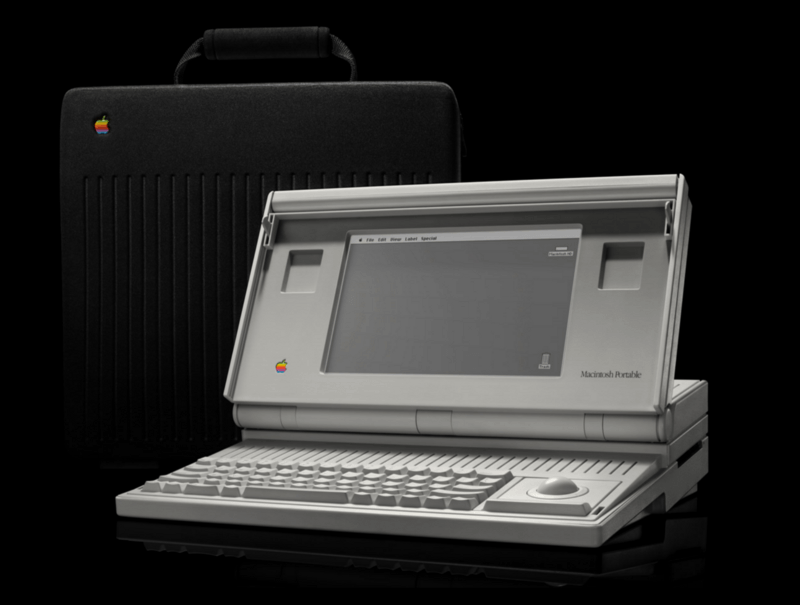
Jonathan Zufi, author of ICONIC, a coffee table book that celebrates the history of Apple products through beautiful photography, uses the October 27th Apple event to challenge a comment by Phil Schiller in 2012 that Apple is ‘focused on inventing the future, not celebrating the past.’

Although Steve Jobs shut down Apple’s internal Apple museum in 1997 and transferred its collection to Stanford, Zufi points out that Apple has begun honoring past products more often in recent years, especially where doing so highlights the innovations of current products. As Zufi observes:

People love reminiscing about the past, and there are still many Apple fans who love to celebrate the company’s rich product history — its successes and its failures. I’ve heard from readers who simply loved the fact that they sat down with [ICONIC and] a glass of wine and lost themselves for hours reliving these old machines, where they were in their lives when they first came across them, and how much has changed.

That’s why Phil Schiller’s comment about not celebrating the past always bothered me and I’m going to disagree with Phil on this — I’m certain Apple will continue celebrating their past as they blaze the future.

Selling the past short isn’t a prerequisite to embracing the future. Apple’s newfound willingness to look back feels like the mark of a mature company that’s as confident with where it’s been as it is with where it’s going.

Permalink

Outlook for iOS Adds Group Scheduling

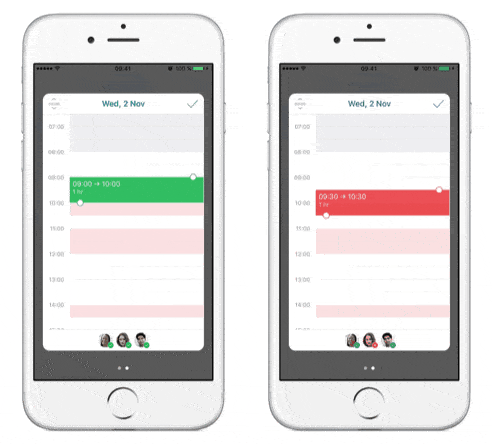
Microsoft has added a new group scheduling tool for Office 365 subscribers and users of the latest version of Exchange. Microsoft’s Outlook blog explains how it works:

Once you’ve created an event from your calendar and added your coworkers to the People field, tap the date picker. Times that work for everyone show in white, yellow indicates availability for one or more people in the group, and red indicates times with no availability. Next, tap the time picker and just drag and drop until it turns green—indicating everyone is available at that time.

After you have found a time that works for everyone and fill out any additional information about your event tapping the checkmark sends an invitation to each invitee and saves the event to your calendar.

Permalink

The End of the Mac Startup Chime

The MacBook Pros introduced by Apple last Thursday no longer chime on startup or when NVRAM is reset. First discovered by Pingie.com, Stephen Hackett dives into the details on 512 Pixels, including a new Apple kbase article on resetting NVRAM.

The end of the startup chime is a small thing, but as Hackett observes:

…the startup chime is ingrained into the experience of having a Mac, I’m sad to see it go. A Mac without the chime feels broken, even if I know it isn’t. I don’t power down my machines often, but I liked hearing the chime when I power them back up.

It’s tradition.

It’s like losing the Happy Mac all over again.

It makes me a little sad and nostalgic to lose the Mac’s familiar chime too. It’s not a big deal, but it’s one more link to the Mac’s origins that is gone, which feels like a loss.

512 Pixels has some great links to the history of the startup chime that are a good read while you’re pouring one out for the Mac’s familiar sound.

Permalink