Posts in Linked

Designing Dark Mode App Icons

Apple’s announcement of “dark mode” icons has me thinking about how I would approach adapting “light mode” icons for dark mode. I grabbed 12 icons we made at Parakeet for our clients to illustrate some ways of going about it.

Before that though, let’s take some inventory. Of the 28 icons in Apple’s preview image of this feature, only nine have white backgrounds in light mode. However, all icons in dark mode have black backgrounds.

Actually, it’s worth noting that five “light mode” icons have black backgrounds, which Apple slightly adjusted to have a consistent subtle black gradient found on all of their new dark mode icons. Four of these—Stocks, Wallet, TV, and Watch—all seem to be the same in both modes. However, no other (visible) icons are.

Fantastic showcase by Louie Mantia of how designers should approach the creation of dark mode Home Screen icons in iOS 18. In all the examples, I prefer Mantia’s take to the standard black background version.

See also: Gavin Nelson’s suggestion, Apple’s Human Interface Guidelines on dark mode icons, and the updated Apple Design Resources for iOS 18.

Permalink

Apple Details Its AI Foundation Models and Applebot Web Scraping

From Apple’s Machine Learning Research1 blog:

Our foundation models are trained on Apple’s AXLearn framework, an open-source project we released in 2023. It builds on top of JAX and XLA, and allows us to train the models with high efficiency and scalability on various training hardware and cloud platforms, including TPUs and both cloud and on-premise GPUs. We used a combination of data parallelism, tensor parallelism, sequence parallelism, and Fully Sharded Data Parallel (FSDP) to scale training along multiple dimensions such as data, model, and sequence length.

We train our foundation models on licensed data, including data selected to enhance specific features, as well as publicly available data collected by our web-crawler, AppleBot. Web publishers have the option to opt out of the use of their web content for Apple Intelligence training with a data usage control.

We never use our users’ private personal data or user interactions when training our foundation models, and we apply filters to remove personally identifiable information like social security and credit card numbers that are publicly available on the Internet. We also filter profanity and other low-quality content to prevent its inclusion in the training corpus. In addition to filtering, we perform data extraction, deduplication, and the application of a model-based classifier to identify high quality documents.

It’s a very technical read, but it shows how Apple approached building AI features in their products and how their on-device and server models compare to others in the industry (on servers, Apple claims their model is essentially neck and neck with GPT-4-Turbo, OpenAI’s older model).

This blog post, however, pretty much parallels my reaction to the WWDC keynote. Everything was fun and cool until they showed generative image creation that spits out slop “resembling” (strong word) other people; and in this post, everything was cool until they mentioned how – surprise!Applebot had already indexed web content to train their model without publishers’ consent, who can only opt out now. (This was also confirmed by Apple executives elsewhere.)

As a creator and website owner, I guess that these things will never sit right with me. Why should we accept that certain data sets require a licensing fee but anything that is found “on the open web” can be mindlessly scraped, parsed, and regurgitated by an AI? Web publishers (and especially indie web publishers these days, who cannot afford lawsuits or hiring law firms to strike expensive deals) deserve better.

It’s disappointing to see Apple muddy an otherwise compelling set of features (some of which I really want to try) with practices that are no better than the rest of the industry.


  1. How long until this become the ‘Apple Intelligence Research’ website? 
Permalink

Apple Announces New Features Coming to Its Services This Fall

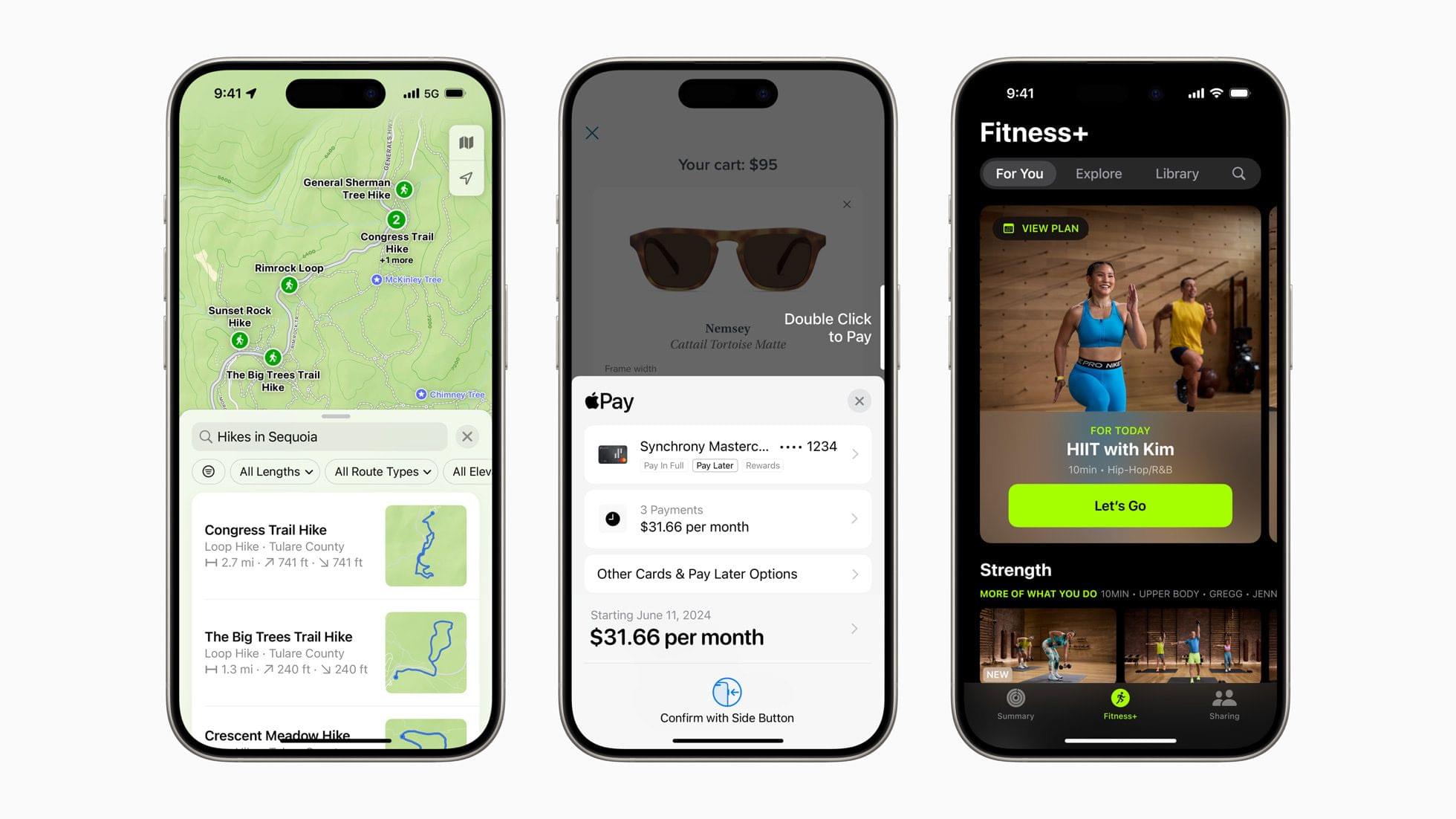
Alongside updates to Apple’s platforms and Apple Intelligence, the company announced an assortment of new features coming to its line of services this fall. From the press release in Apple Newsroom:

“So many of our users rely on Apple services throughout their day, from navigating their commute with Apple Maps, to making easy and secure payments with Apple Pay, to curating playlists with Apple Music,” said Eddy Cue, Apple’s senior vice president of Services. “We’re excited to give them even more to love about our services, like the ability to explore national parks with hikes in Apple Maps, redeem rewards or access installments with Apple Pay, and enjoy music with loved ones through SharePlay in Apple Music.”

I like that this services roundup is becoming an annual WWDC tradition. Some of these features were mentioned or shown on-screen during the keynote, but it’s easy for them to get overlooked in light of major operating system changes. While they might seem small in comparison, improvements to Apple’s services can have lasting day-to-day impacts on those who use them, myself included.

A few of my favorite services updates this year:

  • A new Places Library in Maps that allows you to save locations and write notes about them.
  • Tap to Provision, an easier way to add credit and debits cards to Wallet by tapping them instead of entering card numbers.
  • Redesigned event tickets in Wallet that can feature new types of data, including parking and weather information.
  • The Library tab in Apple Fitness+ for quicker access to saved workouts, Custom Plans, and Stacks.
  • Redesigned iCloud settings to better surface recommendations and features you’re using.

Check out the press release for all the updates coming to Apple’s services this fall. There’s a lot to look forward to there, and I’m happy to see the company continuing to push its services forward.


You can follow all of our WWDC coverage through our WWDC 2024 hub or subscribe to the dedicated WWDC 2024 RSS feed.

Permalink

Comfort Zone Debuts on MacStories’ YouTube Channel

Comfort Zone is a weekly podcast about trying new things. Every Thursday, co-hosts Matt Birchler, Niléane Dorffer, and Christopher Lawley challenge themselves and each other to try something new in their tech lives whether it’s hardware, an app, a workflow, an automation, or something else. It’s a fun way to explore the tech world with the show’s hosts.

But Comfort Zone isn’t just a new podcast at MacStories. It’s also our first podcast on our new YouTube channel. The first episode, which has its own playlist on the channel and is embedded below, is out today.

Of course, you can also subscribe to the audio-only version of the show too. Links to subscribe to the audio version in Apple Podcasts, popular podcast players, and the show’s RSS feed are all available on MacStories.

It’s great to have Comfort Zone on the MacStories YouTube channel. This is a new experiment for us, but with the early enthusiasm for the video version of the show, I expect Comfort Zone is just the start of more to come from MacStories. So, be sure to check out episode 1 of the Comfort Zone on YouTube, subscribe to our channel, and let us know what you think.

Permalink

Josh King Built the iPhone Game Controller No One Wants to Make

I love this story that I first saw mentioned on Brendon’s blog a few weeks ago about a Redditor who designed the iPhone game controller of my (our?) dreams.

Picture this: it’s a PSP Go/Xperia Play-styled, slide-out controller that attaches via MagSafe to any iPhone, has Bluetooth, a USB-C port for charging, and therefore works with any modern iOS game or emulator regardless of whether the iPhone is mounted on it or not. The controller has a built-in kickstand that supports landscape and portrait gaming (the latter is essential for DS emulation in Delta) and is much more portable than other snap-on solutions available for iOS devices.

The best part: the creator of this controller, called the M-Con, has announced plans to make this a real product that you can buy in the future. You can watch the announcement video below:

As Jonathan’s story in last Saturday’s issue of MacStories Weekly showed, the dream for many of us right now is a compact, MagSafe-enabled game controller for iPhone that doesn’t use USB-C and allows the iPhone to be rotated. No official product that is not a 3D-printed adapter or DIY hack that does all that exists right now.

I wish Josh all the best in this adventure, and I hope to be able to purchase an M-Con game controller in the near future.

Permalink


Ruminate, Episode 185 – I’ll Eat Glue Cheese

This week on Ruminate, I go to Applebee’s and a new game store, we both check out the new Legend of Zelda Lego, Robb launched a new project, then we head into AI corner.


Read more


AppStories, Episode 385 – Our 2024 macOS and visionOS WWDC Wishes

This week on AppStories, we continue our annual wishlists with a look at macOS and visionOS.


Sponsored by:

  • Raycast – A collection of powerful productivity tools all within an extendable launcher. Fast, ergonomic and reliable.
  • Notion – Start turning ideas into action. Try it free today.
  • CleanMyMac X – Your Mac. As good as new. Get 15% off today with code APPSTORIES15

Our 2024 macOS and visionOS WWDC Wishes

  • Our macOS Wishes
    • Notifications
    • Alerts
    • Finder
    • Stage Manager
    • System Settings
    • Music
    • TestFlight
    • Shortcuts
  • Our visionOS Wishes
    • The Developer Strap
    • Multitasking
    • Better Voice Control
    • iPad Virtualization
    • Environments
    • Apple Pencil Pro
    • More Native Apps
    • Software OPtimizations
    • Home Screen Changes
    • Wi-Fi Performance
    • Support for Mice
    • Multiple Desktops
  • Related:

On AppStories+, a video experiment, i have iPad Pro follow-up, and Federico has technical follow-up and a question for listeners about streaming videogames over Wi-Fi.

We deliver AppStories+ to subscribers with bonus content, ad-free, and at a high bitrate early every week.

To learn more about the benefits included with an AppStories+ subscription, visit our Plans page, or read the AppStories+ FAQ.

Read more


Magic Rays of Light: Apple TV Wishes Past, Trying, and Sugar

This week on Magic Rays of Light, Sigmund and Devon highlight the return of Trying, recap the first season of Sugar, and revisit their 2023 WWDC hopes to see what came true and what remains on the wishlist.


Show Notes


Send us a voice message all week via iMessage or email to magic@macstories.net.

Sigmund Judge | Follow Sigmund on X, Mastodon, or Threads

Devon Dundee | Follow Devon on Mastodon or Threads

Read more