This week on AppStories, we conclude our mini-series on artificial intelligence with a conversation about the apps we’ve used that include AI features.
Geekbench tests have always been grounded in real-world use cases and use modern. With Geekbench 6, we’ve taken this to the next level by updating existing workloads and designing several new workloads, including workloads that:
Blur backgrounds in video conferencing streams
Filter and adjust images for social media sites
Automatically remove unwanted objects from photos
Detect and tag objects in photos using machine learning models
Analyse, process, and convert text using scripting languages
In addition to updating benchmark workflows, Primate Labs says Geekbench includes modern file types and file sizes that reflect current computing tasks on Macs, iPhones, iPads, and other devices. The company also changed its multi-core benchmark to include tasks that span multiple cores to align the tests with how modern devices typically tackle a job.
My time with the new benchmark apps has been limited, but running them on my Mac and iPhone went smoothly. It’s worth noting that the apps are significantly larger, and it take longer than before due to the changes made to the underlying benchmark tests. However, it’s great to see Primate Labs working to make its tests reflect modern usage patterns and hardware.
This week on AppStories, we begin a new series on the impact of artificial intelligence on apps and the world around us. This week’s episode sets the stage with a look at chatbots, image-generation tools, and issues and opportunities they raise.
Today, 1Password announced that it’s moving to a passkey-based system for unlocking its password manager app. Using a password manager like 1Password already means not having to remember passwords for every site and service you use because it locks your passwords behind a single, hard-to-guess password. With passkeys, that single password approach will become a thing of the past, allowing users to access their passwords through biometric-based passkeys generated locally on their devices.
1Password’s new passkey feature is coming this summer. The company explains how passkeys differ from the way the app works today:
Now, unlocking 1Password without a password is nothing new. It’s something we do every day using biometrics. 1Password was the first third-party iOS app to offer Touch ID, all the way back in 2014, and since then we’ve added support for Face ID, Windows Hello, Android Fingerprint, and more.
But as convenient as biometrics are today, they don’t actually replace the password; they only mask it. That’s why 1Password asks you to type in your password periodically in order to ensure that you have it memorized.
Passkeys also use biometrics, but they allow us to go farther and eliminate the underlying password entirely.
By replacing passwords with passkeys, 1Password will be able to preserve the benefits of biometrics while eliminating the need to ever use a password to access the app’s data, no matter what platform you use.
Passkeys are a big deal for security. The apps, sites, and services you use may not adopt passkeys for a while, but with 1Password doing so, the passwords you still need to use will be protected better than before. I know I’ll be switching to this system as soon as it’s available.
Last week, I wrote about the Sonos Move in MacStories Weekly. I love the Move’s portability and rich, warm sound, which make it perfect for use in multiple places around my house and outside. In fact, I’ve enjoyed the Move so much that I’d begun looking at Sonos soundbar and subwoofer options, anticipating that the original HomePods I use with my living room media setup would eventually need to be retired.
Then, Apple released the HomePod (2nd Generation), which iterates on the original version. I had hoped that Apple would make a soundbar of its own, so when all we got was a HomePod, I was disappointed. That pushed me further into the Sonos camp, but with my original HomePods going strong, my window shopping has been just that: window shopping.
However, after watching Stephen Roble’s latest video comparing the new HomePod to its predecessor and the Sonos Beam and Arc soundbars paired with subwoofers, my interest in soundbars has waned. Robles evaluates the HomePods from a bunch of different angles, from music and movies to smart home integration, making a compelling case for a pair of the new HomePods as the best value for someone who wants a multipurpose device.
When I think about it, that’s exactly my use case. My pair of original HomePods are the only speakers on the main floor of our house. I AirPlay podcasts and music to them, use them to control HomeKit devices, and for watching TV and playing games on my PS5 and Xbox.
I’m still disappointed Apple didn’t announce more than a new HomePod last month. I’d like to see the company explore new home-centric devices that address use cases beyond speakers. Still, for audio, it’s hard to argue against the HomePod.
I will say that there are certainly some macOS UI elements that could be tricky to use with touch, but I think they’re the exception, not the rule. Still, Apple will certainly make some UI changes to accommodate touch as an officially-supported input method on the platform.
And:
There’s a narrative out there that touch is just so incompatible with macOS and that in order to make it work, the macOS UI would have to get blown up to comical proportions, but I don’t think that’s the case. Changes will be made, but I think macOS is more touch-friendly today than many people give it credit for.
I’ve seen this argument regarding the concern of “blowing up” the macOS UI in recent years too, and I think it’s shortsighted. Look no further than the iPad Pro: in a single device, Apple was able to let touch, pointer, and now even hover interactions coexist. Even without display scaling, I don’t think iPadOS has a comically large interface, as some believe.
There is a lot of work to be done to achieve a similar kind of input balance on macOS (think of all the elements that haven’t been redesigned in recent years, like drag controls for windows; the list is long), but it is possible, and I hope Apple gets there in the near future.
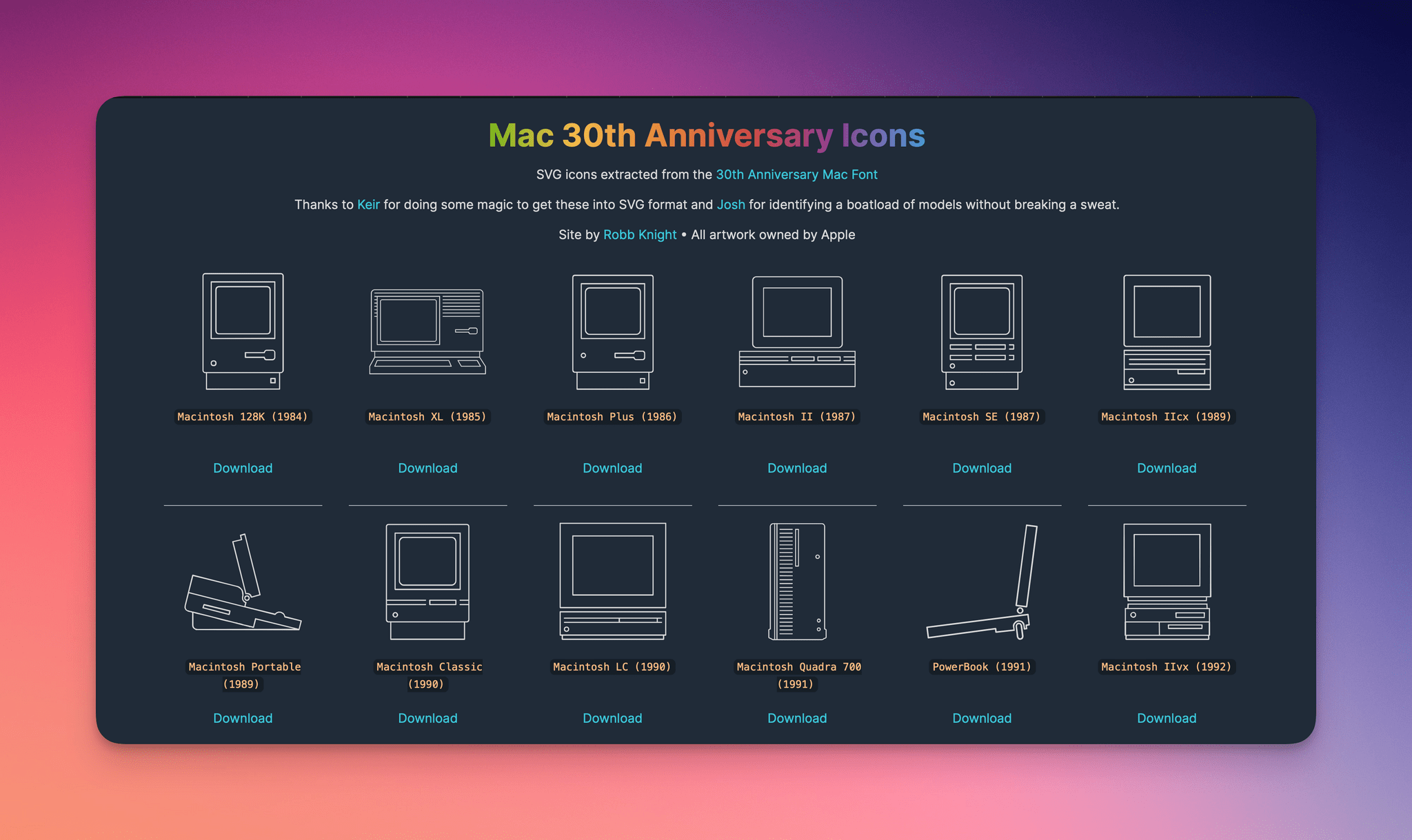
In 2014, for the 30th anniversary of the Mac, Apple celebrated with a mini site featuring the stories of the people behind the computer and its users. As part of that event, Apple created a special font of line-drawn versions of every Mac from its introduction on January 24, 1984 through 2014.
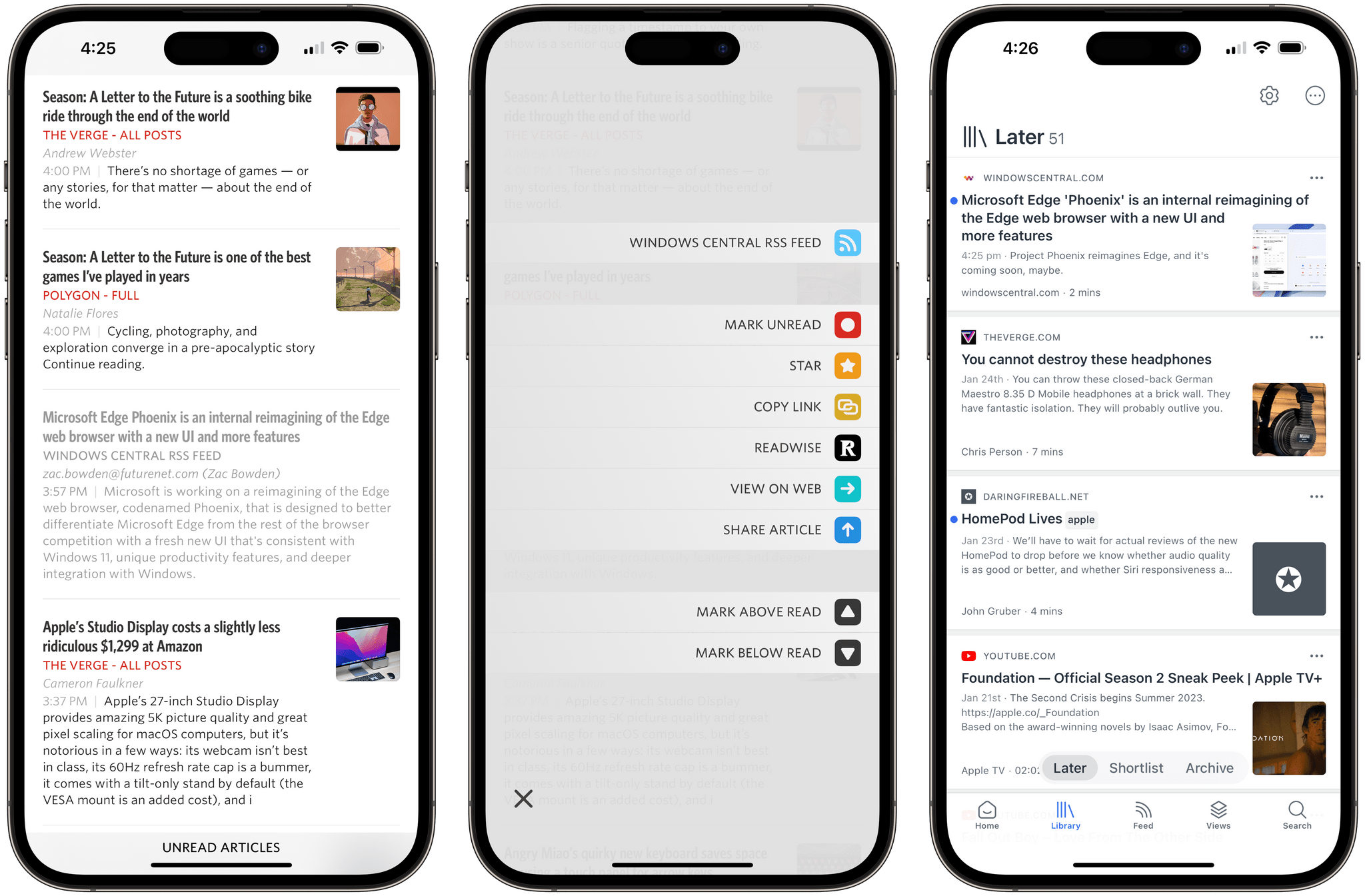
Unread, the elegant RSS reader by Golden Hill Software that we’ve covered before on MacStories, received its 3.3 update today, and it’s an interesting one I’ve been playing around with for the past week. There are two features I want to mention.
The first one is the ability to set up an article action to instantly send a headline from the article list in the app to Readwise Reader. As I explained on AppStories, I decided to go all-in with Reader as my read-later app (at least for now), and this Unread integration makes it incredibly easy to save articles for later. Sure, the Readwise Reader extension in the share sheet is one of the best ones I’ve seen for a read-later app (you can triage and tag articles directly from the share sheet), but if you’re in a hurry and checking out headlines on your phone, the one-tap custom action in Unread is phenomenal. To start using it, you need to be an Unread subscriber and paste in your Readwise API token.
The second feature is the ability to save any webpage from Safari as an article in Unread, even if you’re not subscribed to that website’s RSS feed. Essentially, this is a way to turn Unread into a quasi-read-later tool: the app’s parser will extract text and images from the webpage, which will be then be saved as a ‘Saved Article’ in Unread Cloud, Local feeds, or NewsBlur, or as a ‘Page’ in Feedbin.
Manton’s post is in response to questions about why Micro.blog work with Tapbots’ Ivory since both Micro.blog and Mastodon implement the ActivityPub standard. The answer is that ActivityPub is primarily a service-level server-to-server API that allows Micro.blog and Mastodon servers to interact with each other. However, clients like Ivory use a different Mastodon API for reading and writing Mastodon posts that doesn’t match up feature-for-feature with Micro.blog. Manton explains the problems that causes:
Could Micro.blog implement the Mastodon API, thereby allowing Ivory to connect to Micro.blog as if it was a Mastodon server? Technically yes, but doing so would introduce a couple problems. By design, Micro.blog does not have exactly the same features as Mastodon. We left out boosts, trends, and follower counts, and added other things that are outside the scope of Mastodon.
If Micro.blog worked with Ivory, what would the UI look like when the features didn’t exactly match up? It would be confusing. Ivory would appear broken and it would disrupt the experience we’re going for with Micro.blog’s community.
That isn’t to say that signing into Micro.blog from Ivory to read and post to Micro.blog in the future is impossible. However, as Manton points out, it will require further experimentation and, ultimately, coordination with third-party apps while keeping an eye on preserving Micro.blog’s identity. Because, after all, Micro.blog and Mastodon are two distinct services that approach social media with different philosophies that are reflected in their designs. Interoperability is appealing on the surface, but not if it comes at the expense of the unique features that users of Micro.blog or any other service have come to expect and rely on.








](https://cdn.macstories.net/banneras-1629219199428.png)