This Week's Sponsor:

Turbulence Forecast

Know before you go. Get detailed turbulence forecasts for your exact route, now available 5 days in advance.


Posts in reviews


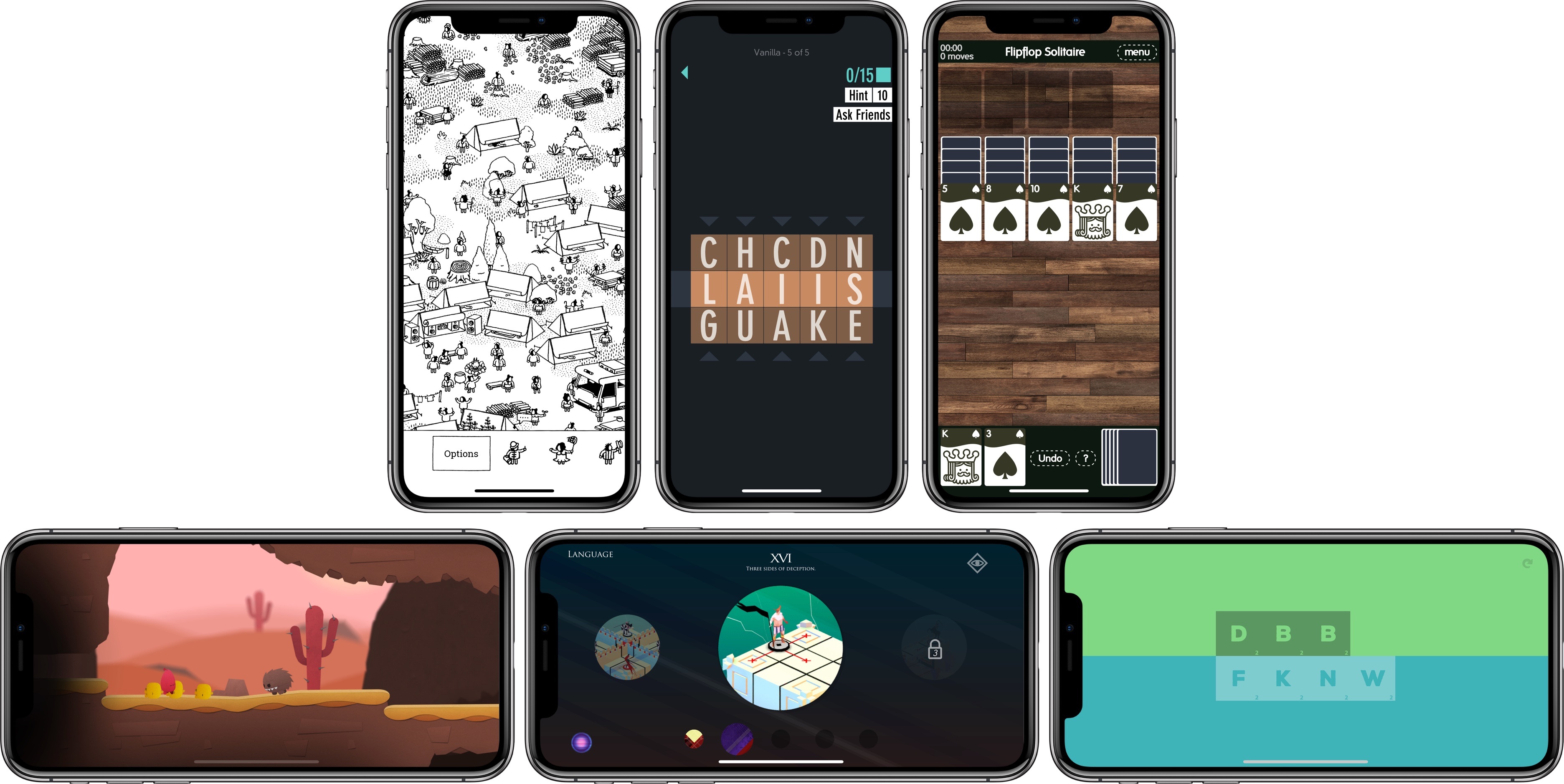
My Favorite iOS Games of 2017

As 2017 draws to a close, we’ve seen what may prove to be a shift in iOS gaming. With the recent introduction of app pre-orders, iOS may attract more paid-up-front indie games and ports of console and PC titles than in the past. Pre-orders aren’t limited to games, but it’s no coincidence that the first batch of pre-orders released on the App Store were all successful indie titles.

It’s too early to tell if recent developments are the beginning of a trend towards a more diverse and interesting iOS game market or a one-off anomaly that will fizzle, but I hope it takes hold. The prospect of the App Store attracting new sorts of games could broaden the appeal of iOS as a gaming platform, which in turn, could change the dynamic of iOS gaming in 2018.

We’ll have to wait to see what 2018 has in store, but in the meantime, the end of the year is a good time to look back. It’s always hard to pick favorites. So many excellent games were released this year, and I didn’t have time to try them all, but here are my six favorites of the 37 that I covered in 2017 along with links to each of the reviews of them.

Read more


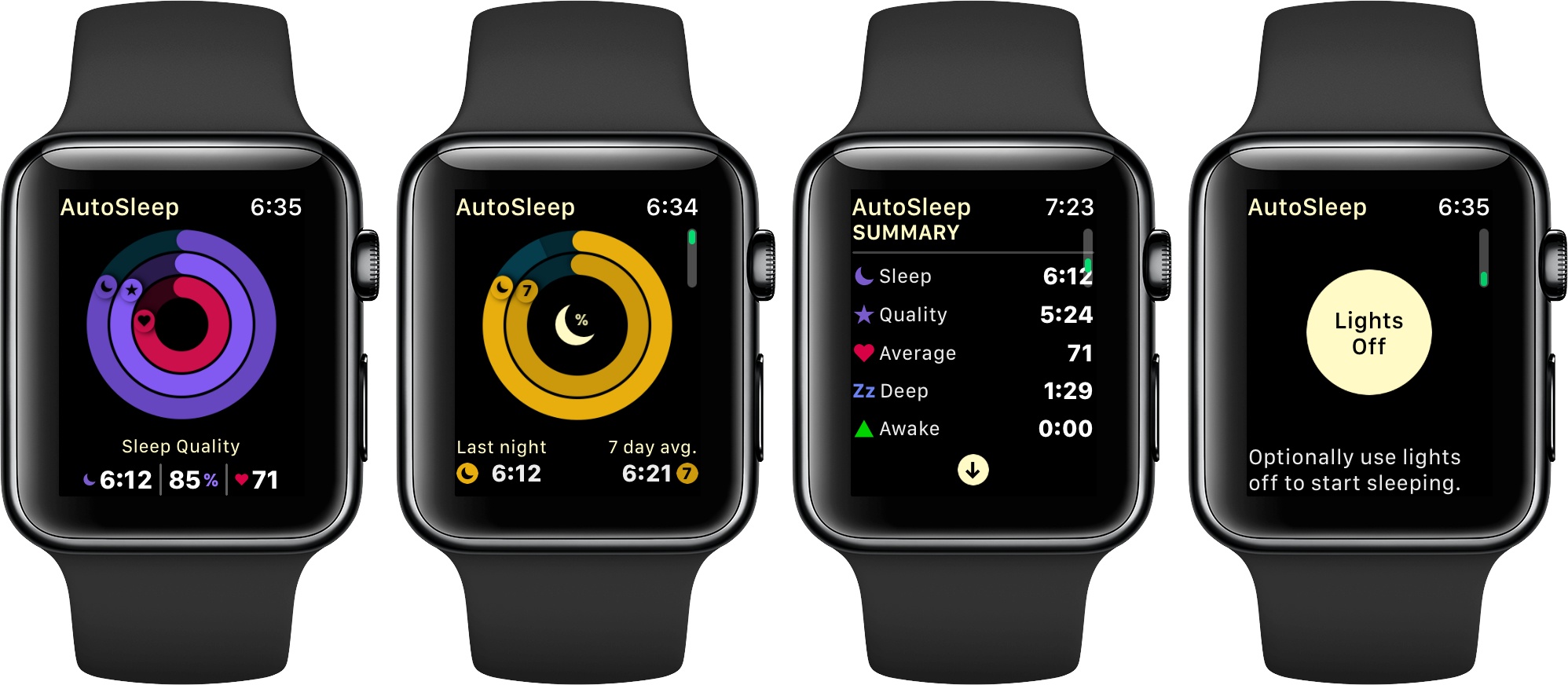
AutoSleep 5 Adds Automatic Apple Watch Sleep Tracking and Much More

Slowly but surely, the Series 3 has changed my Apple Watch habits. I abandoned earlier models of the Watch for most tasks other than notifications and workout tracking because, with some notable exceptions, few apps worked well enough to be more convenient than pulling out my iPhone in most circumstances.

The Series 3 Watch is different. Not only is it faster, but the battery life is significantly better. The changes have caused me to rethink how I use my Apple Watch and look for new ways to use it. So when I heard AutoSleep, an app that Federico uses and has reviewed in the past, was getting a big update that includes enhanced Apple Watch functionality, I saw another opportunity to extend how I use my Series 3.

I haven’t been disappointed. AutoSleep 5 is a broad-based update that touches every aspect of the app, but what I like best is its Apple Watch integration, which has begun to give me new insight into my sleep patterns. Although I find the amount of data displayed in AutoSleep overwhelming at times, after spending several days with the app, I plan to stick with it as I try to adjust my schedule to get more rest each week.

Read more


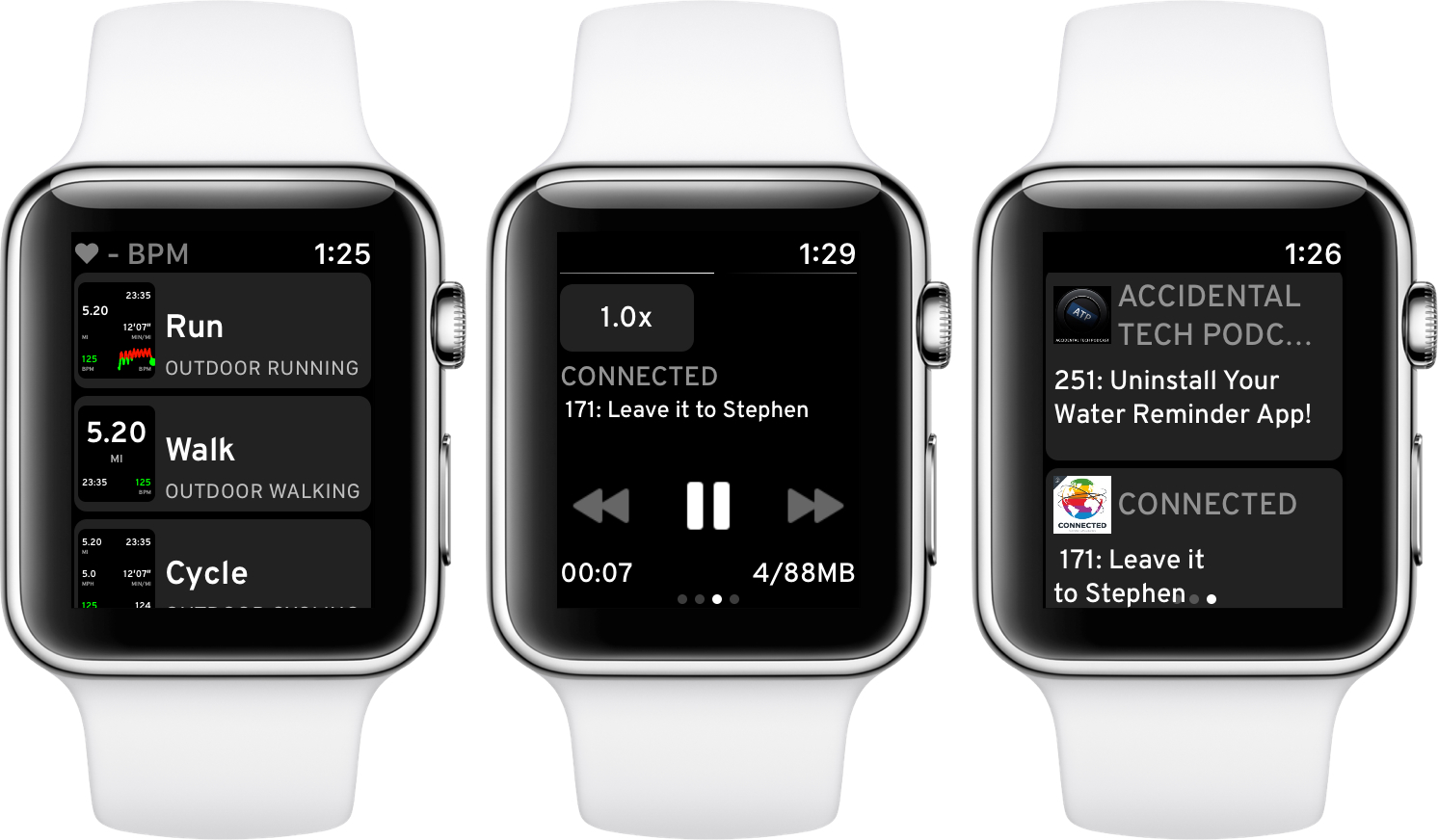
Workouts++ Adds Podcast Playback, Mapping, New Workout Types, Siri and More

Almost a year ago, David Smith released Workouts++, an alternative to watchOS’ built-in Workout app that adds an iOS component to leverage the data collected during workouts. Today, Smith released version 2.0 of Workouts++ with a host of new features enabled by advances in the Apple Watch and Apple’s health and fitness APIs, including podcast playback, location tracking and mapping, support for new workout types, Siri integration, and more. On top of that, Workouts++ is now free with no In-App Purchases, advertising, or subscription.

Read more


Automating Your Holiday Lights Inside and Out

It’s easy to get carried away with elaborate and expensive home automation projects when you’re just starting out. A better place to begin though, is with a simple, temporary setup that doesn’t cost a lot but will still give you a glimpse of some of the conveniences of home automation without making a big commitment. When I heard that iHome had introduced a reasonably-priced outdoor smart plug, I knew immediately that it and some holiday lights would make an excellent home automation starter project.

This is by no means a Clark Griswold-level undertaking. My family’s holiday decorations are fairly simple. In the front yard, we put up lights in the bushes and on the columns on either side of our front door. Inside, we have a Christmas tree in our living room with lights. The first step was to put up the outdoor lights the weekend after Thanksgiving on what turned out to be a mercifully warm day.

After the lights were up and working, I plugged them into the iHome’s iSP100 Outdoor SmartPlug, which I connected to an outdoor outlet near my front door. The iSP100 is about as simple as you can imagine. It has a short cord attached to a plastic box that holds its electronics. One end plugs into a standard US outdoor electrical outlet, and the other end takes two or three-pronged electrical devices.

Read more


Punish Website Is a Blacklist-Only iOS Content Blocker

Several weeks ago we got a question from a Club MacStories member wanting to know if any of us had come across a blacklist-only content blocker. We hadn’t. We did some research and still came up empty, which we reported back to MacStories Weekly readers. That prompted developer Salavat Khanov to step in and fill the gap with a new app called Punish Website.

Khanov is the developer behind 1Blocker, a popular iOS content blocker that we’ve covered in the past. However 1Blocker, like its competitors, blocks ads, comments, and other content based on an elaborate system of rules. You can whitelist sites, but the default behavior is to block content unless instructed otherwise. Our reader wanted to come at the problem from the other direction with a content blocker that only blocks elements on blacklisted sites.

That’s exactly what Punish does. It’s primarily an action extension that’s invoked from the system share sheet. When you come across a site that crosses your tolerance line for website clutter, all you need to do is tap the share icon in Safari and pick Punish. The extension UI will appear to confirm you want to add the site to your blacklist. After you tap the Done button, the site reloads free of distractions.

To take a site off your blacklist, simply open the app and swipe left to reveal a delete button or use the Edit button. Managing your list is simple, but I’d also like to see a Cancel button added to the extension for those circumstances where you have second thoughts about invoking the blocker.

I’m glad to see that Khanov developed Punish. It’s easy to paint all websites with the same anti-advertising brush, but the reality is that advertising is still a big part of how sites earn money and there’s a strong case for a more considered and deliberate approach, which Punish enables.

Punish Website is available on the App Store for $2.99.


CARROT Weather Adds Powerful, Redesigned Apple Watch App

Version 4.3 of CARROT Weather for iOS launched today, bringing a ground-up redesign of its Apple Watch app that offers power and flexibility in a beautifully designed package.

CARROT Weather’s story isn’t that it had an old, out-dated Apple Watch app that’s now finally become modern. Instead, today’s update takes what was already a very good Watch app and replaces it with a great one.

Before this big redesign, CARROT’s Watch app was already fast and flexible, with an assortment of customization options for things like complications. It even worked well when your Watch was running solo; by contrast, most third-party Watch apps depend entirely on a paired iPhone and can’t function at all when untethered from the device. CARROT’s new Watch app keeps all these positives, improves upon them, and adds a lot more to the package.

Read more


Pixelmator Pro First Impressions: A Beautiful Modern Interface with Advanced Image Editing Tools

Five years in the making, Pixelmator Pro debuted today with an all-new look and host of new features. The new interface eliminates visual clutter and anchors tools in side panels, so you always know where they are. Much of the app’s chrome has been eliminated too, putting your project in the spotlight where you can focus on it and not the app. It’s a modern, clean style that makes the app feel spacious and professional.

Pixelmator Pro adds a raft of features as well. Layer styles, color adjustments, and effects are all highly customizable, can be saved as presets, and shared. I’ve only had a little over 24 hours to put Pixelmator Pro through its paces, but based on my first impressions, it’s an impressive debut that I expect will replace the original version of the app as my go-to image editor.

Read more