This week on Magic Rays of Light, Sigmund and Devon discuss new Apple Original comedy series The Completely Made-Up Adventures of Dick Turpin, Apple’s brand new Sports app for iPhone, and the potential for immersive video across sports, music, and live performances.
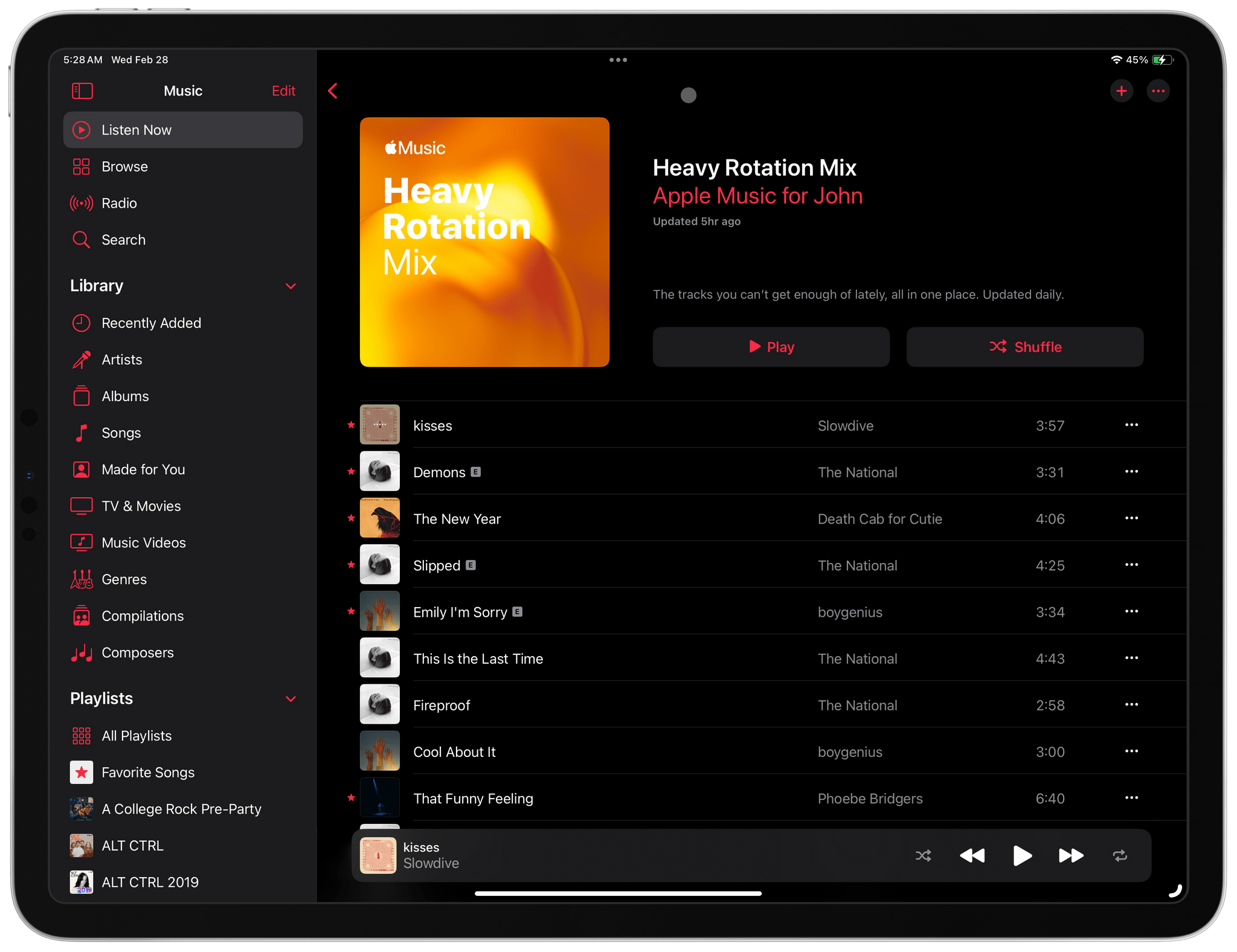
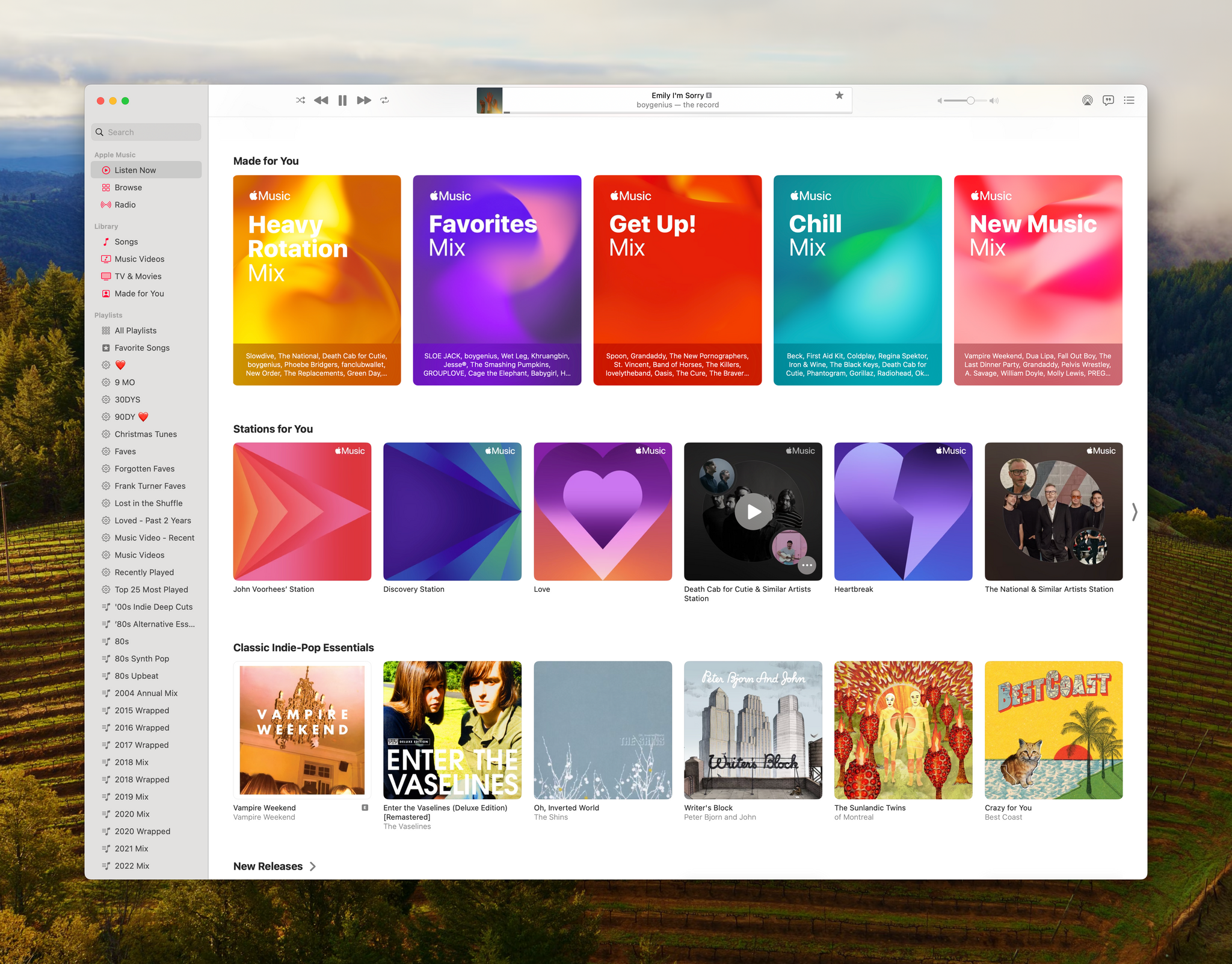
This morning I woke up to a pleasant surprise. Apple had quietly added a new Made For You playlist to the Music app called Heavy Rotation that’s updated daily.
As you’d expect from a playlist called Heavy Rotation, mine is comprised of 25 songs, most of which I believe I listened to yesterday and probably other times recently. What’s a little different about Heavy Rotation compared to the other Made For You Playlists is that it’s updated daily, while the other Made For You playlists get updated weekly.
Made For You and Stations for You are excellent complements to Apple’s curated playlists.
If you listen to a lot of albums, you’ll probably have a bunch of songs by a handful of artists in your Heavy Rotation playlist. That is certainly true of The National’s Trouble Will Find Me, an album I listened to yesterday. However, most of the time, I listen to playlists, which will undoubtedly add more variety.
Curiously, the new playlist doesn’t seem to respect the Focus filter that allows you to exclude listening from your Apple Music Listening History. Both Federico and Jonathan use that feature and told me they each found a track in their Heavy Rotation playlist that should have been filtered out.
Heavy Rotation is an excellent addition to Music. Playing it as I write this, it feels like I’m picking up where I left off yesterday as I walked around my neighborhood with my AirPods Pro. I hope that today’s addition of a new Made For You playlist and the recent addition of the Discovery station are signs that Apple plans to explore even more ways to resurface songs in your Music library.
One of my favorite kinds of apps is simple utilities that solve a common problem and are straightforward to use. That’s exactly what Greg Pierce has created with Simple Scan, a scanning app for the iPhone and iPad that simplifies the process of one-off document scans.
Simple Scan is entering a crowded scanning market. Many scanning utilities also help you organize your scans, store them in the cloud, submit expense reports, and more. There are people who need that sort of extended feature set, but somewhere along the way, people with simpler needs have been forgotten.
That’s exactly my situation. I occasionally scan a receipt for one reason or another, but it’s not something I do often. As a result, it doesn’t make sense for me to pay a lot for a scanning app with features I’ll rarely use. Nor do I want to use a free version with ads, which is why I like Simple Scan so much.
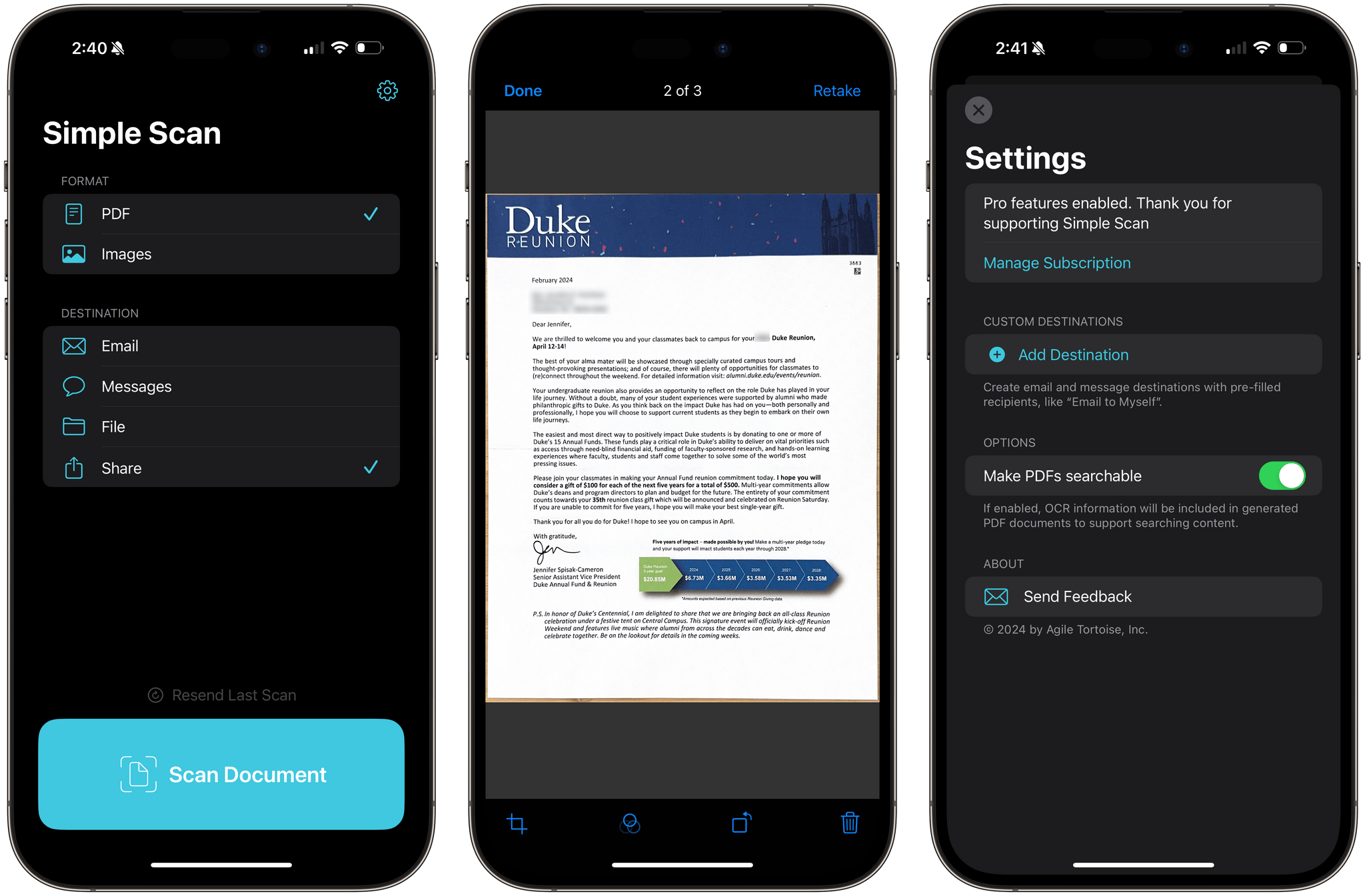
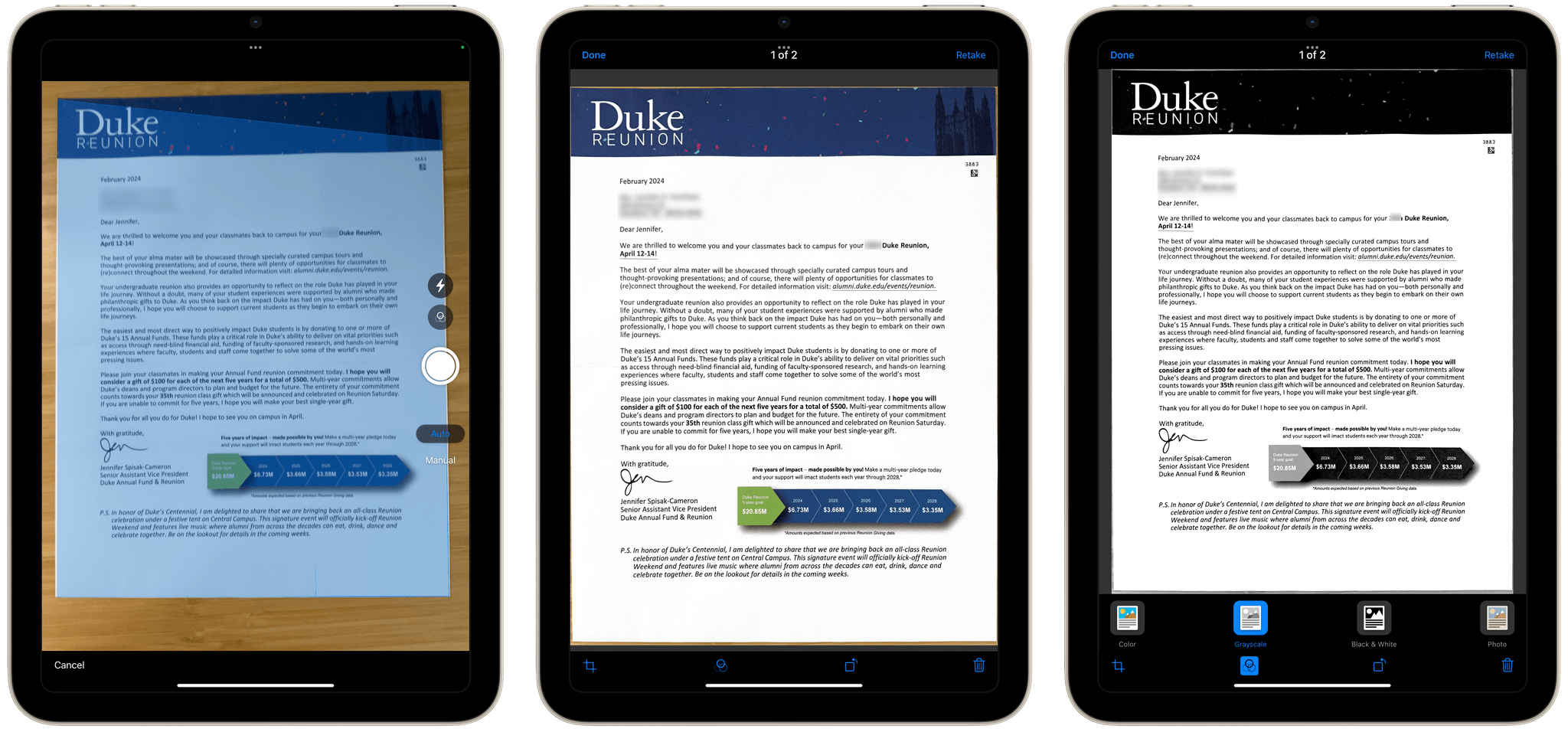
Simple Scan has two options and a big ‘Scan Document’ button. Pick whether you want to create a PDF or an image, select a destination, then point your device’s camera at a document and start scanning. That’s all there is to it. Destinations include email, Messages, the Files app, and the system share sheet, covering all the obvious places you’d want to send most scans.
There are four scanning modes including color and black and white.
The destination options in Simple Scan are key. You can already scan documents into Apple Notes, but it adds to the overhead of scanning and clutters Notes with one-off scans. With Simple Scan, you’re up and running faster and with more options for where to store or send your documents.
The scanning process uses Apple’s built-in scanning feature, allowing you to drag points to the corners of your document for cropping. The app also supports:
Manual or automatic shutter
Color, Greyscale, black and white, and photo scans
Automatic, on, and off settings for your camera’s flash
Plus, there’s a toggle in settings to turn OCR of PDF files on or off.
As you scan pages, they stack up as thumbnails in the corner of the screen, where you can tap on them to make basic edits or discard them. When you’re finished, there’s a Save button on the opposite side of the shutter button that sends the images to whatever destinations you’ve chosen. That’s all there is to Simple Scan, but for a lot of people, myself included, it’s also enough.
Simple Scan is free to download from the App Store and use for your first five scans. Paying $4.99 per year or $19.99 one time unlocks unlimited scans and custom destinations that allow you to pre-fill email and iMessage recipients.
I don’t agree that there is any “real” difference in prestige between mediums beyond ever-changing societal norms, all art is capable of rising to sit upon a pedestal. I also don’t agree that any art necessarily needs to rise up in that way, and games built for quick hit sessions or telling small and relatable stories are just as valuable to the culture as anything else. Apple Arcade launched with a lineup that seemed to make a statement aligning with that belief, and has since drifted away from it while Netflix Games has run with the baton.
That belief is exactly the vibe Apple Arcade started with and still has – to a degree. But it’s also a vibe that people seem to sense is fading. I hope not. As much as I enjoy AAA titles, there need to be places to showcase games from small studios and for indie ‘finds.’ I’d love Apple Arcade to continue to be one of those places.
According to multiple unnamed mobilegamer.biz sources, some game developers are unhappy with Apple Arcade, citing shrinking payouts and canceled games. No specifics about canceled projects are cited in the story. Nor are concrete revenue numbers shared. Moreover, the criticisms leveled by some developers were not universal, with some sources speaking favorably about their relationship with Apple. Clearly, however, not everyone who has worked on Arcade titles is happy.
The details of mobilegamer.biz’s story that I think are most interesting are the ones about the business terms Apple has struck with game developers. Those are details that developers seem to be contractually prohibited from talking about. I know because I’ve asked developers about how it works before. However, according to mobilegamer.biz, Arcade developers are paid an up-front fee and from a ‘bonus pool’ based on something called ‘qualifying sessions’:
“They have this opaque metric that they call a qualifying session, and bonus pool payments are made based on that,” said one source. “But no-one knows what a qualifying session actually is – it has something to do with if the game was launched, how long the player played for and how often they return. But it’s a black box, really.”
It will be interesting to see if those arrangements change in light of the purportedly declining revenue developers are earning and the money that Netflix is spending to attract games to its newish subscription-based videogame service.
We’re about three weeks away from the annual Game Developers Conference in San Francisco, and this story strikes me as an attempt to send a message to Apple by developers who feel their games have been abandoned by the service as it has evolved. Maybe Apple hasn’t been as clear with developers as some would like. However, it’s hard to imagine that game developers paying attention to Arcade are truly surprised by the projects it approves.
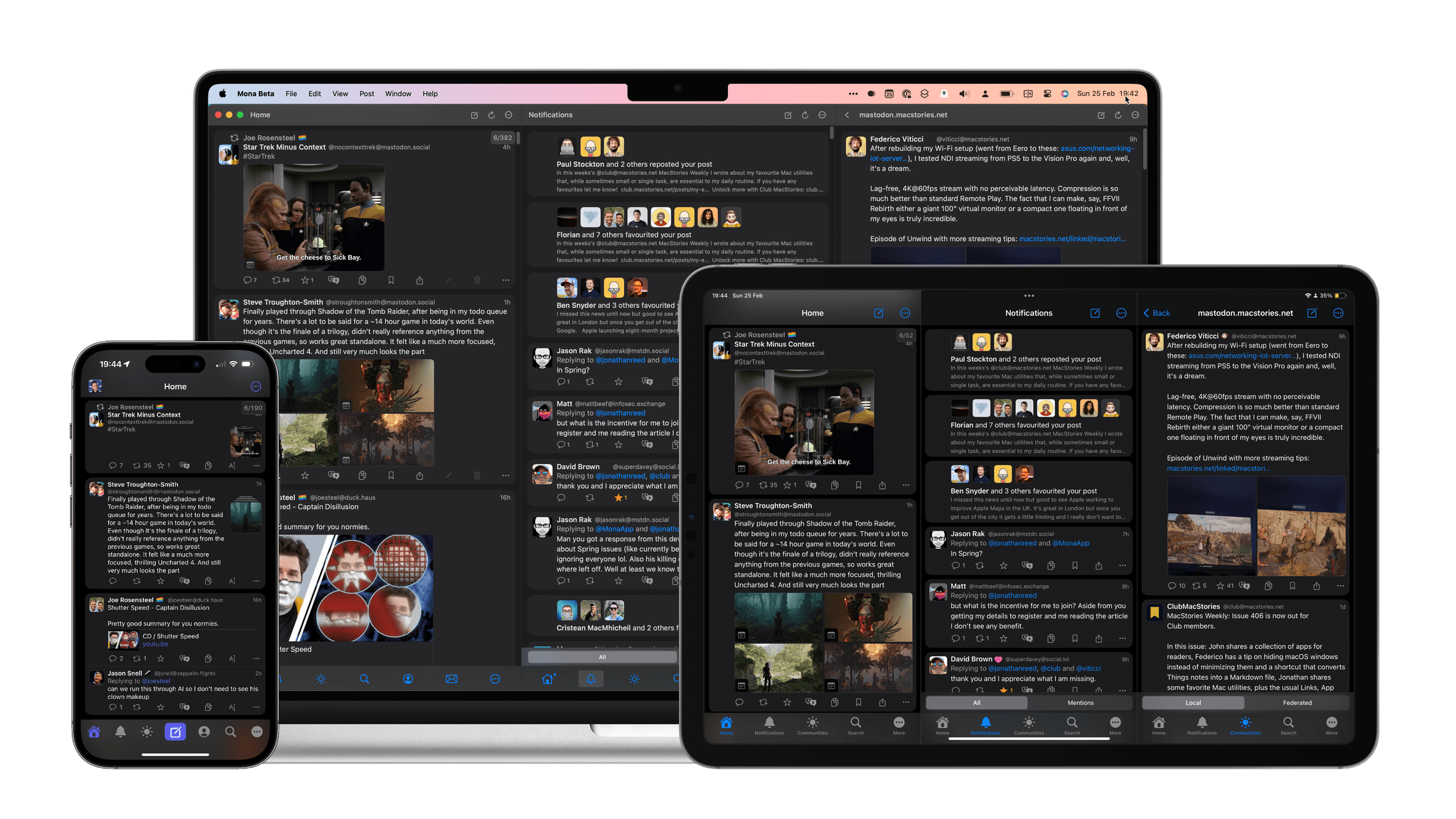
Mona, the Mastodon client for iOS, iPadOS, and Mac from Junyu Kuang, is out today with a significant version 6 update. Mona is my choice for using Mastodon primarily due to what John referred to in his review as its ‘epic level of customization.’ Everything from how the taskbar at the bottom of the screen looks to how posts are displayed is fully customizable. Even the main app view on iOS can be vertically split in two.
But Mona is not just about looks; it’s also a solid tool for navigating Mastodon. Things like the ability to privately set colors or notes to other users, timeline syncing across your devices using iCloud, and full support for VoiceOver make it a strong choice for a wide variety of people.
Which brings us to this new update. In the year and change since the mass Twitter exodus, Mastodon has matured a lot as a platform, introducing new features that users can take advantage of while filling some of the gaps impeding the platform from growing. Version 6 of Mona includes those new features while advancing its power user functionality with powerful new Shortcuts actions, including one that takes advantage of the Action Button on the iPhone 15 Pro.
The September 2023 MGM hack quickly became one of the most notorious ransomware attacks in recent memory. Journalists and cybersecurity experts rushed to report on the broken slot machines, angry hotel guests, and the fateful phishing call to MGM’s help desk that started it all.
And, like a slick magic trick, the public’s attention was drawn in the wrong direction. Now, months later, we’re still missing something critical about the MGM hack.
That’s because, for many of the most important questions about the breach, the popular answers are either incomplete or inaccurate. Those include: who hacked MGM, what tactics they used to breach the system, and how security teams can protect themselves against similar attacks.
Why is that a problem? Because it lets us write off the MGM hack as a one-off story, instead of an example of an emerging style of attack that we’ll certainly be seeing more of. And that leaves companies and security teams unprepared.
Who hacked MGM?
Plenty of news stories have confidently blamed the MGM attack on either the Scattered Spider or ALPHV hacking group, but the truth is still murky, and likely involves a dangerous team up between different groups, each bringing their own expertise to the table.
Their attacks first use fluent English social engineering skills to get onto networks, where they then deploy sophisticated ransomware that quickly establishes persistence across multiple systems.
What tactics did they use?
The dominant narrative has been that “a single phone call hacked MGM.” A phone vishing attack to MGM’s IT help desk is what started the hack, but there’s much more to it than that. The real issue is that this help desk worker was set up to fail by MGM’s weak ID verification protocols, and probably wasn’t doing anything “wrong” when they gave the bad actors access to a super administrator account.
How can security teams protect themselves?
Cybersecurity experts have centered most of their advice on user ID verification. But while it’s true that MGM’s help desk needed better ways of verifying employee identity, there’s another factor that should have stopped the hackers in their tracks.
That’s where you need to focus your attention. In fact, if you just focus your vision, you’ll find you’re already staring at the security story the pros have been missing.
It’s the device you’re reading this on.
To read more of what we learned when we researched the MGM hack–like how hacker groups get their names, the worrying gaps in MGM’s security, and why device trust is the real core of the story–check out the Kolide Blog.
Our thanks to Kolide for sponsoring MacStories this week.









](https://cdn.macstories.net/banneras-1629219199428.png)