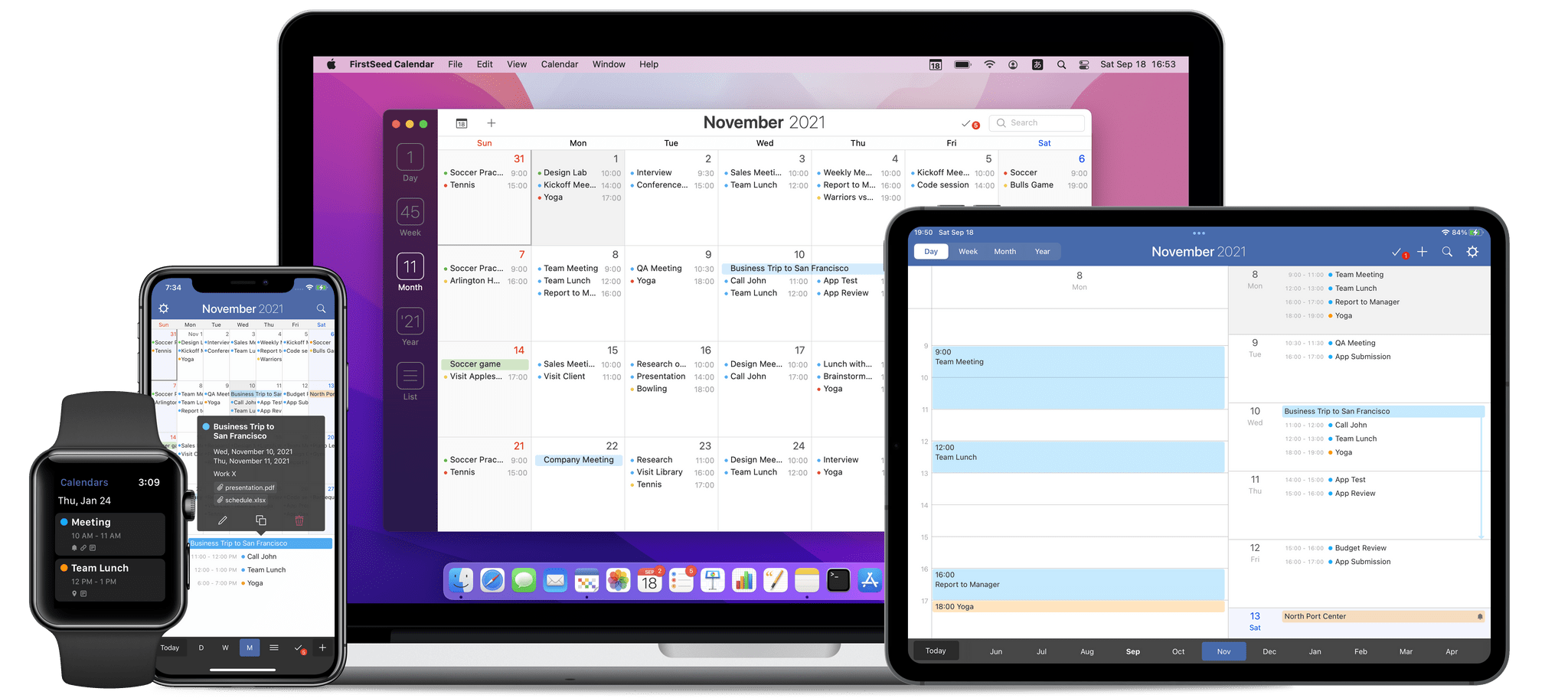
Calendar app Fantastical has added new and redesigned scheduling features that should improve short-term and long-term event planning for many of its users. Openings is a brand new feature for letting others know when they can schedule time on your calendar. Fantastical’s Calendly-like meeting organizing system has been refined too, and the app now includes a new quarter view for long-term planning.
Fantastical 3.6 Adds In-App Scheduling and Quarter View
Play: A Fantastic Utility for Saving and Organizing YouTube Videos for Later
Today, Marcos Tanaka released Play, an iPhone, iPad, and Mac app for saving links to YouTube videos for later. The app doesn’t save the videos themselves. Instead, it saves their URLs, along with metadata, making it easy to organize, sort, filter, and rediscover videos that might otherwise fall by the wayside.
Play is an excellent example of how purpose-built apps often outshine more general solutions. There are many ways to save a YouTube video for later, from a bare URL pasted in a text file to a bookmarking or read later app. YouTube has its own solution, too, with its Watch Later playlist. Each solution I’ve tried in the past works to a degree, but by focusing solely on the experience of saving YouTube links for watching later, Play outshines them all.
Six Colors’ ‘Apple in 2021’ Report Card
For the past seven years, Six Colors’ Jason Snell has put together an ‘Apple report card’ – a survey that aims to assess the current state of Apple “as seen through the eyes of writers, editors, developers, podcasters, and other people who spend an awful lot of time thinking about Apple”.
The 2021 installment of the Six Colors report card is now out, and you can find an excellent summary of all the submitted comments along with charts featuring average scores for different categories on Six Colors.
I wasn’t able to participate in last year’s report card, but I’m happy Jason invited me back to share some thoughts and comments on what Apple did in 2021. As it turns out…I had a lot of opinions I wanted to share this year, particularly about the Mac. This may be surprising coming from me – a longtime iPad Pro user – but I’m incredibly fascinated by Apple’s new direction with the Mac platform and how it’s changed thanks to Apple silicon.
I’ll have much more to share about macOS and the M1 Max MacBook Pro I’ve been testing in the near future. In the meantime, I’ve prepared the full text of my answers to the Six Colors report card, which you can find below. Once again, I recommend reading the whole thing on Six Colors to get the broader context of all the participants in the survey.
Genius Scan: A Scanner in Your Pocket [Sponsor]
Genius Scan makes scanning and managing documents with an iPhone or iPad simple, fast, and efficient. The app works the way you do and includes a flexible set of powerful, modern tools that are always with you. Its scanning engine is fast and accurate, delivering crisp, clear scans on the go, using your device’s camera or by picking images from the app’s system file picker, your photo library, or as part of a custom shortcut.
Just place a document in front of your device’s camera. Genius Scan has advanced edge detection that quickly picks out the page against its background, using powerful AI and cropping multiple scans and gathering them into a single PDF for sharing or archiving. The app’s scanning algorithms also clean up artifacts, shadows, and unclean edges, to give you fantastic results every time.
Rescanning is easy too. There’s no need to rescan an entire document from scratch because Genius Scan lets you delete or replace individual pages with a few taps. It’s a workflow that’s as intuitive as it is efficient.
Genius Scan features highly accurate optical character recognition, enabling full-text searching of your scans and the ability to copy the text for use elsewhere. The app also supports machine learning-based file naming, Shortcuts, extensive sharing options, Split View and Slide Over on the iPad, and much more. There’s a big update coming soon too!
Used by everyone from students to doctors and pilots, Genius Scan offers pricing to fit all needs. Genius Scan Basic is free and fully functional with no watermarks, scanning limits, third-party ads, or tracking. Genius Scan+ unlocks background uploading support to cloud services like Dropbox and Google Drive, OCR, locking the app with Touch ID, PDF encryption, and smart document naming for just $7.99. Also, a Genius Cloud subscription adds document sync and backup for peace of mind for $2.99/month or $29.99/year.
So download Genius Scan today, to support these independent, honest, privacy-conscious developers and put the App Store’s best scanner in your pocket.
Our thanks to Genius Scan for sponsoring MacStories this week.
New Apps We Are Trying or Revisiting (Part 2)
AppStories Episode 259 - New Apps We Are Trying or Revisiting (Part 2)
34:45
This week, Federico and John conclude their tour of new apps they are trying for the first time or revisiting.
This episode is sponsored by:
- Wealthfront – Invest for the long term on your terms. Get your first $5,000 managed for free.
- Instabug – Ship quality apps with real-time contextual insights
Links and Show Notes
New Apps We’re Trying or Revisiting
We deliver AppStories+ to subscribers with bonus content, ad-free, and at a high bitrate early every week.
To learn more about the benefits included with an AppStories+ subscription, visit our Plans page, or read the AppStories+ FAQ.
Follow us on Twitter
Follow us on Instagram
MacStories Weekly: Issue 306
This week, in addition to the usual links, app debuts, and recap of MacStories' articles and podcasts:
- New Club MacStories+ and Club Premier Discounts, by MacStories Team
- Obscure Mac Keyboard Shortcuts, by John
- Week Note Template Shortcut Update, by John
- A Wordle Super Share Shortcut, Bypassing Shortcuts' Permission Prompts, and a Technique for Overwriting Files with Quick Action Shortcuts, by Federico
- Reader Setup: Robby Burns, by MacStories Team
MacStories Unwind: Pokémon Legends: Arceus
This week on MacStories Unwind, Federico and John cover their first joint Unwind pick, Pokémon Legends: Arceus, plus MacStories highlights.
Federico and John’s Joint Pick:
- Pokémon Legends: Arceus
- More on this week’s pick:
MacStories Rewind
- CARROT 5.5 Debuts Redesigned Weather Maps with Expanded Customization Options
- Preserve and Play the Original Wordle for Decades with WordleForever
Follow us on Twitter
Follow us on Instagram
Automation Academy: Creating a Podcast RSS Feed for Your Matter Queue in Shortcuts with MatterPod
Last week on MacStories and MacStories Weekly, I explained how I leveraged the Matter integration with Obsidian to interact with the (so far not officially announced) Matter API using Shortcuts. For those who missed it, you can read my original story here, but the gist of it is: Matter has an incredible API that exposes...
Read moreAppStories, Episode 258 – Starting the New Year with New Shortcuts, Workflows, Apps, and More→
This week on AppStories, we look back at the MacStories Starter Pack coverage last week, digging into the themes and details of each of the stories we wrote and the ways you can incorporate everything into your own workflows.
On AppStories+, a little behind the scenes of the MacStories Starter Pack, along with a detailed discussion of the bug fixes and other changes to Shortcuts in iOS and iPadOS 15.3 and our wishes for the app’s future.


](https://cdn.macstories.net/banneras-1629219199428.png)