This Week's Sponsor:

Turbulence Forecast

Know before you go. Get detailed turbulence forecasts for your exact route, now available 5 days in advance.


Posts tagged with "app store"

2025 App Store Award Winners Revealed

From a pool of 45 finalists, Apple has named 17 App Store Award winners comprised of apps and games across all of its platforms. This year’s App Store Award honors were presented to:

Apps

iPhone App of the YearTiimo from tiimo. 

iPad App of the YearDetail from Detail Technologies B.V. 

Mac App of the Year: Essayist from Essayist Software Inc. 

Apple Vision Pro App of the YearExplore POV by James Hustler.

Apple Watch App of the YearStrava from Strava, Inc. 

Apple TV App of the YearHBO Max from WarnerMedia Global Digital Services, LLC.

Games

iPhone Game of the YearPokémon TCG Pocket from The Pokemon Company. 

iPad Game of the YearDREDGE from Black Salt Games. 

Mac Game of the YearCyberpunk 2077: Ultimate Edition from CD PROJEKT S.A. 

Apple Vision Pro Game of the YearPorta Nubi by Michael Temper.

Apple Arcade Game of the YearWHAT THE CLASH? from Triband ApS.

Cultural Impact

Art of Fauna by Klemens Strasser

Chants of Sennaar from Playdigious

despelote from Panic, Inc.

Be My Eyes from Be My Eyes

Focus Friend by Hank Green from B-Tech Consulting Group LLC

StoryGraph from The StoryGraph

Tim Cook had this to say about the winners and their apps:

Every year, we’re inspired by the ways developers turn their best ideas into innovative experiences that enrich people’s lives. This year’s winners represent the creativity and excellence that define the App Store, and they demonstrate the meaningful impact that world-class apps and games have on people everywhere.

This year’s list of App Store winners is one of my favorites for a bunch of reasons. There are excellent games ranging from Art of Fauna by indie developer Klemens Strasser to Cyberpunk 2077 by CD PROJEKT S.A., as well as other great titles like despelote, which was published by our friends at Panic, Chants of Sennaar, and DREDGE, whose creators Federico and I interviewed at WWDC this year. There were other excellent apps, too, like Essayist, the academic-focused word processor.

Of course, my favorite app among the bunch is Detail, this year’s iPad App of the Year. Yes, I’m hopelessly biased because my son Finn is part of the team that built the app. But it’s also a great example of an app that lowers the barriers to creativity by leveraging Apple’s hardware in a unique way.

Congratulations to all of this year’s App Store Award winners. Of all the apps on the App Store, it’s quite an honor to be among the 17 apps recognized by Apple’s editorial team.

Finally, the year-end award season isn’t over. We’ll be presenting the 2025 MacStories Selects Awards later this month, so keep an eye out for more award-winning app coverage from us.


Black Friday 2025 App Deals

There’s more than just gadgets on sale this Black Friday. There are also hundreds of excellent app deals from collections and bundles to one-off sales. We’ve gathered some of our favorites for you here, which are generally available through Monday, December 1, but check for details on the websites linked below:

The biggest collection I’ve seen is from Indie App Sales with ouver 475 app deals. Indie App Sales has been curating a list of apps from indie developers for years now, and there are always a bunch of gems on this list. Be sure to check it out for deals on apps like:

There are hundreds more deals in the Indie App Sale, so be sure to visit the site to browse through them all.


There are other great sales happening elsewhere too, including the following:

Happy deal hunting!


Wading Back Into the Liquid Glass Pool: The MacStories OS 26 App Roundup Continued

Last month, we featured 15 great examples of apps that have adopted Apple’s Liquid Glass design language and latest APIs. Today, the MacStories team is sharing nine more of our favorite updates that take advantage of Apple’s latest technologies.

We’ll have additional coverage in the weeks ahead, but for now, let’s dive into even more of the best OS 26 updates we’ve seen this fall.

Denim

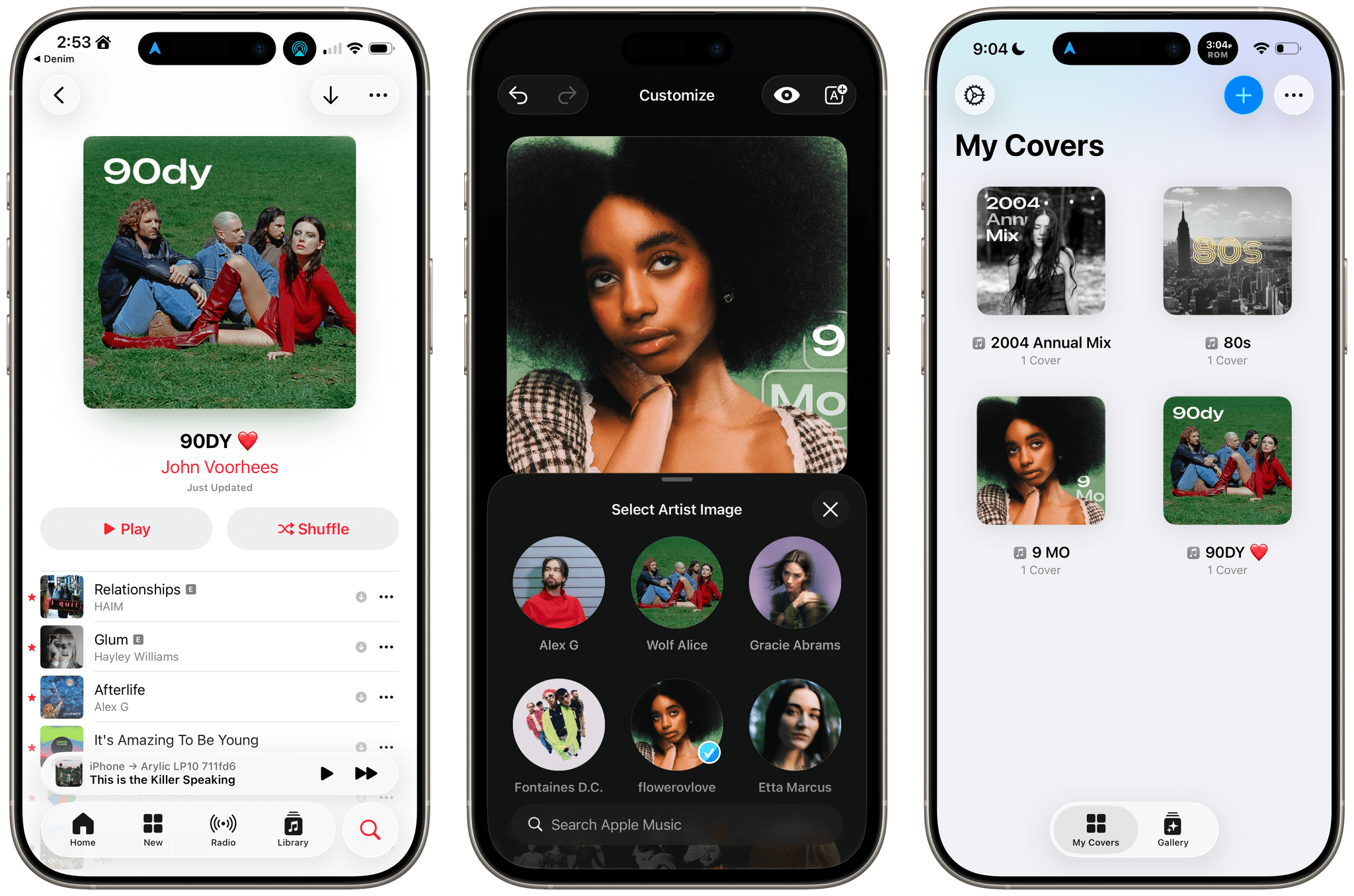
John: I remember when Denim was first released. It was a great idea that filled a gap in Apple’s Music app, allowing users to create their own playlist covers. The designs you could make with that first version were nice, though fairly modest. But Denim is one of those indie developer stories that I love. Through relentless iteration, the app has evolved into something very special, being named an Apple Design Award finalist in the Delight and Fun category earlier this year.

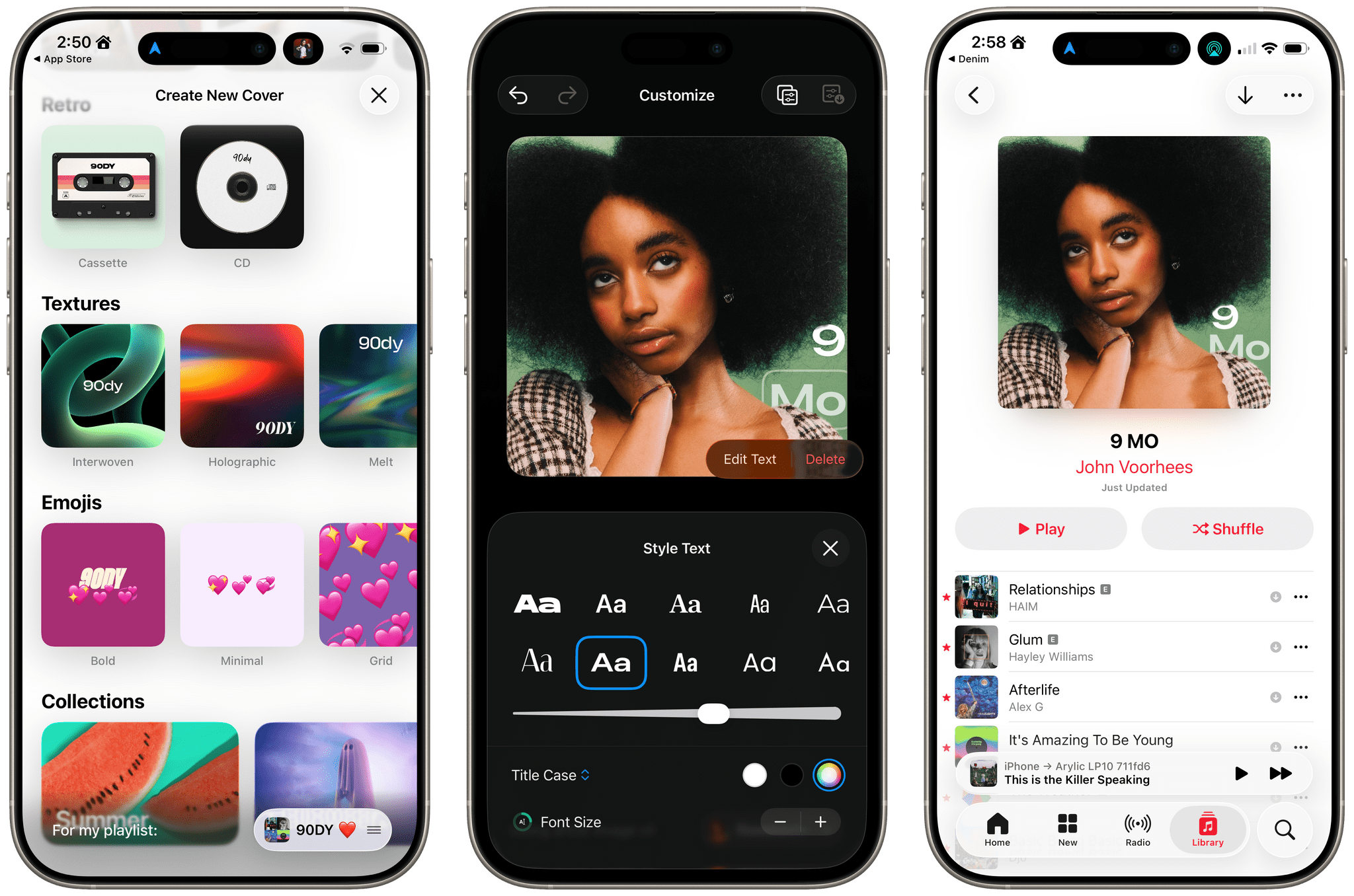
With the OS 26 release cycle, Denim is all-in on Liquid Glass. We’ve covered a lot of great Liquid Glass implementations already, but Denim’s is extra special. The design is present in the app’s tab bar, where you’ll see the glass blob effect, but it’s also in the animations, like when you return from the cover picker to your playlists. Similar animations are on display when you tap the ‘+’ button to add a new cover or the ‘…’ button.

Denim’s Gallery interface is an excellent example of Liquid Glass used to display a collection of artwork. The view has a lot in common with apps like Music, but it does a better job of implementing the design without sacrificing legibility, thanks to its buttons’ frosted treatment.

Denim’s Liquid Glass update aside, if you haven’t tried the app in a while, it’s worth taking another look at. I get tired of the auto-generated playlist art in Music, and the alternative covers Apple added a couple of years ago are uninspired. In contrast, Denim offers a wide variety of styles with highly customizable artwork, fonts, and colors. The gallery is incredibly deep, allowing you to make some fantastic covers.

Denim, which is iPhone-only, is available on the App Store for $2.99/month, $9.99/year, or a one-time payment of $29.99.

Drafts

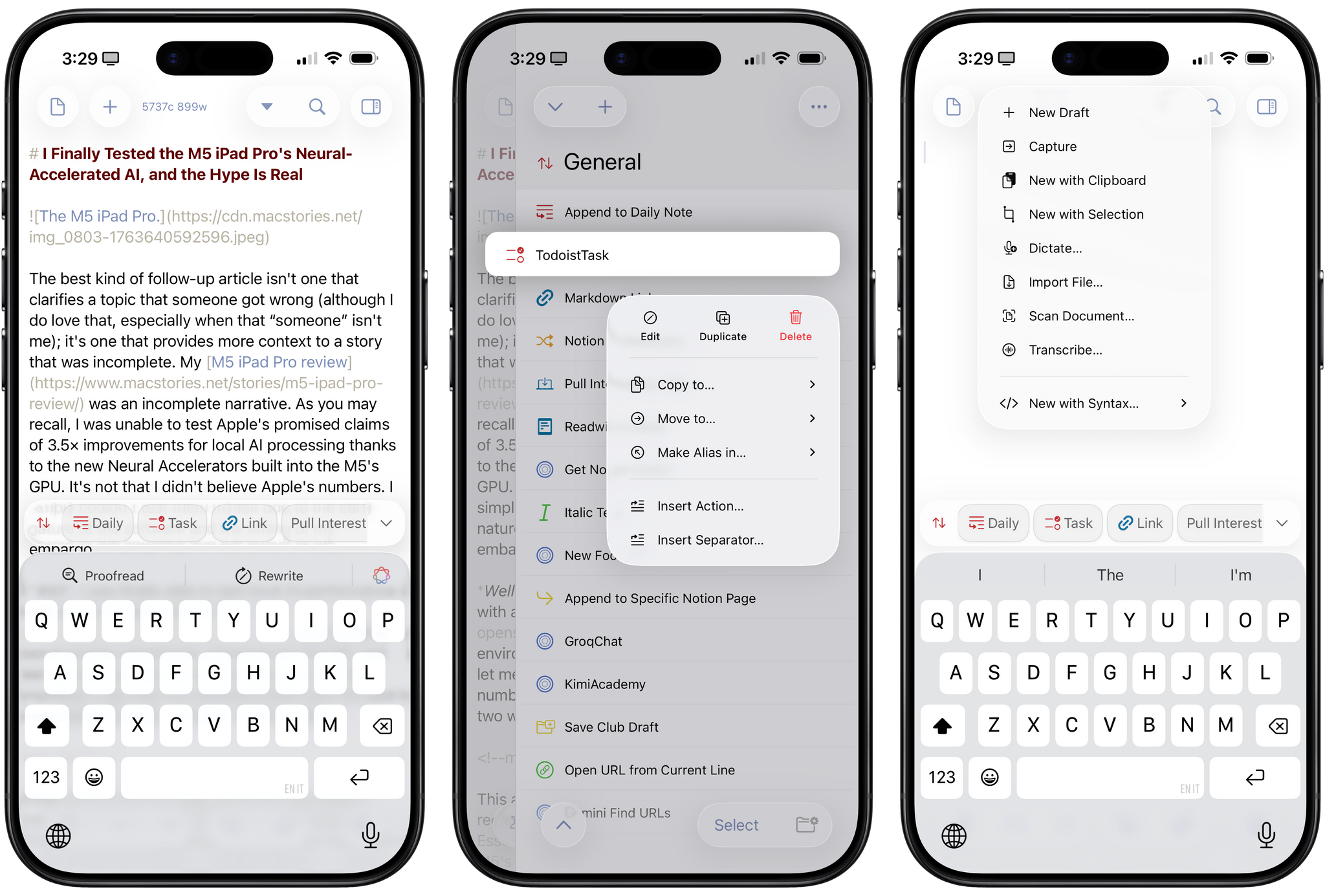
Federico: 2025 has been the year that I’ve fully embraced Drafts as my Markdown text editor/notepad of choice, and that’s all thanks to AI. Let me explain: thanks to the advancements in coding for models like GPT-5 and Sonnet 4.5, I’ve been able to turn Drafts into a highly personalized, extensible plain text editor that – unlike Obsidian – is natively integrated with Apple’s design language and latest platform features. That was never the case with Obsidian, which is an Electron app at its core and can’t match the pace of truly native apps for iOS and iPadOS. With Drafts, I get to have my cake and eat it too; I can “vibe-code” my own actions thanks to Claude, and I don’t have to give up on the nice perks that come with an application that is frequently updated for the latest Apple APIs.

Over the past two months, Drafts has received a series of notable updates for the 26 family of OSes. The app has been updated for Liquid Glass, which I think pairs well with Drafts’ UI, but more importantly, it’s also been optimized for iPadOS 26. That means full integration with the menu bar, multi-windowing, and keyboard shortcuts. Greg Pierce has done a solid job integrating with App Intents: Drafts actions can now be triggered from Control Center on the Mac and Apple Watch, and there’s a new ‘Show Capture’ action in Shortcuts that opens the app’s Capture window with the ability to pre-fill some text in it. Last but not least, Pierce also added support for the on-device Foundation model, which can be invoked from Drafts’ JavaScript-based scripting library to access tools that let you query drafts, create new ones, and more.

In a sea of so-called “opinionated” text editors that often use that adjective as an excuse for their lack of features, Drafts has managed to keep its simplicity while unlocking incredible potential for power users. If you haven’t played around with Drafts in a while, its latest updates for iOS, iPadOS, and macOS 26 are a great opportunity to test the app again.

Drafts is available as a free download for iPhone, iPad, and Apple Watch, with the full feature set available as part of Drafts Pro for $1.99/month or $19.99/year.

Read more


Apple Announces 45 App Store Awards Finalists for 2025

Source: Apple.

Source: Apple.

Today, Apple announced the finalists for the 2025 App Store Awards. The App Store Awards are Apple’s annual celebration of exceptional apps and games across 12 categories spanning the company’s platforms. It’s an excellent collection that includes solo developers, small indie teams, big companies, and many MacStories favorites.

Here’s the complete list of finalists.

iPhone App of the Year Finalists:

iPhone Game of the Year Finalists:

iPad App of the Year Finalists:

iPad Game of the Year Finalists:

Read more


Apple Introduces a Mini App Partner Program Featuring a Reduced Commission

Today on its news site for developers, Apple announced a new Mini Apps Partner Program for the App Store. The announcement is brief but backed by a more detailed explanation about the eligibility requirements. Here’s how it works.

As Apple explains, mini apps are “self-contained experiences that are built using web technologies like HTML5 and JavaScript” that are hosted within a native app. That’s not something new. Companies like WeChat and Line have offered this sort of thing for a long time, and Apple has supported mini apps officially since 2017. What’s different is that now, developers who meet Apple’s eligibility requirements can offer those mini apps at a reduced commission. That means for any mini app not made by the developer of the native app that hosts them, the hosting developer will pay Apple a flat 15% commission.

To be eligible for the program, developers must ensure that the mini apps they host support certain APIs, including the Declared Age Range API and the Advanced Commerce API, the In-App Purchase system, and the Send Consumption Information endpoint that enables the processing of refunds. In other words, native app developers who do the work to ensure that mini apps meet the program requirements will pay Apple a reduced commission on mini app sales in return.

If you’re wondering what constitutes a mini app, Apple has provided some examples. Mini apps are “software packages, scripts, or game content that are added after app installation and executed on the device, provided such code is written in HTML5 or JavaScript, or another language approved by Apple”, such as mini games, streaming games, chatbots, plug-ins, and game emulators. As I mentioned above, it’s also important to keep in mind that mini apps are apps that are not controlled by the developer of the native app that hosts them.

Also, to participate in the Mini App Partner program, developers must apply – that link takes you to a form requesting information about the mini apps a developer wants to offer, so eligibility can be determined.

App Store users stand to benefit from the program, too. APIs like the Declared Age Rating API will help ensure that only age-appropriate mini apps are available to kids. Plus, by supporting the Advanced Commerce API, mini apps will include more metadata, providing users with a richer experience in places like their App Store purchase history.

Mini apps based on web technologies are a growing part of the App Store. The App Review Guidelines have accounted for mini apps since 2017 and the rules around them have continued to adapt to the market ever since. The Mini App Partner Program reflects the further evolution of the category, promoting privacy and transparency for users, while offering the carrot of lower commissions to developers.

What will be interesting to watch is the extent to which developers sign up for this new program. The program isn’t required (although compliance with App Review Guideline 4.7 still applies), so it will come down to whether the reduced commission provides sufficient incentive for developers to further police the mini apps they host.


Google and Epic Games’ Settlement Is Far from a Done Deal

Last week, Epic and Google made a big show of settling their antitrust dispute. The only trouble is that they didn’t do so until after the judge in the case had entered a permanent injunction requiring Google to make changes to how it operates its Play Store, which were upheld on appeal. That makes it harder to settle, as the mobilegamer.biz reports today:

The agreement was framed by Epic and Google as a conclusion to the court battle between the two that has been rumbling on since 2020. But a report from Law360 quotes the Judge overseeing the case as saying the proposals do not go far enough to rectify Google’s behaviour. Judge Donato also wants another hearing in December or January to straighten it all out.

“My concern here is that these proposed modifications … [are] not providing an adequate remedy for Google’s wrongdoing,” said Judge Donato, according to Law360.

This sort of thing isn’t unheard of, especially when the dispute is over a legal issue that takes into account the effect on consumers along with the parties involved. The judge in the case has scheduled hearings for December and January to consider the proposed settlement, but it looks like this case could end up in the U.S. Supreme Court after all.

Permalink

Proposed Epic–Google Deal Would Expand Access to the Play Store

Late yesterday, Epic Games and Google announced a settlement of their Google Play Store litigation that, subject to court approval, would open Google’s storefront more widely than ever before.

Like Apple’s revisions to its store in response to the European Commission, Google’s settlement is complex, but here are some of the highlights, as reported by Sean Hollister for The Verge:

  • Whereas the U.S. District Court’s injunction only applied to the U.S. Play Store, the settlement is global.
  • The settlement also runs through 2032, which extends beyond the three years ordered by the court.
  • Google has agreed to reduce its standard fee to 20%, and in some cases, 9% depending on the type of transaction.
  • Google will create a registration system to allow third-party storefronts.
  • Developer fees for using Play Billing, Google’s payment system, will be separated from the transaction fees.

As I said, though, there’s a lot more to the proposed settlement that you can read in full in the PDF linked in The Verge’s story, and it’s subject to court approval, but it does seem to reflect significant concessions by Google.

What does this mean for Apple and its App Store skirmishes with regulators around the world? Nothing technically; however, contextually, if the settlement is implemented, it should add to the pressure on Apple to open the App Store more widely in the U.S. and elsewhere.

Permalink

Shop Nintendo Hardware, Games, and Merch with the New iOS App

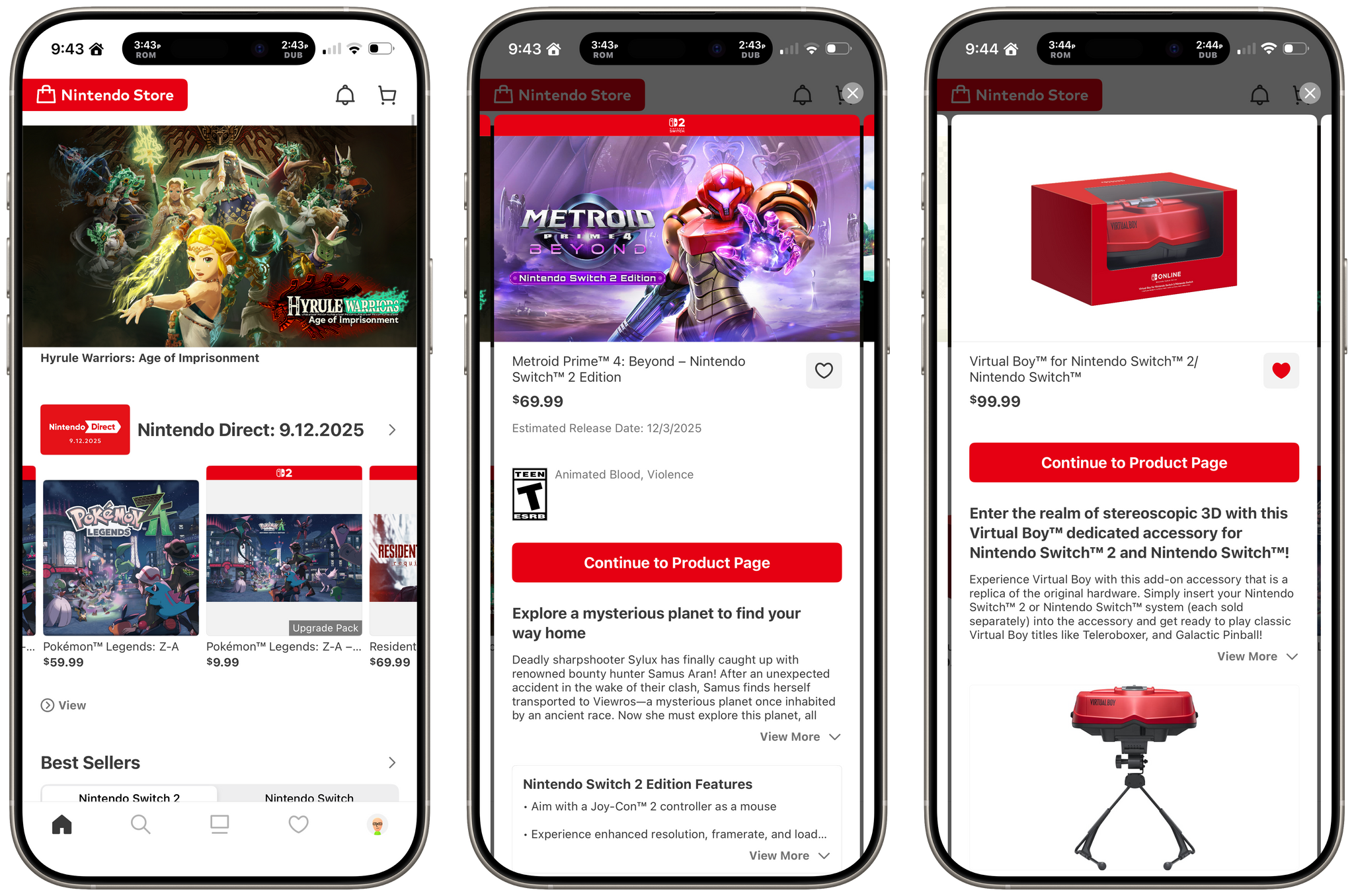
Nintendo fans in Japan have had a “My Nintendo” storefront app for everything Nintendo for five years. Now, it’s finally here for the rest of us, rechristened Nintendo Store for iOS and iPadOS. With the release of the Switch 2, the Nintendo eShop’s performance is much better than before, but it’s still not a great experience to navigate, which is why I was so excited to dive into the new app.

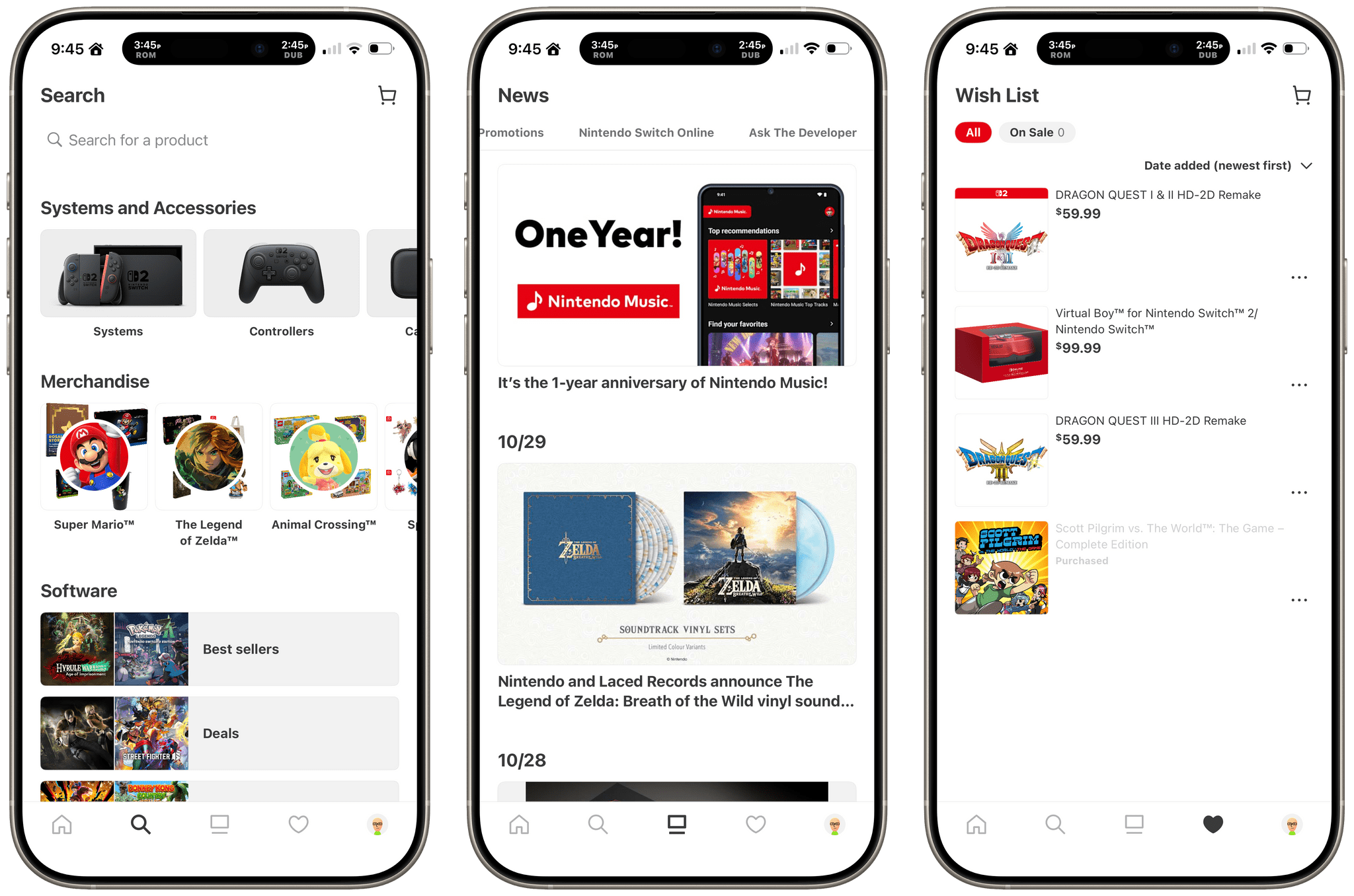
Search, News, and Wish List.

Search, News, and Wish List.

If you’ve ever shopped on Nintendo’s website, the new app will look familiar. The home tab is a mix of featured games, consoles, and accessories, a best sellers list, sales, and other collections. The app also includes tabs for:

  • Search, which pre-populated lists for hardware, franchise merch, games, and more;
  • News, which features upcoming games and other announcements;
  • Wish List where products you’ve marked as favorites show up; and
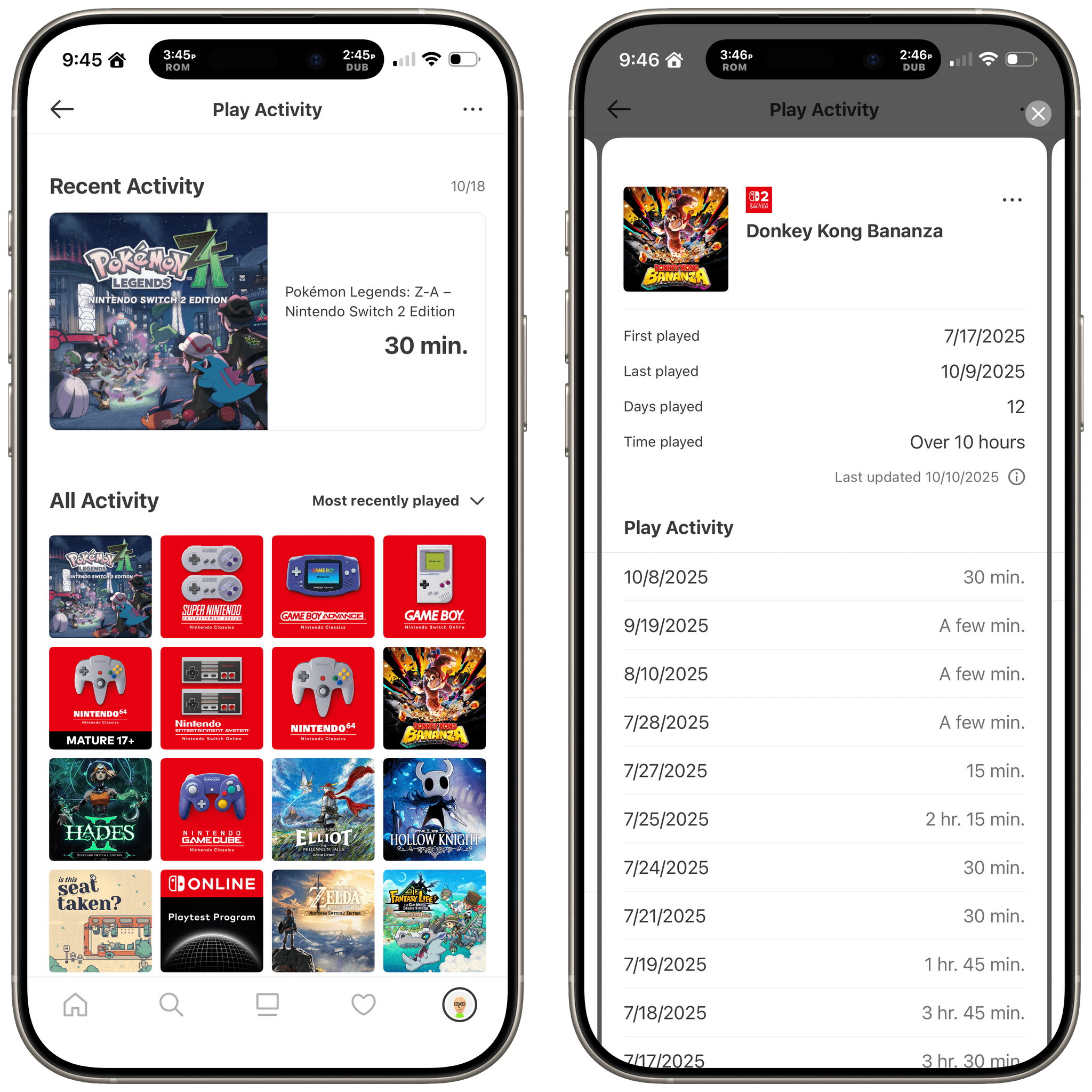
  • Your Profile, where you can check your Play Activity by game title.
Play activity is built into the Profile tab.

Play activity is built into the Profile tab.

When you’re ready to purchase something, the transaction happens in a Safari view controller rather than as an in-app purchase, and the process is smooth, especially if you already have a Nintendo account. The app also has extensive notification settings for everything from game releases and sales to check-in events and app updates, which can be individually turned on or off.


There’s nothing in the Nintendo Store app that you can’t find elsewhere on the web or eShop on the Switch. However, the experience of having it all available in a single app that you can use when you might not have your Switch nearby or want to navigate Nintendo’s website is a convenience I’m glad is now available.

The Nintendo Store app is available as a free download on the App Store for the iPhone and iPad. The Nintendo Store app is available on Android, too.


Apple Recreated the App Store on the Web with No Way to Download or Buy Apps

Today, Apple launched a web version of the App Store, with a twist. I’ll admit that this wasn’t on my “things Apple will do this fall” bingo card. I’ve wondered since the earliest days of the App Store why there wasn’t a web version and concluded long ago that it just wasn’t something Apple wanted to do. But here we are, so let’s take a look.

You’ll find the new web-based App Store at apps.apple.com, where you’ll be greeted by a sort of amalgam of the App Stores on each of Apple’s platforms. Along the left sidebar, you’ll find the same Today, Games, Apps, and Arcade tabs found in the native App Stores. This is where Categories reside, too. One big difference is that in the top-left corner, you’ll see what store you’re viewing, which defaults to the iPhone even if you’re on a different device. Click the drop-down label, and you can switch to another storefront.

Stray is $29.99, but you'll need to open the Mac App Store app to buy it.

Stray is $29.99, but you’ll need to open the Mac App Store app to buy it.

An even bigger difference from the native App Stores is that you can’t buy anything on the web. That’s right: there’s no way to log into your Apple account to download or buy anything. It’s a browse-only experience.

The site looks great and is a fully responsive replica of the native App Store apps in just about every way, but in place of the usual ‘Get’ or ‘Buy’ buttons, there’s a ‘View’ button, which is replaced by a ‘Share’ button when you go to an app’s dedicated page. I really don’t get it. At least on the Mac, there’s a button to open an app in the Mac App Store, but the same isn’t true on the iPhone and iPad.

The website is a great amalgamation of the native App Stores, but it's not really a store if you can't download or buy anything.

The website is a great amalgamation of the native App Stores, but it’s not really a store if you can’t download or buy anything.

Sure, you can always share an app to yourself on a device where you can buy it. But shouldn’t the point of a web store be to allow you to make purchases when you’re not on an Apple device or, for example, to buy a Mac app on your iPhone and have it waiting for you when you return to your Mac? I’ve literally checked the site multiple times because I can’t believe Apple built a storefront but left out the commerce part.

Look, the website is very nice and does a great job replicating the UI of the App Store, just like the web versions of Music, Maps, and iCloud do. I just wish I could buy something.