This Week's Sponsor:

Turbulence Forecast

Know before you go. Get detailed turbulence forecasts for your exact route, now available 5 days in advance.


Posts tagged with "apps"

Netflix Appears to Be Rolling Out Apple TV App Integration in the U.S.

Source: [FlatpanelsHD](https://www.flatpanelshd.com/news.php?subaction=showfull&id=1739529080).

Source: FlatpanelsHD.

Update: A spokesperson for Netflix has told The Verge that the integration with the Apple TV app’s Watchlist and Continue Watching features was a mistake and is being reversed. Perhaps the reaction to the change will cause Netflix to reconsider its refusal to participate in the TV app, but I wouldn’t hold your breath waiting for that to happen.


FlatpanelsHD has discovered that Netflix, long a holdout that was unavailable in Apple’s TV app, is beginning to prompt users to add the service to the TV app:

Today, FlatpanelsHD received a prompt on Apple TV 4K to integrate Netflix into the Apple TV app, as shown at the bottom. After accepting, Netflix content appeared in the Continue Watching queue and Watchlist within the Apple TV app, as seen below.

FlatpanelsHD says the feature is currently limited to Netflix Originals programming and users who are also U.S. account holders.

I’ve looked for this myself and haven’t seen it yet, but it may just be that the rollout is happening gradually. As of publication, I haven’t seen an update to the Netflix app (though the update may be a server-side change) and as 9to5Mac points out, Apple’s list of apps that support Watchlist hasn’t been updated in almost one year. So, it’s possible that after more people have the new feature, we’ll see an official announcement from Apple and/or Netflix.

This is great news, although my enthusiasm is tempered by the reported limitations. I hope the feature extends beyond Netflix Originals and to other countries. Still, for a lot of people I’m sure the only service they use that isn’t in the TV app is Netflix, so any integration after all these years is better than none. I know I’ll be checking my Apple TV throughout the day to try this myself.

Permalink

Our MacStories Setups: Updates Covering Video Production, Gaming, and More

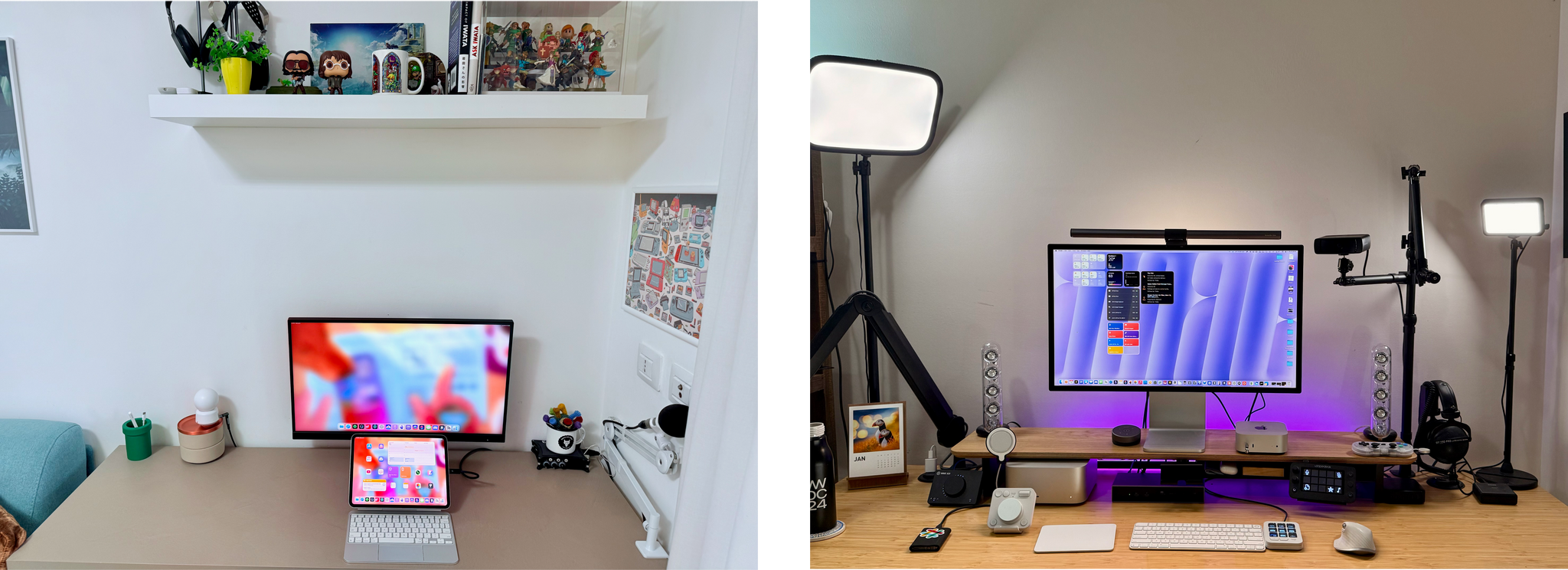
The second half of 2024 saw a lot of change to my setup and Federico’s. We launched the MacStories YouTube channel, expanded our family of podcasts, and spent time chasing the ultimate portable gaming setup for NPC: Next Portable Console. The result was that our setups have evolved rapidly. So, today, we thought we’d catch folks up on what’s changed.

Our Setups page has all the details, but you’ll notice a couple of trends from the changes we’ve made recently. As Federico recounted in iPad Pro for Everything: How I Rethought My Entire Workflow Around the New 11” iPad Pro, the linchpin to ditching his Mac altogether was recording audio and video to SD cards. He already had a solution for audio in place, but video required additional hardware, including the Sony ZV-E10 II camera.

Federico's White OLED Steam Deck and Lenovo Legion y700 tablet.

Federico’s White OLED Steam Deck and Lenovo Legion y700 tablet.

Federico’s gaming setup has evolved, too. The Sony PS5 Pro replaced the original PS5, and he swapped the limited edition white Steam Deck in for the standard OLED version. He also revealed on NPC: Next Portable Console this week that he’s using a Lenovo y700 2024 gaming tablet imported from China to emulate Nintendo DS and 3DS games, which will be available worldwide later this year as the Lenovo Legion Tab Gen 3. Other upgrades to existing hardware Federico uses include a move from the iPhone 16 Plus to the iPhone 16 Pro Max and an upgrade of the XREAL Airs to the XREAL One glasses.

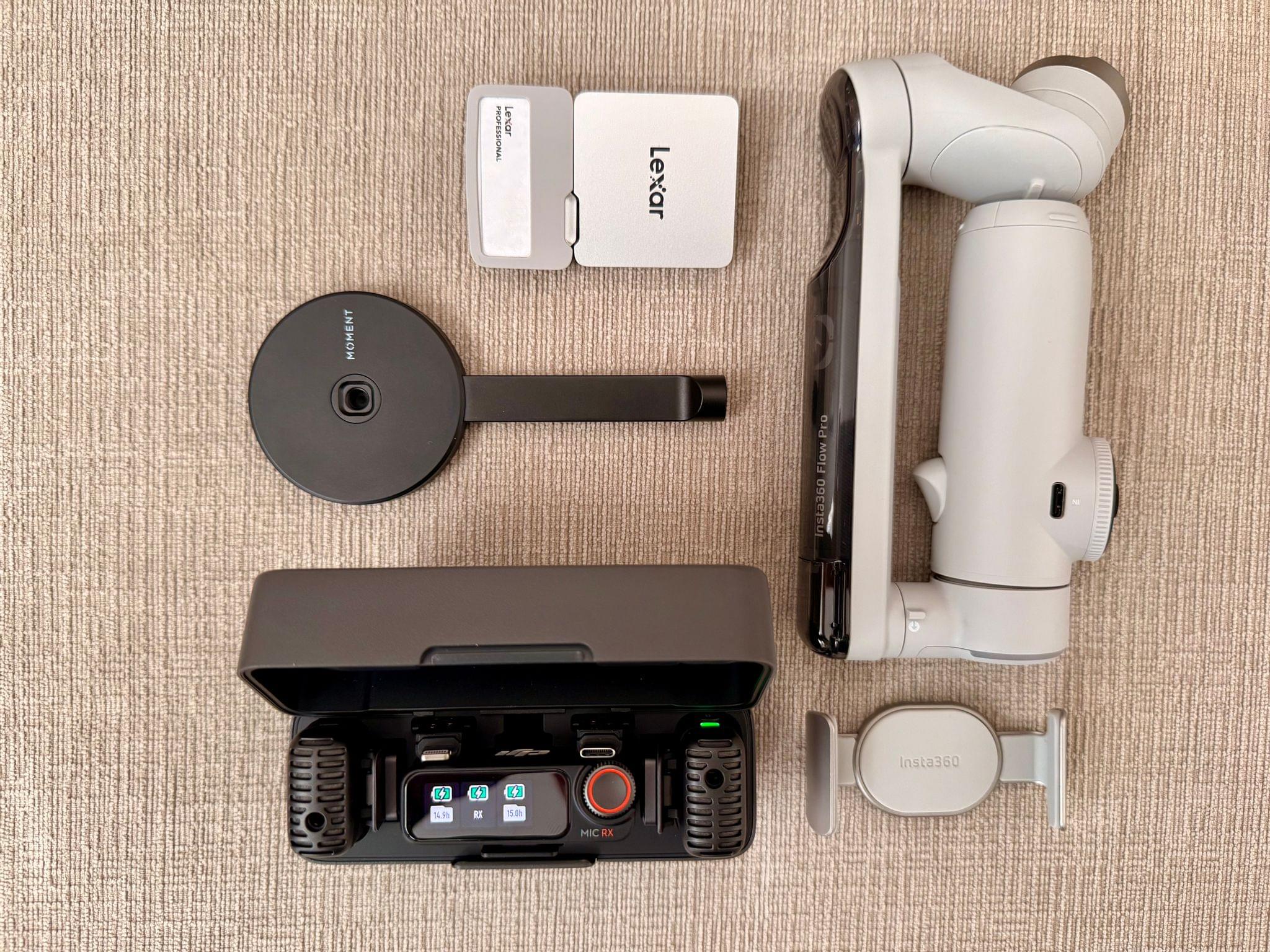
My portable video recording setup

My portable video recording setup

As for myself, CES and its bag size limitations pushed me to rethink my portable video and audio recording setups. For recording when I’m away from home I added several items to my kit that I detailed in What’s in My CES Bag?, including:

On the gaming side of things I added a white TrimUI Brick and GameCube-inspired Retroid Pocket 5.

2024 was a big year for setup updates for both of us. We already have new hardware incoming for testing, so keep an eye on the Setups page. I expect we’ll update it several times in 2025 too.

Permalink

A Bluesky-Based Photo-Sharing App Is Coming

Sebastian Vogelsang, the Berlin-based developer of Skeets, an alternative to Bluesky’s official client, is working on a new photo-sharing app called Flashes that is built on the same codebase as Skeets. As reported by Sarah Perez at TechCrunch:

When launched, Flashes could tap into growing consumer demand for alternatives to Big Tech’s social media monopoly. This trend has led to the adoption of open source, decentralized apps like Mastodon and Bluesky, among others, including the recently launched Pixelfed mobile apps, built on Mastodon’s ActivityPub protocol. It’s also, in part, what’s fueling TikTok users’ shift to the Chinese app RedNote ahead of the U.S. TikTok ban — that is, U.S. users are signaling that they would rather use a foreign adversary’s app than return to Meta at this point.

The idea behind Flashes is fundamentally different from Instagram. Whereas Instagram is a standalone product that allows users to cross-post to Threads automatically, Flashes is being built on top of the same social graph as Bluesky. That means Flashes will act as a Bluesky filter focused on photo and video content instead of your entire Bluesky feed. It’s an interesting approach that sidesteps the messiness of cross-posting entirely and allows Vogelsang to focus Flashes’ feature set on photos and video.

I’m looking forward to giving Flashes a try. Instagram is more deeply embedded in many people’s lives than Threads, which makes it harder to replace. However, I’m glad to see Vogelsang and Pixelfed trying. There are enough people like us who are fed up with Meta’s policies that these sorts of alternatives may have a shot at gaining traction with users.

Permalink

Razer Launches PC Remote Play for Streaming PC Games to the iPhone, iPad, and Other Devices

Source: Razer.

Source: Razer.

Yesterday, Brendon and I wandered into a ballroom where Razer was showing off its latest hardware. We weren’t expecting much beyond super-powerful gaming laptops (✅) and lots of RGB lights (also ✅). However, just as our guided booth tour was ending, we asked about an iPhone, iPad mini, and Windows PC setup on a nearby table, which it turns out was a demo of Razer’s new PC Remote Play app.

There are a lot of ways to stream games from a Windows PC to iPhones, iPads, and other devices, but Razer PC Remote Play looks like it could be one of the easiest and nicest of the bunch. What was impressive about the demo was that Razer’s app automatically adjusts to the device to which you’re streaming, matching its screen’s refresh rate and aspect ratio. That ensures you’ll get the most out of the device to which you’re streaming, and you won’t see letterboxing or pillarboxing, which is caused by a mismatch between the aspect ratio of your PC remote device. According to a Reddit user who says they are a Product Developer for Razer PC Remote Play, the app is built on the open source Moonlight/Sunshine projects, with the goal of simplifying setup and configuration.

Razer PC Remote Play is currently in beta and requires that you run Razer Cortex on your Windows PC and install the Razer PC Remote Play and Razer Nexus apps on your iPhone, iPad, or other devices. I haven’t had a chance to set this up yet because I don’t have a PC with me at CES, but judging from the iOS app I set up it looks as simple as opening Razer PC Remote Play, which detects if there is a PC on your network running Razer Cortex. Once paired, Razer says your PC games will show up in its Nexus game launcher app alongside your other games.

I’m excited to try Razer PC Remote Play myself. The Moonlight/Sunshine project is a great way to stream PC games, but it can take some fiddling to work well with any given setup. What Razer is promising is a simplified version that just works out of the box. We’ll see how well it works in practice, but the demo I saw was promising.


Lux Reveals Plans for Halide Mark III

Yesterday, the team at Lux announced that they are working on the next major release of their pro camera app, Halide, which will be dubbed Halide Mark III. The next iteration of Halide, which Lux hopes to release in 2025 will focus on three areas:

  • Color Grades: Like Kino, their App Store iPhone App of the Year for shooting video, Lux plans to add custom color grading to Halide.
  • HDR: Lux is developing its own implementation of High Dynamic Range that will give Halide’s photos “a thoughtful and nuanced HDR look.”
  • Redesign: Although Lux has not revealed any details, Halide will be redesigned, which should include a focus on color grading.

In addition to upcoming features, Lux announced a new community Discord for Halide and Kino, to collect feedback from customers and to allow them to share their interest in photography. The Discord and social media will also be where users can participate in the Halide and Kino 52-Week Challenge:

Every week you’ll get a photography challenge on our Discord. We’ll also include resources to help with the challenge — like app-specific tips. The challenge will be shared there and on our social media. Once you’ve got your shot, you can share your shots and see what the rest of the community came up with.

I love both Halide and Kino, and I’m intrigued by Lux’s new approach to development. Running a community can be challenging, but I expect the feedback Lux gets from users will be invaluable, as they work on the next big update to one of the App Store’s best camera apps.

Permalink

Apple Reveals the Top App Store App and Game Downloads of 2024

Apple’s App Store has published its year-end list of the top free and paid apps and games, along with its top Apple Arcade games.

The top free apps are about what you’d expect. There are social networks, shopping apps, a few streaming music and video apps, Google, Gmail, McDonald’s, and ChatGPT. Among the top paid apps are several we’ve covered here and on Club MacStories, including AutoSleep, Paprika, Procreate Pocket, Forest, RadarScope, µBrowser, and long-time favorite Streaks. Strangely, the paid app list also includes a gameSuika Game clone called ‘Merge Watermelon for watch’ for the Apple Watch.

Among the free and paid games, highlights include Subway Surfers, NYT Games, Minecraft, Geometry Dash, Stardew Valley, and Balatro. If you’re an Arcade subscriber, top games include NBA 2K24, Sneaky Sasquatch, Sonic Dream Team, NFL Retro Bowl ‘25, Angry Birds Reloaded, Retro Bowl+, Stardew Valley+, stitch, and Tomb of the Mask.

Each of the three lists includes 40 free and paid apps or games for 120 total. The vast majority of apps are the sort of everyday apps people download to shop, search the web, browse social media, and entertain themselves. There is more variety among the paid apps, with categories like health, self-improvement, productivity, and creative apps leading the apps for which users are willing to pay.

On the games lists, what struck me more than anything else is how many games on the lists aren’t new. That’s less true of Arcade, but it seems as though the hits of the past continue to rule the regular App Store game list. I’d like to see more variety in 2025, but it’s also good to see some truly great apps among the more everyday apps that will undoubtedly continue to get lots of downloads.


Apple Announces the 2024 App Store Awards

iPhone App of the Year winner Kino. Source: Apple.

iPhone App of the Year winner Kino. Source: Apple.

Apple has revealed its annual App Store Awards winners, recognizing the standout apps and games of 2024. This year, the company picked a collection of apps and games from 17 developers across 12 categories, including new categories for the Vision Pro App and Game of the Year.

Apple CEO Tim Cook had this to say about this year’s winning developers:

We are thrilled to honor this impressive group of developers who are harnessing the power of Apple devices and technology to deliver experiences that enrich the lives of users and have a profound impact on their communities. The remarkable achievements of this year’s winners demonstrate the incredible ingenuity that can be unlocked through apps.

This year’s App Store Award winners are:

iPad App of the Year winner Moises. Source: Apple.

iPad App of the Year winner Moises. Source: Apple.

Apps

  • iPhone App of the YearKino, from Lux Optics, Inc. 
  • iPad App of the Year: Moises, from Moises Systems, Inc. 
  • Mac App of the Year: Adobe Lightroom, from Adobe, Inc. 
  • Apple Vision Pro App of the Year: What If…? An Immersive Story, from Disney
  • Apple Watch App of the Year: Lumy, from Raja V.
  • Apple TV App of the Year: F1 TV, from Formula One Digital Media Limited
Mac Game of the Year winner Thank Goodness You’re Here! Source: Apple

Mac Game of the Year winner Thank Goodness You’re Here! Source: Apple

Games

Cultural Impact winner Oko. Source: Apple.

Cultural Impact winner Oko. Source: Apple.

Apple also honored the following Cultural Impact winners:

I had a chance to meet with the developers of three winning apps: Thrasher, Oko, and Moises. I wasn’t familiar with any of these apps before my meetings, but every one of them struck a chord with me, and I can see why Apple included them in their awards.

Thrasher takes advantage of the Vision Pro’s many sensors to create a uniquely immersive visual and musical experience. Oko uses the iPhone’s cameras to help low-vision and blind users navigate busy cities safely and independently. Moises leverages AI to break down music in a way that helps musicians practice and improve their skills. They’re all very different apps, but each pushes Apple’s devices in its own way to elevate their users’ daily lives whether it’s improving their skills, helping them through their daily lives, or entertaining them during a moment of downtime.

Congratulations to all of this year’s App Store Award winners. It’s always great to see developers’ hard work and contributions to Apple’s platforms recognized.


MacStories Selects 2024: Recognizing the Best Apps of the Year

John: 2024 was a big year for apps, but it was also different from most. More often than not, app innovation is driven by new Apple APIs; that wasn’t the case this year. Instead, it was other trends that shaped the apps we love.

Artificial intelligence played a big role, with some apps adopting it in clever ways to reduce user friction while other developers reacted to it by adopting a more human-centric, creative approach. The rapidly evolving social media landscape played a part, too, with new ways to communicate and manage our timelines emerging.

However, the biggest driver of change in the world of apps this year was government regulation led by the European Commission. The full effects of the Digital Markets Act and the U.S. Department of Justice’s antitrust action against Apple have yet to play out, but nothing since the introduction of the App Store has shaken up the status quo like governments in the EU, U.S., and elsewhere did in 2024.

Not all regulatory effects were what developers wanted – or even positive – but as 2024 winds down, it’s undeniable that apps that weren’t possible before regulation are now available worldwide. Plus, developers in certain parts of the world have more options than before, which we at MacStories are happy to see as fans of apps and their makers. Let’s hope the opening up of the App Store continues and spreads geographically in 2025 and beyond.

Change lingers in the air, which makes me excited for the apps that 2025 will bring, but before we shut off the lights on 2024, it’s time to pause as we do each year to reflect on the many apps we tried in the year gone by and recognize the best among them.

Like last year, the MacStories team picked the best apps in seven categories:

  • Best New App
  • Best App Update
  • Best New Feature
  • Best Watch App
  • Best Mac App
  • Best Design
  • App of the Year

Club MacStories members were part of the selection process, too, picking the winner of the MacStories Selects Readers’ Choice Award. And as we’ve done the past few years, we named a Lifetime Achievement Award winner that has stood the test of time and had an outsized impact on the world of apps. This year’s winner, which joins past winners Pixelmator, PCalc, and Drafts, is the subject of a special story Niléane wrote for the occasion.

As usual, Federico and I also recorded a special episode of AppStories covering all the winners and runners-up. It’s a terrific way to learn more about this year’s apps. Plus, it’s on our YouTube channel this year, giving you a chance to actually see the awards as we cover them.

You can also listen to the episode below.

AppStories+ Deeper into the world of apps
0:00
55:19

AppStories+ Deeper into the world of apps

And with that, it’s my pleasure to unveil the 2024 MacStories Selects Awards.

Read more


The MacStories Selects 2024 Lifetime Achievement Award

Transit

Earlier this year, I took the time to step back from the tech news cycle and reflect on one of my favorite iPhone apps of all time, Transit. For the past decade and more — Transit first launched in 2012 — the app has been a powerful way to plan trips and look up waiting times when traveling around your hometown using public transportation. But the team behind Transit has never stopped enhancing and improving the app. Today, Transit remains one of the best transit apps on the iPhone, and it’s not even close; not only that, but the app has also slowly but surely cemented itself as a staple of UI design in this category.

I started relying on Transit in 2014, when I first arrived in France. At the time, I had never experienced a massive public transit network like the one in Paris, and I specifically remember how overwhelming it all felt. Finding Transit in the App Store truly felt like a godsend for 18-year-old me.

When it was first released, the app focused on one key feature: as soon as you tapped its icon on the Home Screen, it would immediately give you real-time waiting times for bus and train stops all around you, wherever you were in the city. Unlike with its competitors, you didn’t need to tap around the UI to find the stop or train line you were looking for; in all likelihood, the information you were looking for was already there, right on the app’s main screen. Instead of trying to play the retention game and keep you in the app as long as it could, Transit was designed to be launched and dismissed again just a few seconds later, as soon as you got a glance at the waiting times on its main screen.

This basic foundation immediately made Transit relevant at any time of the day. It also explains why, over the past ten years, I’ve never once removed the app’s icon from my Home Screen. In fact, it’s hard for me to imagine my Home Screen setup without Transit.

Transit lets you compare itineraries on a timeline and presents you with a detailed breakdown of each itinerary.

Transit lets you compare itineraries on a timeline and presents you with a detailed breakdown of each itinerary.

Today, in addition to checking waiting times, the app also lets you plan itineraries and compare trips, and it can track your vehicle to alert you when you’re about to reach your destination so you don’t miss your stop — all of this across 741 cities and regions in 23 countries. If this sounds like a lot, just know that at every step along the way, the app is always graced with a thoughtful design that never makes any part of it feel overwhelming. Every single data point has been carefully placed in the interface and is introduced with beautiful and subtle animations.

When I try to think of apps that started strong so many years ago and only evolved to become stronger, there are just a few names that come to mind. Transit is one of those names.

Transit's Live Activities are a perfect use case for the feature. They let you keep track of your trip and alert you when you're about to reach your destination.

Transit’s Live Activities are a perfect use case for the feature. They let you keep track of your trip and alert you when you’re about to reach your destination.

One of the reasons the app has been able to achieve this is its ability to gracefully adopt Apple’s new system APIs in iOS every year. This was especially true in iOS 16 with Live Activities, which allow you to track your trip and keep an eye on your next stop right from your iPhone’s Lock Screen. And just last month, the Transit team went beyond our expectations, revealing an impressive new way to track your train when it’s underground and you don’t have a GPS signal. The app now utilizes the iPhone’s built-in accelerometer and analyzes its patterns to identify when your vehicle is in motion and every time it reaches a new station. I’ve been able to try this new feature over the past month in the tunnels of the Paris Métro, and I’m happy to report that this wizardry actually works.

In November 2024, Transit added a prediction model that allows it to track your train underground without GPS, using only the iPhone's accelerometer.

In November 2024, Transit added a prediction model that allows it to track your train underground without GPS, using only the iPhone’s accelerometer.

The Transit team’s ability to innovate and expand to more regions around the world, all while keeping the app focused on the main feature set that it launched with 12 years ago, is remarkable. For that, and the app’s ever-beautiful design, Transit deserves to be recognized with this year’s MacStories Selects Lifetime Achievement Award.

Learn more about Transit: