This Week's Sponsor:

LookAway

It helps you take regular breaks from your Mac to rest your eyes, without breaking your flow.


Posts tagged with "developers"

“Universal Save” for iOS Apps

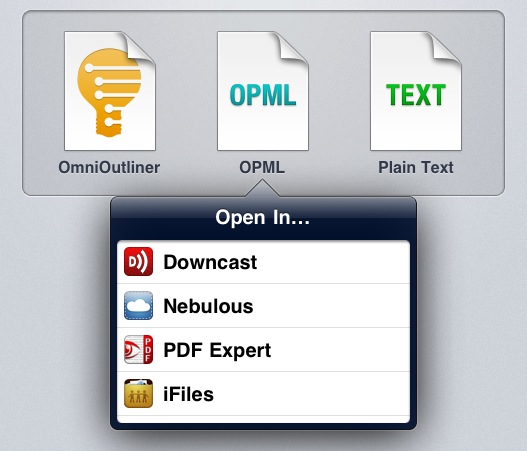
Ted Landau at The Mac Observer covers an issue I’ve mentioned several times in the past, which Apple has partially fixed with the last releases of iOS: saving documents and moving them across apps. Specifically, Landau notes that the lack of a “universal save” option for documents that can be read by third-party apps (PDFs, text files, images) leads to an annoying and pretty much useless duplication of content. Apple has implemented an “Open In…” menu to send files to other apps, but the file that’s being sent is a copy. iOS apps can’t read and modify a source file from a single location.

Currently, iOS does not come close to matching the advantages of Mac OS X here. There is no way to have a unifying folder in iOS that contains related documents from different apps. There is no way to have a document easily opened in different apps, where any changes you make in one app are instantly accessible by all the compatible apps. You can come closer with Dropbox, but closer is not good enough here.

That’s annoying for me, too, as I constantly switch between apps to get my work done, and it’s not like I don’t enjoy trying new ones. This typically leads to some sort of geek frustration – why can’t Apple build an invisible layer that lets Elements edit a text document from Evernote and Pages access the same file?

For Ted and me, yes, being able to avoid file duplication and tedious exporting processes would be nice. But I do wonder how much does Apple care about such functionalities considering the underlying paradigms of iOS and the upcoming iCloud functionalities of iOS 5. For one, Apple really cares about application sandboxing: each app has its own controlled data environment and only a few items can be shared between multiple apps. Apple cares about sandboxing so much that they’re bringing it to the Mac App Store. Would iOS sandboxing allow for a source file to be edited and “saved” by multiple apps? Where does that file belong to, technically? Would iOS apps be able to write specific metadata to it? And what happens if, hypothetically, this “shared” file needs to be pushed back and forth with iCloud?

I’m no iOS developer, but I can see this proposed “universal save” model becoming an issue when on iOS, unlike the Mac, there’s no visible, centralized Finder location to write and read files from. In fact, Ted is right when he says that the convenience of a Mac is being able to create “a folder that will contain all the assorted files needed to put his column together”. That’s made easy by the Finder – but on iOS? Apple allows third-party developers to plug into the Music library or Camera Roll, yet there’s no Apple app to “create text file here” or “save webpage from Safari here”. Again, the lack of an iOS Finder would require “universal save” to work inside any app. iDisk could have been a centralized location for files – it could have even been Apple’s “answer to Dropbox” – but it’s not going to be supported by iCloud.

And then there’s the conceptual issue of an iOS device being the app that you’re using. When you use Pages on an iPad, the iPad is a word processor. When you browse the web with Safari, you’re holding the web in your hands. On a technical level, this app console model is represented by sandboxing and one-way “Open In” menus, and soon iCloud-based documents that allow multiple versions of the same app to access files. Would a “universal save” option somehow break the illusion that you’re holding an app, reminding us that we’re using a device with multiple layers of abstractions including a filesystem?

I don’t know. I believe I’d like this feature in theory, but I wonder if there would also be a considerable trade-off to accept.

The Mac App Store, Two Months After Lion’s Launch→

The Mac App Store, Two Months After Lion’s Launch

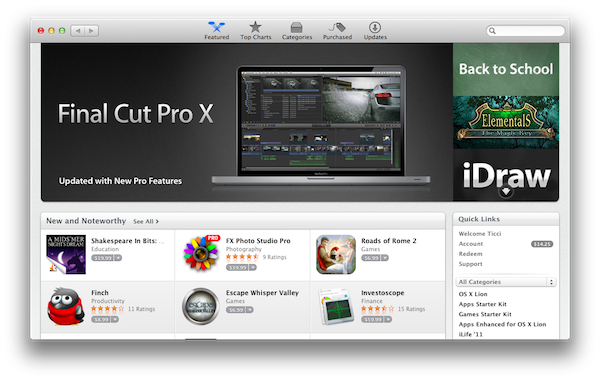
Dan Frommer at SplatF takes a look at the Mac App Store, two months after the public debut of OS X Lion:

What we haven’t seen are big moves by companies like Microsoft or Adobe into the Mac App Store. Adobe launched Photoshop Elements in July, and it seems to be doing pretty well, as the no. 7 highest-grossing app. But it’s still not clear if more of the Creative Suite or Microsoft’s Office suite will eventually make it into the Mac App Store.

In general, though, it seems as if app selection is growing nicely. And now that Lion is the default OS installed on new Macs, and as more Mac users upgrade, App Store sales should continue to grow.

You can look at the data on Dan’s blog, but to sum up: average prices are up and there’s less Apple software in the top charts. I’d argue that Apple has been relatively slow with software updates in the summer (before the big wave that hits with iCloud this Fall) and thus committed third-party developers have jumped the charts, but let’s focus on another aspect of the story – availability. Dan notes that big names like Microsoft and Adobe have shown little or no interest in releasing specific Mac App Store versions of their productivity suites. However, with almost 7,000 apps, there’s a high chance you’ll find your new favorite image or text editor in the Mac App Store, which is empowering less popular third-party Mac devs to make their apps available to a greater audience.

That was the point of the Mac App Store all along – to offer a centralized way for any kind of Mac developer to release and easily update apps. Recent releases like the successful launch of 1Password seem to confirm that there’s plenty of room for smaller companies and independent devs in the top charts. I also look forward to the upcoming launch of Pixelmator 2.0 – you may remember version 1.0 earned $1 million on the Mac App Store in the first 20 days (with the promise of a free 2.0 update).

That’s not to say Apple has achieved the perfect formula with the Mac App Store. Delta updates are nice, but there’s still no way for developers to implement easy upgrade options, or free trials (this is true on the iOS App Store as well – meanwhile, Windows Phone 7’s marketplace features free trials alongside “full versions” of apps). Similarly, there should be a better way to browse in-app purchases, or even manage a basic wish list.

I’m looking forward to some possible tweaks and changes in the next weeks, and I’ll check back in two months.

Permalink

Mac App Store Gets “Re-Buy Warning” For Apps Already Installed→

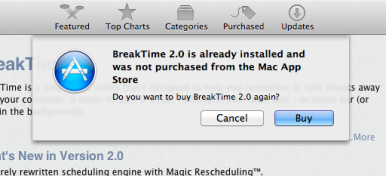
Mac App Store Gets “Re-Buy Warning” For Apps Already Installed

While many are still waiting for Apple to implement a basic wish list functionality in the Mac App Store (eight months after its public debut, there’s now a pretty good selection of high-quality software in Apple’s desktop storefront to choose from), Macworld has noticed the Mac App Store will now give you a heads-up before buying apps you already have installed on your computer. This can be particularly useful as a warning if you’re about to purchase an app you had previously downloaded from a developer’s website, out of the Mac App Store.

Though this doesn’t really reduce the pain of having to pay a second time for the same app, it does at least give less savvy users a heads-up before they accidentally buy a program all over again.

You can try this now with an app like OmniFocus, which is available with the same version (1.9.3) both on The Omni Group’s website and the Mac App Store. When the Mac App Store launched in January, the fact that it reported as “Installed” apps downloaded from a web browser caused some confusion among users.

It’s still unclear whether this dialog box requires the same version of an app to be already installed on a Mac (example: 1Password 3.9 is available on the Mac App Store, whereas AgileBits’ website give you access to an older version), but I assume this new “warning” does indeed require the exact same version to be installed, otherwise the Mac App Store version of an app will install alongside apps purchased elsewhere (this already happens if you head over the Purchased tab, and re-download a newer version of an app you already have on your Mac).

Permalink

iMessage for OS X To Be Integrated with iChat?

According a series of code strings found by MacRumors in the current version of iChat for OS X Lion, Apple may be building support for the new messaging system first announced at WWDC for iOS 5 devices inside its IM desktop application. The properties found in iChat’s code refer to “read” and “delivery” receipts, two iMessage features that inform users when a message has been read or simply delivered to another device, respectively. These code strings can’t be found in earlier versions of iChat, apparently, and MacRumors believes they can relate to iMessage support being built inside iChat for Lion.

The “timeDelivered” and “timeRead’ fields indicate the tracking of delivery and read receipts for instant messages. These features, however, are not supported in any of iChat’s native messaging protocols, while the same features are offered in Apple’s iMessage protocol. These properties were also not present in previous versions of iChat prior to OS X Lion. We believe the only reason Apple would have added these properties was to build in cross compatibility with their new iMessage protocol.

Ever since its introduction in June, many have wondered whether Apple could support iMessage, a free messaging protocol for iOS devices, on the desktop as well, allowing iOS users to send text messages to Mac users in their Address Book, and vice versa. Unlike FaceTime, iMessage works on both WiFi and 3G, but similarly to Apple’s video-calling solution it’s completely free of charge and works with email addresses and phone numbers – if an iOS user is already in your Address Book and he’s using the same phone number or email, iMessage will work. The service will be iOS 5-only when it launches this Fall, and Apple hasn’t revealed plans for OS X or Windows versions yet. iMessage has been compared to other free messaging solutions, like RIM’s BlackBerry Messenger, or Google’s Huddle.

A few code strings are no confirmation of Apple’s plans to build iMessage for Mac, but if history is of any indication, it would make sense for Apple to support its new app on multiple platforms. Whereas iChat as an app is still nowhere to be seen on iOS, FaceTime as a service was ported to the OS X and later built into every new Mac. For this reason, many are speculating iMessage could follow a similar trend, perhaps as a standalone app, or a service plugin for iChat.

In the past months, a number of fan-made mockups have tried to imagine what an hypothetical iMessage for Mac would look like. Just like the theories floating around, some imagined the service being supported in existing apps like iChat or Mail, others created videos showing iMessage working as a separate app for effortless Mac-iOS communication. Below, we’re embedding an iMessage concept by Jan-Michael Cart.

iMessage is currently available for iOS 5 beta testers, and it’ll publicly launch with iOS 5 and iCloud this Fall.
Read more


TestFlight’s New SDK Brings In-App Updates, Checkpoints, More

In the recent months, TestFlight has become many developers’ favorite way of distributing internal “beta” builds of their iOS applications to testers. Thanks to the over-the-air installation method introduced by Apple in iOS 4, services like TestFlight allow developers to stop worrying about manually sending .ipa files to testers by relying on a unified web interface that collects testers’ UDIDs (deprecated in iOS 5), alongside other device information and app installation data. TestFlight has been largely successful thanks to its ease of use, nicely designed web apps and user adoption – with the release of a new SDK for developers, as noted by TechCrunch, the company aims to take a step further in letting developers access even more data from their testers and beta apps.

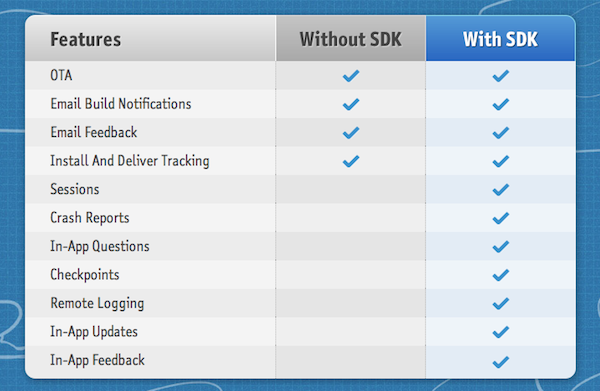
The SDK, available here, brings sessions, crash reports and checkpoints to TestFlight-installed apps. This means developers will be able to discover how testers are using their applications, and how far they’re getting thanks to virtual “checkpoints” placed in the app (useful for, say, level-based games, easter eggs or new, unusual interfaces). With in-app updates, beta apps built through TestFlight’s SDK will directly notify users of available updates without the need of checking email for new TestFlight updates. Similarly, in-app questions will enable developers to run small survey directly into their beta apps.

  • Over-The-Air - Painless App Distribution. Send your beta apps over the air with ease. It’s simple, painless, and magical.
  • Team Management - Get everyone on board. Manage devices and create custom distribution lists to selectively send builds over the air.
  • Feedback - Get the memo. Gather more feedback with in app forms and emails, which is all organized in your dashboard.
  • Reports - The Black Box of beta testing. Solve the mystery of beta testing. No longer wonder which testers installed the app, started testing, or opened their email invite. Reports bring transparency to beta testing, all in real time.
  • Checkpoints - Flag down insight. Monitor tester engagement and trigger in-app questions by placing checkpoints throughout your app.
  • Crash Reports - Crash, but don’t burn. Real time reports with environment snapshots, full session activity, and your NSLogs.
  • Enterprise - Enterprise signed IPA’s. The added benefit of unlimited devices with all the TestFlight features, at no charge.
  • In-App Questions - What’s up? Get the answers you need, by asking questions the moment a checkpoint is reached.

The TestFlight SDK allows you to track how beta testers are testing your application. Out of the box we track simple usage information, such as which tester is using your application, their device model/OS, how long they used the application, logs of their test session, and automatic recording of any crashes they encounter.

To get the most out of the SDK we have provided the Checkpoint API.

The Checkpoint API is used to help you track exactly how your testers are using your application. Curious about which users passed level 5 in your game, or posted their high score to Twitter, or found that obscure feature? With a single line of code you can find gather all this information. Wondering how many times your app has crashed? Wondering who your power testers are? We’ve got you covered.

Information gathered by the TestFlight SDK is sent to the web dashboard in real time, or after an app has been put in the background/terminated. The SDK has been in testing with selected developers for some months now, and the new features seem very welcome among the community. Developers using TestFlight include Spotify, Adobe, Marco Arment of Instapaper, The Iconfactory and Halfbrick, not to mention thousands of smaller “indie” devs trying out the service for the first time.

The TestFlight SDK supports Apple’s Enterprise distribution as well, and is available as a free download here.


Apple Releases iOS 5 Beta 7

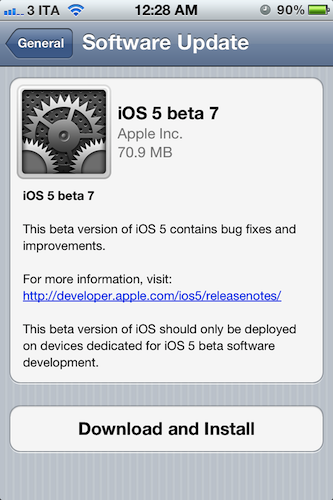
Apple has just pushed iOS 5 beta 7 to developers, releasing the new build through Software Update on iOS devices. At the moment of writing this, the iOS Dev Center still reports beta 6 as the latest version available. iOS 5 beta 6 was seeded on August 19, bringing several bug fixes and performances improvements to the next major version of iOS that’s expected to become publicly available this Fall.

iOS 5 comes with new features such as direct Twitter integration, PC-Free setup, iCloud support, and a new notification system. We will update this post with more information on the latest beta as it becomes available.

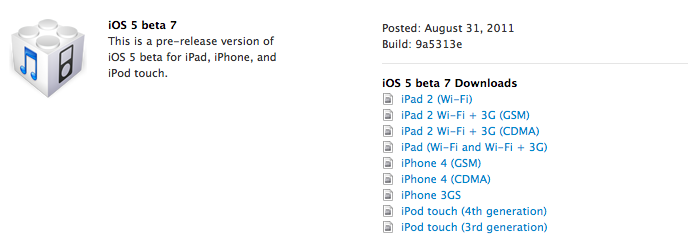
Update: iOS 5 beta 7 is now available on the Dev Center alongside a new Xcode Developer Preview, iTunes 10.5 beta, and Apple TV Software.


Help Fund A New Q&A Video Series With Startup and Solo iOS Developers

A few weeks ago Anthony Agius ran the ‘One More Thing’ conference in Melbourne, Australia. It was a conference in which a number of Australia’s top iOS developers came and gave speeches about their paths to App Store success to an audience of around 160 people. Some of the developers that appeared at the conference included Matt Comi of Big Bucket Software (The Incident, TV Forecast), Thomas Killen of Voxel Agents (Train Conductor), James Cuda of Savage Interactive (Procreate) and a number of others. Those speeches have now been posted online in full and for free, so if you’re a developer looking for inspiration or just interested be sure to check them out.

Agius hasn’t stopped there though, and has now decided to embark on a new project to make a 5-episode online TV series that features Q&A sessions with the speakers from the One More Thing conference. It is all inspired from a 60 minute Q&A session from the actual conference in which over 100 questions were submitted but time only allowed for 12 questions to be answered.

We want to develop an online TV show to support new startups and solo iOS developers. We will interview some amazing iOS developers about what it takes to do well in this industry, and some of the unexpected challenges that come up.

To make this a reality, Agius is appealing for donations to fund the project. To do it (as he says) to “the quality the community deserves” he is looking for $25,000 to cover all the costs from video editing, web design, motion graphics, flights, equipment hire and various other costs which he has roughly calculated. He is attempting to fund the project through ‘Pozible’, which if you are unfamiliar with is very similar to Kickstarter, and is offering various ‘rewards’ for funding the project which increase as the size of the donation increases - everything from a “twitter hug” to a name on the credits to a free Blu-Ray copy to adverts within the episodes.

So as you can see, it gets expensive to put on a high quality production! I don’t plan to make a profit off the show. Unless the project exceeds the funding target, I won’t make a cent. All raised funds will be put into the development of the show and promoting it. I just want to cover the costs to get it made, enjoy the experience, produce a show I can be proud of and create a valuable information source for those wanting to be indie iOS developers.

Below the break is a video of Agius explaining the project and you can read even more about the project on the Pozible project page, which is where you can also go to help contribute to the project. Video of the speeches from the ‘One More Thing’ conference can be found on Vimeo and you can follow Anthony Agius who co-founded MacTalk Australia on Twitter.

Read more


Apple Releases New iTunes Beta with iTunes Match

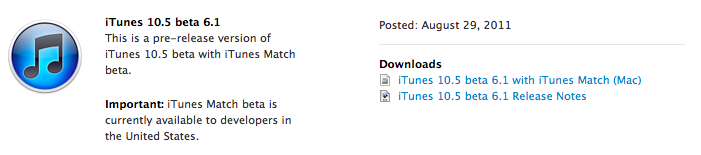
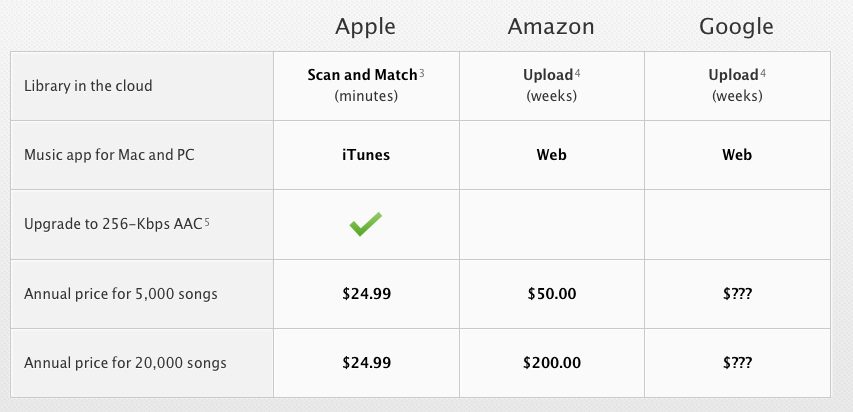
Apple just seeded a new version of iTunes 10.5 to developers, enabling the iTunes Match functionality that will allow users to upload songs to Apple’s iCloud directly from their iTunes libraries this Fall. Unlike other “cloud locker” services from Google and Amazon, Apple’s iTunes Match uses a “scan & match” technology that will try to match songs from a user’s library to the ones found on Apple’s iTunes Store servers, thus avoiding to upload a library in its entirety. The iTunes Match beta is currently available to developers in the United States, and as Apple explains in the release notes the music libraries added during this beta period may be subject to deletion, thus leading to additional re-scans and uploads.

As Apple also mentions in the release notes, iTunes Match beta subscribers “will receive the beta period and an additional 3 months of service with their 12 month subscription”, which as previously announced it’s set at $24.99 per year for 25,000 songs. iTunes LP and Extras are currently unsupported by Match, which is available as a subscription from iTunes’ new interface. From Apple’s official iTunes Match webpage:

Here’s how it works: iTunes determines which songs in your collection are available in the iTunes Store. Any music with a match is automatically added to your iCloud library for you to listen to anytime, on any device. Since there are more than 18 million songs in the iTunes Store, most of your music is probably already in iCloud. All you have to upload is what iTunes can’t match. Which is much faster than starting from scratch. And all the music iTunes matches plays back at 256-Kbps iTunes Plus quality — even if your original copy was of lower quality.

The first beta of iTunes Match comes with a few known issues such as impossibility to add music to iCloud from more than one computer at a time, or some playback issues on iOS. Apple is suggesting developers to backup their iTunes music libraries before installing and subscribing.

More information about iTunes Match is available on Apple’s website. Ars Technica also had a good write-up about this new service back in June.

Read more


Apple Releases New 10.7.2, iCloud, iPhoto 9.2 Dev Builds

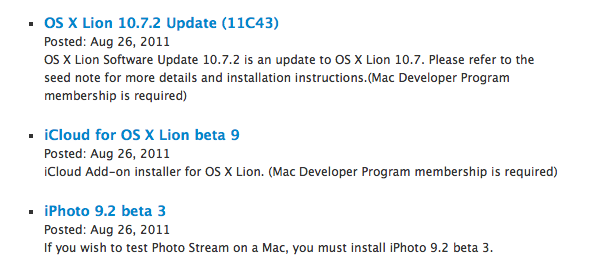
Exactly one week after the latest iOS 5 beta, Apple has released new developer builds of OS X Lion 10.7.2, iCloud beta, and iPhoto 9.2. iCloud beta and 10.7.2 were last updated alongside iOS 5 beta 6 on August 19, which brings today’s releases to:

  • iCloud for OS X Lion beta 9
  • iPhoto 9.2 beta 3
  • OS X Lion 10.7.2 Update (11C43)

Apple is expected to introduce iCloud this fall, and 10.7.2 is in fact being seeded to developers for testing purposes through the separate iCloud installer. iPhoto 9.2 will introduce Photo Stream, a new way of syncing photos from iOS’ camera roll to iCloud, and have the most recent ones always available on all devices including the Mac (indeed, with iPhoto) and Windows PCs.