This Week's Sponsor:

LookAway

It helps you take regular breaks from your Mac to rest your eyes, without breaking your flow.


Posts tagged with "developers"

A Trusted System

Over the past few months, I’ve noticed a trend emerging in my daily app consumption and workflow: as the App Store gets populated by thousands of new applications every day and developers struggle to get noticed in the sea of iPhone and iPad releases and “promotions”, I increasingly tend to rely on “a trusted system”, rather than constantly tweaking my home screen or dock to accommodate new apps from “indie devs” to try out, and perhaps replace with something else entirely the week after.

More than a trend, people who know me well might argue that I have a problem: I switch between apps less, and thus I am becoming that kind of guy that doesn’t care about what’s new in spite of my professed interest for innovation and good software.

But that’s my point exactly, and there’s an important difference between caring about new apps and trusting only a few selected ones for my work that I’d like to point out in this article.

Why should I buy the latest to-do app for iPhone or the next RSS reader for the iPad? Why should I constantly tweak and fiddle when the trusted system I’ve built is serving me so well? Some people, including me, are big advocates of App Store discovery and innovation: you never know what hidden gem the Productivity category might hide beneath hundreds of “wallpaper customizers”, and therefore it is an app lover’s job to navigate the App Store with the sole purpose of discovery in mind. With half a million apps to choose from, those who set out to explore the intricate App Store maze are the Magellans of the digital distribution era. Yet, I believe app discovery should be the reason behind good information and curiosity, not the ultimate goal towards getting things done or simply enjoying iOS devices.

We, as geeks, want to be – or at least “feel” – productive with our iPhones and iPads. Whereas we look at “the average user” and justify our expenses saying that unlike those people, we actually do stuff with Apple devices, the other end of the spectrum is equally true in my opinion, but we often don’t see it: all kinds of people (“the users”) are now serious about iOS, and whilst for some buying an iPhone will always be related to the status symbol, more customers than we, as geeks, usually think of are starting to look at iPhones and iPads as productivity platforms. It’s not just for the nerds or the fashion victims anymore. And as people get serious about iOS, they develop the “trusted system awareness” in that they start looking for apps to rely on without hesitation on a daily basis.

For me, the trusted system has become a synonym of great software developed by people that are serious about the bits and Xcodes they work with. Software from people that have something to lose if things go south. Apps from developers that are deeply invested in the platform – apps from people that often do this for a living but that are also users of their own creations. And this synonym has led me to trust the smaller, indie devs less, because I always fear the app I’m showing interest in will be discontinued tomorrow and never come back to support my needs.

It’s not like this hasn’t happened before. Too many times I’ve decided to fit an app in my workflow, only to find out months later the developer had no willingness whatsoever to maintain it or at least come clean and say “look, it was just an experiment”. And I can understand that point of view, really. I’m not saying garage developers and seven year-olds shouldn’t take their first steps in iOS development and see what’s like to gain popularity in the App Store. Not at all. I’m looking at us, the users who are serious about iOS, and deconstructing the difference between being curious, which is legitimate, and not getting anything done because of the constant tweaking, which is poisonous.

We need to separate work from leisure and app discovery. If we’re really committed to proving that iOS devices can be fantastic replacements for trucks, we need to get serious and understand that switching between apps and feverishly mining for the latest productivity goldmine won’t make you smarter or “more productive”. On the other hand, developers need to understand that just because they’ve released a new Google Reader client or GTD app, they shouldn’t expect thousands of users to jump on board and hit Buy.

iOS users have come to the point where the trusted system is more important. They know what developers and “names” to follow in the long term, and they’re happier when said developers provide an ecosystem for their apps that will make spending money on three different platforms less painful.

From personal experience, I see myself “trusting” people like The Omni Group, Evernote, The Iconfactory, Agile Bits, Edovia, Smile, Acrylic Apps or Tapbots more and more every day. I know I can get actual work done by using their apps, I know I can look forward to great customer support and shoot them a tweet when I’ve got a question – I can spend $50 bucks knowing that the work and enjoyment I’ll get in return will be greater.

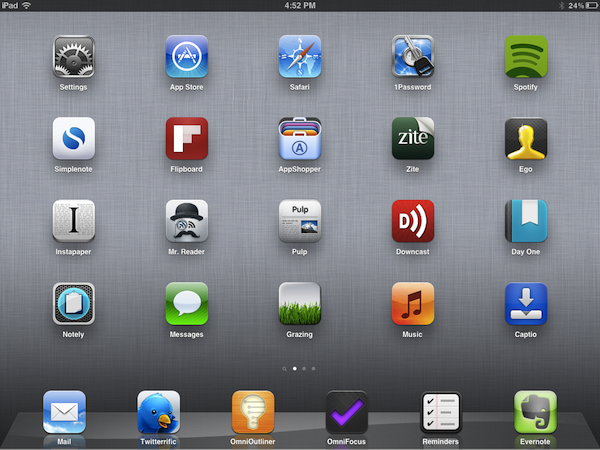
But that’s not to say I’ve stopped giving the benefit of the doubt to “new kids on the block”, or that I’ve given up on trying to find the hidden gems in the App Store caves. Those who read this site know that I’ve started using Mr. Reader and Grazing Browser on my iPad and iPhone – apps from two relatively less-known developers that, however, have showed outstanding support, commitment to their software and a steady flow of software updates in the past weeks. To me, these seem like people who are serious about what they do. And I’m willing to trust them even if they haven’t been around for 10 years like others in this industry. More apps like Prowl, Notesy and Notely also come to mind.

iOS devices are now playing an important role in our lives, and we shouldn’t stop exploring all the ways to make them better with new apps, and different workflows. But I believe no one can blame us for choosing the trusted system when it’s time to work, and stop tinkering.

UDIDs To Become App-Specific After iOS 5

A subtle change noted by TechCrunch in the developer documentation for iOS 5 details how Apple, sometimes in the future and not necessarily starting with iOS 5.0, will start assigning unique device identifiers, or UDIDs, to apps rather than the device itself. TechCrunch reports that according to the documentation, “uniqueIdentifier” has been deprecated in iOS 5, suggesting developers to start using identifiers assigned to each app. For those not familiar with the concept of UDID, it is a alphanumeric string unique to each device (such as iPhone or iPad) that is widely used by advertisers to target ads at users without knowing personal information (just the UDID of a device, and some data associated with it), or by developers to test betas with a specific pool of users, making sure the beta doesn’t get installed on other devices (thus the UDID requirement).

In the past months, however, UDID usage has caused a number of privacy and security concerns because of certain advertisers and developers collecting more information associated to the UDID (such as email addresses or list of names) than they were allowed to, leading to a discussion as to whether UDIDs were really necessary. Basing on TechCrunch’s report, it’s unclear if Apple is going to remove UDIDs as we know them from the first version of iOS 5:

I guarantee Apple will not stop using UDID,” predicts one mobile industry CEO. If Apple does continue to use UDID for itself but denies it to developers that would be an “extremely lopsided change.” It would give Game Center and iAds yet one more advantage over competing third-party services.

Furthermore, when Apple announces that they’re “deprecating” a technology, it doesn’t mean it’s going away in a few weeks or months. Usually, a “deprecated” API or specific technology in, say, OS X is more of a warning to developers, a way to inform them that, going forward, there will be changes. This seems to be what Apple’s doing now with app-specific identifiers, with several iOS and Mac developers already wondering on Twitter how could Apple make the transition from device-based to app-specific UDIDs as seamless as possible for the developers themselves, and users.


Apple Releases iOS 5 Beta 6

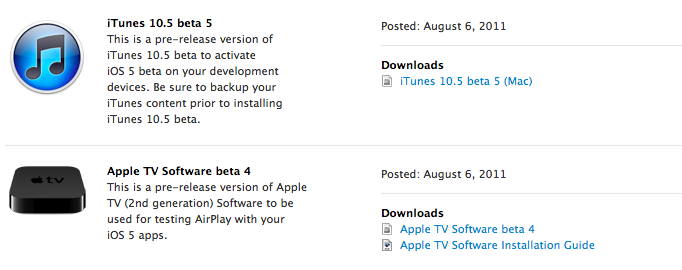
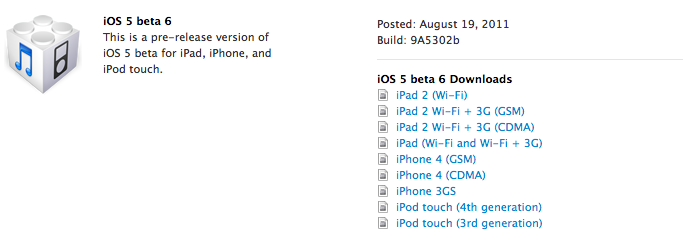
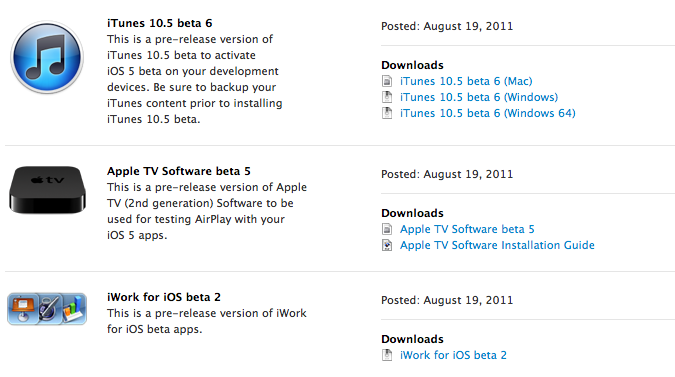
Apple has just released iOS 5 beta 6 in the Dev Center, with build number 9A5302b. Additionally, Apple has also released a new iTunes beta, Xcode 4.2 Developer Preview, Apple TV software and the second beta of iWork for iOS with iCloud functionalities. The release comes two weeks after iOS 5 beta 5, seeded to developers on a Saturday. iOS 5 is expected to be the operating system the next-generation iPhone will ship with out of the box, with recent rumors suggesting an early October release for the device.

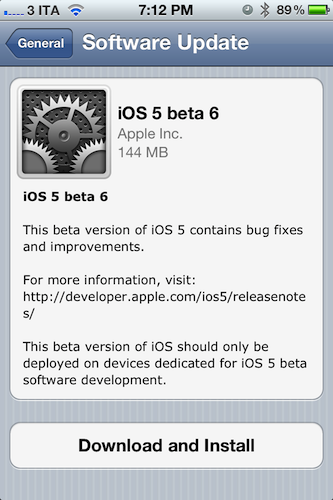
iOS 5 beta 6 can also be installed over-the-air on devices running iOS 5 beta 4 or later – beta 6 for the GSM iPhone 4 is a 144 MB download as pictured below. Apple recommends a backup either through iTunes or iCloud prior to installing iOS 5 beta 6.

iOS 5 is the next major release of Apple’s mobile operating system for iPhone, iPad, and iPod touch, bringing new features like direct Twitter integration, PC-Free setup, iCloud, and completely revamped notifications to iOS devices this Fall. We will update this post with more information on the latest beta as it becomes available.

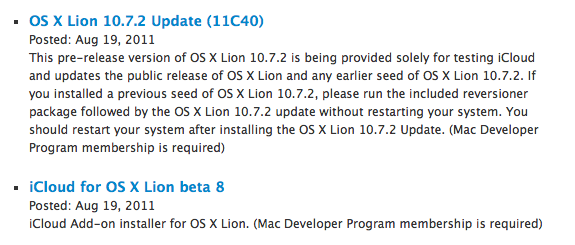
Update: Apple also seeded a new beta of the iCloud desktop control panel for Lion, Safari 5.1.1 for developers, as well as a new version of OS X 10.7.2. OS X 10.7.1 was released earlier this week, and 10.7.2 is being provided to developers to test iCloud integration on the Mac.


Firefox 6 Officially Released

Firefox 5 was released less than two months ago and work on Firefox 7 is already underway, and to keep up with their “fast release cycle” promise Mozilla has officially released Firefox 6 today, making the browser 20% faster than Firefox 5 and improving the behavior of tab groups in Panorama, the functionality that allows users to get a quick glance at open tabs from an elegant bird’s eye view. With Firefox 6, released nearly five months after Firefox 4, Panorama comes with faster start-up times as tab groups are only loaded when selected; another noticeable improvement – bug fixes and speed optimizations aside – can be seen in the address bar, which now highlights domain names to give you a better idea of the website you’re on.

The new Firefox also brings important changes for developers:

The new “Web Developer” menu in Firefox provides easy access to tools that help developers build and debug websites directly in the browser. Developers will enjoy the new Scratchpad tool, which makes it simple to quickly enter, execute, test and refine JavaScript snippets in Firefox without needing to work in a one-line console. The Web Console is improved with an auto-complete feature and the ability to customize the console’s location to save developers time.

Whilst Mozilla is busy keeping up with three major releases in testing in their Aurora, Beta and Stable channels, recently posted mockups have shown that the company is interested in updating the browser’s interface in the future to fully take advantage of OS X Lion. The current versions of Firefox (in all the three channels available) don’t come with native Lion features such as full-screen or popover menus, though Mozilla’s Product Visual Designer Stephen Horlander suggested the Firefox team is experimenting with (or at least discussing) new interaction methods and graphical elements for Firefox on the Mac.

You can read more about changes in Firefox 6 here, and download the latest update from Mozilla’s website. Check out more screenshots after the break. Read more


Apple Highlights Apps “Enhanced for OS X Lion”

OS X Lion has been out for less than a month, and Apple is now starting to promote apps that take advantage of some of the new features of the OS on the front page of the Mac App Store. As noted by Stephen Hackett at Forkbombr, Apple has included the “Enhanced for OS X Lion” tagline in the banners pointing to applications that have recently been updated with Lion-exclusive features such as Versions, Full-Screen, or multi-touch gestures. These banners can be seen on the front page of the Mac App Store, both in the top section (Screenflow 3.0 and Touchgrind) or in the lower part of the page, where currently there are promotional images for Fantastical, swackett x, and Scrivener. Fantastical is indeed one of the apps that has been updated in the past month with “Lion compatibility” and Lion-only gestures for navigation in the calendar view.

This is not the first time Apple has taken special interest in apps updated to take advantage of new functionalities introduced by the company in a new version of their OSes. For example, Apple went as far as creating a dedicated section for apps updated with AirPlay support soon after the release of iOS 4.2 back in November 2010. In April, Apple showcased subscription-based magazines in the App Store’s homepage. The “Enhanced for OS X Lion” tagline doesn’t have its own category just yet, but it wouldn’t be a surprise as more customers upgrade to Lion, and developers start releasing Lion-specific app updates.

With over 250 new user features and 3,000 new developer APIs, Lion is opening a whole range of possibilities for developers willing to rewrite or update their applications to trigger the new OS. Such features and APIs include the aforementioned full-screen mode and Versions support, as well as desktop notifications, In-App Purchases, new UI controls, Resume, and Auto-Save. This Fall, developers will also be able to integrate their apps with iCloud, which will allow them to store documents and data in the cloud, enabling seamless synchronization of content between devices.

In November, Apple will also start requiring developers to update their apps with Lion’s Sandboxing APIs – you can  read more about this in John Siracusa’s OS X Lion review. By highlighting apps that have already been updated for Lion, Apple is both encouraging other developers to do the same in the next few weeks, and showcasing great software for new customers that have installed Lion and are looking for new apps to try out. Apple itself updated several apps ahead of Lion’s launch to enable new functionalities exclusive to 10.7, such as Safari 5.1 – which comes pre-installed on Lion – and the iWork suite.


MobileMe to iCloud Transition Goes Live for Developers

As first noted by 9to5mac, Apple is now allowing developers with access to the iOS 5 beta or OS X Lion 10.7.2 preview to migrate their existing MobileMe accounts to iCloud. A MobileMe account needs to be associated with a development device to be correctly transitioned to iCloud for now – once an account is eligible, the migration process can be initiated from OS X Lion (from the MobileMe control panel) or by directly visiting me.com/move.

As Apple previously detailed in its MobileMe to iCloud Transition Q&A, some functionalities of MobileMe won’t transfer over to iCloud. This includes MobileMe Gallery, iDisk and iWeb publishing, which, however, will still be accessible until June 30, 2012, even after moving to iCloud. Another feature that iCloud won’t include is the ability of syncing several Mac OS X items like Dashboard widgets, Preferences, and Mail Rules.

Apple’s web interface for the transition is very straightforward and guides you through the process of moving your MobileMe account to iCloud by detailing each step with an explanation, and links pointing to support articles.

Once upgraded, an already configured MobileMe account on iOS or OS X will need to manually “confirmed” before completely moving to iCloud. If the account isn’t already configured, you’ll just need to log in as a new iCloud account and choose which content you’d like to keep stored on Apple’s servers.

The process is now exclusive to developers and there’s the chance Apple will tweak the interface/steps required before the public release of iCloud. However, the information available today falls in line with what Apple revealed months ago about the transition. Furthermore, it appears MobileMe accounts will be automatically upgraded to a paid 20 GB plan for free until June 30, 2012, (with pricing depending on where you live, and the 20 GBs are in addition to the 5 GBs iCloud already gives you for free) although there are no subscription management options available yet to developers on iCloud.com. Read more


Apple Releases iOS 5 Beta 5

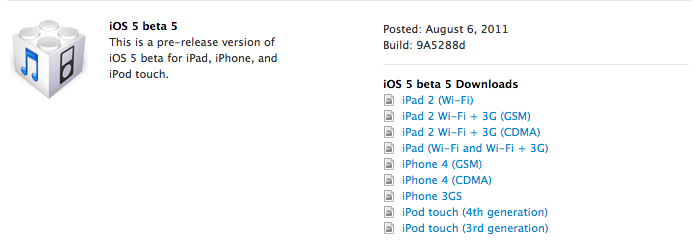
Apple has just released iOS 5 beta 5 in the Dev Center, with build number 9A5288d. Additionally, Apple has also released a new iTunes beta, Xcode 4.2 Developer Preview, and Apple TV beta software.

Read more


Apple Seeds iWork for iOS Beta Apps With iCloud Support

Following the launch of iCloud.com beta to developers, Apple updated its iCloud beta for Developers page including special versions of the iWork for iOS apps. Labelled “iWork for iOS beta apps” by Apple, the package includes new versions of Pages, Keynote and Numbers for iOS that will allow developers and testers of iCloud to start working on a new document on a device, and find it after a few seconds on another iCloud-connected device or the web counterpart, which also comes with web apps to edit documents.

The functionality was first demoed by Apple at the WWDC in June, and an iOS developer program membership is required to test the new iWork beta apps.


Face Detection Technology And APIs Make Their Way Into iOS 5

After doing some digging in iOS 5, 9to5 Mac today reported that Apple is planning to open up face detection APIs to developers. It appears from what they found that Apple will bring similar face detection techniques that Photo Booth on Lion currently employs to iOS and allow developers to build different apps that utilize the APIs.

These claims come after 9to5 Mac found the ‘CIFaceFeature’ and ‘CIDetector’ APIs within a recent beta build of iOS 5, which they say are “very advanced” APIs. The first of the two can be used by developers to locate where a person’s mouth and eyes are, whilst the latter is used when processing those images for face detection. Apple’s Developer Library online also already has some notes on the new APIs for developers to take advantage of.

Obviously at this point there is only speculation as to what these purported APIs could be used for – an obvious stretch is that the iPad version of Photo Booth may add the new effects added to the Lion version that take advantage of the information of where a person’s facial features are. It is also claimed that Polar Rose, a company that specialized in facial recognition software and was purchased by Apple last year, played a role in the development of these technologies within iOS and Lion.

[Via 9to5 Mac]