Posts tagged with "iOS"

Twitter Updates iOS App with Lots Of New Features

An interesting (and rather huge) update to the official Twitter app for iOS was released a few minutes ago, and it includes improvements both for the iPhone and iPad version of the client. New features has been added to this release as well, which unlike previous updates doesn’t only focus on bug fixes and stability improvements.

First off, the tweet compose screen has been greatly improved and redesigned to have a much cleaner UI and buttons to attach media for easier photo uploading; location info and usernames shortcuts are part of the redesigned screen, too. There’s even username auto-completion now, which is very nice on the iPhone considering one doesn’t always have time to type a long username on the virtual keyboard.

Trends have been improved, the app now shows trends for your specific location and there’s also a bar on top of the timeline called “Quick Bar” that allows you to cycle through trends. I wonder if there’s a way to disable it from the new Settings view. Twitter for iOS can also look in your local address book now to find friends that you might want to follow. This has been enabled both on the iPhone and iPad. Local trends, on the other hands, can be ignored thanks to an option in the Settings.

We are looking for new features and details right now and we’ll update this post as we find more interesting stuff. Check for more screenshots below, and go download the app here.

Update: The app seems a lot stable on the iOS 4.3 beta, and the bug that caused DMs and mentions to be marked as “unread” on each launch has been fixed. Finally, DM conversations behave like you would expect, too.

Update #2: Surprisingly enough, Twitter for iPad doesn’t seem to have the Quick Bar. Also, Quick Bar on the iPhone only stays at the top of the list and doesn’t follow you when scrolling the timeline.


Read more


Nintendo Still Doesn’t Get The (New) Mobile Market

Nintendo Still Doesn’t Get The Mobile Market

Nintendo CEO Satoru Iwata, speaking about “quality video games” and mobile platforms like iOS and Android:

In a feisty attack on the fastest-growing sectors of the video-game industry, Nintendo CEO Satoru Iwata said that smartphone games and social-media games focus on quantity instead of quality.

“They are not like gaming consoles, there’s no motivation [for] high-value video games,” Iwata said at the Game Developers Conference in San Francisco.

I’d say this is one of the biggest problems a company like Nintendo is facing right now: trying to compete in the mobile gaming space with a device that’s just meant for gaming, while consumers are demanding something that goes beyond cartridges and games sold at $40 a piece. And so they try to build “social functionalities” into their consoles, hoping that an avatar creation feature or in-console communication would provide a solution to a market that’s deeply changed in the past four years.

Should Nintendo change at its roots and start doing all that consumers want? No. But the way I see it, they should pull their head out of the sand and understand that the rules have changed and it’s time to stop complaining, and start building to stay in the game. Those Angry Birds won’t go away by themselves.

Permalink

BlackBerry Messenger Coming to iOS?

BGR reports sources close to RIM have told them the company is working on a port of the popular BlackBerry Messenger communication service for Android and iOS devices. While the Android version seems to be coming soon, not so many details have been provided regarding BBM for iOS –no release date or whether the app could be available only for iPhone owners.

Boy Genius Report, however, says RIM has been looking for a way to extend its platform’s capabilities to other mobile operating systems, which have seen the rise of similar services like WhatsApp and Kik recently. BlackBerry Messenger for non-BlackBerry devices might be a stripped down version of the original software with only a few features such as contacts lists and chat. Location, photo and video sharing might remain exclusive to BlackBerry owners as an advantage over iOS and Android counterparts.

Right now, we have heard that Android is definitely a go. But again, we’re not sure on timing, though our sources are confident that it will launch some time this year. RIM chose Android first because of the fact that it could develop and integrate something like this much easier with an open platform, but the plan is to build and deploy an iOS version at some point as well.

There is no secret the App Store is full of applications that allow users to communicate and share media in real time, for free. If BlackBerry is really planning on bringing its vision to other platforms and, perhaps, tablets, then we’re definitely looking forward to that. Maybe in the future iPad 2 owners will be able to communicate with PlayBook users. [via BGR]


New iOS 4.3 Feature: iTunes Home Sharing

At today’s iPad 2 event, Apple said iOS 4.3 will be available next Friday, March 11. A new feature mentioned was iTunes Home Sharing, so let’s dig in.

iTunes currently has Home Sharing between Macs or PCs on the same Wi-Fi network, but now iOS 4.3 is letting you stream all your music, movies and TV shows from your Mac or PC to any iPad, iPhone or iPod Touch. After installing iTunes 10.2, tap and enjoy all your media in your iTunes library anywhere in your home. Imagine, you can stream a movie from your Mac to your iPad anywhere your Wi-Fi range can reach. Want to listen to an excellent new podcast, connect and go!

Current iOS 4.3 GM users, the iTunes Home Sharing feature is now in the beta. Others, it will definitely be in the public release on March 11.

UPDATED WITH SCREENSHOTS BELOW: Read more


Apple Releases iTunes 10.2 with iOS 4.3 Support, New Home Sharing

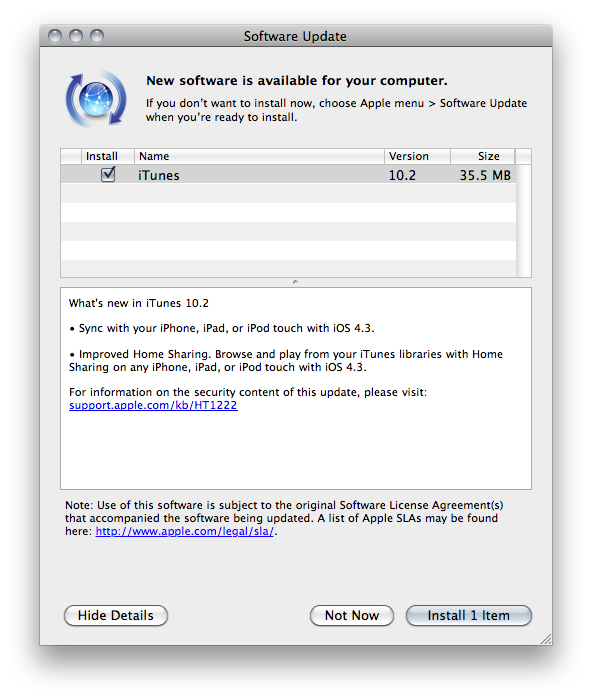
Just as we expected after seeing a brief mention of iTunes 10.2 on Apple’s website, the update is now available for download. You can find it on Apple’s iTunes page or Software Update on your Macs. The new version of iTunes officially introduces support for iOS 4.3 and brings an improved home sharing feature to share libraries with iOS devices running iOS 4.3.

Changelog below:

What’s new in iTunes 10.2

• Sync with your iPhone, iPad, or iPod touch with iOS 4.3.

• Improved Home Sharing. Browse and play from your iTunes libraries with Home Sharing on any iPhone, iPad, or iPod touch with iOS 4.3.


iOS 4.3 To Be Released on March 11

At Apple’s iPad 2 event, Scott Forstall just confirmed that together with the iPad 2, customers will also get iOS 4.3 on March 11. This doesn’t come as a surprise, as the new iPad runs iOS 4.3 by default with FaceTime and Photo Booth capabilities. We assume a GM build will be released shortly.


Push Browser: An App That Sends Webpages from iOS to OS X

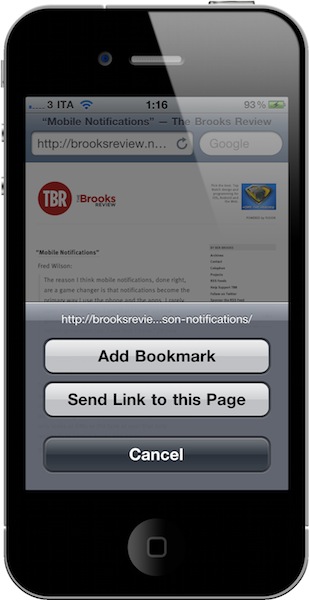
Two weeks ago I realized I needed a way to send a webpage not only from my Mac browser to an iOS device, but from the iPhone or iPad to my Mac browser as well. The reason is simple: I find an interesting link on my iPhone I don’t want to bookmark or Instapaper, yet I want to simply check out later on the desktop. There’s no easy way to do it. So with the help from a friend and support from my Twitter followers, I created a folder action script for OS X that receives links shared from iOS through Dropbox and opens them in a new tab in the system’s browser. The method still works for me and it’s a really easy (yet powerful) way to save just about any link for later desktop usage, but I saw many had trouble trying to make the script work or integrate it with Dropbox. So here comes an app for that. Read more


Simple iOS Photo Editing with Crop and Straighten

Crop and Straighten by Fingertips is the photo editing app for iOS Apple should have built into their operating system. It’s a simple, fast, minimal solution to change the aspect ratio of your photos and crop them, on the iPhone and iPad. That’s it.

You fire up the app, and you’re asked to import a photo from your camera roll. Choose one, and you’re ready to edit. You can pinch to zoom and focus on a specific detail, or rotate the photo with the usual two-finger gesture and adjust it taking a look at the grid that appears on screen. Very simple. If you want to change the aspect ratio, tap the button in the toolbar and you can choose between 1:2, 2:3, 3:4, 6:7 and 1:1.

If you need an app to quickly crop your photos (especially on the iPhone), Crop and Straighten is highly recommended. Go download it here.