
Posts tagged with "iOS"

“Integration” As A New Way To Define iOS

In case you missed it, Steve Jobs made a surprise appearance at today’s Apple Q4 earnings call. What he had to say about 7-inch tablets, Android, Nokia, RIM and Apple’s philosophy is all over the internet. You can read a full transcript here.

Reading between the lines, what strikes me is the focus Steve put on the word “integrated”. The iOS platform is integrated, Android is fragmented. With the iPhone, you get an integrated device. You don’t have to mess with hundreds of different devices running multiple versions and variations of the Android OS. But that’s not really the point, we get Steve’s thoughts on Android. Tweetdeck’s developers get them even more.

What interests me is the use of the term “integrated” as a new way of defining iOS, and thus the devices is runs on, against competitors. By definition, to integrate means to “combine two or more elements so that they become a whole”. So it’s clear that, in Jobs’ mind, Apple deeply integrated the hardware with the software to create a new, reliable, user-friendly experience. Read more

Complete Transcript Of Today’s Steve Jobs Statements

Complete Transcript Of Today’s Steve Jobs Statements

This one pretty much sums it all up:

Nokia makes $50 handsets, and we don’t know how to make a great smartphone for $50. We’re not smart enough to have figured that one out yet, but believe me I’ll let you know when we do. And so our goal is to make really breakthrough great products, make the best products in every industry that we compete in, and to drive the cost down while constantly making the products better at the same time. That’s what we did with iPod. We updated our products many times every year with better functionality, often times at same price and sometimes at a lower price. And it was the relentless improvement at in some cases a lower price, that was able to beat our competition and yield the market share that it did.

Permalink

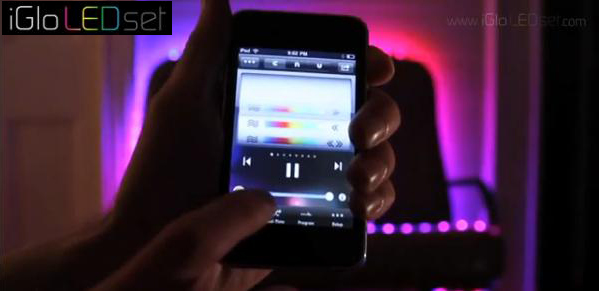
Wi-Fi LED Lights + iOS App = iParty

This is a whole new use for the iPhone - the iGLO LED Set bundles a WiFi-enabled strip of 120 multi-color LEDs (over 16 feet) with a (free) iOS app to control them. The lights are $299, but imagine all the possibilities! Parties, raves, birthdays, college dorms, a colorful lasso - the possibilities are endless.

Read more


150 Million iOS Devices Next Year

150 Million iOS Devices Next Year

Horace Dediu:

What seems to be happening is that Apple is pulling out all the stops and going for unrestricted iPad distribution. This may also foreshadow unrestricted iPhone distribution next year. It may also portend a CDMA iPad (or at least an LTE version) next year.

If it happens all estimates for next year need to be revised sharply. I had been expecting 100% growth for the iPad and 50% growth for the iPhone. These might need to be increased to 150% and 100%.

The consequence could be that total iOS devices sold could top 150 million for calendar 2011.

And none of them runs Flash.

Permalink


Expenditure 1.1: iOS 4 Ready, More Currencies, Still One Of The Best Financial Apps for iPhone

When I reviewed the first version of Expenditure by Shape HQ in July, I called it one of the best financial apps for iPhone. I stand by my statement: even if I have a problem with financial apps, Expenditure is one of the finest implementations of the “track your income and expenses” system. It’s got a clean UI which doesn’t distract and doesn’t get in the way; it’s easy to navigate; it took 3 months for the developers to release the 1.1 update.

In spite of the delay, the new version of Expenditure is still great: there’s full iOS 4 support now, and the app finally really shines on the Retina Display. But the developers went further than a simple device and OS update, they implemented many (much needed) new features requested by Expenditure’s active userbase. The app now contains 13 new currencies: it should be enough for everyone. An import / export feature has been added, but I haven’t been able to test it; together with it, a passcode lock option for the privacy freaks among you.

The categories screen has been redesigned to provide a better overview, and now you can also rename categories - thank god. Last, there’s an option to reset sums every month. Oh, and lots of bug fixes.

Expenditure 1.1 surely sits on top of the best financial apps together with Squirrel, MoneyWell and MoneyBook. I may have my issues with these apps, but I acknowledge the quality. Two bucks in the App Store. Read more