


I almost didn’t get this review finished. While I should have been writing, I found myself wandering the globe with the help of Streets 3, a browser for Google Street View from FutureTap. I started at a remote church on the coast of Iceland, stumbled into a pub in London, and then made stops in Kings Park in Perth, El Calafate, Argentina, and finally, Plaza Navona in Rome. From the remotest location to the biggest cities, Streets’ panoramas were gorgeously detailed and easy to navigate.
Posts tagged with "iOS"
See the World With Streets 3
Filters 3 Is Universal, with a Powerful Photo Extension

Filters, which was originally developed by Mike Rundle, an iOS designer and developer, was acquired by tap tap tap in July 2015. With over 800 filters, overlays, and effects that you can apply to your photos, Filters is a little overwhelming at first. But with well done favorites, undo features, and filter categories, Filters makes it easy to navigate its vast array of effects to find just the look you want.
Starz Comes to iOS and Apple TV

According to BusinessWire, Starz launched a new streaming service today that is available on iOS devices and Apple TV. The service is noteworthy because like HBO NOW, it is a standalone offering that does not require a cable subscription, though existing cable subscribers can use the service too. The Hollywood Reporter adds that on iOS:
The app allows up to four users to watch simultaneously and offers virtually unlimited downloads, a first for a premium cable channel app. Existing Starz subscribers can authenticate and view Starz programming through the app as well.
On Apple TV, Starz supports universal search with the Siri Remote.
Starz features more than 2400 items each month, including original series like Outlander, and movies from Disney and Sony, which will include Star Wars: The Force Awakens later this year. A Starz streaming subscription costs $8.99 per month.
TextExpander Updates Focus on New Service

TextExpander from Smile Software is one of those indie apps that feels like it’s been around forever. TextExpander has saved customers countless hours of typing by letting them define short abbreviations that it expands into longer snippets of text. Today, Smile released TextExpander 6 for Mac, TextExpander 4 for iOS, and even an all-new Windows beta. The apps include some interesting updates, but at the center of the updates is a new service, TextExpander.com, which provides snippet group syncing, sharing services, and team management. Smile is simultaneously moving TextExpander to a subscription pricing model, a development that I expect will not be popular with some long-time customers.
Hey Siri, Play Ball!→
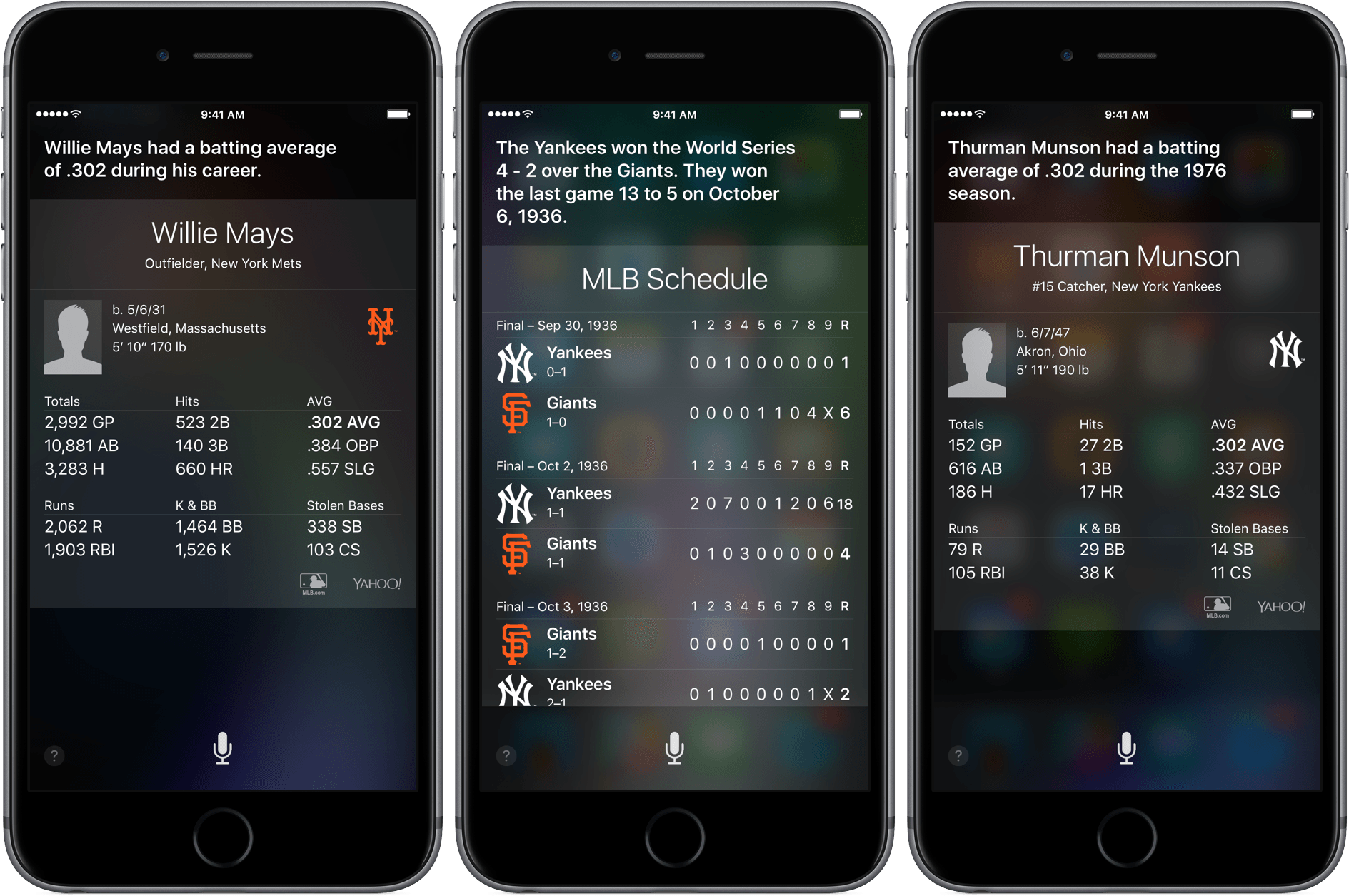
The Verge reports today that Siri has been upgraded with a load of baseball facts, just in time for Opening Day:
Siri now has some more baseball smarts: it can answer questions about more detailed statistics, according to Apple, including historical stats going back to the beginning of baseball records. You can also get information on career statistics, and there’s now specific information for leagues other than the Majors — there are 28 other leagues, including the Minors, that are covered now.
I tested out a number of questions with Siri and, like Dante D’Orazio of the Verge, found that certain questions like “Who hit the most home runs ever in baseball?” tended to return either Google search results or in the case of the home run question above, the results for the 2016 season, not all time.
In case you were wondering, right now Troy Tulowitzki and Corey Dickerson are tied for the lead with one home run each.
Capture Ideas Quickly and Easily With Yeti

Yeti is all about quick capture and effortless export. Yeti’s main interface is dominated by four colorful buttons that allow you to capture your thoughts with a note, a photo or video, audio, or a sketch. What you create is stored on iCloud Drive in one of a handful of non-proprietary formats that can be easily opened in other apps. And while Yeti does an admirable job of making it fast and easy to record information on your iPhone, the lack of support for capturing data from other devices or apps, will limit Yeti’s utility for some people.
A Mysterious Bug is Causing Links to Fail on iOS
Over the weekend, 9to5Mac reported what appears to be a widespread iOS bug that causes links to fail to open. In some cases, long pressing links crashes the app containing the link. What’s worse, rebooting your iOS device or uninstalling third-party apps affected by the bug seems to only correct the problem temporarily.
Ben Collier has been doing some digging and it looks as though the culprit may be Shared Web Credentials, a means by which websites and apps can share login credentials. As Ben explains:
In iOS 9 Apple introduced Universal Links, these allow app developers to associate their website and app, so links to the website can open the app up automatically if installed. For example, following a link to a Guardian article opens up the Guardian app to that specific article instead of their website.
App developers put an app association file on their website which lists which types of URLs the app can open. When you install an app, iOS downloads this associated file and updates your own database of what URLs your installed apps can open. The website and app listing in iTunes are linked by the developer - so it prevents anyone from hijacking your website with their app.
When you tap a link in iOS, the system looks through the database of installed apps supported URLs to see if it matches a pattern an installed app can handle. If nothing matches it opens it up as a standard app.
9to5Mac has been able to replicate the bug by installing the Booking.com app, which until today, had an unusually large association file. The bug does not appear to be limited to the Booking.com app, but the unusual size of its association file lead to initial speculation that file size was the culprit. However, further investigation suggest that the problem may be with the Shared Web Credentials daemon itself and is either triggered by a large association file, or becomes corrupt regardless of the size of association files. Whatever the cause, let’s hope that a reliable workaround is found soon and that Apple releases an iOS update that fixes the problem.
We have reached out to Apple for comment regarding the bug and will update this post with whatever additional information we learn.
[Update: 2016-03-29] Based on follow up reports by 9to5Mac and Ben Collier, it appears that large association files are indeed the source of the bug that that causes links to fail to open for some iOS users. According to 9to5Mac:
Sources tell us that Apple is working with high-profile developers to help them understand and better use the universal links APIs.
9to5Mac also quotes a statement it received from Apple PR:
“We are aware of this issue, and we will release a fix in a software update soon.”
Whether the source of this quote is the same as the sources that reportedly told 9to5Mac that Apple is working with ‘high-profile developers’ is unclear.
9to5Mac also reports that the Wikipedia app and Eat24 apps may also trigger the link bug. Unfortunately, there is still no known workaround for the issue. Nor is there a way to tell which apps are affected before installing them.
Ben Collier, whose post yesterday pinpointed the source of the bug, has posted a fix that requires users to complete a dozen steps. The fix appears to be dependent on the timing of the steps, which means that it may require multiple attempts to get it to work.
DeskConnect Brings Fast File Transfers Between iOS and OS X
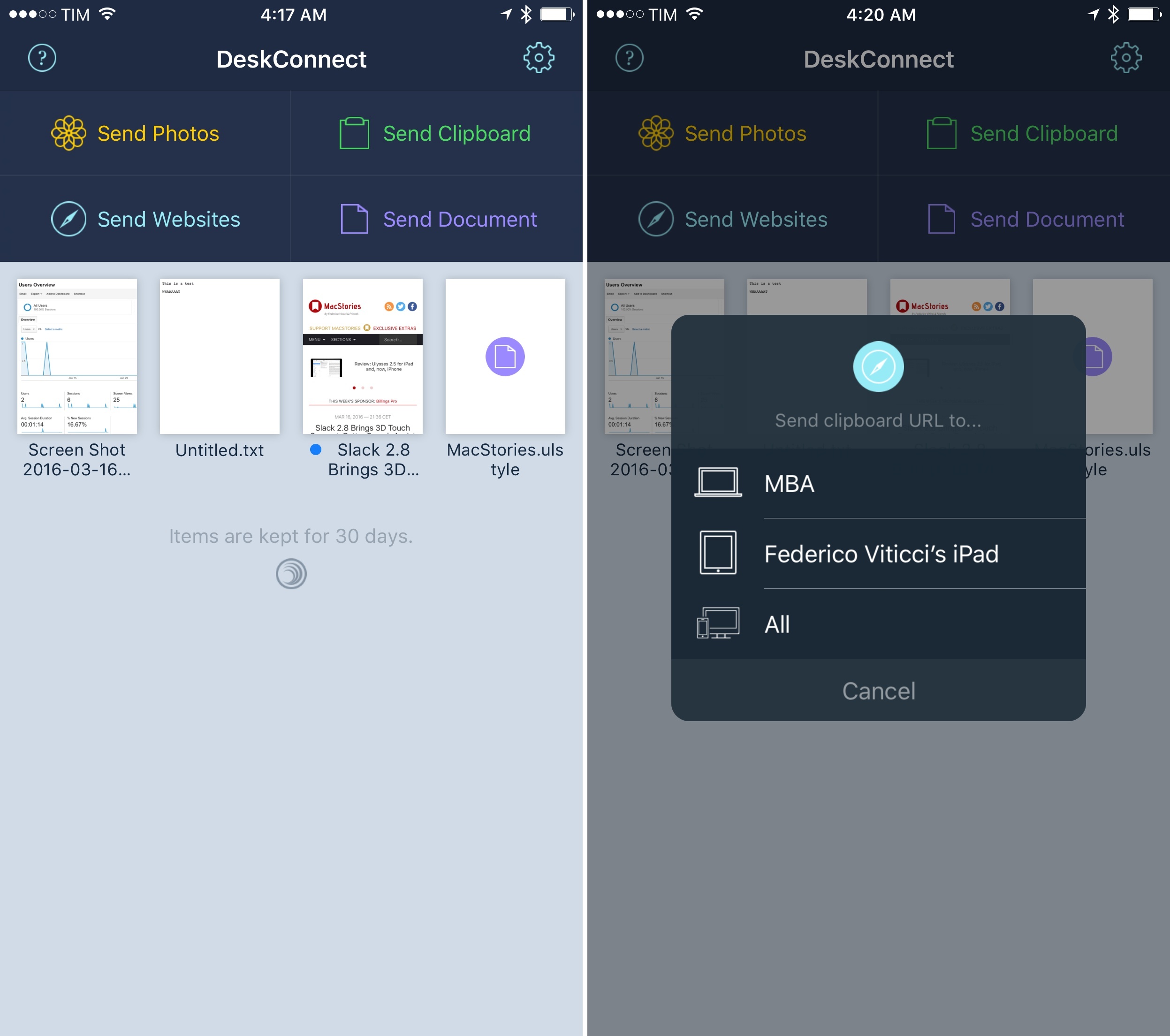
Before he co-founded Workflow, Ari Weinstein was the creator of DeskConnect. Originally born out of a hackathon, DeskConnect was a Mac and iOS utility to speed up the process of transferring bits of text and files between devices. Based on a cloud service and built with speed in mind, DeskConnect predated Apple’s Continuity efforts with AirDrop in iOS 8 and OS X Yosemite; when it launched in the summer of 2013, DeskConnect was featured by Apple on the Mac App Store and it ranked in the top charts for several consecutive days.
However, after Weinstein and Workflow co-founders Conrad Kramer and Nick Frey began working on the app that would later win an Apple Design Award, DeskConnect was put on the shelf so the team could focus on their powerful take on iOS automation. They never forgot about DeskConnect, though. With a major redesign and adoption of modern iOS technologies, DeskConnect’s comeback, launching today on the App Store, brings an even faster way to share documents, photos, and just about anything across multiple devices. After testing the new DeskConnect for the past couple of weeks, it’s impossible not to be impressed with its simplicity and speed.
Scanner Pro 7 Adds OCR and Workflows
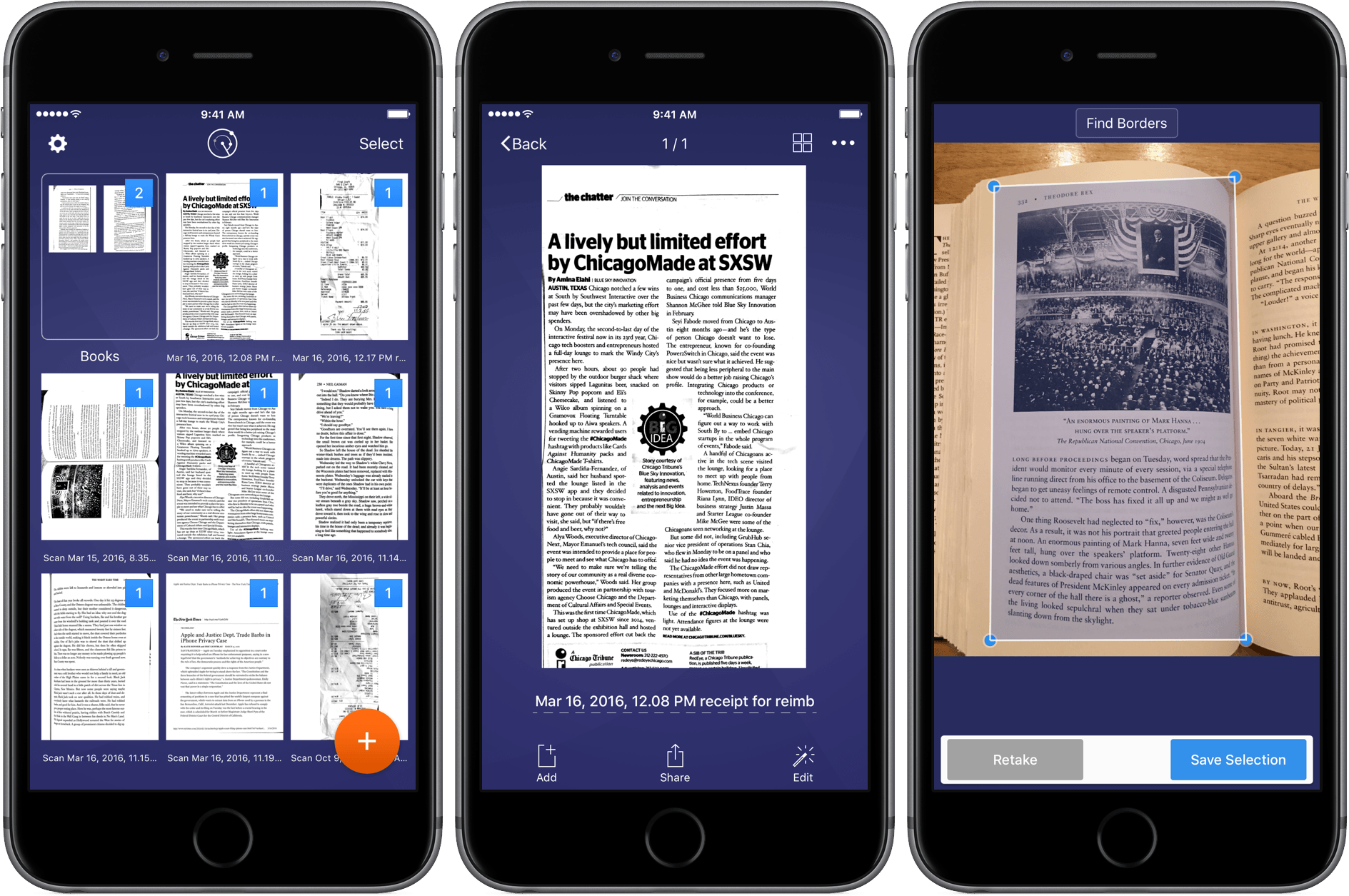
Scanning apps have become a big category on iOS. There are a lot of great options and the quality and diversity of the category creates a healthy competitive atmosphere that means frequent updates and innovations, which are great for customers. Today, Readdle launched version 7 of Scanner Pro, which adds optical character recognition (OCR), distortion correction, and a cool new trick – workflows. With Scanner Pro 7 you can chain multiple actions together and fire them off with just one tap.