


Here are today’s @MacStoriesDeals on iOS, Mac, and Mac App Store apps that are on sale for a limited time, so get them before they end!
Posts tagged with "iOS"
#MacStoriesDeals - Thursday
#MacStoriesDeals - Wednesday

Who cares about Google? It’s time for #MacStoriesDeals! Here are today’s @MacStoriesDeals on iOS, Mac, and Mac App Store apps that are on sale for a limited time, so get them before they end!
Google Releases Gmail for iOS
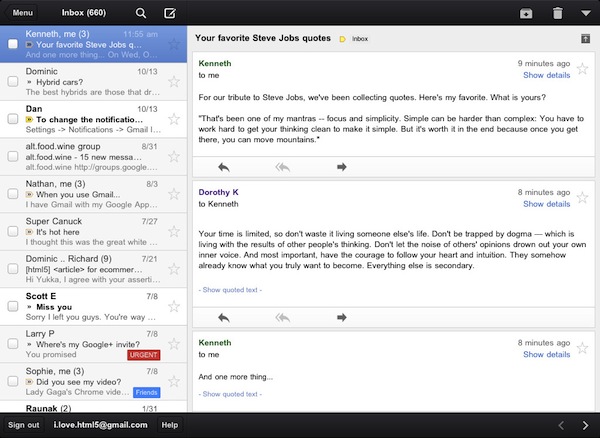
Google has just released its first official Gmail app for iOS, available on the App Store here. The app runs natively on the iPhone and iPad, features notifications, messages threads, Priority Inbox and many other Gmail features from the web interface. In developing Gmail for iOS, Google says they have tried to bring the best features of Gmail for the web – which is also optimized for iOS devices – to the iPhone and iPad while taking advantage of the native capabilities of these devices.
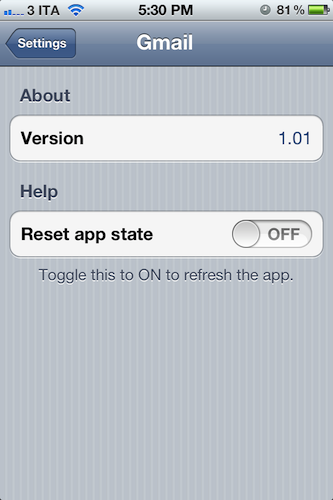
The company has indeed implemented name auto-completion and Camera Roll integration for image attachments, but we couldn’t find support for multiple email accounts in this first version. Also, we were unable to receive “badge notifications” for new messages, although this may be related to the just-launched nature of the app and an error that several users are reporting on Twitter. The lack of multiple account support is disappointing, frankly, as the app simply loads up a web view upon first launch, asking you to log in with a Google account, and that’s it. There are no settings, no account options – there is a “reset app state” button in the iOS Settings app, which will simply reset the app’s state (logging you out of your account) as the name suggests.
As many have already noticed, the interface of the app seems to consist mainly of a web view inside a native environment that guarantees some of the aforementioned features such as attachments from the Camera Roll. Some animations are smoother than Gmail’s web counterpart – such as the swipe-to-reveal Inbox action – and this should be an advantage of the “native” nature of some elements of the app. Other animations and menu, however, are clearly web-based, and not as smooth and responsive as you would expect from, say, Apple’s Mail app. Overall, it appears Google took Gmail’s existing web app for Mobile Safari, added some new features and graphical elements in the inbox and message list, and released it as a free app on the App Store. This app clearly can’t be compared to Android’s native Gmail experience, or Apple’s Mail app for iOS, which still remains a fine and powerful client. If you’re a fan of Gmail’s web app for iOS devices, I believe you’re going to like some improvements of this “native” version, but I can’t imagine any Gmail power-user – people who regularly switch between two or more accounts every day – doing any serious email work with this app.
There are some nice improvements over the Gmail web app for iOS devices, but this is far from the “pretty fantastic” native app many were expecting.
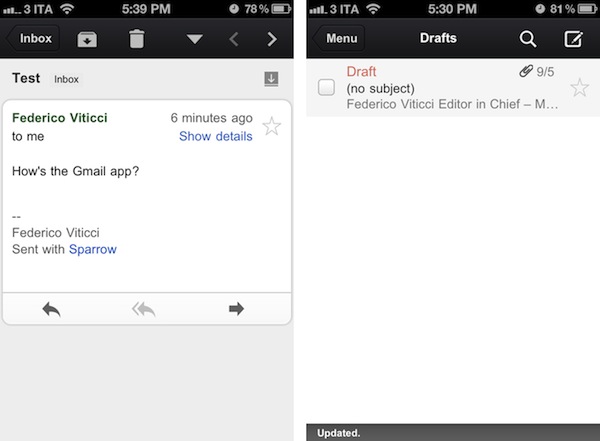
From the feature list:
- Get alerted to new messages with push notifications and sounds
- Find an email in seconds with search across your entire inbox
- Autocomplete email addresses from your Gmail contacts or select from your device’s address book
- Upload photos with a click using the new attachment button in compose view
- On iPad, navigate your inbox and read your mail simultaneously with split view
You can find Gmail for iOS on the App Store.
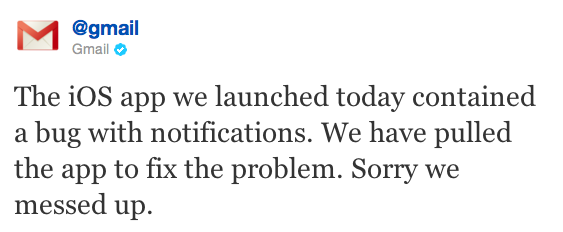
Update: Google had to pull Gmail from the App Store to fix the notification bug mentioned above.
#MacStoriesDeals - Tuesday

Be sure to check out our Amazon Mac Download below. Here are today’s @MacStoriesDeals on iOS, Mac, and Mac App Store apps that are on sale for a limited time, so get them before they end!
#MacStoriesDeals - Halloween Monday!

Happy Halloween! Be sure to also check out our Amazon Mac Download below. Here are today’s @MacStoriesDeals on iOS, Mac, and Mac App Store apps that are on sale for a limited time, so get them before they end!
Plex 2.0 for iOS Brings Revamped Remote Access, New Home Screen - Plex 0.9.5 “Laika” Released
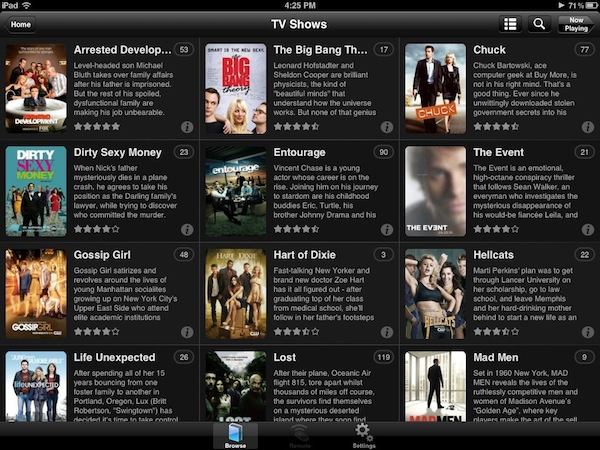
Back in April I wrote about Plex 1.1, a new iOS version of the popular media manager for Mac and Windows (as well as other connected devices such as Roku) that brought a new design, better streaming of movies and TV shows with Direct Play and Direct Streaming, and many changes from the original application that was released a year ago in November 2010.
With a series of releases announced via various blog posts, the Plex team launched last night version 2.0 of Plex for iOS, another major revamp of the mobile client for iPhone and iPad that brings an improved home screen design (for the grid UI that was introduced in 1.1), new remote access, better subtitle management and over 150 bug fixes. As previewed last week, the Plex team figured one of the most requested functionalities for the desktop media server – a utility that finds media on your computer or local network and handles transcoding, metadata and streaming to Plex clients – was better access of personal media (movies, music, TV shows) over the Internet. In its previous versions, Plex was capable of making a computer or external hard drive available over the Internet via port forwarding, but setup was far from easy and seamless, and the lack of any online counterpart for over-the-air sharing made it impossible to build a platform on top of a local Plex installation. With myPlex, Plex brings “real” remote access to all your media, allowing the app to communicate with my.plexapp.com through a user account (which you can create for free), letting users not only access servers (like your iMac or Mac mini) remotely, but also to share specific sections of a library with other Plex users.
myPlex is a full-featured solution to access, share and save content for later. “Access” means all your connected Plex media servers will show up online, readily available to show your sections and library; I haven’t been able to personally test the remote access part of myPlex as my router doesn’t want to play nice with port mapping, but I can see how the redesigned preference panel will make for a more intuitive experience when making a computer available online. Moreover, the screencasts posted by the Plex team (available below), show how easily it’s possible to connect media servers to myPlex.
Sharing plays another big role on myPlex: whereas in previous iterations of Plex users could only share content with others by opening up their routers for external access, providing a friend with the required authentication system to access a Plex installation, myPlex makes it extremely easy to pick a folder (say a Music collection, or a TV series), enter an email address of another Plex user, and start sharing content online. Users can share an entire Plex library or just some sections, and obviously the system will take advantage of Direct Play and Direct Streaming between remote connected users and libraries whenever possible. myPlex is a simpler interface on top of the old (manual, URL-based) sharing process, and it’s deeply integrated with the updated iOS and Mac clients. Read more
#MacStoriesDeals - Friday

Halloween sales are upon us! Be sure to also check out our Amazon Mac Download below. Here are today’s @MacStoriesDeals on iOS, Mac, and Mac App Store apps that are on sale for a limited time, so get them before they end!
#MacStoriesDeals - Thursday

Halloween sales are upon us! Be sure to also check out our Amazon Mac Download below. Here are today’s @MacStoriesDeals on iOS, Mac, and Mac App Store apps that are on sale for a limited time, so get them before they end!
#MacStoriesDeals - Wednesday

Be sure to check out our Amazon Mac Download below. Here are today’s @MacStoriesDeals on iOS, Mac, and Mac App Store apps that are on sale for a limited time, so get them before they end!