Posts tagged with "iOS"

AirPort Utility Now Available for iOS 5

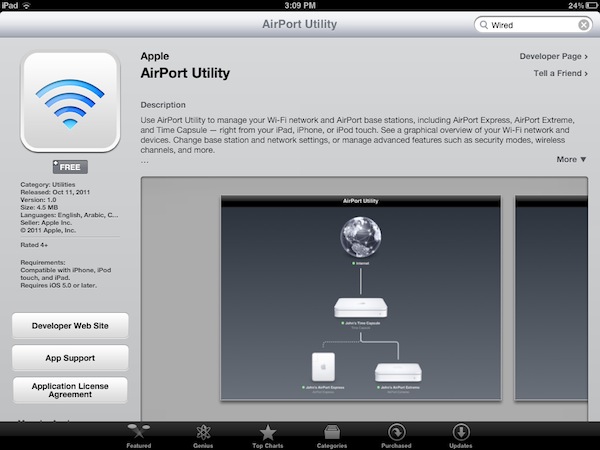
Apple today released AirPort Utility for iOS, an app to configure and manage AirPort devices on a local network. An early beta version of iOS 5 showed that Apple was building support for managing AirPort stations (such as the AirPort Express and AirPort Extreme) right into the operating system; however, as we noted last week the Golden Master release of iOS 5 included a link to download AirPort Utility for iOS from the App Store, which wasn’t available.

AirPort Utility requires iOS 5, which will become available publicly later today. You can install the app by clicking on “Manage This Network” on your iOS device’s WiFi settings for an AirPort station.

The app isn’t showing up in iTunes search yet, but here’s the direct link that should be available shortly: AirPort Utility

AirPort Utility provides a straightforward interface to manage AirPort devices on a local network. The app shows AirPort stations that are connected to the Internet, and on the iPad gestures are supported to zoom out the view and get a better visual of all the available devices. Tapping on the Internet icon will let you see the status of your connection with Router Address, DNS Servers and Domain Names; tapping on an AirPort Device will show a popover menu with the device’s name, IP Address, Serial Number, Software Version, Network and connected Wireless Clients. You can check out the connection status, IP Address and Hardware Address for each connected client.

Tapping the Edit button will enable you to configure various settings of an AirPort device, including File Sharing and Disks for an AirPort Extreme, DHCP and NAT, WAN Setup and Access Control. You can restart a base station from the app and restore it to default settings. You can manage the Internet Connection settings for the device, activate a Guest Network and change the WiFi Mode of an existing network. Overall, it appears the AirPort Utility app for iOS 5 has implemented much of the options available in its Mac counterpart.

More screenshots after the break. Read more



Apple To Release AirPort Utility for iOS?

In the early betas of iOS 5, it was reported the operating system gained a new functionality to set up AirPort stations on a local network. AppleInsider posted screenshots of the feature, and wrote:

Under Wi-Fi Networks, a new option reads “Set up an AirPort Base Station…” In setting up a Time Capsule, users are given the option to create a Wi-Fi network, complete with password, or “Do something different.” Selecting the latter option gives users the option to join an existing network, or to replace a base station. Users are also given appropriate error messages or details on how to fix any issues directly from the iOS Settings application.

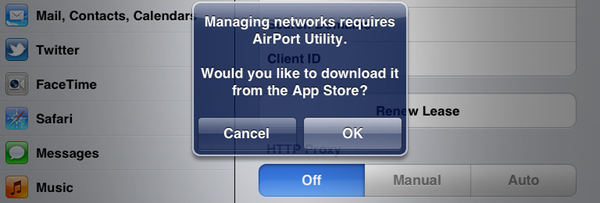
As noted by Twitter user @SonnyDickson and a forum poster on MacTalk.com.au, it appears Apple is now preparing to release a dedicated AirPort Utility app for iOS, which should soon be available in the App Store, perhaps as early as next week when iOS 5 will be publicly released. In the iOS 5 GM release, a button named “Manage this Network” in the WiFi settings for an AirPort-based network will ask users if they want to download AirPort Utility from the App Store. The dialog box will then launch an iTunes link, which is not live yet, to download the app on the Store.

It’s unclear whether iOS 5 will have basic AirPort setup functionalities built-in, or if the features spotted in the early betas have all been moved to a separate App Store download. One of the key features of iOS 5 is PC Free, a set of tools that will allow iOS owners to set up their devices without using a Mac or PC – being able to configure an AirPort network directly from an iPhone or iPad would certainly be in line with Apple’s willingness to “cut the cord” and let iOS devices be independent from desktop computers. iOS 5 and iCloud will debut next Wednesday, October 12th, and Apple is also set to release another App Store app on that day, Cards.


Shazam’s Free iOS App Gets Unlimited Tagging

, the very popular music ID service for iOS, made a major change to the free version of its iOS app. “Shazamers” are now getting unlimited free tagging. Shazam believes this shift will give them more opportunities for users to discover and interact with their favorite music and television shows.

Andrew Fisher, Shazam CEO said, “Shazamers already identify over 1 billion songs each year and go on to purchase over $100 million in digital music via our service. Now, with no limits, people can Shazam even more songs they don’t know – or they already know - to conveniently purchase them, see the lyrics, watch the official music video, share on Facebook, Twitter or email, get recommendations and purchase concert tickets instantly. Unlimited free access means people can use Shazam even more as part of their daily lives.”

Users of the Shazam service can of course upgrade to the paid app, called Encore, and get the benefits of ad-free usage and features like LyricPlay, which allows users to view lyrics as the tracks play.

A link to the free Shazam app can be found here.
Read more