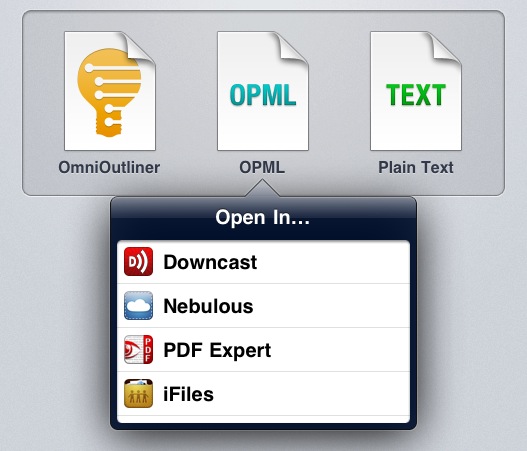
Ted Landau at The Mac Observer covers an issue I’ve mentioned several times in the past, which Apple has partially fixed with the last releases of iOS: saving documents and moving them across apps. Specifically, Landau notes that the lack of a “universal save” option for documents that can be read by third-party apps (PDFs, text files, images) leads to an annoying and pretty much useless duplication of content. Apple has implemented an “Open In…” menu to send files to other apps, but the file that’s being sent is a copy. iOS apps can’t read and modify a source file from a single location.
Currently, iOS does not come close to matching the advantages of Mac OS X here. There is no way to have a unifying folder in iOS that contains related documents from different apps. There is no way to have a document easily opened in different apps, where any changes you make in one app are instantly accessible by all the compatible apps. You can come closer with Dropbox, but closer is not good enough here.
That’s annoying for me, too, as I constantly switch between apps to get my work done, and it’s not like I don’t enjoy trying new ones. This typically leads to some sort of geek frustration – why can’t Apple build an invisible layer that lets Elements edit a text document from Evernote and Pages access the same file?
For Ted and me, yes, being able to avoid file duplication and tedious exporting processes would be nice. But I do wonder how much does Apple care about such functionalities considering the underlying paradigms of iOS and the upcoming iCloud functionalities of iOS 5. For one, Apple really cares about application sandboxing: each app has its own controlled data environment and only a few items can be shared between multiple apps. Apple cares about sandboxing so much that they’re bringing it to the Mac App Store. Would iOS sandboxing allow for a source file to be edited and “saved” by multiple apps? Where does that file belong to, technically? Would iOS apps be able to write specific metadata to it? And what happens if, hypothetically, this “shared” file needs to be pushed back and forth with iCloud?
I’m no iOS developer, but I can see this proposed “universal save” model becoming an issue when on iOS, unlike the Mac, there’s no visible, centralized Finder location to write and read files from. In fact, Ted is right when he says that the convenience of a Mac is being able to create “a folder that will contain all the assorted files needed to put his column together”. That’s made easy by the Finder – but on iOS? Apple allows third-party developers to plug into the Music library or Camera Roll, yet there’s no Apple app to “create text file here” or “save webpage from Safari here”. Again, the lack of an iOS Finder would require “universal save” to work inside any app. iDisk could have been a centralized location for files – it could have even been Apple’s “answer to Dropbox” – but it’s not going to be supported by iCloud.
And then there’s the conceptual issue of an iOS device being the app that you’re using. When you use Pages on an iPad, the iPad is a word processor. When you browse the web with Safari, you’re holding the web in your hands. On a technical level, this app console model is represented by sandboxing and one-way “Open In” menus, and soon iCloud-based documents that allow multiple versions of the same app to access files. Would a “universal save” option somehow break the illusion that you’re holding an app, reminding us that we’re using a device with multiple layers of abstractions including a filesystem?
I don’t know. I believe I’d like this feature in theory, but I wonder if there would also be a considerable trade-off to accept.