Posts tagged with "iOS"

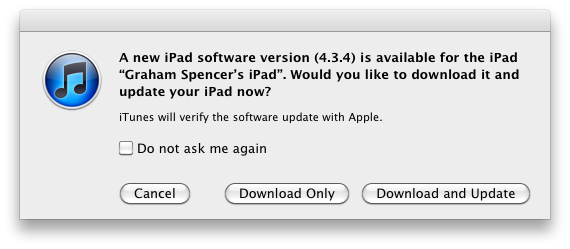
Apple Releases iOS 4.3.4 [Direct Links]

Apple has just released iOS 4.3.4 in iTunes. The new firmware should be available now if you check for updates, and it is supposed to fix an issue that allows jailbreaking an iOS 4.3.3 device through a PDF vulnerability. Apple describes the technical fixes in a  support document:

Impact: Viewing a maliciously crafted PDF file may lead to an unexpected application termination or arbitrary code execution

Description: A buffer overflow exists in FreeType’s handling of TrueType fonts. Viewing a maliciously crafted PDF file may lead to an unexpected application termination or arbitrary code execution.

Users who have jailbroken their devices using JailbreakMe will obviously need to stay away from the update if they want to keep Cydia and other installed jailbreak tweaks – Apple had already confirmed a fix was coming to patch the PDF security hole that could allow for other malicious exploits, not necessarily related to jailbreak.

Here are the direct links for iOS 4.3.4:

Apple has also released iOS 4.2.9 for the Verizon iPhone, which you can download here.



Mophie Pulse for iPod Touch Will Add Stereo Sound and Haptic Vibration

Mophie, who makes great accessories for iOS devices such as the Juice Pack Air, has a new product in the pipeline for the iPod Touch 4G - the Mophie Pulse. The Pulse is a video game/app enhancer that turns your iPod Touch into the “ultimate gaming device with pulse-pounding stereo sound and bone-shaking game feedback.” It’s all built into a textured gaming grip. The Pulse gets its magical powers from ViviTouch Technology that converts game audio into a variety of different effects. ViviTouch doesn’t require an API to generate vibrations but the games will be better optimized if the developers use it.

There currently is not a release date but a “coming soon” sign-up form on the product page if you want informed when the product launches. The Pulse looks like a great addition to Apple’s favorite gaming device and as long as the price point is good, Mophie will have another hit on their hands. If the iPod Touch version is a success, could an iPhone version be next?

Video after the break.

Read more


Grazing 2.0: Once Again, My Favorite iOS Browser

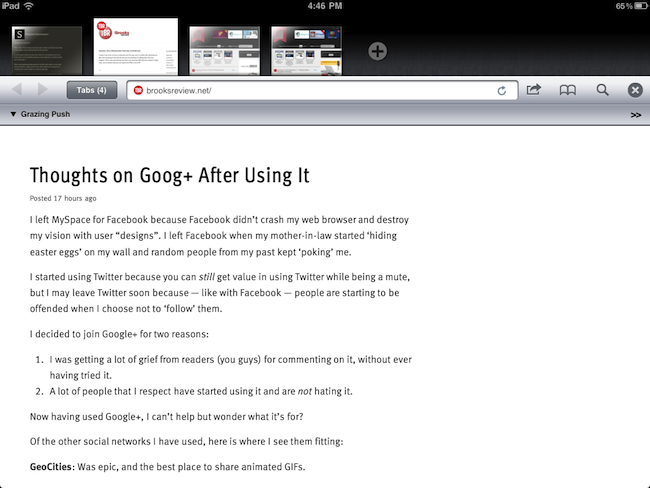
Back in September I first reviewed Grazing, an alternative web browser for the iPad that came out a few weeks after I complained about the average alternative browser for the iPad lacking the ideas, feature set or implementation to properly compete with Safari. Lots of things have changed since then, both with iOS Safari and the third-party development scene. Safari for iPhone and iPad got faster with the Nitro engine, received AirPlay support for any video found on the web and, with iOS 5, is also getting a major facelift with tabs on the iPad and other welcome additions such as tab undo and history right from the toolbar. On the other hand, the past few months have seen an explosion of alternative browsers that, in spite of the lack of Nitro JavaScript engine, are playing around with the craziest ideas when it comes to re-inventing web browsing on the tablet. I was impressed by the feature set of iCab Mobile (perhaps the most popular 3rd party browser for iOS), the UI of Sleipnir and the underlying concept of Portal, without a doubt the most innovative iPhone browser to date. There are dozens (if not hundreds) of alternative browsers for iOS now, and unlike last year many of them are really, really good. Apple still doesn’t allow iOS users to set a different default browser other than Safari, but third-party support has increased in the past months, so we’re starting to see integration with alternative browsers (usually iCab) in apps like Handoff and Mr. Reader.

Developers realized there could be so much more besides copying Safari and putting a sharing menu and tabs in an “alternative” browser. We have seen experiments with visual tabs, gestures, tab re-organization, and more. Is there still room for innovation? With iOS 5 bringing a slew of enhancements to Safari (including direct Twitter integration) and titles like iCab, Portal, Sleipnir, Skyfire and iChromy already available on the App Store, what’s next for third-party iOS browsers?

Grazing 2.0, a major update to the app I reviewed in September, provides an answer to this question by offering an interesting mix of features aimed at turning the app into a multitouch-enabled, platform-connected browsing experience for iOS. Read more


Screens for iOS Now Lets You Log Into Lion Computers

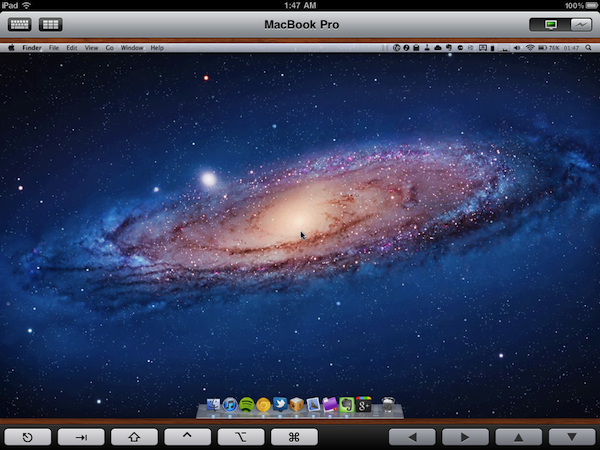
Screens, Edovia’s VNC client for the iPhone and iPad we’ve reviewed a couple of times on MacStories in the past, has been just updated to version 1.6 which, alongside a series of speed and performance improvements, brings full compatibility for machines running OS X Lion. With Mac OS X 10.7, Apple has changed a few things with VNC and remote user authentication, enabling features like Apple ID support and possibility of logging into a separate account while a machine is active on a different one.

The new Screens 1.6 allows you to log into a computer running Lion avoiding the additional login prompt you’d get when logging in with a VNC password (if you’ve tried VNC apps that haven’t been updated for Lion, you should be familiar with the login prompt). Screens, in fact, has a new OS authentication method that, by logging into a machine with your OS account name and password, skips the VNC prompt altogether and directly takes you to your desktop, with whatever is on screen, just like with previous versions of the app on Snow Leopard. Current Screens users willing to connect to a Lion computer should switch to the new setting for an optimal experience (that is, unless you want an additional login dialog). Bug fixes aside, Screens 1.6 brings keyboard support for more languages, and Windows VNC servers.

You can download Screens at $19.99 on the App Store. Read more