


Here are today’s @MacStoriesDeals on iOS, Mac, and Mac App Store apps that are on sale for a limited time, so get them before they end!
Posts tagged with "iOS"
#MacStoriesDeals - Friday
Apple Promises Software Update To Fix iOS PDF Vulnerability
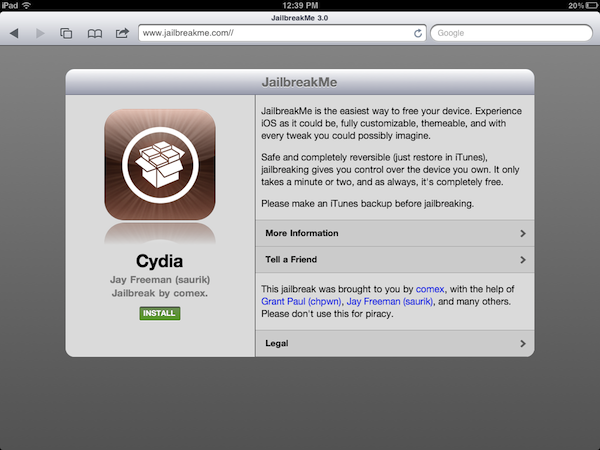
Following the release of @comex’s latest jailbreak tool yesterday, JailbreakMe 3.0, many wondered how long it would take for Apple to take action and patch the security hole that allows special PDF documents opened through Mobile Safari to give admin privileges to code hidden inside them. The method, discovered and developed by comex, enables JailbreakMe to install Cydia on devices running iOS 4.3 and above with a simple click, making it the easiest jailbreak ever developed for a variety of devices including the iPad 2. The exploit works on various versions of iOS after 4.3, but the iPad 2 is only being targeted on iOS 4.3.3. As a preliminary version of the exploit leaked online before the official jailbreak was released, comex had already warned users that Apple would soon issue a software update to patch the vulnerability.
The Associated Press reports [via The Next Web] Apple Inc. spokeswoman Bethan Lloyd has confirmed the company is aware of the issue and is developing a fix that will be available via Software Update. A group of German researchers took a look at comex’s exploit yesterday, and warned Apple that any maliciously crafted PDF could take advantage of the Safari hole to install code on a device without a user’s consent.
Apple Inc. spokeswoman Bethan Lloyd said Thursday the company is “aware of this reported issue and developing a fix that will be available to customers in an upcoming software update.”
She declined to specify when the update would be available.
In the past, Apple closed another PDF vulnerability that allowed the installation of Cydia through JailbreakMe 2.0 in roughly a week. Whilst Cydia developers are relying on an exploit that could also be used by malware creators, they’re also taking the necessary steps to prevent the vulnerability from working again after the jailbreak is done and Cydia is installed. In fact, they have released a “PDF Patcher” tool that, once installed from Cydia, will make the exploit used to jailbreak a device unusable. For this reason, Apple will soon issue a software update to officially close the hole, but it’s very likely that several users who don’t want to lose their jailbreaks, yet want to stay secure, will install the unofficial patcher from Cydia.
#MacStoriesDeals - Wednesday

Here are today’s @MacStoriesDeals on iOS, Mac, and Mac App Store apps that are on sale for a limited time, so get them before they end!
#MacStoriesDeals - Tuesday

Here are today’s @MacStoriesDeals on iOS, Mac, and Mac App Store apps that are on sale for a limited time, so get them before they end!
The New Brain Behind Your Photos
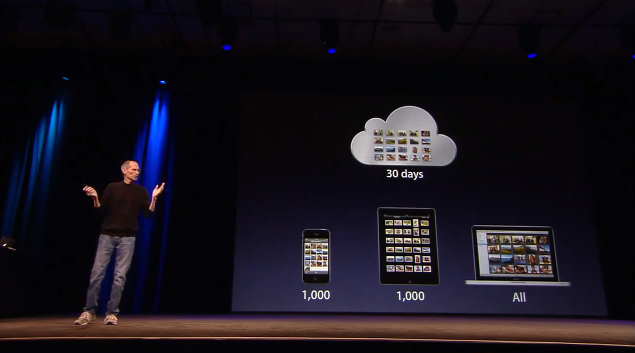
One of the new features of iCloud that was announced at WWDC but was slightly overlooked by bloggers and iOS users is Photo Stream. Built into the native Photos app for iOS devices, iPhoto for Mac and the Pictures folder on Windows PCs, Photo Stream will allow you to automatically find on any device the photos you’ve taken on an iPhone, iPod touch or iPad. With the addition of the Apple TV 2nd gen, Photo Stream will let you watch these photos on the bigger screen with your friends and family. How does it work? For those that missed the announcement, here’s a quick recap: because iCloud automatically stores, updates and pushes your content on all your registered devices (be them iPhones, iPads, or Macs and PCs running the iCloud control panel), Photo Stream acts as an extension of the mobile Camera Roll that, rather than just storing pictures locally, also pushes them to the cloud as soon as they’re taken, provided you’re on a WiFi connection. If you’re not on WiFi, Photo Stream will upload the photos from the Camera Roll to iCloud as soon a a new connection is established.
As explained by Steve Jobs on stage, and later demoed by Eddy Cue, the main purpose of Photo Stream is that of easing the process of importing photos shot on, say, an iPhone to an iPad or Mac for better viewing. With previous versions of iOS, users were forced to email pictures themselves and open the message on OS X to save the photos (facing at the same time a risk of quality loss due to email limitations); create an account on social services like Flickr or Facebook to upload photos from their mobile devices to avoid a desktop transfer process; even worse, users had to go home, find a USB cable, connect their iPhone to a computer, launch iPhoto or Image Capture and manually import the most recent photos. That’s a long and tedious process Apple wants to eliminate with a smart, automatic system that always puts the most recent photos on all your devices. In fact, Photo Stream can display the 1,000 most recent photos on iOS devices, whilst files are stored on iCloud for 30 days due to storage limitations on both ends (iOS and Apple’s server farms). On desktop computers, which come with more storage, Photo Stream stores all photos. Again, this new functionality works out of the box with any iOS 5 device configured with an iCloud account, and Photo Stream can be enabled in the Settings app. On the desktop’s side, right now Apple is requiring developers to download a special beta version of iPhoto and the iCloud control panel to test Photo Stream, but once iCloud publicly launches this fall everything will be baked in with no further configuration needed.
Read more
Verbs 2.0 Now Available for iPhone, Adds Pro Service

We covered Verbs back when it was released in December and again in January; it’s a great IM client for the iPhone that has a nice design and excellent execution.
Today #include tech posted on their blog that they have introduced a Pro version in today’s update (2.0) of Verbs. Verbs 2.0 focuses on performance, memory management, improved Address Book integration and photo uploading issues from the camera.
Version 2.0 features and improvements:
- Enable Push Notifications and stay logged in for up to 7 days (Verbs Pro).
- The text entry field grows vertically as you type longer messages.
- Send Chat logs via email. (preview here)
- Send links in received messages to Instapaper for reading later.
- Horizontal swipe action in the chat view to switch between chats.
- Pinch gesture to zoom out a conversation.
- Tap and hold the unified accounts cell to sign in/out of all accounts.
- Faster buddy list scrolling.
- The collapse Offline buddies preference was not getting saved between launches.
- Now displays AIM buddies “Mobile” status with a blue icon.
- Shows buddy presence above the chat thumbnails.
- Fixed the delay when the buddy list favorite header is tapped.
- Resets the keyboard to display alphabets after sending a message.
- Fixed issues with uploading pictures taken from camera.
- Change application settings through URL Schemes.
- Bug fixes and better memory management.
#MacStoriesDeals - Friday

Here’s an epic list for today’s @MacStoriesDeals on iOS, Mac, and Mac App Store apps that are on sale for a limited time, so get them before they end!
AppShopper 1.4: Top 200, App Ratings, Reviews, and more
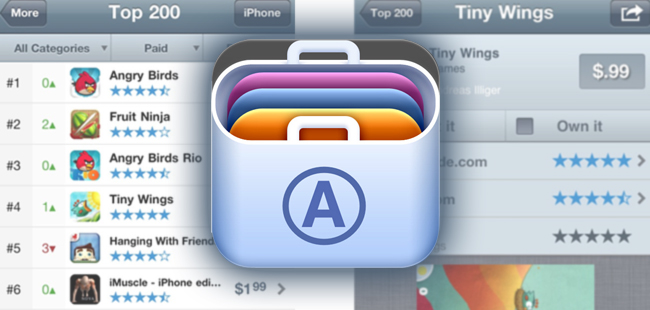
Last week, Arnold Kim gave twitter a little preview of some new features and functionality of AppShopper 1.4 for iOS. The new update was just approved by Apple and now has features like Top 200 and App ratings. Other new features include:
- Links to 3rd party app reviews like 148apps and TouchArcade
- Automatically load apps when scrolling to the bottom of a list
- New filters for search
- Email notification settings
- Disable push notifications during certain times of the day (Yeah!)
- In-app AppShopper account registration
- Share an app’s info via Twitter, Facebook, email and more
- Various bug fixes
Screenshots for iPhone and iPad after the break.
#MacStoriesDeals - Thursday

Here are today’s @MacStoriesDeals on iOS, Mac, and Mac App Store apps that are on sale for a limited time, so get them before they end!