


Here are today’s @MacStoriesDeals on iOS, Mac, and Mac App Store apps that are on sale for a limited time, so get them before they end!
Posts tagged with "iOS"
#MacStoriesDeals - Wednesday
#MacStoriesDeals - Tuesday

Here are today’s @MacStoriesDeals on iOS, Mac, and Mac App Store apps that are on sale for a limited time, so get them before they end!
How To Child-Proof Your iPhone→
How To Child-Proof Your iPhone

Dave Caolo at 52 Tiger shares a series of interesting tips to “child-proof” an iPhone (though most of these features are enabled on the iPad as well) to make sure kids using a device won’t get access to functionalities like deleting apps and pulling the trigger on in-app purchases. Something I never had the chance to play with is the restriction settings panel for location and email:
Next, exercise (limited) control over location services and email accounts. First, tap Location to see the locations options screen. You can disable/enable location services on an app-by-app basis or turn it off entirely. Once you’ve set this up how you’d like it to be, select Don’t Allow Changes. Likewise, tapping email accounts and then Don’t Allow Changes won’t let you modify existing email, contacts or calendar information or create new ones. Of course, Jr. can still read your mail (and reply to it), so this isn’t entirely useful.
You can read more at 52 Tiger by hitting the source link below, and enable restrictions under Settings->General on your iOS device. Apple has been criticized in the past for not offering the right tools to parents to prevent children from spending money in iTunes, though with iOS 4.3 they introduced a broader set of restrictions and brought the in-app purchase window (when a device asks for your Apple ID password) from 15 minutes down to 5 minutes.
#MacStoriesDeals - Monday

Here are today’s @MacStoriesDeals on iOS, Mac, and Mac App Store apps that are on sale for a limited time, so get them before they end!
Apple Blocks SHSH Blob Method Of Downgrading Firmware Versions In iOS 5
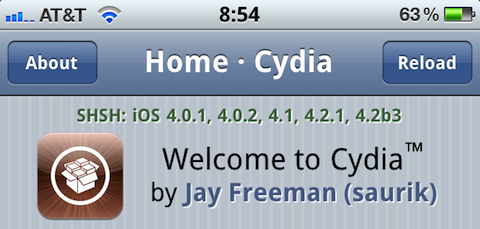
Apple and the jailbreak community have always enjoyed somewhat of a cat-and-mouse game between them and today we are learning that Apple has pounced to fix up one of the common circumventions used by jailbreakers. The circumvention in question doesn’t involve an actual exploit to jailbreak devices but rather a way that people were using to downgrade from one iOS version to another – often to a version that was capable of being jailbroken.
Apple had implemented a system where it would only authorize certain iOS builds to be installed, making it nearly impossible for downgrades. The circumvention was that by using SHSH blobs people could use iTunes to restore to a previous firmware version. According to what the jailbreak Dev-Team has said in a blog post today, that is all changing in iOS 5 as Apple moves to a new signing process. As the Dev-Team explains, the new process will become much more like the BBTicket (Baseband Ticket), which will make it much more difficult to reverse engineer:
Starting with the iOS5 beta, the role of the “APTicket” is changing — it’s being used much like the “BBTicket” has always been used. The LLB and iBoot stages of the boot sequence are being refined to depend on the authenticity of the APTicket, which is uniquely generated at each and every restore (in other words, it doesn’t depend merely on your ECID and firmware version…it changes every time you restore, based partly on a random number). This APTicket authentication will happen at every boot, not just at restore time. Because only Apple has the crypto keys to properly sign the per-restore APTicket, replayed APTickets are useless.
It isn’t all bad news though, restoring to pre-iOS 5 firmware versions will still be possible (although it will probably require an old version of iTunes) and tethered limera1n exploits will not be affected by this. As for why Apple has decided to now change this process, the Dev-Team explains that it was only a matter of time before Apple made the changes and that with delta iOS updates, it was made all the more necessary. The Dev-Team ends the post by noting that whilst Apple has “stepped up their game”, there may be ways to combat this move.
[Via Dev-Team Blog]
#MacStoriesDeals - Friday

Here are today’s @MacStoriesDeals on iOS, Mac, and Mac App Store apps that are on sale for a limited time, so get them before they end!
Review: #NowPlaying with NowPlayer
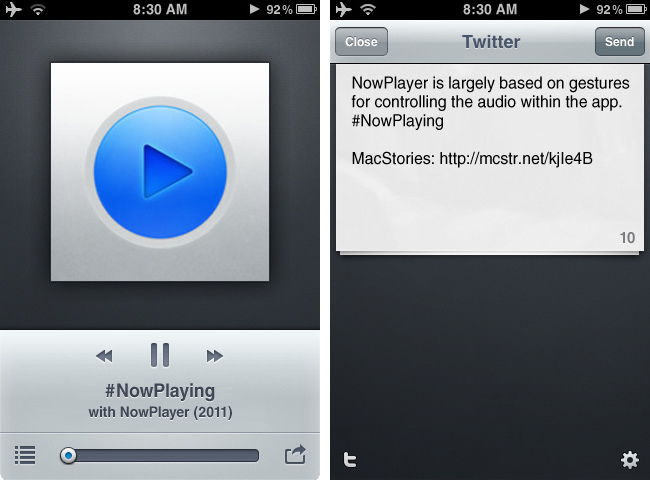
There are many iPhone audio player apps available, yet only a few really stand out. My Artists, which we have reviewed in the past, is one of our favorites and is very feature filled. Notes on artists, links to videos, and lyrics are just some some of the extended features. However, most of the time I don’t need these features and if I’m on AT&T’s stellar EDGE network, many of these features take too long to load on my iPhone.
I jumped on a new beta some time ago from @misecia for an app called NowPlayer. Without ever using it, but only seeing mock-ups on Dribbble, I was very interested. The interface is sexy and every pixel has been placed perfectly. Now, I know that usability is important too, and this app doesn’t fall short in that category either. NowPlayer is largely based on gestures for controlling the audio within the app: you can control your music with swiping or tapping with your finger on screen. These gesture controls are perfect for when you’re exercising or typing up a review and don’t want to look over at your iPhone’s display. The gesture system is totally customizable too: two-finger tap is used to play/pause, but it can be changed to a double tap if you desire; you can then perform a three finger tap to auto-send a tweet, swipe left/right to change tracks, swipe up/down to change the volume, and double tap with two fingers to change shuffle mode. There are a few Easter eggs for extra options, some still haven’t been found! Don’t worry, as there are onscreen controls, too, and they are minimal and look great as well. Read more
My 10 Favorite Apps To Share Content Between iOS and OS X
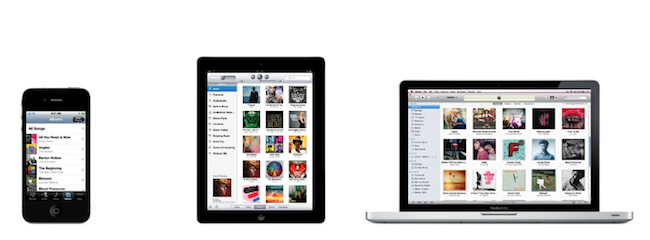
Let’s face it, if you’re a Mac user who also happens to have an iPhone, iPad, or both, chances are you’ve been there before: with two devices in hand and a computer on your desk, how do you share stuff between them? What are the apps that enable you to share content across different devices, simultaneously and perhaps over the Internet as well?
In this post I’ve collected 10 iOS apps that are making my workflow more streamlined and connected on a daily basis, but before I delve deeper into the list I think I should define the “content” from this page’s title and the kind of “stuff” I want (and need) to share. With Lion approaching its final release in July and iCloud set to deliver a state-of-the-art OTA experience for users and developers alike, it seems like Apple has taken the necessary steps to free iOS devices from the need of a cable, building new features aimed at easing the process of sharing content between different machines and devices. Take Lion as an example: AirDrop, a new menu baked into the Finder, will allow Mac users to easily share files and documents with computers (and thus friends) nearby, over a WiFi network. Or, perhaps more importantly, the new iCloud APIs with instant push and cross-platform sync will enable developers to build better applications that take advantage of the cloud to keep their data synced and always up to date with the most recent changes. Whilst services and apps have been syncing content through their own backends for years, it’s the promise of a free iCloud infrastructure from Apple that’s convincing developers to ditch third-party solutions like Dropbox to rewrite their software with iCloud in mind. We’ll see the first result in September.
So what’s the content to share? What’s the stuff I find myself needing to share across devices every day? Links, photos, screenshots, PDFs, notes – you name it: as OS X and iOS become more intertwined on each software update, data needs to easily get out from one app to another. And in spite of an iCloud on the horizon, there hasn’t been a universal solution to share anything between a Mac and an iPhone.
In this article, I take a look at 10 iOS apps and services with some sort of Mac counterparts that have helped me over the past months in getting data out of my iPad and iPhone, and onto my MacBook Pro, iMac, and the cloud in general. Read more
Instagallery Updates to 1.2.2: We Catch Up with all the New Features
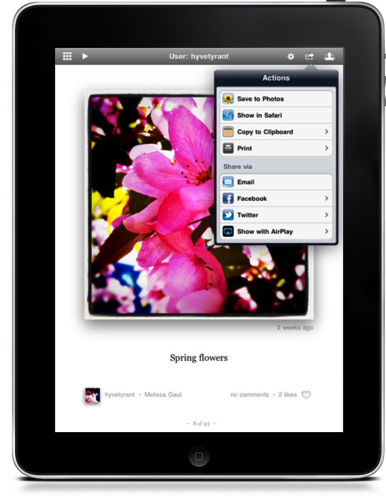
There’s a pair of updates to Instagallery which we first briefly covered in March as an Instagram browser for your iPad, and they bring a ton of functionality to the $1.99 preview-based app that’s sure to excite many Instagram fans.
The update to version 1.2 delivered social sharing to Facebook and Twitter, the ability to open images in Safari, a grid view so you can browse photos quickly, AirPlay so you can get Instagram on your big screen TV, improvements to commenting and tagging, TextExpander support, a history view to browse recent photos, and printing to AirPrint enabled servers amongst of slew of other features.
Yesterday, Instagallery was updated to version 1.2.2 which added translations for foreign languages, author bio and website information, and lots of performance tweaks to keep browsing snappy.
Instagallery is available for $1.99 in the App Store, universally for the iPhone, iPod touch, and iPad.