Posts tagged with "iPad"

A Paintbrush Stylus for iPad Is What Every iArtist Needs

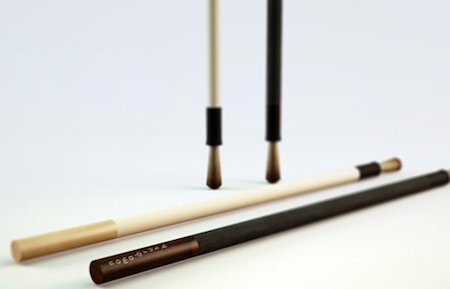
Realized by NomadBrush and made “with a long handle and soft bristles”, this paintbrush stylus looks like a first on the iPad. It’s coming in February, “patent is pending” according to the official teaser website and with this, you should be able to come up with original digital creations like the ones we’ve seen before.

Well, here’s your chance to become an iArtist. Check out the promo video below. [Gizmodo via NomadBrush] Read more


How Do You Like These iPad 2 Mockups?

In the shadow of today’s big announcements regarding the Mac App Store, some leaks, I mean mockups, showed up. Not to detour you from downloading lots of new Mac Apps, but don’t forget the iPad 2 is still hot news.

So MIC Gadget actually thought they had leaked pictures of the next gen iPad (updated with “mockups”). If a small blog can get screenshots of the Mac App Store (and post them), why can’t MIC Gadget get iPad 2 pictures? Well, they’re obviously fake. Anyway, here’s some interesting mockups of the upcoming iPad 2 for your enjoyment and we even included Joy of Tech’s list of iPad 2 “dreamy” expectations (and maybe ours). More after the break. Read more


D-Pad, E-Pad, Badidea-Pad

Hey kids, an iPad Phone! The D-Pad and E-Pad are two small cellphones that somewhat resemble the iPad, except they’re telephones, much smaller, and nothing like Apple’s iPad. They have a 3.5-inch resistive touchscreen, 2.5mm headphone jack, 0.3 MP front-facing camera and 2 MP rear camera with LED flash. Also included for you is dual SIMs, telescoping antenna (how cool will you look?), and a CMMB mobile TV tuner. Manufactured in Shenzhen, China and available now in white or pink 550 Chinese yuan (about $70).

Video and more images after the break

Read more


To The Future! Apple Granted Liquid Metal Patent For Fuel Cell Casing

To The Future! Apple Granted Liquid Metal Patent For Fuel Cell Casing

Apple’s new patent describes “amorphous alloy” collector plates for fuel cells, an electrochemical battery that uses hydrogen to generate electricity. Although the patent doesn’t reference the Liquidmetal trademark, the material is an amorphous alloy or “ metallic glass.”

Last year, Apple signed an exclusive agreement to use the Liquidmetal Technologies’ IP in consumer electronic products. But of course, the ever-secretive company hasn’t hinted at its plans for the material. The possibilites are endless. Liquidmetal is a super lightweight, high-strength, scratch-proof metal that NASA says is “poised to redefine materials science as we know it in the 21st century.”

I don’t think we’ll see anything like this our next iPhone, but the prospect of having a fuel cell iPhone is intriguing. If you thought battery life was excellent now, just imagine not having to charge your iPhone for an entire month. The collector plates enable the chemical reaction that generates power - liquid metal is preferred because of it’s strong qualities as being durable and anti-corrosive.

Permalink


The iPad Dock That’s Also A Projector

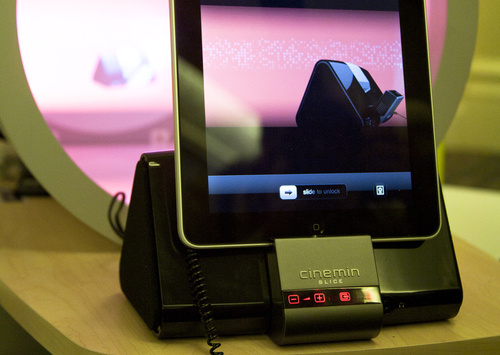
We have seen hundreds, if not thousands, of simple or original stands and dock stations for the iPad. From those that just hold your iPad upright while charging it, to the more sophisticated units that come with additional ports and connections, there’s wide range of possibilities to consider. If you’re looking for an iPad dock that also happens to be a Pico projector, though, you might just consider the WowWee Cinemin Slice.

It’s a dock, but it’s got a projector built in. As you put the iPad in there, the Cinemin Slice will take care of projecting your iPad’s screen wherever you like. Available for pre-order at $429, WowWee says it’s perfect for media and for small groups of friends, where TVs can’t go. The unit has mini-HDMI and AV ports for media players and a VGA ports for PCs and laptops. It supports the 16:9 aspect ratio and it has a resolution of 854 x480. An infrared remote control is included in the package, together with 5 docking trays for iOS devices.

If you’re thinking about getting one, head over WowWee’s website. [Gizmodo via WowWee]


Joby’s GorillaMobile Yogi Gives Your iPad Legs

The iPad is only as versatile as a flat piece of cardboard when it comes to holding or propping the device against your pillow. While many cases have hit the market in the past month in an attempt to give our iPads some additional ergonomic superpowers, Joby has stepped outside of the box by bringing our favorite camera tripod, the GorillaPod, to our iPads. Via a slotted sleeve that can accept a pair of curvy legs in portrait or landscape orientation, Joby promises your iPad is adaptable to just about anything. While I wouldn’t be so ballsy to leave my iPad hanging from a cupboard (if that things hits the floor…), but this would really great for propping on the arm of a chair, in the backseat of a car, or even wrapping it around your forearm as an anti-little-brother mechanism. You can check out the video above for a slightly creepy product demo of Joby’s latest creation, or you can skip past the nonense and buy it direct for $49.95.

[Joby GorillaMobile Yogi via Gizmodo]


Remote Conductor: All-in-One OS X Controller for iPad

If you’re that kind of user who has set up a home entertainment system based on a machine running OS X, then probably you’re always looking for the next big thing in remote control. Several users, instead of buying a dedicated set-top box like an Apple TV or a Roku Player, prefer to get a relatively entry-level machine like a Mac Mini and route all their music, movies and photos through it. Because entertainment aside, the thing also happens to be a computer that can backup itself on a daily basis and serve content to other computers or iOS devices in the house. Just think of all the iTunes libraries or Plex installations shared through Mac Minis or, at best, Mac Pros that are powerful enough to be both desktop machines and entertainment systems for when the work is done and all you need is a good movie. A Mac computer set for such tasks, however, needs a good remote control system because, frankly, you just can’t use a mouse and keyboard on your couch.

Sure, you could use an Apple Remote and get most of your things done without having to lift a finger, but what about all those times when you want to use the stuff a computer also comes with – you know, like a web browser and high-def Youtube videos scaled to take all your TV screen? After all, even if geared towards home entertainment purposes, it’s a computer. And it needs to be remotely controlled. You could buy a VNC app like Screens for your iPhone and iPad, and control the computer that’s running on the TV in front of you with the comfort of also having it in your hands, in a portable app. Perhaps, though, you don’t need to have its screen mirrored on an iOS device and you just want a remote app that acts like a touchpad and lets you quickly launch and quit apps, and check on running ones.

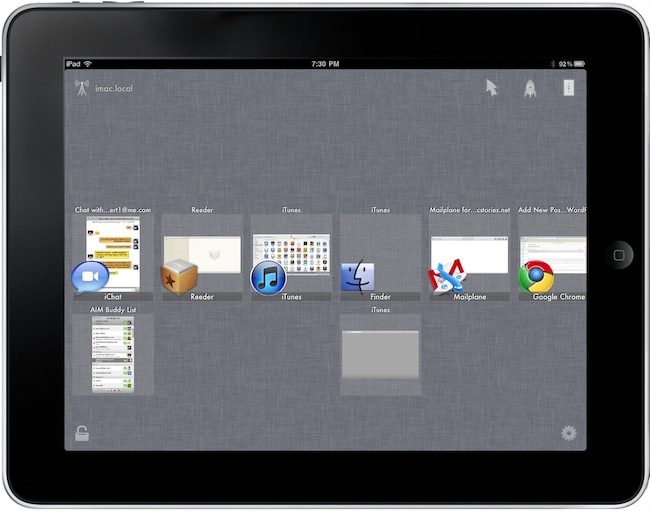
Remote Conductor, a new iPad app by m3me, aims at reinventing the “remote controlling” app genre by combining in a single package features like a touchpad, multi-touch gestures support and some sort of application launcher and OS X-like Exposè to let you easily and effortlessly control your Mac’s screen from anywhere in your room using an iPad. Read more