Posts tagged with "iPad"

Griffin Set to Release Crayola ColorStudio™ HD for iPad

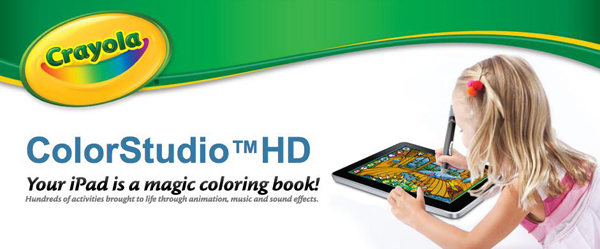
Griffin Technology, with a special partnership with Crayola, has announced the new Crayola ColorStudio HD. It’s a new iPad accessory that uses the “iMarker”, a AA battery-powered digital stylus, plus the Crayola ColorStudio HD app, to allows young artists to color and interact with “live” animated coloring books. Printing is available in-app on iPads running iOS 4.2 or later. Maybe this is one reason to actually use AirPrint, then you can hang your kids’ works of art on your fridgerators. Have a little Picasso on your hands? Shared them via e-mail or Facebook. The Crayola ColorStudio HD will be available in Spring 2011 for $30.

Looks like my son will be getting a great birthday present (as long as he shares with his dad and little sister)! Read more


Fling, A Tactile Game Controller for the iPad

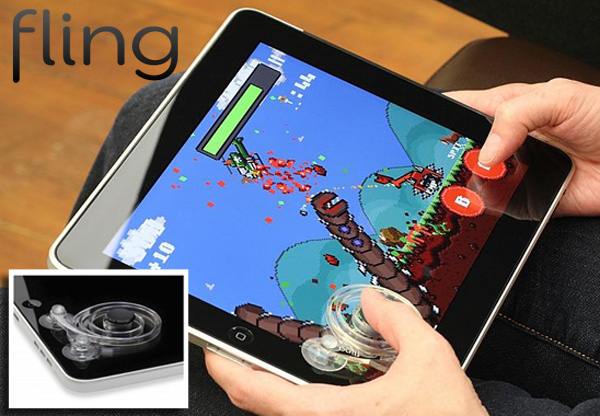
One of the main criticisms of gaming on the iPad (or any iOS device) is that there is no tactile buttons for games that feature a directional pad, or virtual joystick; one example is Super Mega Worm. iOS Gamers rejoice! Ten One Designs came out with Fling, a tactile game controller for the iPad.

Snap Fling onto the iPad glass using the suction cups and starts gaming. It’s clear plastic, offering only a slight obstructed view of what’s underneath. The part that actually touches the screen is made of a conductive material, similar to your finger tips.

It won’t work with all your games, but for only $25 it could make your gaming experince a little more rich. The Fling preorder opens on January 6 so get your credit card ready.

Video and FAQ after the break. Read more


ClipTouch, Final Cut Server Client for iPad

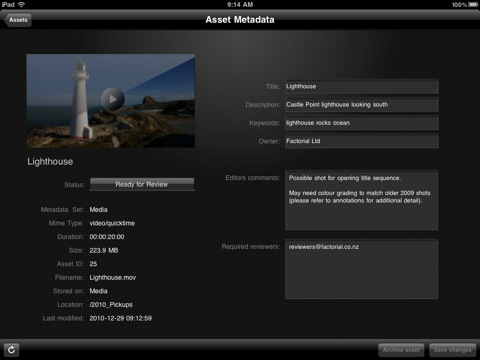
With an update for the Final Cut suite rumored to be released around March or early April, a new client for Final Cut Server showed up in the App Store. And I believe this is the first native Final Cut Server client specifically designed for the iPad – ClipTouch by Factorial. ClipTouch (which requires iOS 4.2, Final Cut Server v1.5.1 and access to open ports 8821 and 8826) works “out of the box” by giving you access to all your video assets stored in FCS, browse and collaborate on your media taking advantage of the iPad’s large screen and multi-touch functionalities.

You can use the iPad app instead of a review workstation to access your library over local or remote WiFi, 3G and VPN, download and view clip proxies, change the default asset’s metadata and add annotations. ClipTouch works with the standard format of clip proxies, but a compressor is available to achieve optimal results. A search feature is available, together with the possibility to clip the timecode display.

ClipTouch for iPad is available at $14.99 in the App Store. More screenshots below. Read more


Music Mashup with iPhone, iPad and iMovie [Video]

In 2010 we saw some amazing videos of songs played and, at best, created using only iOS devices. Does the new Gorillaz album sound familiar to you? That’s because it was entirely created with an iPad and some apps. iOS devices, also thanks to full-featured MIDI support introduced in iOS 4.2, now provide a feasible alternative to portable, digital music making and mixing.

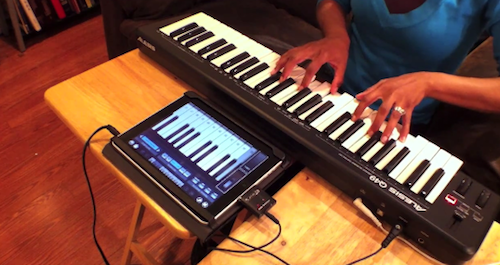
Ellen Hilton wanted to show her friends and family that it was possible to do music with an iPad and a MIDI external device. So she took two of her favorite songs – “Hey Soul Sister” and “New Soul” – mashed them up and played along with her iPad. She filmed the performance using Pro Camera on the iPhone, edited the video using iMovie ‘11. The session was recorded by running everything into Cubase. The result is fun and definitely worth a look.

The apps used in the video include Pianist Pro, NanoStudio, Percussions and BeBot. If there’s anything Steve Jobs should feature on stage at the next iPad keynote, that should be about people using the iPad to make music. Read more


MacStories’ 2010 Roundup: Top 8 Apps for Kids

Welcome to another MacStories’ 2010 Roundup! In this new series, we collect the best apps released in 2010 for the Mac, iPhone and iPad — apps we have or will feature here on MacStories. Only the best apps, both free and paid. Apps you shouldn’t miss.

Do your kids often ask you do play with your iPads or iPhones? I know my 3.5 year old son does, he’s always asking me! Entertain your little ones with these iOS apps and games, great for toddlers, preschoolers, and big kids at heart.

Why 8? Because we tried and tried to narrow it down to 5 but we couldn’t do it! So, we have collected our top 8 apps for kids released this year. We think they are great apps you should go install right now. We could have included more, but we wanted to bring some of the best to your attention, not just the “pretty good” ones.

So jump after the break, and check our Top 8 list of kid’s apps for iOS.

Read more