
Posts tagged with "iPad"

Watercolor Painting On The Apple Canvas

When Apple sent out the invitations for its iPad announcement even in January, the email included a picture of a white canvas with lots of paint splattered on it. The invitation said “come see our latest creation”, and it eventually turned out to be about the iPad – the device we know and love today.

Several users and bloggers speculated “Apple Canvas” might be a good name for the rumored tablet back then. Of course it didn’t happen, but we liked the concept. And now it all comes back to life again, thanks to an app called Auryn Ink that will turn the iPad’s screen into a watercolor painting canvas.

The app doesn’t come with the best UI elements and menus ever (they’re actually pretty ugly and need a lot of refinements), but the functionality is there. Auryn Ink lets you choose between different canvas types, tip shapes and bristles, adjust the brush size and even set the fade of ink as you’re brushing. You can set different watercolors, adjust the thickness of brushes and apply pressure effects as well as speed of gestures.

Auryn Ink hasn’t got the most beautiful UI of the year but I’m sure real artists will make this work for them to come up with stunning creations. Plus, the app is free in the App Store.


First Infinity Blade Update Now Available

First Infinity Blade Update Now Available

- 5 new Swords, 5 new Shields, 5 new Helmets, and 1 new set of Armor - Collect and Master them all!

- Maximum Character Level raised from 40 to 45!

- New Enemy - The MARROW FIEND! This creature is rumored to devour its victims, taking their bones for its blade and shield…

- Because it’s awesome, you can now listen to your own music while playing INFINITY BLADE!

- Optimizations and minor Bug fixes

Infinity Blade 1.1 is available here. I can’t wait for multiplayer mode to come in the next version.

Permalink

Huffington Post Releases Completely Redesigned iPad App

If you’re loyal Huffington Post readers, happen to have an iPad and don’t mind downloading free apps from the App Store (why would you?), perhaps you’d like to take a look at the just released Huffington Post iPad app. The HuffPo’s iPad client has been around for a while, actually. Indeed, version 2.0 is a major redesign of the app aimed at taking it a step further, following the latest trends in iPad app development.

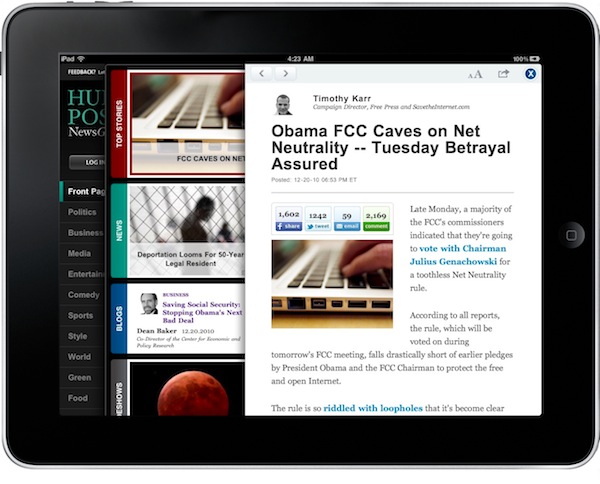
The app has this visually rich star page with a navigation sidebar on the left, main categories (Top Stories, News, Blogs, Slideshows, Popular) on the right. You can log in your account using a box in the upper left corner. You can browse the categories on the right by swiping your finger over the featured headlines.

As you tap on an article, a clean web view slides in allowing you to read without leaving the homepage. The design is nice and elegant. You can share a post, increase or decrease the font’s size, but you can go full-screen – unlike Twitter for iPad which features a similar concept but allows you to open web views in full-screen mode. Slideshows have a similar clean (although much darker) design, too.

Huffington Post for iPad is available for free in the App Store. More screenshots below. Read more


Sorted, Simple To-Do App for iPad, Gets A Lot Better With Version 2.0

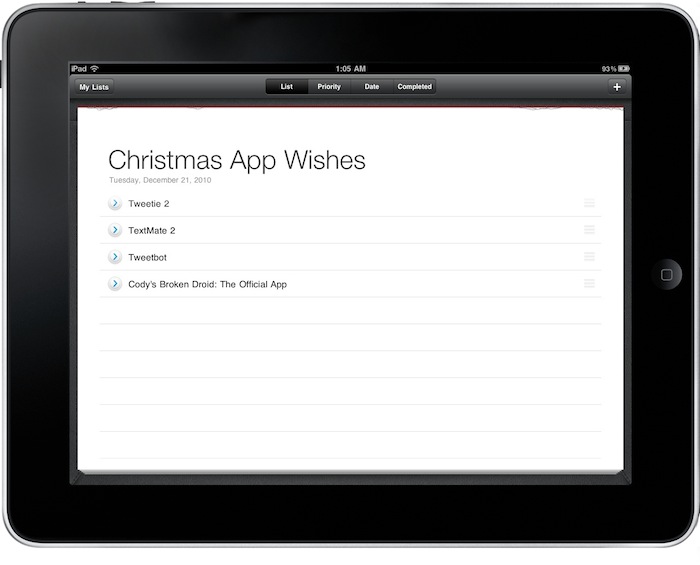
Sorted is a very simple (and beautiful) to-do / list app for the iPad we first reviewed in May. The iPad was “the new hot thing” back then, not so many productivity apps were available and Things was my GTD app of choice. Sorted managed to stand out because it was elegant and provided a new way to simple list creation and task management on the tablet. It wasn’t meant for the average GTD power user still it captured the hearts of many hardcore users by being the “alternative” to more popular software like the aforementioned Things or, months later, OmniFocus for iPad.

I liked Sorted because it was the app I used to create lists out of my daily GTD environment. In fact, I still have the app on my iPad. But it’s a lot better now, as version 2.0 was released in the App Store a couple of days ago and it’s really good. Read more


Textie Hits 1.1, Now For Both iPhone & iPad

One my favorite text messaging solutions on the iPod touch is Textie, and it’s just hit version 1.1. Bringing a myriad of customization features such as custom chat bubbles and font sizes, photo previews, and the ability to see which of your friends have Textie, free text messaging is getting a much needed facelift. Not on a phone? Textie now allows you to initialize Facetime, perfect for folks like me who opt for the free-model of an iPod touch communication device. It really is an excellent companion for the Facetime icon on your homescreen, and you can download the latest version in the iTunes app store right now.


Dungeon Defenders Will Bring Android & PC Cross-Platform Multiplayer to iOS

Dungeon Defenders (universal, $2.99) is a recently release game for iPhone and iPad that it’s like a mix between Diablo and the classic Tower Defense; it’s got nice graphics and loot system but apparently gets lost when it comes down to UI (lots of huge buttons on screen) and 3D camera controls. In spite of the flaws of the first version, we should all look forward to the next update. Dropping sometime next year, an updated Dungeon Defenders will bring proper iOS, PC and Android cross-platform online multiplayer.

Several developers tried to follow the road of mobile and desktop cross-platform online battling before, and most of them failed. In the video below, though, you can see the DD developers playing the same game at the same time on an iPad, a PC and two other Android tablets. It all looks smooth and fast. It’s cross-platform multiplayer between the desktop and two different mobile OSes. Pretty intriguing.

We, too, do wonder whether the game’s servers will actually hold up once the update goes live, but right now – it looks perfect. iOS, PC and Android running the same game online? Don’t tell this doesn’t make you excited. At least a bit. [via TouchArcade] Read more