


When I’m not in my boxer shorts watching Unboxing Porn on Revision3 after the sun goes down, I’m relaxing in my boxer shorts browsing CollegeHumor. Thanks to the iPad, that awkward relationship you have with Jake and Amir is now much more intimate and down right multi-touchy.
Posts tagged with "iPad"
Bust A Gut With CollegeHumor For The iPad
USB, SD and Micro SD In A Single iPad Camera Connection Kit
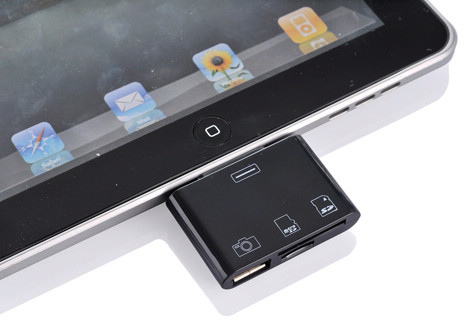
Feeling a little disconnected from your iPad lately? Do you think you could use some extra gadgets to make sure your favorite tablet can communicate with any other device in your room?
Give this 3-in-1 camera connection kit for iPad a try: it features USB, SD and Micro SD connection in a single (and unofficial) dongle that can be yours for just $25 from M.I.C. Gadget. Too bad it’ll be available “soon”.
While the idea sounds definitely interesting, I do wonder how many devices will be able to work with the connection kit on iOS 4.2. Granted, Apple doesn’t want you to use keyboards and Guitar Hero mics with the Camera Connection Kit, but I bought one yesterday and a simple 8GB USB key is not working on it thanks to iOS 4.2. Perhaps hackers will find a way to beam more power to the Camera Connection Kit soon. [via Gizmodo]
#MacStoriesDeals - Tuesday

In case you missed our announcement yesterday, we started another new feature, and it’s called #MacStoriesDeals. We’ll try our best to update the list throughout each day.
Here’s some great deals for today on iOS & Mac apps that are on sale for a limited time, so get ‘em while they’re hot!
The First iAd for iPad Is Coming This Afternoon [Update: Screenshots]

According to AdAge, Apple will launch its first iAd for the iPad later today. The iAd will feature Disney’s blockbuster movie “Tron Legacy” and, according to an Apple spokesperson, it’ll be the only iAd to appear on the tablet this year.
The format, designed to maximize the ad potential of Apple’s tablet computer, will be launched widely in early 2011 when other ads start flowing onto the platform.
Like its iPhone and iPod Touch predecessors, the first iPad iAd is chock-full of the rich graphics, touch navigation and video native to apps.
The full-screen ad will allow users to enjoy 10 minutes of footage, use a theater locator to check on where they can go see Tron: Legacy, preview the soundtrack in-ad with the possibility to directly download it from iTunes – again, without leaving the ad. The preview should go live in a few hours in apps such as TV Guide which was updated on November 30th to vaguely include support for iOS 4.2. I just fired up the app and the iAd isn’t showing up yet.
In November, Apple announced that it would bring iPhone’s iAds to Europe starting with an exclusive Renault campaign to showcase the Twizy car. Apple has also teamed up with brand agency Dentsu to bring iAd to Japan in 2011.
Update: Screenshots of the Tron: Legacy iAd below. Read more
Google Voice App Now Works On The iPad and iPod Touch

One month after the release of the official Google Voice app in the App Store, here comes an updated version that works both on the iPad and iPod Touch. Announced by Google a few minutes ago, the new Google Voice app has been updated to work on non-iPhone devices allowing you to send and receive text messages. As you can guess, no – you can’t make cellular calls on the iPod Touch.
Still, the Google Voice team introduced a new functionality called Click2Call which lets you initiate calls with your phones. On your iPad or iPod Touch, tap on the “call” button and select which phone you want to ring. It’s a very easy way to let Google Voice call your phone and then connect the call to a contact’s number.
Among other improvements and bug fixes, text forwarding is now disabled by default when you activate push notifications so you don’t get multiple and annoying dialogue boxes. You can now set a “Do Not Disturb” status in the settings, access you Address Book contacts from a built-in Contacts tab, tap & hold on inbox messages to delete or archive. Nice. I’m pretty sure MacStories’ own Cody Fink (who’s a die-hard iPod Touch user) is going to love this.
Google Voice app is, as usual, free in the App Store.
iPad Portraits: The Woz

David Newman is one of the most talented artists that use the iPad as a canvas for their creations. We covered David’s impressive portraits before, but his latest is just too great and geeky to not deserve another spot here. I mean, it’s the Woz!
That’s right, a portrait of Steve Wozniak while using a MacBook with his custom white iPhone 4 sitting on a Glif. The portrait was entirely realized on an iPad and Steve set it as his new profile picture on Facebook. It can’t get any geekier than this.
Check out the animation video of the portrait below. As usual, Newman doesn’t disappoint.[via RazorianFly] Read more
CNN Releases Official iPad App

CNN released its first official app for the iPad earlier today, and it’s a solid first iteration on the tablet. It’s available now for free in the App Store.
The CNN app is meant to let you enjoy the full CNN experience with stories, insights and videos directly on your iPad. Being the iPad both a personal and communal device, the developers over at CNN thought it would be appropriate to build sharing features and a commenting system right into the app. You can share stories on Facebook and Twitter, send them via email, save a story for offline viewing (as you can guess, very useful on iPad WiFi devices). Read more
Fotopedia Heritage 3.0: Instant Slideshows, Suggestions, iOS 4.2 Support

Fotopedia Heritage is one of those iOS apps (universal, free) that keeps on getting better on each release. First they released a 1.0 version that aimed at becoming the digital encyclopedia for humanity. Version 2.0 added support for the Retina Display, 25,000 more photos and shuffle mode. Today, with the release of Fotopedia 3.0, the developers re-imagined the app from the ground up and redesigned the whole experience to make it more intuitive, fast and beautiful. Read more
MacStories Giveaway: Win A Copy of Screens for iPhone & iPad
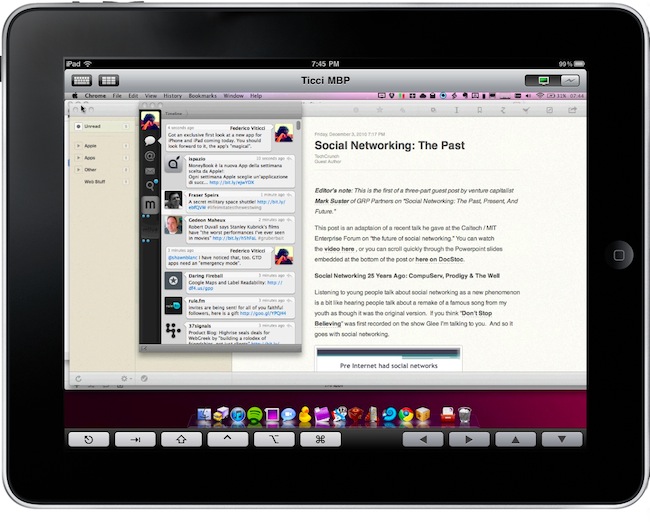
Screens is an excellent new VNC client by Edovia which, unlike other similar apps in the App Store, it’s not aimed at letting you move a cursor on your computer through the iPhone and iPad. It’s an app specifically meant to take advantage of the platform it runs on – iOS – so that you can actually touch your computer remotely.
From my review:
The “simple approach” doesn’t stop at touch controls, however. Once you’re controlling OS X on your device and you’d like to do some actual stuff with it, Screens offer two separate keyboards to execute most of the commands you know and love on the Mac. The first keyboard is a standard iOS keyboard with an additional bar on top which allows you to navigate using the arrow keys, or press Mac-only keys like Command and Control. Those buttons stay pressed until you tap on them again — useful. The second keyboard, though, is much more functional: it contains the same Mac-only and arrow keys on top, but there are no letters at the bottom. Instead, you get these “action buttons” that let you perform tasks that would require a series of taps and dialogue boxes instead. For instance, you can cut, copy, minimize, log out and activate Spolight with a single tap. Huge time saver.
We have 5 copies of Screens to give away to lucky MacStories readers. Check out the giveaway rules below (it ends tomorrow!), and if you can’t wait the app is available here. Read more