Posts tagged with "iPad"

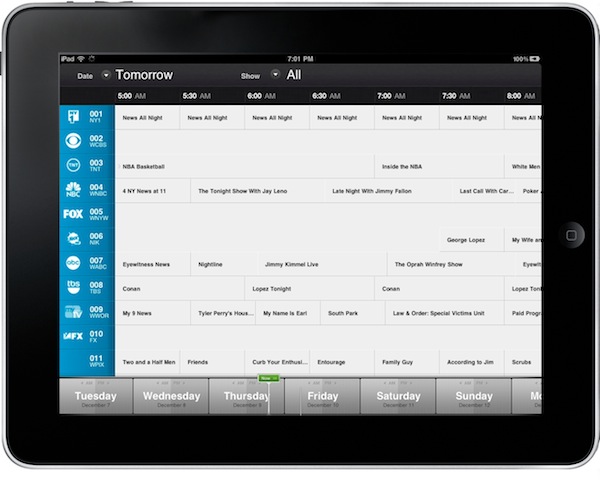
A Beautiful TV Guide For Your iPhone and iPad

I’m thankful for the possibilities offered by today’s technologies, which allow me to ditch the old ways of doing…stuff for more pleasant, rich, interactive and beautiful experiences. Apple’s devices and apps in the App Store surely played a great role in this digital revolution: we don’t buy specific items anymore because there’s an app for that. The last time you bought a radio player? An actual map? A point & shoot camera? Exactly.

Still, there was no “last time” for me when it comes to TV guides. I never bought those magazines that offered monthly and weekly views and summaries of what would be in television – I  just checked TV programming on the internet. Or on my local newspaper. But now I’m ready to step my game up, with an app simply called “TV” and available at .99 cents in the App Store for iPhone and iPad. It’s uncluttered, beautiful, elegant and, finally, it’s something that deeply integrates a TV guide with the information coming from the internet. Read more

Apple Posts The Best iPhone & iPad Apps of 2010

Just like every year, the iTunes Rewind section in the iTunes Store lists the best music, movies, TV shows, podcasts and audiobooks of 2010. This year’s iTunes Rewind is available here, and it includes a huge selection of apps, too.

As you can see in the screenshot above, Apple is showcasing Hipstamatic, Angry Birds, Flipboard and Plants Vs. Zombies in the iTunes Rewind 2010 main page. As you click through, you can check out the “Hot Trends” in iPhone and iPad apps in 2010 – and many more apps are listed there.

The “Hot Trends” contains other sub-sections, such as “Shoot, Edit, Share” (iTunes) which features apps like Instagram and Path. Read more


“iBand” Plays Christmas Songs With iPhones and iPads [Video]

Here we are again, featuring a band that doesn’t make music with actual instruments, but decided to go the iOS way instead. The “iBand” from the North Point Community Church (website), indeed, played 3 Christmas songs (Carol of the Bells, Rockin’ Around the Christmas Tree and Feliz Navidad) using only iPhone and iPad apps.

The result, as you can see in the video embedded below, is fantastic. The songs turned out great when played through the apps, and the members of the iBand actually had fun when performing on stage all together. Crowd was cheering, the video is going viral on Youtube – all thanks to the power of quality music making apps released in the App Store these past two years.

Reid Greven from North Point writes on his personal blog:

Jared arranged “Rockin’ Around the Christmas Tree” and “Feliz Navidad” using the apps, and creating a demo by multitracking them in Apple’s Logic software (though any Digital Audio Workstation would do the trick).

Jared, Eddie Kirkland and I arranged the first song, “Carol of the Bells“. It’s amazing what you come up with when you sit in a room, hook 3 iPhones up to some speakers, and get adventurous!

The apps used in the performance include SoundGrid, Guitarist, iGog, Pianist and Percussions. Back in October we featured New York-based band Atomic Tom, performing a song using only iPhone apps.

Once again, I’m amazed by the results some people can accomplish by solely relying on modern Apple devices and applications. Check out the video below, then tweet it. It has to go viral.

Read more


Shocker: iPad 2 Won’t Use AMOLED

As noted by 9to5mac, Digitimes published yet another report last night about the next generation iPad – or, “iPad 2” – claiming that Taiwan-based company Coretronic has been selected to supply the backlight units (BLUs) for the new device to Chimei Innolux and LG Display.

The second generation iPad is expected to hit the market at the end of the first quarter of 2011 and suppliers in the supply chain are estimated to start shipments in the first quarter.

It is understood that Coretronic is the only BLU supplier of CMI for iPad 2, while LG Display is getting iPad 2 BLUs from Coretronic and Radiant Opto-Electronics.

So according to this new report, the next iPad won’t use the popular AMOLED screens (well, at least popular on Android devices thanks to Samsung’s “Super AMOLED” units) but will keep relying on standard LCDs instead.

Surprised, huh? Don’t be: Apple never really liked AMOLED screens, and with the iPhone 4 they decided to deploy their own LCD solution with extremely high resolution and call it “Retina Display”. The iPad also comes with IPS (in-plane switching) technology, which allows for improved viewing angles and picture quality.

The real question is: will the iPad 2 have some sort of Retina resolution?


Infinity Blade Now Available In The App Store - Not The U.S. One Yet

Infinity Blade is one of the most anticipated games for iPhone and iPad to hit the App Store this holiday season. Demoed on stage at Apple’s event back in September and released as a tech demo known as Epic Citadel back then, the game is built on top of the Unreal Engine 3 for iOS devices and it shows impressive graphics and animations. Apparently, Steve Jobs couldn’t believe the game was running on an iPhone when he first saw it either.

As previously confirmed in November, the game changed its name from Project Sword to Infinity Blade and was set to come out in December. TouchArcade also revealed that the app would be released on December 9th at $5.99, but we just took a look inside the New Zealand App Store and found out that, as usual, iTunes started propagating the app on its own due to time zone differences.

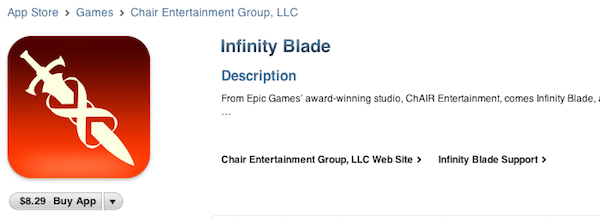
Infinity Blade is available at $8.29 over there, and you can take a look at the screenshots and full description from iTunes below. The app isn’t available in other stores for now, but we believe it’ll start propagating in European ones in 10 hours. The app is universal and runs on iPhone 3GS, iPhone 4, iPad, iPod Touch 3, or iPod Touch 4 – with Retina Display-ready graphics optimized for the iPhone 4.  From what we can read in iTunes, it seems like there will be customization possibilities, a “dynamic single player campaign” and support for Game Center leaderboards and achievements.

We’ll take a deeper look at the game once it becomes available in the U.S. Store. Read more


Hardware Orientation Lock for iPad Returns … As a Case

MacLocks just added what it calls “The First iPad Security Cable Lock”, the iPad Lock - a clear plastic iPad case that can be closed with a lock (same locking mechanism as a bike lock) and tethered to whatever your heart desires with a coated steel cable. In Apple-fashion, “This makes the iPad Lock flexible and light, not to mention stylish, so you can easily pack it in your bag and take it with you wherever you go!” Once it’s secured, the only way to remove your iPad is with a key. The case itself is $39.95, or you can purchase the bundle (case & lock) from MacLocks for $64.95.

Read more


Watch Flash Videos On iPhone & iPad, No Jailbreak or Apps Required

Most of web video has been optimized to display just fine on iOS devices, but it’s still annoying to open an article from your favorite blog and find out that the author didn’t use Vimeo’s updated embed code compatible with the iPhone and iPad. Vimeo offers a new embed technology to support iOS devices, but it’s not turned on by default. Just like Vimeo, other services such as Flickr, Megavideo and Dailymotion sometimes struggle in offering video embeds capable of being displayed on Apple’s mobile devices.

The Skyfire browser has been making the rounds recently: an iPhone app that can take any Flash video from any web page, and convert it in seconds to an HTML5-based video you can watch on the iPhone. The app is paid though, and perhaps many users don’t need all of its functionalities. Then, some developers even released tweaks and hacks in Cydia to activate Flash on iOS – with very disappointing results, I have to say. Put simply: either you jailbreak your device to sorta gain access to some Flash content on the web, or you buy Skyfire to convert Flash videos. But there’s no easy way built in Mobile Safari to play that Vimeo embed on the iPhone.

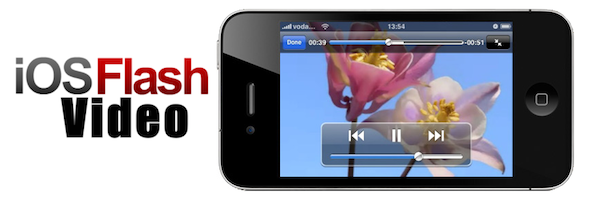
This is changing today, thanks to this neat bookmarklet called iOSFlashVideo I found on iSpazio (Italian) and installed on my iPhone and iPad a few minutes ago. With just the tap on the bookmarks bar, you’ll be able to instantly watch videos from Dailymotion, Flickr Video, MegaVideo and Vimeo through the iOS standard media viewer. It’s very simple to install. Read more


Ego for iPad Updated for iOS 4.2 Multitasking, Now Available at $2.99

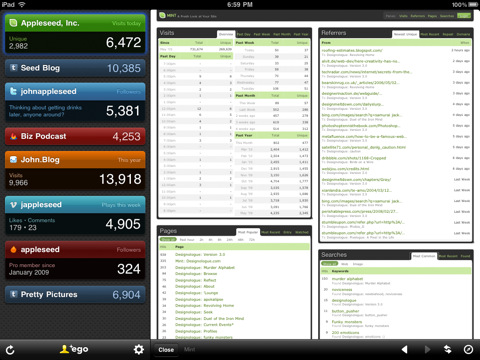
Ego is the best iOS app to check on stats coming from Mint, Twitter, RSS, Vimeo and a variety of other online services. By representing stats as small widgets on a dark background, Ego has managed to become one of my most launched apps both on the iPhone and ipad.

An update to the iPad version (our review) was released a few minutes ago. Version 1.0.6 includes iOS 4.2 compatibility and support for multi-tasking (fast app switching), plus various bug fixes to address Twitter auto-login issues and the detail view on iOS 4.2.

But what’s really cool about this update is that Ego for iPad is now available at $2.99 in the App Store. It’s not a sale, it’s the new price. Go buy it now.


MacStories Giveaway: Win A Copy of djay for iPad and Mac

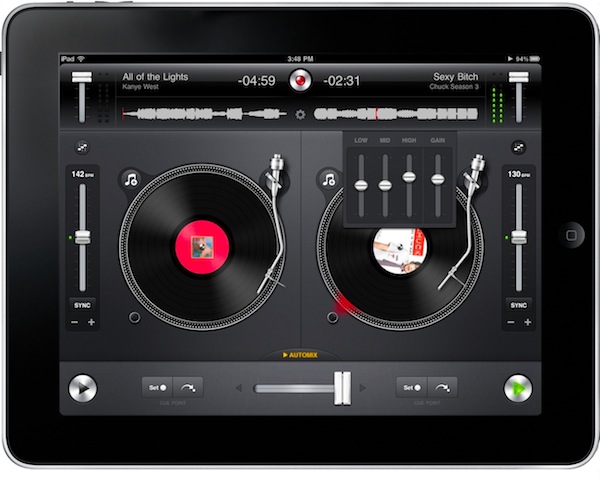
djay by Algoriddim is an excellent music making / mixing software for OS X that recently made its way to the iPad, with an app that takes full advantage of the new features introduced in iOS 4.2. From our review:

…the great value of djay lies in its own software nature: it’s not a complicated piece of hardware you have to set up and manually wire, it’s a great app that can be used in professional environments and by casual users like me at the same time. I’m sure “pro” users will delve deeper into the app to test all the impressive tech that’s behind it, but for someone like me — who’s not really a DJ nor does know all the terminology necessary to understand all the features of djay — this is just so cool, and useful.

We have two copies of djay to give away: one for the iPad, one for the Mac. Check out the giveaway rules below. Good luck! Read more