This Week's Sponsor:

Turbulence Forecast

Know before you go. Get detailed turbulence forecasts for your exact route, now available 5 days in advance.


Posts tagged with "iPad"

Camera Connection Kit on iOS 4.2 No Longer Powers Some USB Devices - Bug or Feature?

When Apple unveiled the iPad, they also announced they would release a dongle called Camera Connection Kit to allow users to connect digital cameras and SD cards to their iPads. When the Camera Connection Kit became available, users found out that it was possible to plug a series of USB devices, keyboards (even Apple’s ones) and microphones in the iPad. The device running the old iOS 3.2 recognized the peripherals just fine.

As reported by Mark Gurman at 9to5mac last night, though, it seems like there is a bug on the recently released iOS 4.2 that prevents devices requiring more than 20mA of power to be connected to the iPad:

The essence of the issue with the connection kit and iOS 4.2 is that connected devices that require power of more than 20mA will no longer work. That means that many USB keyboards (Apple’s included) will no longer work with the iPad, as well as USB flash drives. When the user connects a device that is not self-powered and requires more than 20mA of power from the iPad they get the following alert: “The connected USB device requires too much power.
Read more


EA Gives My Friends One More Reason To Steal My iPad: Monopoly Classic

My closest friends are addicted to two things in this world: Monopoly and my iPad. Either they play the board game, or they grab my beloved tablet to play Fruit Ninja HD. I can tell you this happens every week, on a regular basis, and the only advantage of the iPad is that the battery eventually dies. Otherwise, they would play all night trying to break my girlfriend’s 912 points record at Fruit Ninja’s arcade mode. They’re currently stuck somewhere around 810.

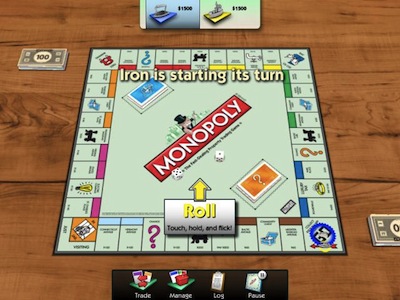
The problem is, anyway, those two addictions will soon merge into one because of Electronic Arts, which is bringing Monopoly to the iPad. The actual Monopoly, the real one – in fact, the game will be released as “Monopoly Classic for iPad” later this month. Just before Christmas. Oh boy. Read more


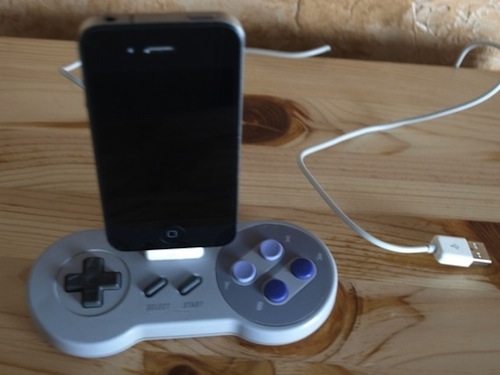
Modded SNES Controller and Nintendo 64 Become iPhone and iPad Docks

In what could be described as a pretty surprising turn of events, Nintendo now considers Apple the biggest threat to its mobile gaming dominance. Etsy user Geekunique, however, wants to bring some love back between Cupertino and Kyoto and find a way to let old Nintendo consoles and modern iOS devices play nice together. Geekunique, in fact, modded an old SNES controller and a Nintendo 64 to become iPhone and iPad docks, respectively.

It seems pretty easy to cut a hole in the controller and place an iPhone dock connector in there but hey – you can avoid the trouble and buy these things now at Etsy. If you think you really need them, be quick: I guess they’ll be sold out pretty soon.

[via TUAW]


Primo Power Core - A Battery Pack For All

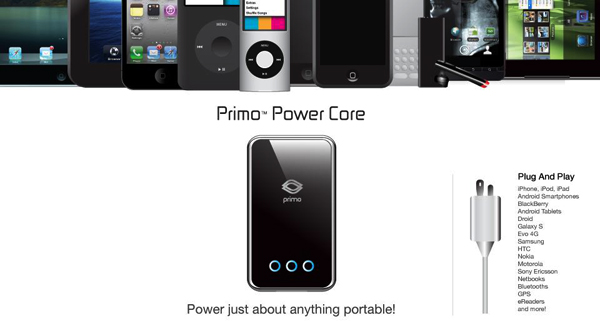
PhoneSuit has just released a new accessory that works for any of your iDevices called the Primo Power Core Battery Back. The Primo Power Core is a “personal, portable, pocket-sized power plant”. It has an impressive 8200mAh capacity battery in a small, lightweight package and enough power to fully charge most mobile devices multiple times on a single charge. The Primo Power Core features automatic amp-switching technology so that your iPad, iPhone, iPod Touch, Classic, Nano or other competing devices are charging at the fastest rates possible. Plug it in to extend movie watching, music or podcast listening, surfing the web, or playing video games.

Read more


MacStories Preview: Screens, New VNC Client for iPhone and iPad

When the iPad came out in April, there was a category of apps I was looking forward to trying on the tablet: VNC clients. Those apps that allow you to connect to your Mac using OS X default sharing capabilities, enabling you to mirror your computer’s screen on an external device – such as the iPad, indeed. I got my iPad, and soon after that I installed iTeleport on it.

I’ve been using iTeleport on a daily basis since then to check on my computer when using the iPad in another room – usually the living room –  to change songs in iTunes, quickly move files to Dropbox and stuff like that. iTeleport is a fast and stable application, and it also comes with a feature that lets you connect over 3G routing the computer through a Google Account. Using a computer remotely over 3G isn’t the best experience you can get, but it works fairly well to start downloads and trigger actions on the go.

A few weeks ago Luc Vandal from Edovia contacted me and asked me if I’d be interested in trying a new VNC client they had been working on for months. I said yes, and now the app is basically ready for App Store submission. I’m running a final version of the app, the same that Edovia will submit to the App Store.

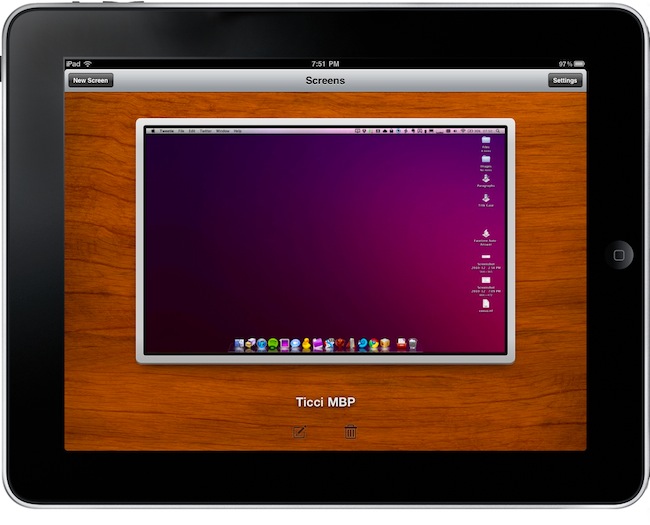
Screens by Edovia has become the best VNC app I’ve ever run on my iPhone and iPad. Read more


iPad At The House of Representatives

iPad At The House of Representatives

Rep. Henry Cuellar, Democratic congressman, has an iPad. He uses it with an app to check on Congress’ information, and he’s also running a teleprompter on it. He says he’s not the only one:

I’m always looking for the newest technology out there and I’ve done that for many, many years. The iPad is just one of those fabulous pieces of equipment that’s available out there. First thing I do in the morning is get my cup of coffee and start reading the papers. … And at night, before I go to bed, I check my last e-mails and check to see if there’s any new stories online.”

He says he’s not the only one toting the Apple gadget: “I’ve seen a couple of other members that have their iPads.

iPads were also spotted at the White House.

Permalink

Fruit Ninja HD: Now With Online Multiplayer and Game Center Support

One of my favorite iPad games to date, and the reason why I basically can’t use the iPad over the weekend (my friends regularly come to my place to grab it and play), was updated yesterday to include full Game Center support and online multiplayer.

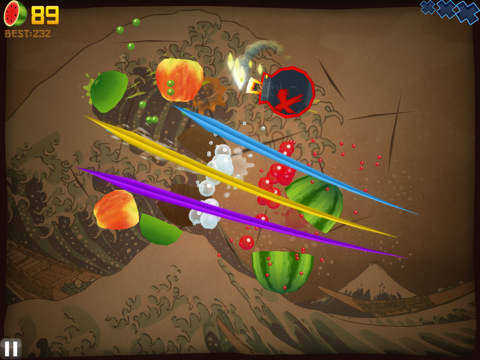
Fruit Ninja HD, the massive hit by Halfbrick Studios which consists in slicing fruits with your fingers, now allows you to play online with a friend – all you have to do is avoid your opponent’s fruit. Sounds like fun, can’t wait to try it. The new update also brings Game Center support with Leaderboards and Achievements.

Fruit Ninja HD is available at $4.99 in the App Store and it’s totally worth your money. Version 1.1.1 changelog embedded below. Read more


This Is How An iPad Goes Crazy

Spotted by 9to5mac and still in development by conradev over at Hackthatifone, Graviboard will basically kill “gravity” on your iPad Springboard. Install it, assign an activation gesture to it and boom – icons will start floating around. You can tilt the device to move the icons, and even drag them around.

We’re not sure if there’s a way back, though. Ok, there is a way back to a normal Springboard, but you don’t have to tell your friend who think his iPad is dead – right? So just watch the video below, and think about the look on your friend’s face when he will see something like this.

Magical.