This Week's Sponsor:

Turbulence Forecast

Know before you go. Get detailed turbulence forecasts for your exact route, now available 5 days in advance.


Posts tagged with "iPad"

Adobe Unveils Photoshop Updates for the iPad and Mac on Its 30th Anniversary

Source: Adobe.

Source: Adobe.

Not many apps can say they’ve been around for 30 years, but that’s how long it’s been since Photoshop 1.0 launched. To coincide with the milestone, Adobe has released updates to Photoshop for the iPad and the Mac. We haven’t tried either update yet, but from the press demo I received, the updates to both versions of Photoshop appear substantial and promise to improve the experience of using the app significantly.

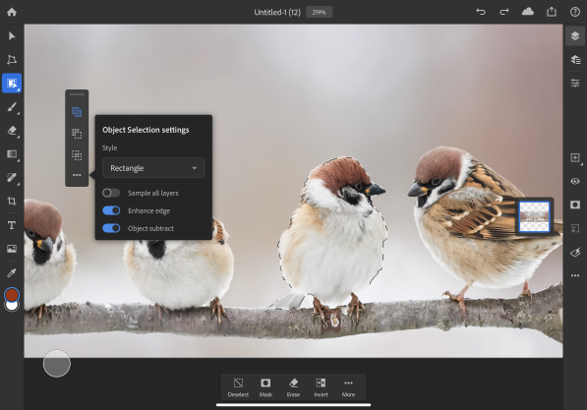
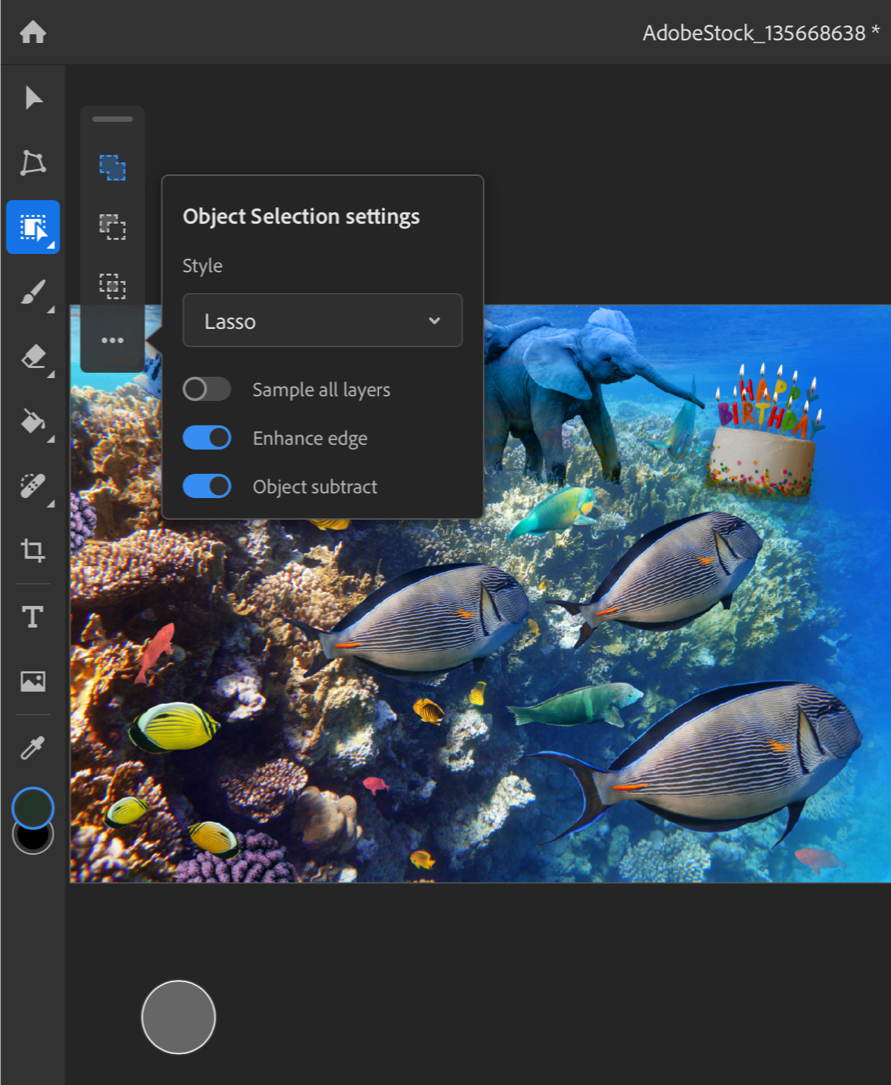
The Object Selection tool. Source: Adobe.

The Object Selection tool. Source: Adobe.

On the iPad, Photoshop already has a Subject Selection tool that lets users quickly select the primary subject of an image, but now, it also has a new Object Selection tool that works a little differently. Object Selection works best when there are multiple subjects in an image, and you want to select just one. After tapping the Object Selection tool, you trace an outline around the object you want to select. Then, Photoshop uses some software magic to figure out what you want and snaps the selection to the object. Finally, you can clean up the selection, adding and subtracting parts using Photoshop’s Touch Shortcut UI. It’s fantastic to see this tool, which just came to the Mac a few months ago at Adobe MAX, already part of the iPad app.

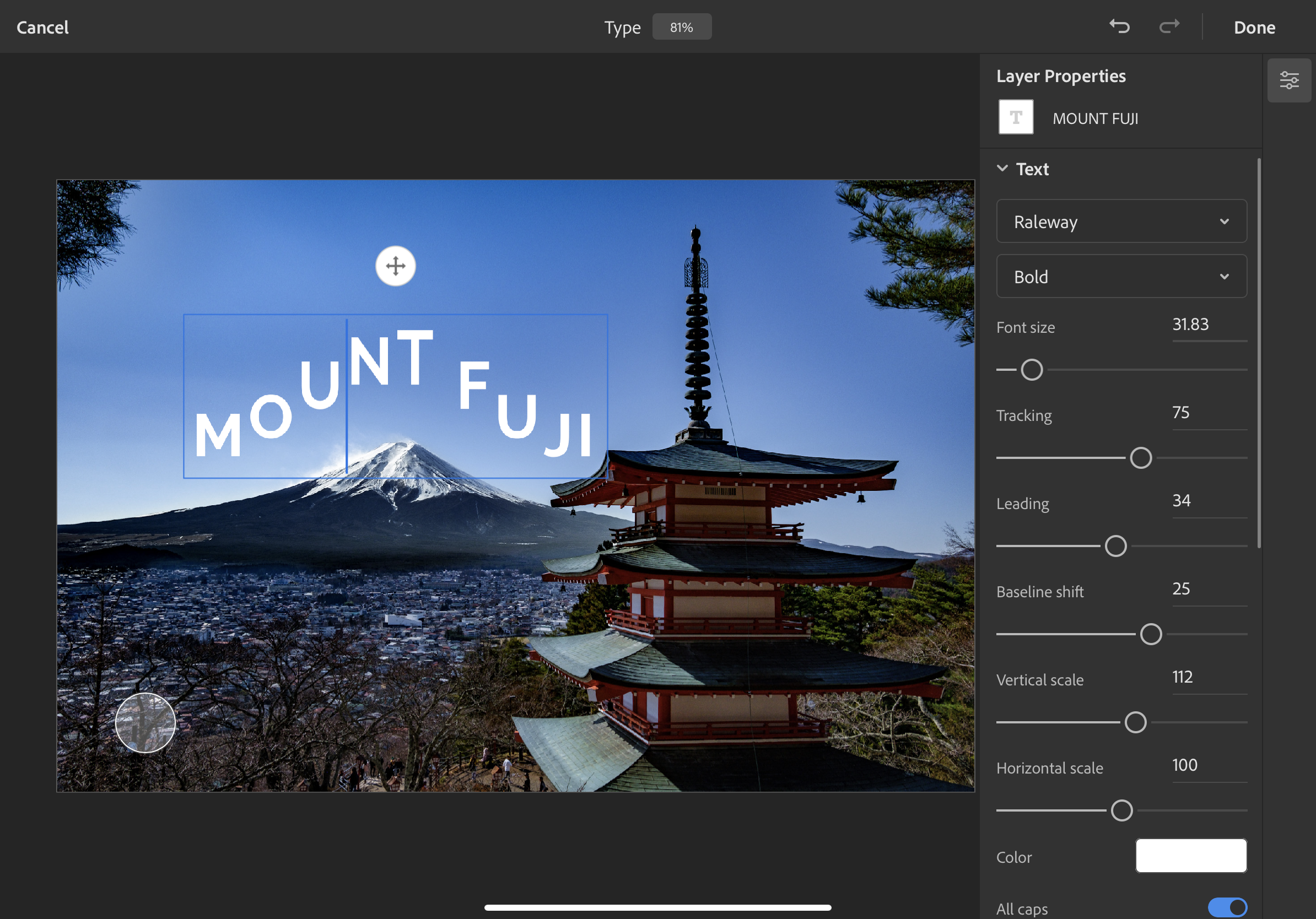
Photoshop for iPad's new type settings. Source: Adobe.

Photoshop for iPad’s new type settings. Source: Adobe.

The other headlining feature on the iPad is better typography settings. There are now type layer, character, and options properties that include tracking, leading, scaling, and other adjustments that can be made to text. It’s not quite the complete set of tools available on the desktop, but it appears to be a substantial improvement over the previous version of the iPad app.

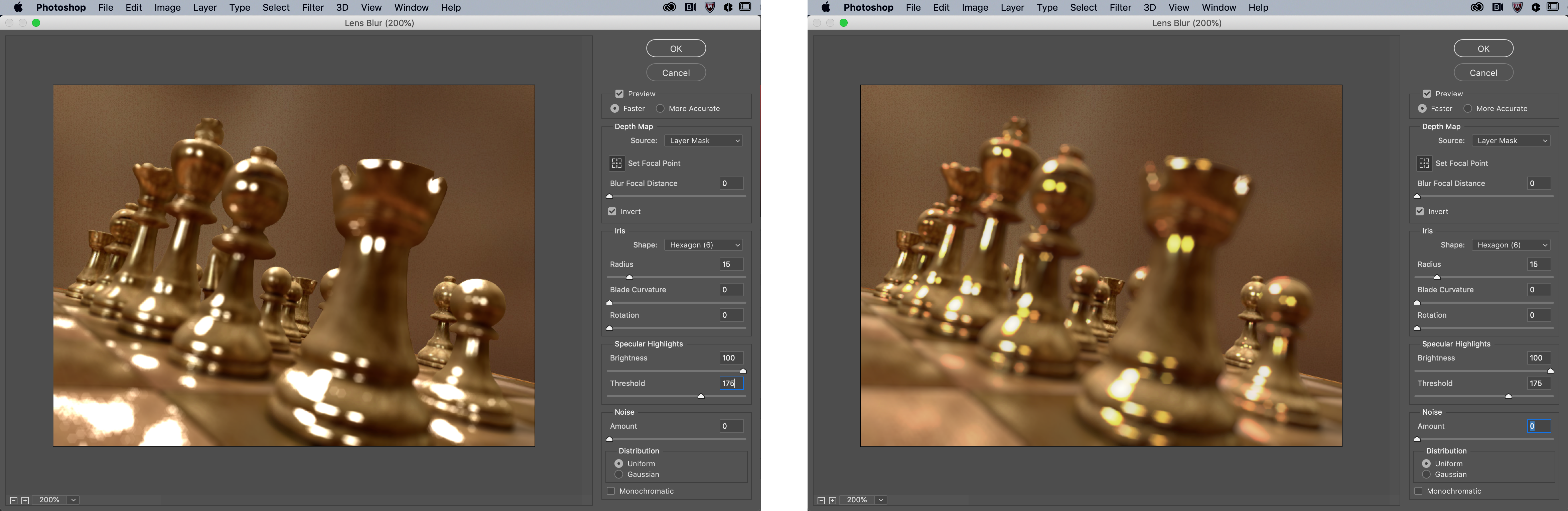
The Mac version of Photoshop has also been updated too. Lens Blur has been moved from the CPU to the GPU for better performance. The app can also read the depth map from images taken with an iPhone and other smartphones, which can be edited in Photoshop to get the exact focal point and look that you want.

The old version of Lens Blur (left) and the new version (right). Source: Adobe.

The old version of Lens Blur (left) and the new version (right). Source: Adobe.

The Content-Aware Fill workspace has been improved too. Now, you can make multiple selections and apply multiple fills in the workspace, whereas before users had to leave the workspace and reenter it between selections.

Photoshop for iPad was released in early November 2019 with the promise of frequent updates to fill the gaps between it and its desktop sibling. So far, Adobe has lived up to that commitment with substantial updates last December and today. Another indication that Adobe is serious about mobile is evident from the Photoshop webpage, which prominently features the app.

Still, there is still plenty of work to be done before Photoshop for iPad rivals the desktop Photoshop experience. In addition to features that haven’t migrated from the desktop to the iPad yet, I’d like to see Adobe implement iPadOS system features like drag and drop, so I can drag images from Lightroom or other photo editors into Photoshop, context menus, which seem like a natural fit for an app with so many settings, options, and actions, and multiwindowing. My hope is that new functionality like keyboard event detection and whatever Apple has in store for iPadOS 14 will make it easier for Adobe to refine Photoshop further and continue to implement the most powerful desktop features on the iPad too.

Photoshop for iPad is a free update that is available on the App Store and requires a subscription. The Mac version of Photoshop is available directly from Adobe.


Jason Snell on Editing Podcasts with Ferrite on an iPad with the Apple Pencil

Jason Snell has edited a lot of podcasts. In fact, The Incomparable, the flagship show of his media and pop culture podcast network of the same name, just reached episode 500.

Since last summer, Snell has been using Ferrite by Wooji Juice to edit nearly every episode of The Incomparable on his iPad with the Apple Pencil. I’ve heard him describe his iPad and Apple Pencil workflow on podcasts before, but there’s nothing like seeing it in action, which you can now do on the Six Colors YouTube channel.

What struck me most about Snell’s video is how natural direct manipulation of multiple audio tracks looks. I’ve always done all of my podcast editing on a Mac with Logic Pro X, but after watching Snell edit an episode with multiple guests, I look forward to trying this myself.

Permalink

A Fix for iPad Multitasking

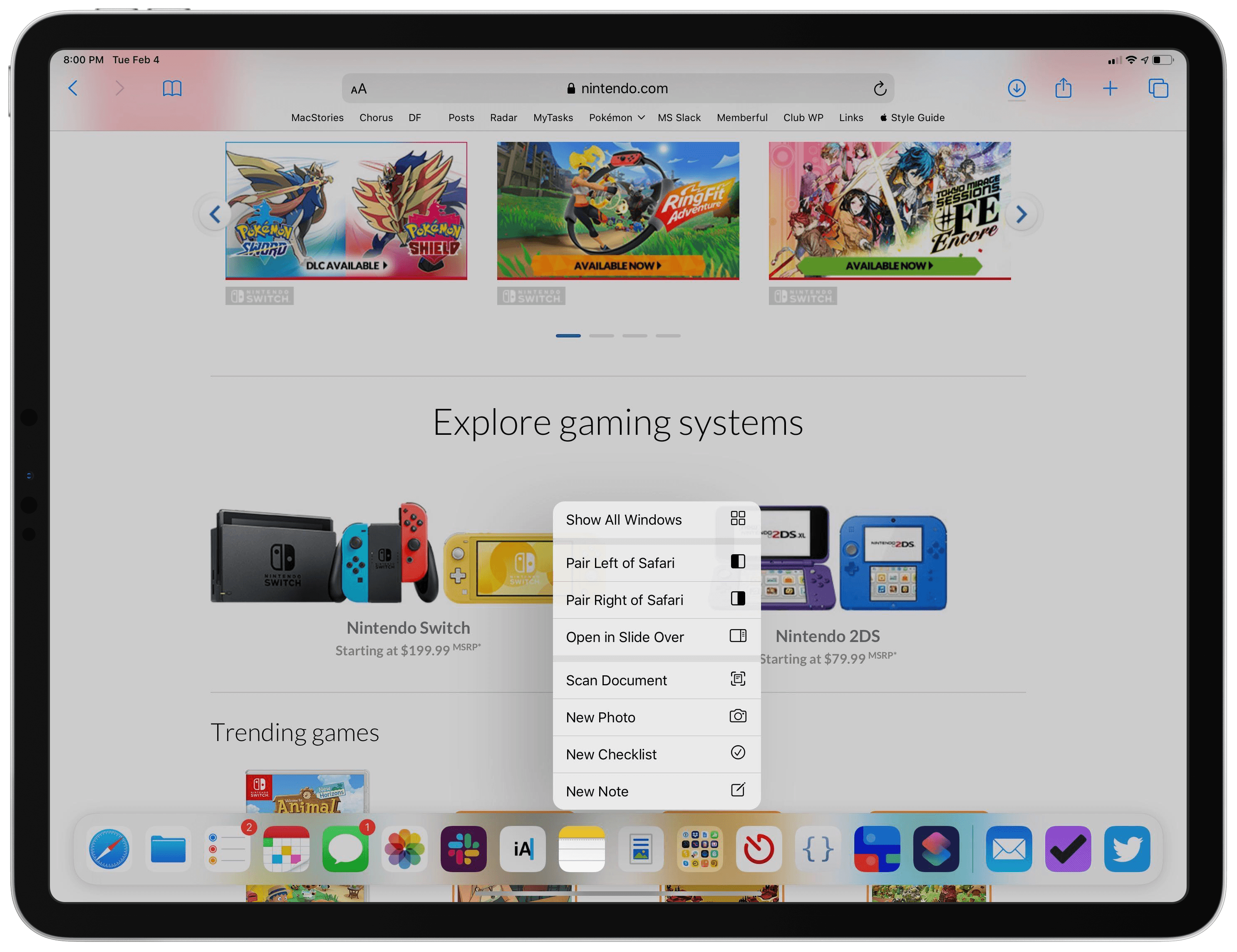
Concept by Silvia Gatta.

Concept by Silvia Gatta.

The iPad’s primary appeal the last 10 years has been its resemblance to the iPhone. If you can use an iPhone, you can use an iPad – at least in most respects. Where that’s no longer true is multitasking.

I love the functionality enabled by iPad multitasking, but the current system is unnecessarily complex. I don’t believe the iPad should revert to its origins as a one-app-at-a-time device, but I know there’s a better way forward for multitasking.

My proposal for a new multitasking system employs a UI mechanic that already exists across both iPhone and iPad. Without losing any of iPadOS 13’s current functionality, it brings the iPad closer to its iPhone roots again and makes multitasking accessible for the masses.

Context menus are the key to a better multitasking system.

When you long-press an app icon in iOS and iPadOS 13, a context menu appears and provides various options. These menus, I believe, are the perfect home for multitasking controls.

Read more


Reflections from the iPad’s Original Development Team

Ryan Houlihan at Input has published a new interview with two key members of the team that birthed the iPad 10 years ago. Married couple Imran Chaudhri and Bethany Bongiorno, former Director of Design for the HI team and Software Engineering Director, respectively, reflect widely on the development process behind Apple’s tablet. Two of the most interesting answers had to do with envisioning the future of the iPad, and regrets about its past.

Chaudhri on the device’s future:

I think it’ll be interesting for all of us to watch and see how Apple evolves the iPad. But, you know, I think one of the struggles that customers have with the iPad right now is really trying to figure out what role it plays in terms of a portable class computer. You have a traditional desktop computer or a traditional laptop computer — and where does the iPad fit in? You know, I would hope and I think they would continue to evolve it to a point where the iPad does end up doing a lot more that the Mac [currently] does and that the Mac redefines itself as more of a professional tool and the iPad defines itself as more of a mass consumer computing platform. I think that would be almost like a natural progression.

Bongiorno on a regret:

I would say one regret is that it became really hard after we shipped the iPad to continue to push it forward in the way that I think Imran and myself and others at the company really wanted to. The gravity of the phone was so big — and it still is so big, right? It makes it really hard.

This week as the iPad’s 10 years are celebrated, it’s become a great time to reflect on where the device has come from and where it’s going. I use my iPad all day, every day for work, and love it. However, for the device to realize its fullest potential as a mass-market computer replacement, I think there’s still plenty of work yet for Apple to accomplish.

Permalink

The iPad at 10: A New Product Category Defined by Apps

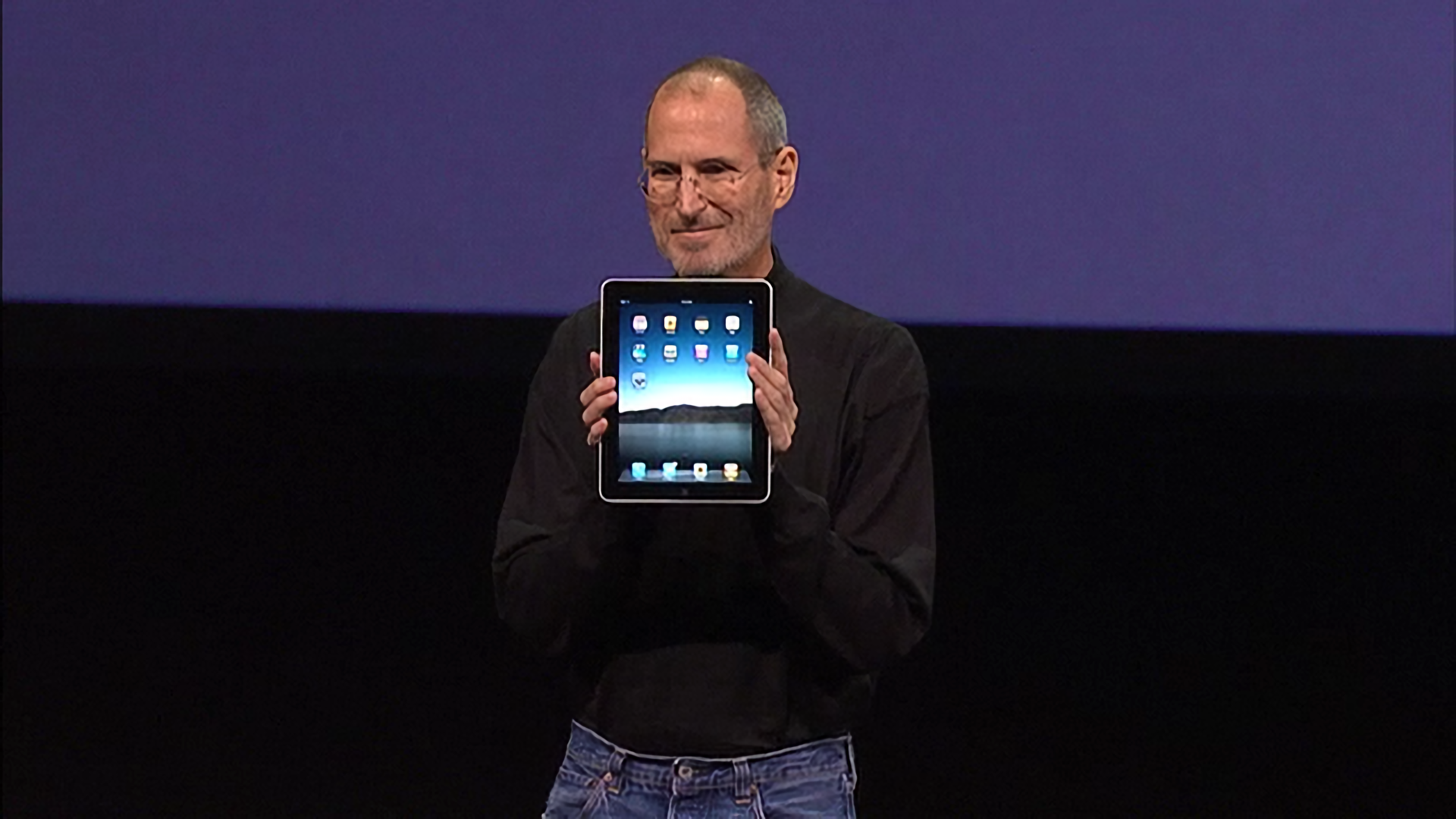
When Steve Jobs strode onto the stage at the Yerba Buena Center on January 27, 2010, he carried with him the answers to years of speculation and rumors about an Apple tablet. Everyone at the event that day knew why they were there and what would be announced. Jobs acknowledged as much up front, saying that he had a ‘truly magical and revolutionary product’ to announce.

Thanks to the iPhone, everyone at the Yerba Buena Center also had a vague notion of what Apple’s tablet would probably look like. Mockups and phony leaks were all over the web, and tablets weren’t new. Everyone expected a big slab of glass. Beyond that, though, few rumors were in agreement about what the tablet’s hardware specs would be.

Source: The Verge.

Source: The Verge.

It was correctly assumed that Apple’s tablet would fit somewhere in between an iPhone and a Mac both physically and functionally, but where exactly was a mystery. That made the OS and the apps the stars of the keynote and critical to the way Apple’s tablet would be used and how it would be perceived for years to come.

Before Steve Jobs revealed Apple’s new tablet to the world, though, he paused – as is still customary during most Apple keynotes – to set the stage and provide context, which is where I will start too. Ten years ago, the tech world was a very different place, and Apple was a very different company. Not only is it fun to remember what those days were like, but it helps explain the trajectory of the iPad in the decade that followed.

Read more


Procreate 5 Review: A Rebuilt Graphics Engine Drives Fantastic Animation, Color, and Brush Tools in an Art App Perfectly Tailored to the iPad

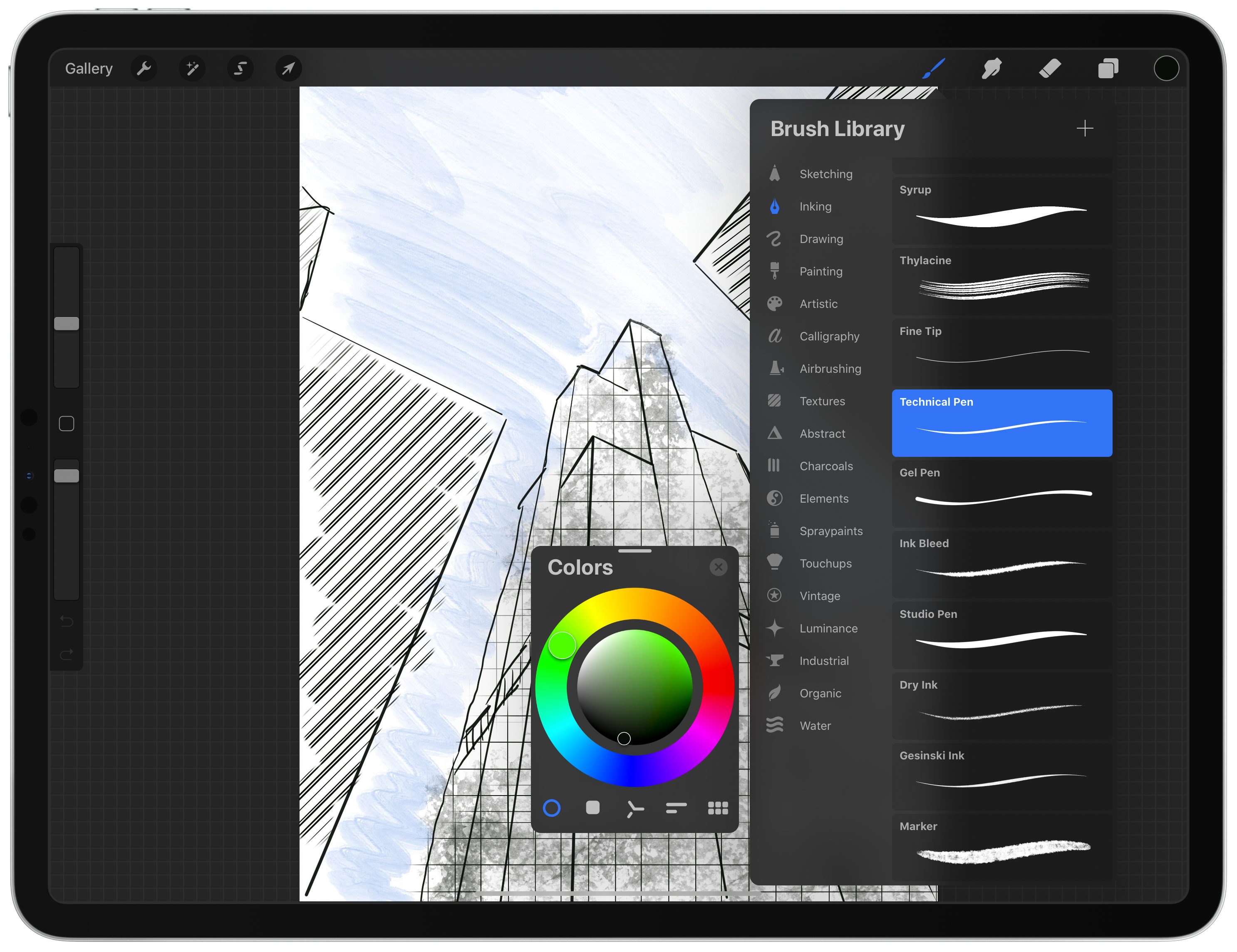
Procreate 5 for iPadOS is out with an impressive roster of new features. The update by Savage Interactive includes a new graphics engine, an updated color picker and color management tools, an incredibly deep and flexible brush studio, and a fun new animation assistant that brings your creations to life. Remarkably, these robust new features don’t clutter the app’s UI or add undue complexity. Instead, Procreate 5 delivers its added flexibility and power gracefully and in a manner that I expect both veterans of the app and newcomers alike will appreciate.

Procreate has been around since the earliest days of the App Store and has been used to create fantastic art. Over the years, we’ve covered stories of artists using the app to create everything from the Stranger Things poster art and a photorealistic portrait of Morgan Freeman featuring 285,000 brush strokes to a recent Apple ad. Procreate’s capabilities are impressive, but also a little intimidating.

I don’t consider myself much more than a doodler at best, which made me question whether the app was for me and whether I should tackle reviewing it at all. Here’s the thing, though: you don’t have to be a professional artist to enjoy drawing. Art is for everyone, and the key to Procreate’s success over its long history is that it too is for everyone. The app’s UI is a model of simplicity and progressive disclosure that stays out of the way, revealing its powerful tools only if and when you need them. Combined with a reasonable $10 price tag, Procreate is a fantastic choice for dabblers or pros alike, and with version 5 out today, Procreate is more powerful than it has ever been, but just as easy to use.

Read more


Adobe Previews Direct Photo Import from External Storage Coming to Lightroom for iPad

In a video shared earlier today, Tom Hogarty, who’s a Lightroom product manager at Adobe, demonstrated an upcoming feature of Lightroom for iPad – the ability to import photos from external devices (such as cameras, drives, or SD cards connected over USB-C) into Lightroom’s library without copying them to the Photos app first.

Here’s how it’s going to work:

The workflow looks very nice: an alert comes up as soon as an external device is detected, photos are previewed in a custom UI within Lightroom (no more Photos overlay) and they’re copied directly into the app. I think anyone who uses Lightroom for iPad to edit photos taken with a DSLR is going to appreciate this addition. Keep in mind that the 2018 iPad Pros support up to 10 Gbps transfers over USB-C, which should help when importing hundreds of RAW files into Lightroom.

Direct photo import from external USB storage devices was originally announced by Apple at WWDC 2019 as part of the “Image Capture API” for iPadOS. When I was working on my iOS and iPadOS 13 review, I searched for documentation to cover the feature, but I couldn’t find anything on Apple’s website (I wasn’t the only one). Eventually, I just assumed it was part of the functionalities Apple delayed until later in the iOS 13 cycle. It turns out that this feature was quietly introduced by Apple with iOS and iPadOS 13.2, as also suggested by Hogarty in the Lightroom video.

According to this thread on StackOverflow, direct photo import is part of the ImageCaptureCore framework, which is now also available for iOS and iPadOS. I still can’t find any documentation for it on Apple’s developer website.

Permalink

Adobe Releases Photoshop for iPad and Aero, an iOS AR Creation Tool, Plus Offers a Peek at 2020’s Illustrator for iPad

Source: Adobe

Source: Adobe

Adobe MAX begins today in Los Angeles and runs through November 6th. As in past years, the three-day conference is an opportunity for Adobe to announce new products and updates to existing ones.

Last year, Adobe previewed Photoshop for iPad and Aero, an iOS AR creation tool. Today, those apps are finally out of beta and are available to everyone in the App Store. In fact, both Photoshop and Aero showed up on the App Store the evening before the start of MAX, providing me with a little hands-on time with them in advance of their official release.

Adobe has also previewed an iPad version of Illustrator, another of its core Creative Suite apps, which the company says will be available sometime in 2020.

Adobe’s announcements are packed with updates to a wide range of its products, but there’s a clear focus this year on mobile apps. In addition to Photoshop, Aero, and Illustrator, the company also announced updates to Lightroom for iOS and iPadOS and its Rush video creation app.

However, the centerpiece of Adobe’s mobile announcements is Photoshop, the company’s iconic professional design app relied upon by creative professionals worldwide. Ever since word of Photoshop for iPad was leaked to Bloomberg’s Mark Gurman in July 2018, the idea of ‘full’ or ‘real’ Photoshop on the iPad has captured imaginations. That initial leak, combined with Adobe’s early marketing efforts, led to outsized expectations for the first version of the app.

Instead of the full-featured, desktop-replacement app that some people were expecting, Adobe says that it has built a foundation with its new cloud-based PSD files and Photoshop’s desktop engine, upon which it will evolve with the guidance of users. Based on what I’ve heard from Adobe and seen from my limited use of the app, I believe the company truly is committed to building a more fully-featured version of Photoshop for the iPad; however, it doesn’t appear that users will be able to abandon their desktops anytime soon.

Read more


Apple Introduces Larger Screen 7th Generation iPad with Smart Connector

Today, at the keynote event at the Steve Jobs Theater in Cupertino, California, Apple announced a replacement to the sixth generation, 9.7-inch iPad. The new 7th generation version of the device extends the diagonal measurement of the Retina display by one-half inch to 10.2 inches. The new iPad also adds a Smart Connector, which makes it compatible with Apple’s Smart Keyboard, another first.

Other than that however, the iPad’s specs remain the same. The iPad features an A10 Fusion chip, 8MP rear-facing camera with f/2.4 aperture, records video at 1080p and 30fps, 1.2MP front-facing camera with f/2.2 aperture, and stereo speakers. The pricing is also the same too, starting at $329 ($299 for educational buyers). The Smart Keyboard costs $159.

Perhaps most interesting is how close the 7th generation iPad is to the existing iPad Air, which has a 10.5-inch Retina screen and Smart Connector too, but starts at $499. For the extra price what you get is an iPad with a little bigger screen that’s slightly lighter and thinner, has a fully-laminated, True Tone display, better front-facing camera, higher frame rate slow motion video, and faster A12 Bionic chip. Those are meaningful differences, but ones that may be hard for consumers to understand looking at the two iPad’s next to each other in an Apple Store. Still, it’s nice to see Apple fit a bigger screen in an iPad body that’s only modestly larger than prior models.


You can follow all of our Apple event coverage through our September 10, 2019 hub, or subscribe to the dedicated September 10, 2019 RSS feed.