Posts tagged with "iPad"

River of News 1.3: iOS 4.2 Compatibility, New Icon, Bug Fixes

I’m a big fan of River of News for iPad: it’s a well-designed RSS app that instead of presenting news as a list on unread items inside folders (much like most iPad and iPhone apps do), tries a different approach by enabling you to scroll a constantly updating “stream” (or, yeah, river) of articles. When you reach the bottom of the stream, the app will automatically load the next items until there’s nothing left to load.

A few weeks ago the developer of River of News also posted the results of the app’s sales, fully committing to iOS development as his new day job. Today an update to RoN has been approved: with version 1.3, the apps comes with a new icon (even though I used to like the old one), full iOS 4.2 compatibility and a “save image” feature. You can also open links with the Instapaper Mobilizer, email articles, check on items from people you follow on Google Reader.
Read more


MacJournal for the iPad

It used to hold true that I’d occasionally coordinate my nefarious plans for world domination inside of the iPad’s very own Notes application. I don’t like using Simplenote (as many will tell me to do) for such radical means, which is its own whitespace dedicated for short bursts of random prose. The only solace I could find was with MacJournal, though for a while, it only existed on OS X. And MacJournal is appealing not as a blogging solution, but as a database solution for maintaing multiple journals with optional encryption and password protection. When I can avoid it, I don’t like maintaining multiple files in the Finder.

Read more


Andrew Hyde’s iPad Experiment Gone Wrong

Andrew Hyde’s iPad Experiment Gone Wrong

I like writing, and the touch interface just wasn’t cutting it, so I purchased the bluetooth keyboard for when I wanted to write posts. It was pretty brilliant as a setup. On my last flight I was forced to check my bag, and in the rough handling the keyboard was turned on, keys were pressed, the iPad took this as incorrect password guesses and it locked.

I had all sorts of screenshots and apps to show off, those are all gone, because once your iPad gets in this mode, the only way to get it out is to restore it to the computer it was last synced with. I, not owning that computer, had no choice but to delete everything.

Delete everything.

I can imagine the frustration – more evidence that the iPad still can’t live on its own. [via BrooksReview]

Permalink

BMW Seriously Committed To iOS Integration

Looks like BMW is getting serious about iOS devices integration with their new car models. Engadget first detailed the system BMW was building to integrate iPads in their cars back in September; like it or not (I personally think it’s a little bit overkill) BMW thinks that’s how you’re supposed to enjoy using the iPad in the back seat.

A few days ago BMW launched an ad campaign to prove that what they have is the best way to use the iPad (and iPhone) on board – there’s no room for homemade stands and ugly wooden solutions. That’s really what the video is all about, check it out below.

Read more


Buddies For iPad Provides A Better Way To Check On Your Facebook Contacts

At this point, I guess you’ve figured out there’s no official Facebook iPad app nor does Zuckerberg plan to tell his team to start developing one. Or perhaps we just have to wait a little bit more, as Facebook is currently focused on mobile devices and the iPad isn’t exactly a mobile device. No matter how you look at it, there is no Facebook for iPad and we have to rely on 3rd party offers when it comes to status updates and photo galleries on world’s most crowded social network running on the iPad.

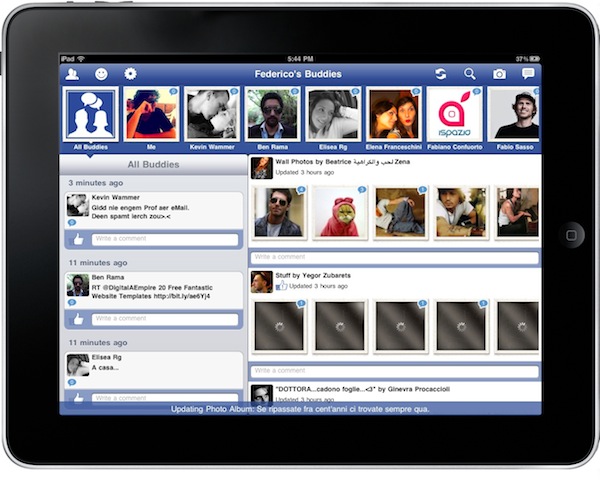
Up until now, Friendly for Facebook has been the most successful unofficial app for iPad to land in the App Store, and sales of the app sky-rocketed with the recent release of a major update. A new 3rd party Facebook app was released yesterday, it’s called Buddies and simplifies the way you can check on your Facebook contacts on the iPad. All wrapped up in an interesting native interface with noteworthy features and curious navigation schemes. Let’s take a look at it. Read more


The Washington Post App for iPad Now Available, Free Access Until February 2011

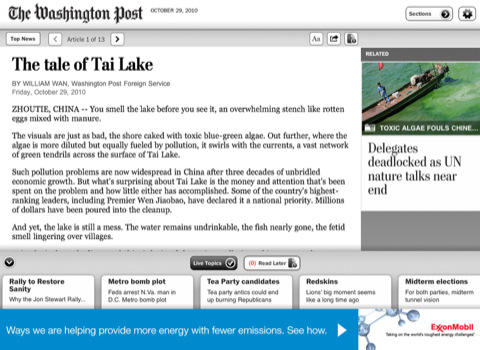
An official Washington Post app for iPad was approved earlier today, and it’s available for free in the App Store here. What’s so interesting about it? Just like the official New York Times app, full access is granted until February 2011 (NYT app grants fere full access until January 2011) for free. No need to submit payment information, but an existing washingtonpost.com account is already required.

You can also create an account in-app. After February 2011, the service will go paid (with a so-called “paywall”) and you’ll need to have a subscription to enjoy the contents of The Washington Post on the iPad. Read more


“There’s Always Ubuntu”

“There’s Always Ubuntu”

Love them or hate them, this is something that Apple—more than any other company—fundamentally gets. They want a computing experience more like the appliance experience. If this vision “wins” that doesn’t mean there’s no place for geeks; there’s still a need for programmers and web developers and sysadmins and UI designers. But the computers that most of the public increasingly interfaces with will be computers that are not designed to be directly programmable.

And I’m pretty sure this vision will win. For the vast majority of users the model of the app console—think game console, but not just for games—is simply better. The iPad is an app console, and the Macs of next year will be, too. And the PCs of the year after that.

And just like with game consoles, geeks will always be able to tinker.

Permalink

You Too Can Have An iPad Origami

You know I’m not a case guy. I’m not a fan of sleeves either. Then I find most stands cheap and bulky. I like my iPad naked, all glass and aluminum black. It’s hard to come up with an accessory elegant enough to match Ive’s design skills. Some accessory makers, though, can get things quite right. Incase surely does.

Their latest product looks like a rather anonymous sleeve, until you put the iPad out and start folding the sleeve. Just like the old paper-folding art this thing’s name is inspired to, you can turn the Incase Origami Sleeve into a completely different thing with a few folds. You can turn it into a stand.

At $35 it ain’t exactly cheap – but it’s cool, right? You too can be an origami Apple geek now. [CrunchGear via Incase]


Which iPad Should I Get?

Which iPad Should I Get?

As an iPad owner, general Apple-advocate and tech geek, I’ve been getting asked this question every few weeks since the iPad came out. The frequency is accelerating with the holidays drawing near, so I’m going to reproduce some of the analysis here that I’ve been sharing via email with friends and family.

Really good points in there. If you’re looking to buy an iPad this holiday season and you’re still on the edge for that 3G unit that cost a little more, but you happen you have a jailbroken iPhone – I can’t recommend MyWi enough. I basically have a 3G iPad thanks to that Cydia app.

Permalink