This Week's Sponsor:

Turbulence Forecast

Know before you go. Get detailed turbulence forecasts for your exact route, now available 5 days in advance.


Posts tagged with "iPad"

News.me iPad App Launches To Take On Social Magazines

News.me, a new social reading experience for the iPad developed by technology incubator Betaworks and The New York Times, launched on the App Store a few minutes ago after much anticipation and speculation on whether or not the service could take on well-established “social magazines” like Flipboard and Zite. There’s no doubt the iPad has created a new market for this kind of applications: rather than presenting a series of links pulled from the top Google News or Techmeme, apps like Flipboard aim at showcasing content being shared by your friends on Twitter and Facebook. But while Flipboard simply collects all content shared in your timelines without applying any sort of filter for relevance and popularity, News.me wants to change the rules of tablet-based social reading experiences by offering a “smart” system that, thanks to data provided by popular URL shortener bit.ly, can filter out the most relevant items appearing in your Twitter timeline – and in someone else’s as well.

That’s the key point of News.me, the feature that will need to be tested in the long term to see if the experiment has a chance to survive in this crowded digital and social newsstand. Not only does News.me enable you to see what your friends are sharing (through tweets), it also lets you see what they are reading. And from this standpoint, logging into Twitter within News.me gives the app a whole new meaning when it comes to “Twitter integration.” It’s a huge bet for Betaworks and The New York Times: can the bit.ly-backed algorithm provide an efficient way to distribute personalized news to iPad users? More importantly, is it enough to convince people to pay $0.99 a week, or $34.99 a year? Read more


Turn an Old iBook into an iPad Case

Many people with broken computers either throw them away, or send them to a recycling program. Why not keep your old iBook and use its shell to make a one-of-a-kind iPad case? Sounds difficult, right? Gary Katz, who created things such as the Personal Shoebox Apple Store and The Apple Museum - 30 Years in 2 Minutes, shows you how and it’s not that difficult. All you need is an old iBook, a Dremel tool and some free time.

Demo video after the break. Read more


#MacStoriesDeals - Wednesday

We’ll tweet the daily deals at @MacStoriesDeals as well as exclusive weekend deals too, so please follow! Here are today’s deals on iOS, Mac, and Mac App Store apps that are on sale for a limited time, so get ‘em while they’re hot!

Read more


#MacStoriesDeals - Tuesday

We’ll tweet the daily deals at @MacStoriesDeals as well as exclusive weekend deals too, so please follow! Here are today’s deals on iOS, Mac, and Mac App Store apps that are on sale for a limited time, so get ‘em while they’re hot!

Read more


Writings 1.2 Adds Workspaces and Custom Keyboard [Giveaway]

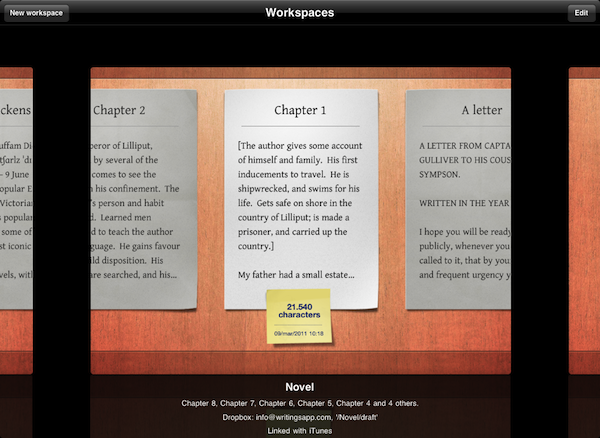
Since I reviewed the first version of Writings for iPad back in December, I haven’t switched to any other text editor for iOS. I don’t write much on my iPhone, so an iPad application is all I’m looking for when it comes to writing long pieces that will eventually end up on my Mac or into an app like Blogsy. Writings, beautiful user interface aside, has the features I need from an iPad text editor: Dropbox support with plain text editing so I can keep writing on my Mac (or anywhere) if I want to; unobtrusive word counter; a readable default font; a handy margin feature that won’t scroll the document when I’m holding the iPad or resting my thumbs at its sides.

Writings 1.2, released today in the App Store, builds on the excellent feature set of versions 1.0 and 1.1 (the latter brought a list view to easily navigate between dozen of documents) by introducing two new functionalities that I’ve been testing in the beta and greatly improved my workflow: Writings 1.2 adds support for Workspaces – you can decide to sync certain documents to different Dropbox folders, even on different accounts. Whilst the feature sounded a little to complex to me at first, I’ve seen that being able to create a “MacStories” workspace alongside a “Personal” one with notes syncing to multiple Dropbox folders at once helps me getting my notes and articles better organized. You can create as many workspaces as you want, and each one will retain its specific settings. On top of this, you can now manually trigger sync within a document without going back to the main screen.

Last, Writings 1.2 comes with an optional extra row of most used punctuation keys above the standard keyboard. This extra row sure makes the keyboard bigger and will let you see less text on screen, but it can dramatically speed up your typing if you think the iOS keyboard could use some customization options for writers. The tab key and quick “-” access sure help me get my writing done quicker.

Writings 1.2 is still propagating in iTunes and it’s available at $4.99. We have 5 codes to give away thanks to the Ice Cream Studios developers, so follow along past the break for a chance to win a copy of Writings 1.2 for iPad.

Read more


#MacStoriesDeals - Monday

We’ll tweet the daily deals at @MacStoriesDeals as well as exclusive weekend deals too, so please follow! Here are today’s deals on iOS, Mac, and Mac App Store apps that are on sale for a limited time, so get ‘em while they’re hot!

Read more


Tickle Your Brain With Puzzle-Logic Game Woozzle

A good time-based brain teaser takes considerable skill and mental coordination to solve, and with Woozzle you’ll be shifting colored orbs around a series of mazes to complete the colored wheels and earn your right to a perfect 3-ball’d perfect score (the equivalent of earning three stars in Angry Birds). Woozzle spits out a series of colored orbs which fall into open slots on wheels that can be spun and aligned with maze-like ramps where you can swipe the orbs onwards to the appropriate destination. Becoming increasingly complicated as you progress, you’ll soon have to manage several paths that change direction thanks to levers, while managing incoming orbs and competing to solve the puzzles as quickly as possible. The puzzles aren’t terribly difficult to solve (you can take as long as you need to get through the sometimes grueling levels), but the faster you complete the objective, the higher score you’ll obtain. Excellent management skills are a must: you’ll have to control multiple wheels at once to prevent orbs from bouncing back and to compete for the best times.

Read more


Rejoice, The Easter Update To Angry Birds Seasons Is Here!

Remember hearing about that “amazing” Easter update for the Angry Birds Seasons game? Well just a few hours ago that update for Angry Birds Seasons went live (for the iPad version too) with version 1.4.0 and its full of 15 new Easter-themed levels, and of course some more of those golden eggs!

The new Easter-themed levels (jump the break for screenshots and a video) look just like you would expect with the strong prominence of the Spring sun, chocolate eggs and of course Easter bunnies. Intriguingly the update also brings the ability to send some Angry Birds and Easter themed cards to others.

EASTER EGGS FOR ANGRY BIRDS!
Spring is upon us and the time is ripe for some chocolate eggs and easter bunnies! So shed the winter gear and get in – Easter Eggs have never been this delicious! If you think St. Patrick’s Day was a blast, well, you ain’t seen nothing yet! This episode will again prove that Angry Birds is the most generous update giver of them all!

New Features in version 1.4.0:

- 15 LEVELS FULL OF SPRING
- NEW THEME TO FIT THE MOOD
- GOLDEN EGGS A-PLENTY
- LISTEN TO THE TWITTER OF BIRDS TO GET MORE

Read more


#MacStoriesDeals - Friday

We’ll tweet the daily deals at @MacStoriesDeals as well as exclusive weekend deals too, so please follow! Here are today’s deals on iOS, Mac, and Mac App Store apps that are on sale for a limited time, so get ‘em while they’re hot!

Read more