


If you didn’t already know, we’ve set up a new twitter account for Deals, it’s @MacStoriesDeals. We’ll tweet the daily deals there as well as exclusive weekend deals too. Help spread the word! Here are today’s deals on iOS, Mac, and Mac App Store apps that are on sale for a limited time, so get ‘em while they’re hot!
Posts tagged with "iPad"
#MacStoriesDeals - Thursday
Microsoft Releases Bing for iPad

Bing for iPad has just been released onto the iTunes App Store and it is Microsoft’s first app to make it onto the tablet device. Just like their Bing iPhone app and the Bing website, the daily image is the first thing you’ll notice with the app and it looks beautiful on the iPad’s screen. Furthermore the app gives you a quick glance of key information of Weather, News, Movies, Trends and more in a bar at the bottom of the screen.
The app contains a wealth of features and has been exceedingly well-designed to take advantage of the iPad’s strengths - this can definitely not be called just a search engine app. Those bottom tabs of information are a gateway into a full screen of lots more information. However probably the best feature of the app is the Trends page which gives you a very nice, almost FlipBoard-esque, page with all the top searches on Bing, along with a relevant image. Like the iPhone app it features a Voice Search (which works pretty well) and search, whether it be done via text or voice, can be for a website, news, image, video or map.
There is a lot of swiping that can be done in the app and it allows you to go back and forward from your last ‘panel’ of information, whether it be a web search, news page or weather. Bing Maps is included and fully functional letting you search for an address or business, find local business and even get directions.
The iPad app is curiously only available in the US iTunes app store which is certainly odd considering the web version does have international editions, that even have a different daily picture. However even weirder is that I downloaded it from the US store and ran it in Australia and it not only gave me the correct weather but the daily image was the Australian one and even Bing Maps showed my location and correctly showed local businesses, only the movie theatre times didn’t work. Jump the break for some more screenshots of the app.
ESPN Launches ‘WatchESPN’ App, Commercial for iDevices
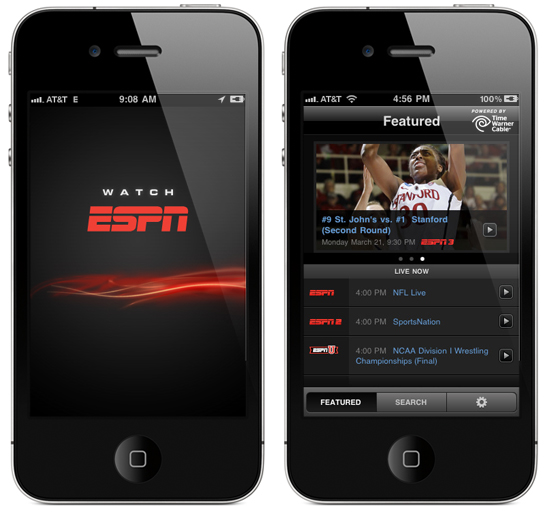
ESPN announced today its flagship network ESPN as well as ESPN2, ESPNU and ESPN3.com are now available to subscribers of Time Warner Cable, Bright House Networks and Verizon FiOS TV via the new ‘WatchESPN’ App in the iTunes App Store.
WatchESPN has shown up in time for the Masters, the NBA Playoffs and the Major League Baseball season. Qualified subscribers who receive the linear networks as part of their video subscription can now watch the channels from the convenience of their iDevices. They even made a very funny commercial to promote the app, check it out after the break. Read more
US Privacy Investigation Targeting Smartphone App Developers
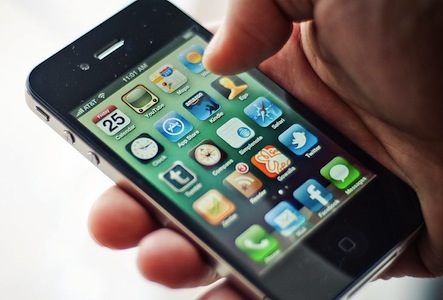
Federal prosecutors in New Jersey are reportedly investigating whether various smartphone applications are illegally obtaining and transmitting data from users without their consent or knowledge. In the US it is a violation of federal computer fraud laws for companies to collect information about a user without notice or authorization.
The prosecutors are investigating whether various apps on smartphones such as the iPhone and various Android phones are not notifying users what data is being collected and why such data is required by the app. This data being collected ranges from a users location to the unique identification data for that device and even personal information. The Wall Street Journal tested 101 apps and discovered that 56 of those transmitted the unique identification number for the device without letting users know, 47 transmitted the phones location and 5 sent a users age, gender and other personal information. Worryingly 45 of the apps tested did not have any privacy policy either in the app or on their website.
FileBrowser for iPad Lets You Access Computers, Network Drives, Shared Folders
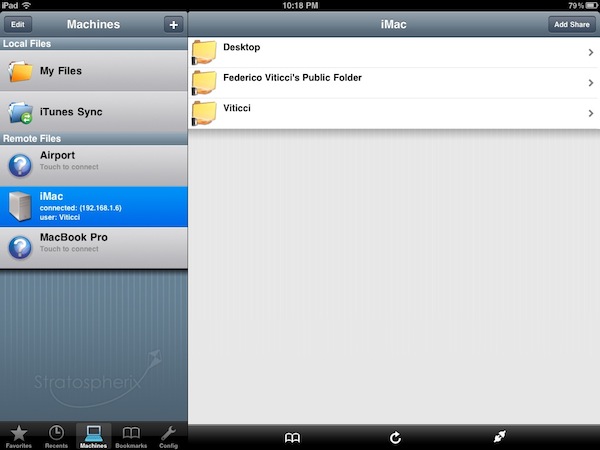
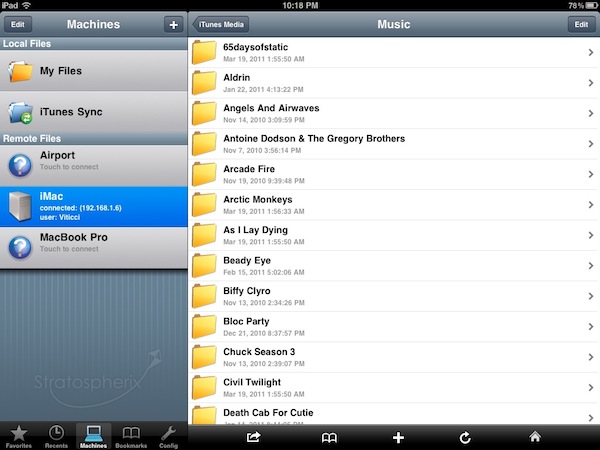
Earlier today I mentioned (again) Cloud Connect Pro, a universal $24.99 app that enables you to access online services like iDisk and Dropbox, local and remote computers, AirPort Disks and much more. Cloud Connect is a pricey app, but it also packs a whole screensharing app, runs on iPhone and iPads and it’s got the possibility to navigate a computer’s filesystem with a Finder-like interface. For quite some time, however, I’ve been using a cheaper alternative to Cloud Connect called FileBrowser that runs only on the iPad, it doesn’t have screensharing functionalities or Dropbox / iDisk / Google Docs integration but enables you to connect to your computers, shared folders and network drives just fine.
FileBrowser uses the CIFS and SMB protocols to connect to Windows and Mac computers, and NAS drives. Linux is also partially supported but you can’t connect using Apple File Sharing (AFP) or FTP. Once File Sharing is enabled on your Mac, FileBrowser should be able to see your machine on a local network. There’s no support for automatic computer discovery, but you can easily add a new computer by typing “username.local” in the “Name or Address” field – where “username” is the actual name you chose for your Mac’s Home folder. With the same .local domain, FileBrowser can connect to an AirPort Extreme station (and thus open the contents of a shared drive) or recognize the folders you’ve decided to share (besides Home) in your Mac’s System Preferences. This app is quite powerful in the way it lets you remotely connect to a machine using a DynDns hostname, enter username and password in the Settings (to avoid being asked every time), or tweak the Advanced Settings to change the SMB port number and pipelining.
FileBrowser can also open and preview a variety of file types, including music files and video formats supported by the iPad (no, it won’t do live conversion for your AVIs like Air Video). Songs can play in the background and be shared through AirPlay, but the app goes fullscreen when playing them and there’s no way to keep browsing or creating a queue. I’m okay with having videos in fullscreen, but the developers should find another implementation for music playback. The app can load images and documents like PDFs too, plus every file can be saved as a “bookmark” for quick access or emailed as an attachment. Again, these files come from your computer and network drives, not the iPad itself. There’s a temporary file cache that you can “purge” from the Settings, alongside many other options to enable admin shares or change the remote permissions for file creation / deletion, for example. There’s a lot of stuff to play with to turn FileBrowser into a powerful app, finely tuned to connect to your computers and network drives. FileBrowser doesn’t have the best interface the iPad has ever seen, but as far as functionality is concerned we have a great piece of software here. Fast, stable, feature-rich and being actively developed by Stratospherix.
At $3.99 in the App Store, FileBrowser gives you the tools you need to access and browse computers and drives from your iPad. Make sure to also check out NetPortal for iPhone, from the same developers, which brings most of the functionalities of FileBrowser to the iPhone.
#MacStoriesDeals - Wednesday

If you didn’t already know, we’ve set up a new twitter account for Deals, it’s @MacStoriesDeals. We’ll tweet the daily deals there as well as exclusive weekend deals too. Help spread the word! Here are today’s deals on iOS, Mac, and Mac App Store apps that are on sale for a limited time, so get ‘em while they’re hot!
Suppliers Reporting 2.4 Million iPad 2s Shipped in March
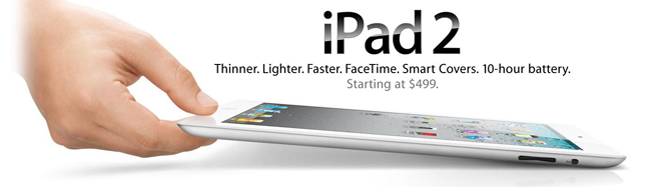
Despite shortages, Apple aggressively sold the iPad 2 at launch date, part suppliers said Wednesday. Roughly 2.4 - 2.6 million iPad 2’s are believed to have shipped in March. Digitimes also said that based on a conservative estimate, Apple is likely to ship 4 - 4.3 million units a month, or a total of over 12 million iPad 2s in the second quarter.
A limiting factor for Apple could be the cover lenses, suppliers said. Taiwan-based companies like Chunghwa, G-Tech, HannStar, TPK, and Wintek are all increasing their capacities this year. Apple usually only uses a handful of suppliers and will have to stay on their supplier’s toes to stay ahead of the demand to reach these numbers.
These unofficial March shipment figures suggest an explosive, and expected, start to iPad 2 sales. Apple took 28 days to ship the first million of the original iPad and likely reached that number twice as fast for the iPad 2. Sales accelerations were certainly helped by an international release only two weeks after the US. Apple had to push non-US availability out by several weeks in 2010 with the release of the original iPad.
Most competitors are feeling the pain from the iPad 2 sales, today TechCrunch has reported that Motorola Xoom and Atrix sales are disappointing. “If it don’t make dollars, then it don’t make sense.”
[via electronista]
Decline, plateau, decline: New data on The Daily suggests a social media decline and a tough road ahead→
Decline, plateau, decline: New data on The Daily suggests a social media decline and a tough road ahead
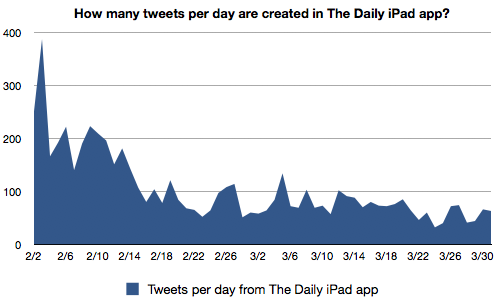
The data doesn’t look good for The Daily. Its activity on Twitter seems to match my own perceptions of how they’re doing — an early rush of excitement; a decline as people lost interest and the app struggled with technical problems; a plateau once the tech got sorted out; and then another decline once the app started charging users.
The data here only takes tweets into account, and not the actual number of The Daily subscribers. While there has been a general decline in tweets with occasional upticks depending on the content being promoted for that day, I ask whether this is a fair assessment of the number of people using The Daily versus how people use The Daily. I know for a fact that I would share articles I found interesting on Twitter, but would somebody like my parents who’re switching to a digital format even bother? Once I tweet an article on Twitter, what return am I getting out of it? As MacStories writers, our whole audience is interested in tech (specifically Apple news), thus I don’t know if I’m going to see a lot of retweets if I share a sports article. Too, the social implementation in The Daily isn’t as user friendly as it could be, and without the flow that apps like Flipboard have, you’ll certainly see a decline in interest over time. The next thing to look at would be whether Facebook sharing declined and how many people are utilizing The Daily’s comments section (and audio tool).
I don’t argue that The Daily isn’t seeing a decline in readership, but I want to see (though probably impossible) heat maps of how customers are interacting with articles, complaints on Twitter about usability, and most importantly subscriber numbers. The Daily certainly got its fair share of promotion in the media, but are people prepared to move from finding free content on the Internet into a dedicated news source that they have to pay for? We’ll save these ideas for another time, but Joshua Benton has shown that social interactions with The Daily have seen a substantial decline.
Official TED iPad App Now Supports AirPlay
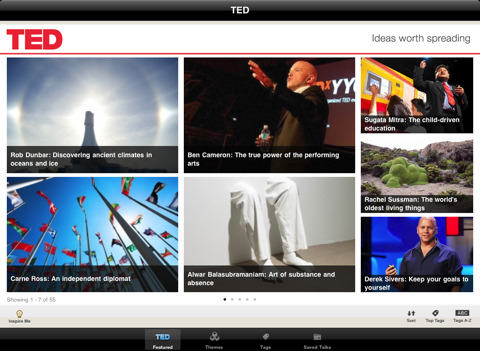
We’re big fans of the official TED app for the iPad, and we’re also huge fans of Apple’s AirPlay streaming technology and the second-gen Apple TV – entirely based on streaming content from iTunes or your local network. The latest update to the TED app doesn’t introduce several new features and optimizations (the app was initially released in October 2010), but it adds one key functionality: AirPlay support for all talks and playlists.
Version 1.3 doesn’t add anything else, but it’s okay. AirPlay support for TED talks was our most requested feature, and it’s finally available. Go get the app here.