Posts tagged with "iPad"

Tablets are changing the way consumers engage with content
Tablets are changing the way consumers engage with content

With more than 165 million tablets expected to ship over the next two years, tablets are growing in popularity and changing the way that we consume content. People are spending considerable time with tablet devices and using them to play games, browse the web and search for information.

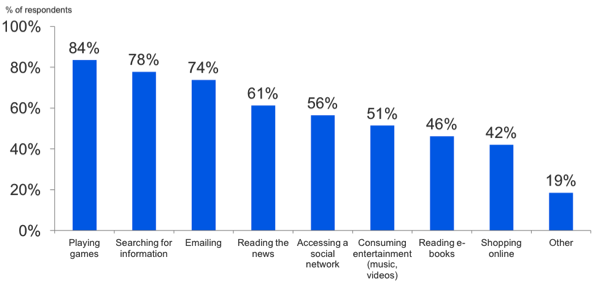
I’m not terribly surprised that tablets are becoming a hub for personal entertainment, but I am surprised at what people are using their tablets for (I figured news and reading would be on top). 28% of 1430 respondents (BGR) said the tablet has become their primary computer in the household, with 43% spending more time with their tablets than their laptops or desktops. 84% of those surveyed play games on their tablets, compared to lesser 61% who use their tablets to consume the news. Only 46% of those surveyed use their tablets to read e-books which is astounding.

Assuming that the majority of those surveyed owned an iPad, does this mean that less than 50% of iPad owners download, purchase, or read books from the iBookstore? What about Kindle and Amazon? With the amount of interactive content available on the iPad, it’s understandable people are seeking apps like Flipboard and are consuming media via their usual outlets, though I’m surprised e-books don’t have a bigger market or aren’t generating more attention.

The initial blog post doesn’t reveal too much, but the included PDF details a lot of interesting numerics for the small March survey.


Permalink

#MacStoriesDeals - Tuesday

We’ll tweet the daily deals at @MacStoriesDeals as well as exclusive weekend deals too, so please follow! Here are today’s deals on iOS, Mac, and Mac App Store apps that are on sale for a limited time, so get ‘em while they’re hot!

Read more


The iPhone Goes Where No Mac Has Gone Before

The iPhone Goes Where No Mac Has Gone Before

Francois Fortier shares his experience with using Macs and iOS devices in a corporate environment:

However, the iPhones and iPads seemed to have crept into most Enterprise class companies from the top floor boardrooms as well as the server rooms in the basements. Not only does the current version of iOS 4.3.1 play nicer with Exchange Activesync than Windows Phone 7 and even Android but its extra management features provide comparable security to BlackBerry Enterprise Server managed BlackBerry’s. In fact, the iPhone comes out tops on this fight too since it doesn’t require a Client Access License for it to be managed. Apple has even released a free tool to allow Exchange Admins to lock out other iPhone features if the need be. Here is a table explaining the current state of the mobile OS landscape.

It is no secret that Apple has managed to capture the heart of corporate America with the latest Enterprise additions to iOS for iPhones and iPads. As several Fortune 500 companies deploy or pilot iOS devices instead of BlackBerrys, there’s a trend among IT departments and employees: why would you need to use a separate “corporate device” when you can just activate the enterprise features and switch between your personal and business-related apps on a single iPhone or iPad? Sure BlackBerrys still have a couple more functionalities than iPhones or iPads, but the 400,000+ apps available in Apple’s App Store are the key factor here. Employees don’t want to swap devices anymore.

Fortier also writes:

So there I was in between floors checking the location of the next meeting while lugging my colleague asked me to review the notes from the last for one of the action items, and this is when it occurred to me. No one was looking at me weird because I wasn’t using a BlackBerry or trying to wake a HP EliteBook from Vista Sleep of death mode. In fact it seemed perfectly acceptable for me to checking my iDevices, getting the info out quickly and move along

You know something has changed when people are writing books on how to use the iPad in corporate with apps available from the App Store. Macs might as well be growing fast in enterprise, but iOS devices have done in 36 months what OS X couldn’t in 35 years. [via Forkbombr]

Permalink

#MacStoriesDeals - Monday

If you didn’t already know, we’ve set up a new twitter account for Deals, it’s @MacStoriesDeals. We’ll tweet the daily deals there as well as exclusive weekend deals too. Help spread the word! Here are today’s deals on iOS, Mac, and Mac App Store apps that are on sale for a limited time, so get ‘em while they’re hot!

Read more


iPad 2 + Head Tracking: Glasses-free 3D

Jeremie Francone and Laurence Nigay from the Laboratory of Informatics of Grenoble at the EHCI Research Group have created one of the most impressive and, overall, amazing tech demoes for the iPad we’ve seen recently. By combining head-tracking technology that uses the iPad’s front facing camera with basic 3D graphics, they have developed a glasses-free 3D experience that doesn’t require the accelerometer, but it’s entirely based on the camera and the movements of a user’s head in front of the screen.

As you can see in the video after the break, graphics on screen change accordingly to the position of the user to give the illusion of tridimensional objects moving on the display. It is pretty amazing that this system only uses the camera and the effect is so well conveyed in a video.

We track the head of the user with the front facing camera in order to create a glasses-free monocular 3D display. Such spatially-aware mobile display enables to improve the possibilities of interaction. It does not use the accelerometers and relies only on the front camera.

Glasses-free 3D has been deployed by Nintendo in its latest 3DS portable gaming console, and a series of reports in the past suggested Apple could implement glasses-free 3D gaming for the next-generation iPod touch. The demo we have here today is truly impressive, so make sure to check it out below. Read more


“Post PC” Doesn’t Mean “Sans PC”

“Post PC” Doesn’t Mean “Sans PC”

Michael Gartenberg weighs in on the “post PC” argument started by Steve Jobs at the iPad 2 media event, when he said devices like the iPad are the perfect example of the “post PC” technology era we’re living in:

The iPad and other devices are not here to displace the PC (by which I mean all personal computers, whether they’re Macs or PCs running Windows). In fact, post PC means after PC, a new generation of products that build on the PC. What it doesn’t mean is sans PC, that is, without PC. The personal computer will no doubt be with us for a very long time… but that doesn’t mean we’re not in the post-PC world.

Gartenberg is right, I don’t think Steve Jobs meant “iPads will replace desktop computers in the next 12 months” – rather, something more like “We’ve seen the numbers, and the iPad is clearly a device different from computers that average users actually want to buy”.

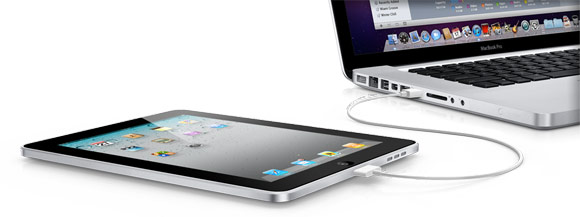
Think about it: iPads can’t “replace” Macs yet if only because a Mac is needed to develop iOS apps. And of course, hundreds of other tasks iOS devices still can’t perform. For this reason I think associating “post PC” with “replacing” is a wrong assumption. It’s obvious the iPad can’t replace a desktop Mac – and yes, also because of the cable that’s needed to sync content. But are we seeing a trend? Yes. And what about 10 years from now – what will the average PC sold at Best Buy look like?

“Post” doesn’t mean “sans”, but the post-PC era has definitely started.

Permalink

Adobe To Launch 3 New iPad Apps That Highlight Potential of Photoshop Touch SDK

Adobe today announced that it will release Creative Suite 5.5 (a “mid-cycle update”) on May 3 along with three new iPad apps that will complement the full-featured desktop version of Photoshop. The three apps are actually designed as a demo of how developers can take advantage of the new Photoshop Touch SDK (which was released today) and create their own apps that complement and add additional functionality to the desktop version of Photoshop but through an Android, BlackBerry or iOS app.

The three iPad apps; Adobe Color Lava, Adobe Eazel and Adobe Nav will all arrive on May 3rd on the same day as Creative Suite’s 5.5 update goes live.  Adobe Color Lava (priced at $2.99) is in simple terms a digital paint palette that will allow you to mix paints and generate a five-color palette that can be sent to the Photoshop color chip or swatch palette. Adobe Eazel ($4.99) is essentially a basic drawing program (similar to Brushes) that features a unique interface in which by placing 5 fingers on the screen a pop-up menu will appear above each finger, sliding up with the relevant finger will select that menu which will then let you to alter the relevant value (such as color or brush size) . Finally and perhaps most useful is Adobe Nav ($1.99), this app turns the iPad into a dedicated control that has the various tool palettes displayed, selecting a particular tool will select that tool on the desktop version of Photoshop, the app will also let you easily cycle between the various files you may have open in Photoshop.

UPDATE: Shawn Welch has already shown off his third party app that takes advantage of the new Photoshop Touch SDK. His app, Photoshop Remote, allows users to view a live preview thumbnail of any image that is open on a network connected Photoshop client and it can handle multiple clients at once. It even adds a dashboard that replicates a lot of the functionality of the Adobe Nav application including; “tool selection, color selection, filters, adjustment layers, and more.” Jump the break for his video demonstrating the app.

Also after the break is a video demonstrating Adobe Eazel and Adobe Nav apps and jump over to CNet where they wrote a short review of each of the 3 apps, also if you are a developer that is interested in implementing the Photoshop Touch SDK make sure to visit the Adobe Developer Center.

Read more


Blogsy: A Better Blogging App for iPad

The lack of great blogging apps for the iPad always puzzled me as a strange inconsistency with a device – and overall, a platform – that in the past year has proved to be more than a simple ecosystem for games and utilities. The iPad – and to an extent, iOS – has become more than a lightweight piece of glass and aluminum for watching movies and playing some Angry Birds. Sure it’s great at those tasks, but then I look at OmniFocus, Simplenote, iFiles, or LogMeIn and I realize there’s so much to do on this device than just consuming content. The iPad was indeed quickly dismissed by many as a “media tablet” when it came out last year: but think about the musicians, the writers, the designers and the movie editors that did all those amazing things using only an iPad. Clearly, this isn’t just about playing games anymore. This isn’t about the passive interaction with content: it’s about the two-way relationship with consuming and creating content made possible by the 75,000 apps available in the App Store.

But then I look at bloggers, people like me, and I don’t understand why it is so difficult to rely on the iPad as a tool for working purposes. Let’s be honest: if you’re a geek and you happen to run a blog with lots of new posts added every day, you’ve had issues with using the iPad as your main work machine. We’ve all been there before: the soft keyboard takes a while getting used to, but it’s the lack of great blogging software designed specifically for the iPad that make us question the possibilities opened by this device as far as blogging is concerned. Getting down to my personal issues with the iPad and writing for MacStories, I identify three main problems: the official WordPress app isn’t that great (an euphemism); among the alternatives, several apps lack advanced functionalities like remote draft editing or custom fields; both 3rd party apps and the official WordPress one are terrible at allowing you to easily insert links, photos, and videos. We’re swimming in a sea of text editors, but as I said many times on Twitter in the past we need a more powerful app – something that combines the simplicity of text editors with rich features like media management and full access to the WordPress backend. I know, I’m asking for a complex solution, and quite possibly a software built for a niche rather than the Doodle Jump masses.

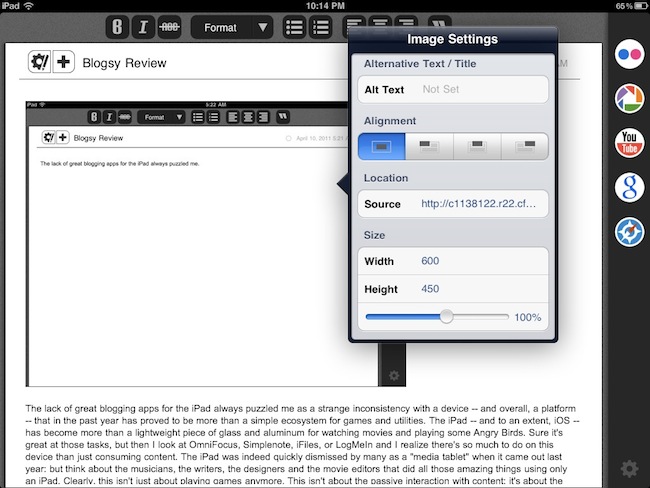
After months of waiting for the perfect blogging app to come around and convince us that the iPad could also be used professionally for blogging, I looked at Blogsy with a bit of skepticism. At first glance, it seemed that this new app borrowed a lot from dPad, an HTML editor I reviewed a while ago that’s aimed at quickly inserting media in documents. Considering that Blogsy, however, was touted as an app for bloggers with WordPress and Blogger integration, I decided that I could take it for a spin. Read more


#MacStoriesDeals - Friday

If you didn’t already know, we’ve set up a new twitter account for Deals, it’s @MacStoriesDeals. We’ll tweet the daily deals there as well as exclusive weekend deals too. Help spread the word! Here are today’s deals on iOS, Mac, and Mac App Store apps that are on sale for a limited time, so get ‘em while they’re hot!

Read more