
Posts tagged with "iPad"

Apple Australia Lets You Reserve An iPad 2 For Pickup

If you’re on the hunt for an iPad 2 and live in Australia you might just have a good chance of snapping one up from an Apple Store by reserving one online. That’s right, Apple Australia is letting customers reserve iPad 2’s for pick-up at an Apple Store and the next day no less!

There is however a (large) caveat in that you can only reserve an iPad 2 if that particular store has them in stock – and after going live only 3 hours ago I’ve looked through most of the Australian Apple Stores and none have stock of any of the 12 models.  Apple Stores do however receive stock fairly frequently, at least a few times a week so keep checking if you’ve missed out in this first batch of reservable iPad 2’s.

If you live close enough to an Australian Apple retail store and want to reserve an iPad 2 for pickup, jump over to the Apple retail site. At this stage it seems that Apple isn’t offering to do reserve iPad 2’s in any other country but one would suspect they may transition this system internationally and hopefully soon as it sure beats going to an Apple store everyday to ask if they have the model you want in stock.

[Via MacTalk]
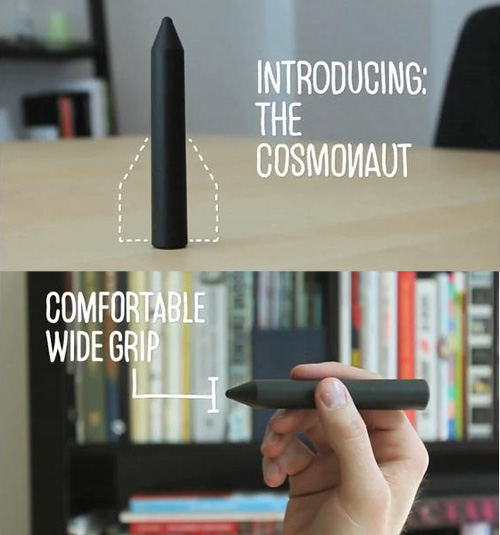


Kickstarter Project - The Cosmonaut: A Wide-Grip Stylus for Touch Screens

Last year before everyone was using Kickstarter, a new iPhone accessory showed up on the site and was a phenomenal success. It was “The Glif” - a tripod mount / stand. We’ve covered it’s rise to popularity here on MacStories. The creators of The Glif, Dan Provost and Thomas Gerhardt, are back with a new project, named The Cosmonaut.

The Cosmonaut is a minimal, wide-grip capacitive stylus for touch screen devices (not just the iPad). They modeled this new product after a dry-erase marker since it makes more sense on an iPad than a small stylus that people use on smartphones.

Video after the break. Read more


#MacStoriesDeals - Friday

If you didn’t already know, we’ve set up a new twitter account for Deals, it’s @MacStoriesDeals. We’ll tweet the daily deals there as well as exclusive weekend deals too. Help spread the word! Here are today’s deals on iOS, Mac, and Mac App Store apps that are on sale for a limited time, so get ‘em while they’re hot!

Read more


#MacStoriesDeals - Thursday

If you didn’t already know, we’ve set up a new twitter account for Deals, it’s @MacStoriesDeals. We’ll tweet the daily deals there as well as exclusive weekend deals too. Help spread the word! Here are today’s deals on iOS, Mac, and Mac App Store apps that are on sale for a limited time, so get ‘em while they’re hot!

Read more


#MacStoriesDeals - Wednesday

If you didn’t already know, we’ve set up a new twitter account for Deals, it’s @MacStoriesDeals - please follow for Deals-only posts. We’ll tweet the daily deals there as well as exclusive weekend deals too. Help spread the word! Here are today’s deals on iOS, Mac, and Mac App Store apps that are on sale for a limited time, so get ‘em while they’re hot!

Read more


What’s The Next Step For Social Magazines?

What’s The Next Step For Social Magazines?

Former Design Director of The New York Times Khoi Vinh shares his thoughts on apps like Flipboard and TweetMag for iPad, digital magazines that plug into your Twitter, Facebook and Google Reader accounts to fetch articles to display in a beautiful magazine-like view. As Vinh points out – and as we argued in the past as well – the next step for these apps isn’t optimizing performances or improving the design. It’s all about making the apps “smarter” and capable of playing an important role in your social graph:

I was thinking about this the other day. What if Flipboard was capable of looking at my Twitter stream and automatically find out the topics that I really care about? And after that, what about filtering articles belonging to those topics and visualize the most relevant ones in a top position? With the acquisition of the Ellerdale Project last year, it seems like the Flipboard developers want to bring further integration with the social graph into the app.

The process, however, includes a difficult goal: making sure the algorithm is intelligent enough to understand whether a user wants to read about content he’s interested in, or discover new articles and material thanks to the app and his friends using the same application. It’s a complex system, but someone will get there eventually. The iPad is only one year old.

Permalink

Quick Tip: iMovie App May Not Recognize Videos From Your Camcorder

With the release of the iPad 2, Apple updated the official iMovie app for iOS to include native support for the device and a brand new user interface that takes advantage of the features and real screen estate offered by the tablet. With new precision controls, intuitive UI and several sharing functionalities, we have seen iMovie for iPad has become for many the perfect way to quickly import a video, edit it with cool transitions and subtitles, and send it off to the cloud. These videos can be imported from an iPhone or iPod Touch, or just shot with an iPad 2 in HD.

Weeks ago we discussed Apple needed a better way to let iOS devices communicate with each other to share information and data without the need of using the cable. Something like AirDrop for iOS. As it stands now, you’re either forced to attach cables, sync with iTunes, or upload to MobileMe or Dropbox and download media again on a second device.

But the problem with the iMovie app for iOS also lies in the fact that it doesn’t recognize “certain non-Apple video clips” recorded with non-iOS devices. A support document updated yesterday explains:

iMovie for iOS is designed to work with video recorded with iPad 2, iPhone 4, and iPod touch (4th generation). To ensure optimal performance, the app filters out certain non-Apple video clips from the Video browser. These incompatible clips cannot be added to your iMovie project.

It’s simple: videos from your camcorder might not be compatible with iMovie out of the box, so forget about the camera connection kit or other techniques. Apple doesn’t provide technical specifications, but we’re pretty sure a free app like Handbrake can help you along with the conversion of a video to an iOS-compatible format. [via AppAdvice]


“Single-Issue” $1.99 Downloads Coming to WSJ iPad App

In an effort to drive more customers to its monthly subscription plans and experiment with the App Store distribution platform, the Wall Street Journal is launching “single-issue” downloads in its official iPad app, Paid Content reports. The option, not available yet in the free iPad app, will allow users to download a day’s WSJ content for $1.99 on their iPad, and according to Dow Jones’ digital head Alisa Bowen the new system will better invite users to subscribe to the full-access digital subscription plan. Single-issue downloads will offer a relatively cheap way to sample content and decide whether or not a full subscription is worth it.

There will be limitations in the single-issue downloads, but the WSJ hasn’t provided additional details. These new downloads won’t affect in any way the current $18 subscription that gives readers complete access to the WSJ website.

Right now, any current WSJ subscriber with a log-in can get full access—to the site and all the apps—and that won’t change. In addition, the WSJ recently began offering a digital bundle offer. Basically, for $3.99 per week, you can get full access to WSJ.com and its suite of digital products (iPad, Android Tablet Edition, iPhone and BlackBerry apps), all of which works out to roughly $17 with tax for a full month.

Bowen told me that she believes readers are more likely to subscribe once they had a taste of the content. But it’s not the first time they’ve tried that approach. For example, WSJ content is available for free to users who log on to Starbucks’ digital network as part of the coffee chain’s free wifi access.

Last week, controversy arose around the New York Times’ subscription plans that will force readers to choose between three different packages for website access, smartphone and tablet apps. Many think the NYT’s plans are too expensive and complex in differentiating between smartphones and tablets; it is unclear at this point whether the WSJ will consider a unified option for iPhone, iPad and Android users or take a similar approach to the NYT by launching different subscriptions across devices. The single-issues downloads are expected to be implemented with a new version of the iPad app, which was last updated in February.


#MacStoriesDeals - Tuesday

If you didn’t already know, we’ve set up a new twitter account for Deals, it’s @MacStoriesDeals - please follow for Deals-only posts. We’ll tweet the daily deals there as well as exclusive weekend deals too. Help spread the word! Here are today’s deals on iOS, Mac, and Mac App Store apps that are on sale for a limited time, so get ‘em while they’re hot!

Read more