Posts tagged with "iPad"

Watchlater: iPad App That’s Like Instapaper For Video

Instapaper is one of my favorite apps ever made for iOS: it allows me to save any article for later, and enjoy it in an uncluttered view on the iPhone or iPad without the stress of the web browser. Offline access makes sure I can read everything even when an Internet connection is nowhere to be found, and the recently introduced social sharing capabilities enable me to stay up to date with items liked by people I read and trust. Instapaper is a great tool, but it works for text. And besides text, I happen to consume a lot of online video, too.

The idea of an Instapaper for video always came back to me as an intriguing experiment someone had to try: just like Instapaper, you hit a bookmarklet and the video is saved in your online account. You fire up an iOS app, the videos are automatically retrieved and cached, and you can watch them whenever you like. Without the anxiety factor offered by Youtube’s website design or, again, the information overload of the desktop browser. Just video.

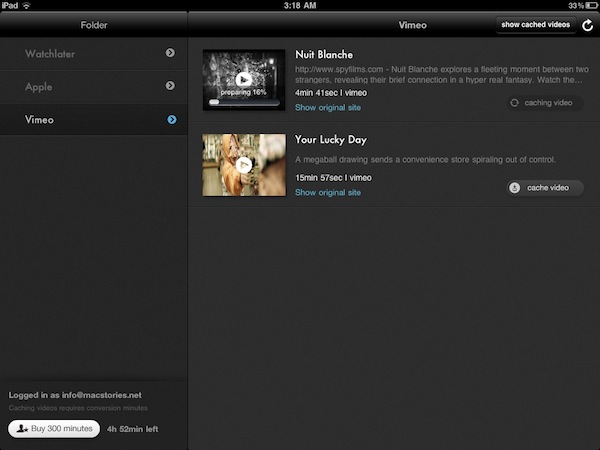
Watchlater, a new iPad app available at $2.99 in the App Store, wants to become the “Instapaper for video” on iOS, and admittedly it’s a pretty neat application. I’ve tested the app over the past months, it’s got lots of potentialities and still a few issues to fix / missing features. But it is available now, and allows you to collect videos from Youtube and Vimeo in a single place. Read more

#MacStoriesDeals - Monday

If you didn’t already know, we’ve set up a new twitter account for Deals, it’s @MacStoriesDeals - please follow for Deals-only posts. We’ll tweet the daily deals there as well as exclusive weekend deals too. Help spread the word! Here are today’s deals on iOS, Mac, and Mac App Store apps that are on sale for a limited time, so get ‘em while they’re hot!

Read more


Giveaway: iPad 2 or iPhone 4, QuickShot Is The Camera App Integrated With Dropbox

QuickShot for iPad

QuickShot for iPad

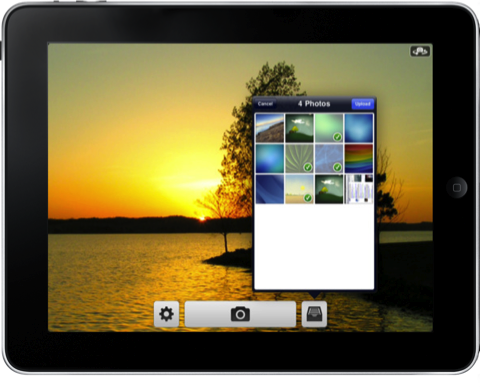
QuickShot is the camera app Apple would make if your photo library existed in Dropbox and not iPhoto. It’s designed to be simple and pleasant to use, working in the background to upload photos as you attend to other tasks and will import old favorites from your Camera Roll so they’re shared to the cloud as well. Configure your iPhone’s camera flash, enable geotagging, set focus and exposure, then snap pictures from the front or rear facing camera for scenery or photo-booth style pics. Right from your camera controls, you see your uploads with the tap of a button, and send your photos off to custom locations for sharing. Federico has taken a look at both the iPhone and iPad versions of QuickShot (and it’s all one universal app), and while you may be familiar with its photo snapping abilities, you may wondering about video. To be implemented soon, you’ll be able to record video from your iPad 2 or iPhone 4 and upload the raw file just as you do with photos. HUGE! Whether you’re working in the field or sharing photos on vacation instantly with friends and family, everyone could use a dose of QuickShot for iOS. It’s only $0.99 in the App Store if you can’t wait, but you might want to stick around. We’re going to run a relatively short giveaway so you too can have a wireless library, and you’ll want to hurry past the break to join in.

Read more


LogMeIn Ignition Update Includes File Manager: Manage Files Between Computers & iPad/iPhone

LogMeIn Ignition For iPad

LogMeIn Ignition For iPad

While I could have jumped on this update as soon as it was announced by the LogMeIn crew, I wanted to go hands on with LogMeIn Ignition’s new features before passing final judgement of whether the new file sharing capabilities are simply cool or deservedly awesome. Using LogMeIn’s free client, all of your computers are accessible to your iPad and iPhone by simply logging in with your username and (strong) password. Similar to how you navigate between open pages in Safari, you can navigate between File Managers on different computers in LogMeIn Ignition to copy & move files between computers, to your iPad, or from your iPad. It works extremely well, and I was able to move files between two Windows boxes and my iPad while tethered to a 3G enabled device. You can open a variety of file types in LogMeIn (I tested .PDF, .TXT, and .RTF files), and once those files are on your iPad you can choose to open files in other applications if permitted (GoodReader is handy to have around for this). Even if LogMeIn Ignition can’t open the file, you should still be able to move and copy files between computers. Interestingly, you don’t even have to copy files to your iPad to open them - LogMeIn Ignition temporarily caches the file and enables you to keep the cache or discard it as needed. You’ll have to get used to navigating LogMeIn Ignitions’s File Manager, as tapping on folders highlights the folder for copying & moving while tapping on its blue arrow will reveal its contents. I think LogMeIn Ignition will refuse to copy certain folders based on size (if the total contents won’t fit on your iPad) or type (I couldn’t copy the entire C:\ to my iPad for example). Otherwise, navigating and using the available tools to manage your files was straightforward.

Read more


#MacStoriesDeals - Friday

If you didn’t catch all the deals we had yesterday, here’s a link back to the page. Here are today’s deals on iOS, Mac, and Mac App Store apps that are on sale for a limited time, so get ‘em while they’re hot!

Read more


MacStories Product Review: JOBY GorillaMobile Ori for iPad

For those still holding onto the original iPad, have you ever thought about stepping your game up when it comes watching a family movie or utilizing the iPad as a bookstand? That folio case you have isn’t going to elevate the iPad above those popcorn jaws, and you certainly aren’t going to get a stable viewing angle on a leather cover as you tap through a recipe book. Even with a slew of gadgets and arms, the iPad is only as flat as its case. JOBY will help your iPad avoid disaster with a product that’s quite transformative.

Read more


iPad: The Microwave Oven of Computing

iPad: The Microwave Oven of Computing

Matthew Guay nails it in his story at Techinch: the iPad is the microwave oven of this computing era, a new device for everyone that might seem useless at first, but creates a new category for consumers.

The microwave isn’t easier for every cooking task, and perhaps it takes longer to prepare a complicated meal in a microwave. Perhaps no award winning meal will be created in one, unless it’s a special contest for microwave cooking. But it simplified simple cooking, and consumers around the world saw it as a necessary piece of equipment within in years of it becoming popular.

Decades later, the same concept works for computers and the iPad:

The world has discovered that the iPad doesn’t have to be a full computer to be successful. It’s a new form factor that makes computing more accessible to more people than ever. Sure, you might not create a new app on it, and there’s still not Photoshop on iOS. You can’t bake a medium-rare roast in a microwave, either. But now instead of waiting for your computer to boot, you can read the news, type a short document, and get on with your day all in the time your aging desktop takes to boot.

Maybe you won’t be able to manage your WordPress blog entirely from the iPad, not even in 2012, and perhaps you’d like to turn yourself to the Xbox 360 if you want motion-based games. But for anything else, you’re just as good with an iPad as millions of people were with a microwave oven when it first came out. And by the way, I also happen to get lots of things done on my iPad.

Permalink

Kickstarter Project - Hanfree: A Handsfree iPad Stand

We’re spotlighting yet another Kickstarter project. Why? Because we love to see handy, unique creations come to life. This one is an iPad accessory called the Hanfree. It makes the iPad handsfree, thus the name, for anytime you’re in bed, sitting down on your couch, in the kitchen using a cooking app, or anywhere you can find a place to use it; all without holding the device on your lap or in your hands.

Video after break. Read more


Flickr Improves Slideshows for iPad

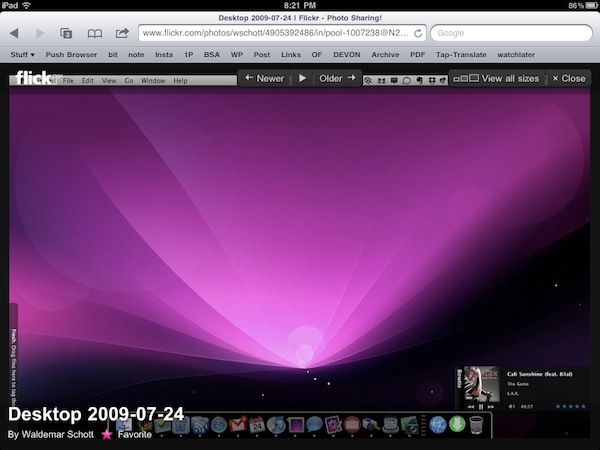
With a note on the official company blog posted earlier today, photo sharing Flickr has announced improved compatibility of slideshows for the iPad’s Mobile Safari browser. By taking advantage of the device’s touch interface, you can now tap on a photo to view at a larger size in the lightbox, and browse through photos with a single swipe. The lightbox displays photos on a clean, dark background and you also have options to mark an item as favorite or quickly go back to the standard photostream.

Flickr also offers a native app for the iPhone, available for free in the App Store, which was recently updated with Retina Display support and sharing to Twitter through the flic.kr shortener. [via Daring Fireball]