


Just released today is WiFi2HiFi, a new iPhone and iPod Touch app that effectively allows you to use your device to stream audio from your computer to an iPod dock, stereo system or anything else that can connect to the 3.5mm jack or the 30-pin port. It virtually emulates the AirPort Express feature of streaming audio from a computer to connected sound system, but how well does it work? I was given a pre-release build to review and a review follows the break.
Posts tagged with "iPad"
WiFi2HiFi Makes Streaming Music From Your Computer to a HiFi Easy
‘I Am Number Four’ Director On Hollywood & iPads→
‘I Am Number Four’ Director On Hollywood & iPads

(Above: Michael Bay using his iPad on the set of ‘Transformers’)
Film director DJ Caruso describes his experience of using the iPad as a productivity tool while shooting ‘I Am Number Four’:
I got it, I don’t want to say as a toy, but then I realized about a week into prep that my storyboards were coming on it, my previs was on it, my script was on it, I don’t carry my script anymore. I started getting emails from two of my storyboard artists who work in Los Angeles and I have this application where I can mark up the boards – I’m a terrible drawer – and I can mark up the boards and send them back. It just became this amazing production tool.
There’s more than a director discovering this new tablet computer as a useful gadget, though. In fact, DJ Caruso says almost everyone at Hollywood from assistants to actors to directors now has an iPad, and not just to play Angry Birds during breaks. He even tells the story of when he got into an email conversation with Spielberg about the apps they had installed and used for work purposes.
The coolest part, however, is about the supernatural powers of the main character of his movie being controlled by a custom-made iPad app:
Pettyfer’s character John Smith, an alien, discovers during the film he has several supernatural powers. One of those powers is that he can control light through his hands. During filming, Alex wore a flashlight-like contraption wired up through his jacket and it was activated… by an iPad off screen.
It turns out, some people do create content on their iPads. Looks like Hollywood is indeed hooked on iPads. [via TUAW]
#MacStoriesDeals - Super Saturday Special Edition!

Friday wasn’t so great for iOS deals so we’ve added a special Saturday edition today! Here are today’s deals on iOS, Mac, and Mac App Store apps that are on sale for a limited time, so get ‘em while they’re hot!
iPad and iPhone Beats Kindle In The UK, But Not In The US
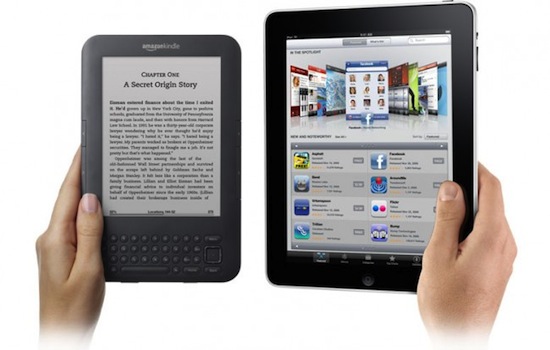
Market research firm Book Marketing Ltd has revealed to GigaOM that in the UK both the iPad and iPhone are beating the Kindle as an eBook reader most used by consumers based on data from last September. The story however is very different in the US however with the Kindle far ahead after stellar growth throughout 2010 as the graph below the break demonstrates.
MacStories Product Review: Just Mobile UpStand for iPad

There are hundreds of iPad stands available on the market, but until a few weeks ago none of them managed to stay on my desk for more than two days. Not even Apple’s own dock for iPad, which is a $29 tiny piece of plastic that could work as a stand to hold the iPad upright, but only works in portrait mode. In the past three weeks, however, I’ve been using the Just Mobile UpStand for iPad and haven’t really looked back to find another solution.
The UpStand is an elegant and simple product to hold your iPad in landscape and portrait modes – there’s not really much else to say about it, but read along past the break to see why I decided to use the UpStand as my iPad stand of choice. Read more
#MacStoriesDeals - Friday

Daily Notes for iPad Makes A Comeback with Tasks, Dropbox Support
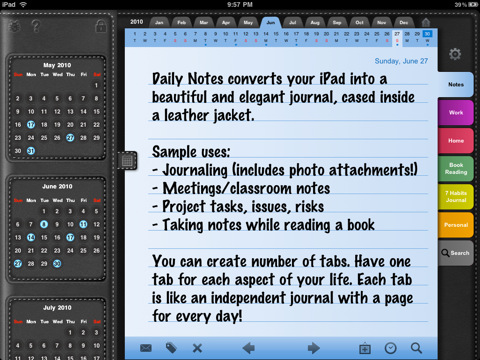
Daily Notes was one of the first apps to adopt a custom interface on the iPad back in the days when iPad apps were a novelty. Reviewed by Cody Fink in May 2010 (a month after the release of the tablet, and the grand opening of the iPad App Store), the app sported an intriguing faux-leather UI that allowed you to organize and schedule your daily events and priorities as if you were using a real agenda. Cody wrote:
Daily Notes is a more traditional styled notebook with lots of calendars built in. Seriously, you cannot miss a date wherever you turn. Asides from what could be overdoing it, Daily Notes has a couple great features built in, but also shows some odd design decisions that need ironing out. Despite some minor gripes, this is probably one of the best looking notepad applications currently available on the iTunes App Store, offering a fair level of organization, note tracking, privacy, and customization.
After a few months of silence, the app is making a comeback today into the App Store with a brand new version 4.0 that comes with several new features like backup through Dropbox and TextExpander integration. Together with that (and I’m sure being able to create daily notes through TextExpander snippets will be appreciated by many) the app can now organize tasks into a dedicated tab and has full multitasking support. But there’s more. You can switch between 30 different themes and 80 fonts, browse fullscreen photo attachments and insert multiple notes per day.
Daily Notes is chock-full of features, but I wish the interface was a little more streamlined. Admittedly, some users might find sections and calendar views confusing at first – thus the implementation of a tutorial when you first launch the app. Still, this is a truly complete app that I hope will get support for more online services in the future. Go check it out here.
#MacStoriesDeals - Thursday

Here are today’s deals on iOS, Mac, and Mac App Store apps that are on sale for a limited time, so get ‘em while they’re hot!
Restaurant Chain Will Let You Design Your Own Pizza - With An iPad
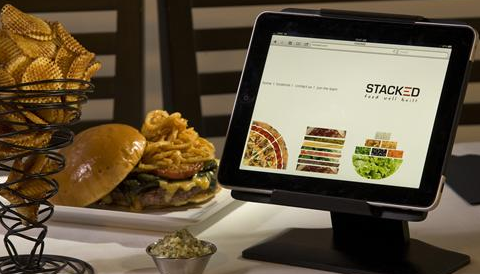
Since the iPad’s release, we have seen several restaurants replacing printed menus with iPads, which provide a good solution to build an interactive experience for customers and save on the cost of paper and ink with a constantly updating menu that’s also cool to use. Digital menus, however, might become a thing of the past as soon as Stacked: Food Well Built launches its restaurant chain, heavily based on iPads to order and design meals.
As USA Today reports, the co-founders of Stacked aim at placing 100 iPads per restaurant atop every table, allowing diners to order meals using static menus or design their own burger, pizza or salad through the iPad’s intuitive multi-touch interface and a custom app built specifically for the restaurant chain. The setup:
The iPads at Stacked will be in metal frames that sit about 3 inches off the tabletops. Folks wanting to order burgers will select the type of bun, meat and toppings on the iPad by clicking and dragging icons. The burger stacks visually on the iPad screen. Ditto for pizzas and salads.
Oh, and what if you try to steal the iPad by carrying it out in your bag? An alarm will go off. This sounds like a really clever implementation (do they have custom doors with iPad recognition?) and marketing technique, although the founders claim they won’t market their chain as “the iPad restaurants”. Still, it’ll be interesting to see how the iPad will further integrate with restaurants, coffee shops and bars in the next years. iPad cash registers are already in place in New York City.