


Happy Wednesday! Here are today’s deals on iOS, Mac, and Mac App Store apps that are on sale for a limited time, so get ‘em while they’re hot!
Posts tagged with "iPad"
#MacStoriesDeals - Wednesday
First Screenshots Of Opera for iPad [Update: Video]
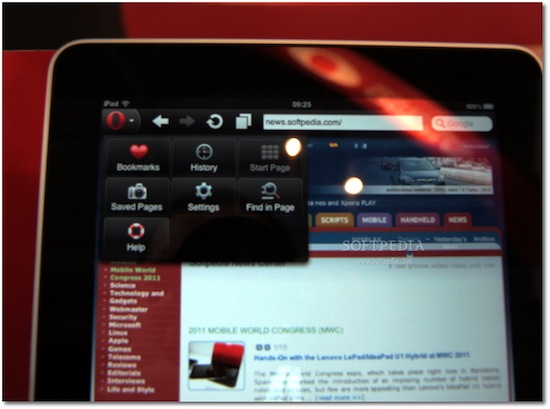
At Mobile World Congress 2011 the folks over at Softpedia managed to get their hands on preliminary version of Opera for iPad, and apparently they were impressed by the speed of the browser. Released on the iPhone last year, Opera for iOS raised some doubts over the quality of the app, mainly due to scrolling smoothness and font rendering on pinching and zooming – clearly inferior to Apple’s Mobile Safari. Opera for iPad is set to provide a much better experience on the tablet screen, with an interface that reminds of the desktop version (visual tabs on top) and menus accessible from a huge Opera button in the upper left corner. The developers also confirm the iPad app has been built on the same engine the powers Opera desktop.
The app runs very smooth, and allows for some rapid movement between visual tabs (open pages). Visual tabs allow users to have several web pages open concurrently and quickly switch between them using tabs. Each tab allows users to preview a thumbnail, as well as the page title and icon for each web page they have open.
Where the default touchscreen keyboard provides a less-than-optimal user experience, users can take advantage of Opera’s virtual keyboard to type and edit information without having to leave the page they are viewing.
I’m curious to see this Opera virtual keyboard and see how it compares to the iPad’s default one. No release date was provided by Opera at MWC, but Softpedia speculates we might see the app in the Store as early as next week. It will likely be free, and quickly jump the charts of free software like the iPhone counterpart did.
Check out more screenshots of Opera for iPad below. Read more
Dayboard: Animated Clock, Weather and Twitter Widget for iPad

Dayboard by Blend is a beautiful and, at the same time, interesting application for all those who prefer to keep their iPads on the desk as a clock widget / second monitor while they’re working. The app, sold at $0.99 in the App Store, combines a minimal, elegant and sexy design with clock, weather, calendar and Twitter widgets displayed on screen at the same time.
Dayboard provides all kinds of information without being just a flip clock – like many other apps in the App Store. Upon launch you’ll be asked to grant location access to the app, and I’ve noticed Dayboard reliably and correctly fetches my current location – which, for some reason, has been kind of a problem with several apps lately. Together with location and weather info, Dayboard displays time and date. On top of the animated flip clock, there’s a button to switch from dark theme to light theme. Last, a widget at the bottom rotates Twitter trends – and you can even pick local trends for your country or stick with the worldwide ones. You can’t tap on them to load Twitter in Safari, but the animation is pretty cool.
Dayboard is available at $0.99 in the App Store. Give it a try if you’re looking for a great addition to your desk.
Midnight Inbox Touch - Get Things Done. Beautifully.
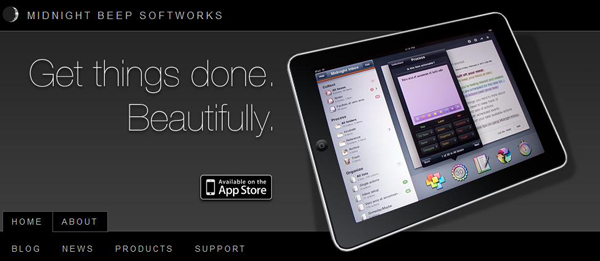
Today Midnight Beep Softworks released a major update to Midnight Inbox™ Touch, a GTD app for iPad. Midnight Inbox™ Touch is a professional-grade GTD productivity app and it’s now $9.99, compared to Thing’s $19.99 and OmniFocus ($39.99). The total system for an iPhone, iPad, and a Mac is only $35. There’s even a free version for Mac, Inbox Classic, if you want to save a few bucks and use an older version. Read more
iPad Magazines With Subscriptions Start Showing Up in the App Store

Well, look at that. Apple announced App Store subscriptions earlier today and, contrary to recent speculation, iPad magazines using the new billing system are already showing up in the App Store, before the public release of iOS 4.3. As noted by WSJ and AdAge, Elle and Popular Science are the first apps to come with the new Apple subscriptions, which rely on weekly / monthly / yearly payments and give customers the possibility to decide whether a publisher may access personal information like email and ZIP code or not. Read more
#MacStoriesDeals - Tuesday

You can always tell when an holiday passes, app prices jump back up! Here are today’s deals on iOS, Mac, and Mac App Store apps that are on sale for a limited time, so get ‘em while they’re hot!
iFacePad App Enables FaceTime On The iPad

Two weeks ago we reported a hacker managed to get FaceTime working in the first generation iPad, even if the device doesn’t come with the camera and the hack requires to perform a jailbreak and load some iPod touch system files. If you really want to run FaceTime on your iPad, but you don’t want to go through the manual effort of copying files and repairing permissions, iFacePad is a new app for the Mac that simplifies the process and allows you to install the iPod touch FaceTime app on the iPad in a few minutes.
To use iFacePad, you’ll need a jailbroken iPad and the iPod touch 4th gen firmware file. An app like PhoneDisk to access the iPad from the Finder is also required, and you can check out the full set of instructions here. Demo video below. [iSpazio via FunkySpaceMonkey] Read more
“The Matrix” iPad App Creates Video Walls
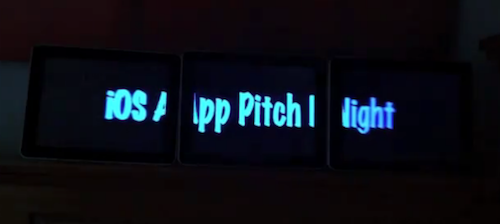
We have covered several video / app walls on MacStories in the past. From Apple’s app wall at the Moscone Center at last year’s WWDC to the Welikesmall iPod Touch Wall, it appears that developers and hackers alike have been playing around with the idea of turning multi-touch displays into interactive installations a lot. So this new app for the iPad, called The Matrix and available at $4.99 in the App Store, doesn’t come as a surprise at this point. But the result, as you can see from the video below, is quite impressive.
The app can turn any rectangular iPad setup into a video wall. Once installed on multiple iPads (demo video shows 3), one instance of the app will act as a server sending video to the clients, which need to be placed properly next to each other for the effect to work.
The Matrix will cost you $4.99 in the App Store, but I guess that’s a no-brainer if you consider you’ll need at least 3 iPads to get it to work. Check out the video below. [via TUAW]
Apple To Outsource A4 and A5 Production? iPad 2 With “Enhanced” A4?
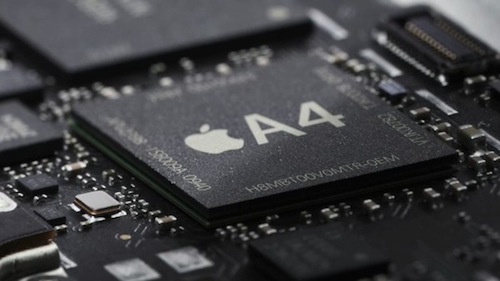
A second report from Digitimes this evening suggest that Apple might outsource the production of the A4 chip and the rumored Cortex-A9-based A5 to Taiwan Semiconductor Manufacturing Company, TSMC. Apple is reportedly concerned about leakage of production techniques and specs now that Samsung is directly competing with them in smartphone and tablet market, and TSMC already provided A4 production when Samsung was unable to meet demand last year.
Apple is reportedly looking to outsource the production of its A4 processor as well as the next-generation ARM Cortex-A9-based A5 processor to Taiwan Semiconductor Manufacturing Company (TSMC), according to industry sources. The Apple A4 processor is currently exclusively produced by Samsung Electronics, and the previous S5PC100 used in the iPhone 3GS was also developed and manufactured by the Korean company.
TSMC declined to comment on the report.
Digitimes also reports the iPad 2 will feature an “enhanced” version of the A4 chip, while the iPhone 5 will come with the brand new Apple A5 processor. A number of reports surfaced in the past indicated Apple was working on a CPU for the next iPhones and iPads, although it is unclear at this point which one will get the new A5. Several pundits also speculated Apple will adopt dual-core processors and implement RAM up to 1GB in the iPhone 5, which will likely come with a universal GSM / CDMA antenna as well.