Posts tagged with "iPad"

Echofon For iPad & iPhone Update to 4.0

How could Echofon’s magical sync-a-bilities get anymore improved between Echofon on the desktop and your favorite iOS devices? How about the addition of user streaming to the iPad, global push notifications for direct messages, and the ability to temporarily mute tweet happy users? User streaming is something I’ve wished for in all clients as long as it continues to retain your place on the timeline (Twitter for iPad is good at this), and not too many have successfully took a swing at Echofon’s syncing features. There’s nothing more annoying that re-reading a garbage bin full of old tweets - pick up where you left off with Echofon, and download the free updates in the iTunes App Store via the links below.

Echofon for iOS, Free

[Business Wire: UberMedia: Echofon 4 Press Release via The Next Web]

Pulse For iPad Is Now Faster, Always In Sync with Google Reader

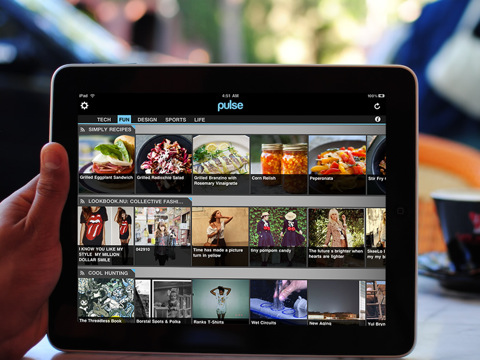
Pulse, the social news reader for iPad, was updated last night to include a number of optimizations and new features. With the release of the new Flipboard a few months ago, Pulse had to play catch-up to face the iPad app of the year, which was updated with better Facebook integration, Google Reader support and huge improvements to the interface and navigation. Pulse, however, was never based on the same concept of Flipboard: where Flipboard is a social magazine that aggregates content from Twitter, Facebook and Google Reader, Pulse is a wall for your news. Moving out of RSS feeds to embrace Facebook links confirms the news wall theory.

The latest update to Pulse is aimed at enhancing speed and Google Reader sync. The app will now store changes offline and sync them back as soon as an internet connection becomes available. On the engine side, Alphonso Labs improved image loading times, refresh and scrolling, which feels much smoother now. The app was never really fluid for me, and I expect things to get even better once the iPad 2 with a faster processor ships.

Images can now be saved to the iPad’s photo library, and search has been refined to direct you to proper news sources. There is no doubt Pulse is getting better over time, however I would like to see a redesign of the interface, which I believe has fallen behind the elegance and minimalism of Flipboard.

Pulse News Reader is available for free here.


Yahoo Announces Livestand, Digital Newsstand For iPad and Android

In an attempt to revitalize its news and content delivery platform and target the new tablet market, today Yahoo announced Livestand, a digital newsstand for iPad and Android devices that will become available in the form of native apps in the first half of 2011. There is no release date and pricing information for now, but a few details about Livestand have been revealed.

Livestand, according to Yahoo, will deliver “a wealth of ever-changing content” from different publishers that will sign up to the project and it will be geared towards a user’s interest and contexts. It sounds like a personalized news platform à la Flipboard, although it isn’t clear at this point whether the information will be real-time, aggregated from social networks and websites, or published at regular intervals from external sources.

With Livestand, we’re using ad formats that evoke the emotion of TV advertising with a highly-visual magazine-like experience.  And they’re combined with the effectiveness of an Internet ad that’s data-rich, actionable, even location aware. It’s all personalized and in context – just like our content.

In the first half of 2011, you’ll see Yahoo!’s vast digital content library come to life through Livestand from Yahoo! – from Sports, News, Finance, Flickr, omg!, and the Yahoo! Contributor Network – as iPad and Android tablet applications.

This is all Yahoo has announced for now. It sounds fairly interesting and promising – honestly though, I’m really looking forward to what comes next for Flipboard. Sorry, Yahoo.


OmniOutliner for iPad Sneak Peek

We’ve already covered the plans of the Omni Group for 2011: a huge update to OmniFocus and OmniPlan, deeper cloud integration with the deployment of the Omni Sync Server in multiple applications and the arrival of outlining and text editing app OmniOutliner on the iPad. A few minutes ago, the Omni Group updated its official Vimeo channel to give a sneak peek of the work-in-progress build of OmniOutliner for iOS, which was demoed at Macworld a few weeks ago.

OmniOutliner for iPad, just like the Mac version, will make it easy to capture ideas and structure them hierarchically with drag & drop, multitouch integration and the possibility to nest as many levels as you need with gestures. Users will be able to apply custom styles to text through a popover menu, or styles to entire rows and multiple rows at the once. It sounds very intriguing. OmniOutliner for iPad, according to the Omni Group, will bridge the gap between a word processor and a spreadsheet app.

Frankly, we can’t wait to try out the app and see if the Omni Group manages to pull out a complete reinvention of OmniOutliner like they did with OmniFocus on the iPad. Check out the video below in its HD glory. Read more


BBC iPlayer For iPad Now Available In UK Store

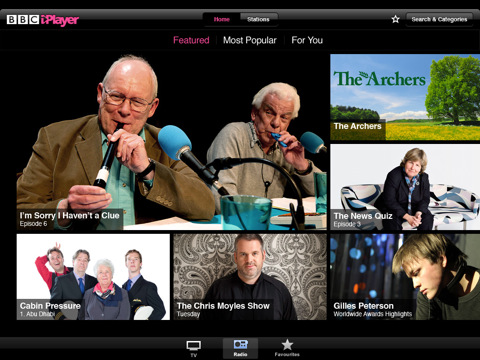
As previously reported, the official BBC iPlayer app for the iPad has launched today in the App Store. Sadly, iPlayer is only out in the UK for now, and it looks like it will stay there for a while until BBC figures out a subscription method for users outside the United Kingdom.

iPlayer for iPad puts BBC’s TV and Radio programs directly on your iPad for easy access and consumption. The app has been entirely written with Apple’s API and Cocoa Touch technology – it’s a native port of the iPlayer experience for the iPad. You can watch TV and listen to radio, manage your favorite shows and episodes through a Favorite list, browse upcoming programs from BBC. The design is really clean and elegant.

BBC iPlayer is available here, for free. [iTunes via 9to5mac]


2011: The Year Of Two iPads?

The next-generation iPad, dubbed “iPad 2” so far, is likely to be released between March and April. According to recent speculation, it will include a faster processor, more RAM, a thinner and lighter design and a front-facing camera for FaceTime. At this point, with even the Wall Street Journal weighing in to confirm the iPad 2 existence and release in the next few months, it seems pretty much obvious that we’ll see an iPad 2 within 10 weeks from today.

Still, two posts published by Daring Fireball’s John Gruber today open up to a new possibility: that Apple will release two new iPads in 2011, with a second one – let’s call it iPad 3 – due for a September release. Read more


iPad Vs. Other Tablets Comparison

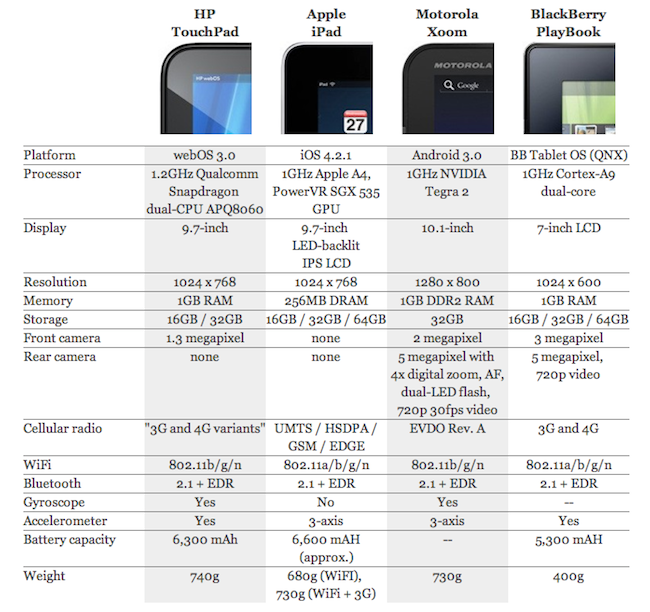
With today’s announcement of the HP TouchPad, we have a new tablet on the horizon. Even though HP says the device has “planned availability this summer”, the un-announced release date and pricing info don’t make the TouchPad any less interesting than it is. Personally, I think webOS was meant for tablets: beautiful and elegant multitasking interface, attention to details, sweet notification system, great photos app with full Facebook integration. And we’ve only seen a demo today. Overall, the TouchPad is promising and - this is the best part in my opinion - it could be the device not from Apple the Apple geeks will love.

In the comparison chart above, Engadget takes a look at the various tablets coming our way soon and the current generation iPad. The original iPad (which at this point should be refreshed very soon) still holds up pretty well, although the Motorola Xoom will sport a higher resolution screen (with 0.3 inches more, though) and the BlackBerry Playbook will have a dual core Cortex A9 processor. The iPad doesn’t have cameras, lacks a gyroscope and has only 256 MB of RAM.

The problem most of these tablets will have to face is the upcoming iPad 2 which is rumored to be faster, lighter, thinner and camera equipped. With iOS 5 also on the horizon for a June release, HP will have to consider both the new Apple hardware and software if they’re really pushing for a mid-summer release of the TouchPad.


MacStories Product Review: Ten One Design Pogo Stylus

Many people would tell you that you don’t need a pen to enjoy touchscreen devices. For the most part it’s true: the iPad shines as fingers flick photos into sharing bins and users check off another todo item in Things. Pen input is old fashioned, and quite frankly there isn’t a successful way to do it on a capacitive touchscreen. Though what would happen if we took the pen away from a poet, or a brush away from a canvas painter? Ten One Design defies finger philosophy with an elegant solution for the iPhone 4, iPod touch, and iPad with the popular Pogo Stylus.

Read more