


Here’s today’s deals on iOS, Mac, and Mac App Store apps that are on sale for a limited time, so get ‘em while they’re hot! Read more
Posts tagged with "iPad"
#MacStoriesDeals - Friday
Adobe Packager To Support iPad Apps Soon?
According to a rumor posted on Japanese blog Macotakara, Adobe is planning to update its Packager software for the iPhone to add support for iPad apps development. Adobe Packager, in fact, as part of the Flash Professional CS5 suite allows developers to re-use existing code to build native applications for iPhone. Since Apple lifted its restrictions on third-party development tools used to build iOS apps, many developers have relied on Packger to ship cross-platform software across a variety of devices and operating systems.
Macotakara also reports the updated Packager will include support for gestures in iPad apps, like pinch to zoom. Android and other “large LCD devices” should be supported as well. [via 9to5mac]
What’s Better Than $1.8 Billion Revenue? Giving Away 5,400 iPads
What happens when a successful and large company like semiconductor maker KLA-Tencor decides to give away iPads to all its employees? Well, it means the IT department is in trouble. After posting revenue of $1.8 billion, the CEO of the company gave each employee an iPad as a reward for the hard work; and not only did he gave people iPads, he also made sure the CIO of KLA-Tencor and IT folks would help everyone with the setup process. That leads to iTunes account creation, email setup, apps installation, secure VPN connections. For 5,400 iPads, that’s a bit of work.
KLA-Tencor’s Ballal didn’t have a choice about the speed and timing of an iPad rollout. The CEO had made a promise to give iPads to employees as a form of appreciation; when you promise someone an iPad, you can’t wait six months to deliver one.
So why couldn’t KLA-Tencor just ship the iPads to employees? Employees wanted the gadgets right away, even though half lived outside the United States. “The big thing was the logistics of getting these devices to different parts of the world,” Ballal says. “It was all the nightmare of shipping. The iPad wasn’t yet released in the different countries when we rolled this thing out. We learned a lot about logistics.
At its Q1 2011 earnings call, Apple announced over 80% of Fortune 500 are deploying or piloting iPads, and 88 of Fortune 100, 60% of Financial Times Europe testing or deploying iPhones. In the past we’ve seen school adopting iPads with special educational programs and corporate America “falling in love” with the device in a matter of months. [via TUAW]
Cloud Connect Pro: A Finder for iPad
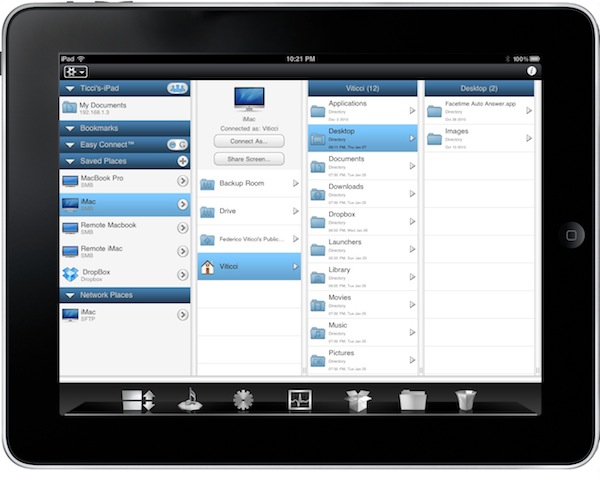
iOS devices don’t have a Finder, and in many ways that’s a good thing. Apple simplified the approach to file management by making the filesystem virtually invisible to the users and delegating “database functionalities” to apps, which are nothing but containers of files, data and information. Apps like Pages, PlainText or the Photos app itself keep actual files together, it’s just that on iOS users aren’t forced to manage, organize, clean and sort them like on the desktop. It’s a simpler and more intuitive approach. For many, though, file management sometimes is necessary. Either because of an app that doesn’t support sharing (thus documents can’t get out) or working needs that require access to a specific file in a specific location, several users over the years have lamented the impossibility to have a Finder-like system on their iPhones and iPads. We have also seen apps like Berokyo trying to bring folders and files together on iOS by making compromises with iOS’ default interface style and features.
Cloud Connect Pro, a new app by Antacea I’ve been testing for the past week, aims at bringing true Finder-like options and file management capabilities to the iPad with deep cloud integration. This app can connect to any computer, Dropbox or iDisk instance and WebDAV / SFTP / FTP server to access folder structures, files and media. It can stream music and videos, double as a lightweight but useful VNC client, open and preview document and much more. Read more
iPad Now Available in India→
iPad Now Available in India

A year after the official announcement, the iPad is now finally available in India, although I guess people who really wanted one in 2010 didn’t wait for Apple to make up its mind and release it. About pricing: a 16 GB standard WiFi model will cost you Rs 27,900, which is around $610, including taxes. It’s curious that today Samsung slashed the price of the Galaxy Tab in India, too.
Product page available here. What’s up with the website? [via Smoking Apples]
#MacStoriesDeals - Thursday

Happy Birthday iPad! Here’s today’s deals on iOS, Mac, and Mac App Store apps that are on sale for a limited time, so get ‘em while they’re hot! Read more
Tapu: iPad Browser That Looks Like Chrome, Plugs Into Facebook
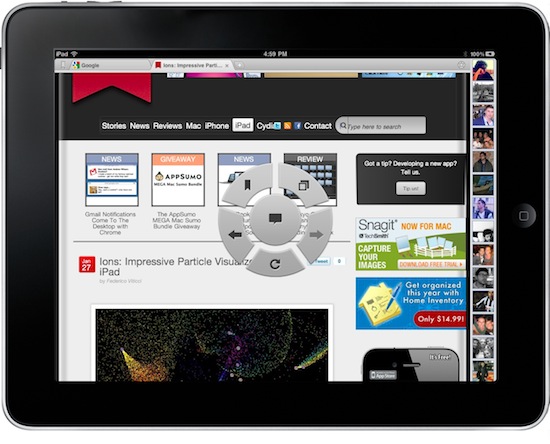
Looking for great alternatives to Mobile Safari, I have stumbled upon a lot browsers for the iPad. Some of them are really nice, like Grazing and Browser+; some them are the result of strange experiments gone terribly wrong, like Super Prober. Overall, the trend amongst developers seem to be that of trying to reinvent Safari by adding features over features that, without good software engineering and quality control, may end up cluttering an app, making everything barely usable. It happened with many browsers I have tested so far. Read more
Ions: Impressive Particle Visualizer for iPad
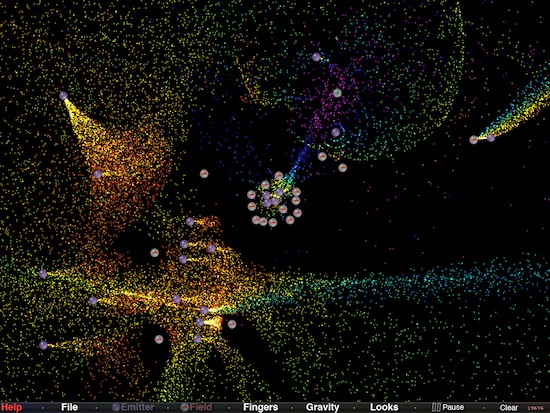
Soon after the iPad came out and Apple launched an App Store specifically meant for it, an app quickly jumped to first position of the charts: Uzu. The app, launched as free and eventually priced at $1.99, is a neat particle visualizer that supports multitouch input and allows you to create patterns with your fingers. Check our demo video here if you missed.
Ions, developed by Douglas Applewhite and available in App Store at $0.99, is an equally impressive particle visualizer that, unlike Uzu, gives you more control over the particles of light moving on screen. In fact, Ions might just be the most powerful and technically advanced particle visualizer we’ve seen on the iOS platform. The app comes with different particle light styles that you can switch at any time; you can control gravity with a slider or de-activate it from a popup menu; most of all, you can place emitters and negative fields on screen to control the movement of particles, which can go up to 20,000. Everything runs at 60fps and I haven’t noticed a single slowdown in my tests. Even with the maximum amount of emitters and fields particle were still running smoothly and fast.
You can also control the amount of particles released by an emitter, adjust the orientation and speed of the flow. Once you’ve achieved an interesting layout, you can save it and load it later to show it to your friends.
Go download Ions here. Demo video after the break. Really impressive. Read more
Pixelsync Transfers Photos Between Aperture and iPad
Professional photographers who own an iPad and have seen that lightweight photo editing is possible on the tablet have been asking for a portable version of Apple’s Aperture software for quite some time now. While there’s no evidence that Apple is working on a native iPad version of Aperture with focus on the OS X audience and the Mac App Store (where Aperture is being sold at a nice discounted price), third-party developers have set out to create alternatives to the most popular “pro” Apple apps like Final Cut and, indeed, Aperture.
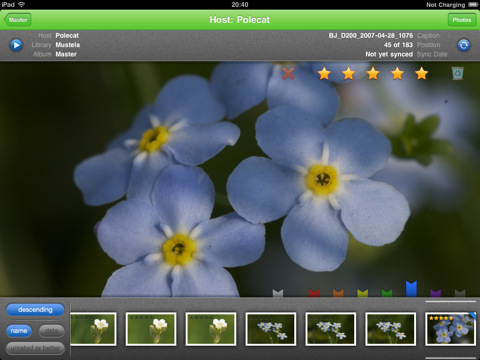
Pixelsync, previously known as “Tagalicious”, is a new app by developer Bart Jacobs that can sync Aperture photos between the iPad and the Mac. With a minimal and elegant interface (that’s dramatically improved since the first version of the app which, frankly, was quite ugly) that resembles the default Photos app, Pixelsync needs to communicate with a “helper” software users will have to install on their OS X machine running Aperture. Pixelsync Helper will than make it possible for the iPad app to fetch photos from the desktop application.
In Pixelsync for iPad you can’t edit photos, but you can play around with the metadata. Put simply, you can rate photos and assign color labels. Once projects and / or albums have been imported, you can edit and organize these data on the iPad and then sync back to Aperture. It all happens wirelessly with no USB cable required.
At $5.99 in the App Store, Pixelsync might be a little too pricey; still, Aperture users who have been looking for a lightweight iPad companion should give it a try.