


If you didn’t already know, we’ve set up a new twitter account for Deals, it’s @MacStoriesDeals. We’ll tweet the daily deals there as well as exclusive weekend deals too. Help spread the word! Here are today’s deals on iOS, Mac, and Mac App Store apps that are on sale for a limited time, so get ‘em while they’re hot!
Posts tagged with "mac"
#MacStoriesDeals - Monday
Fresh Feed Elegantly Puts RSS In The Menubar
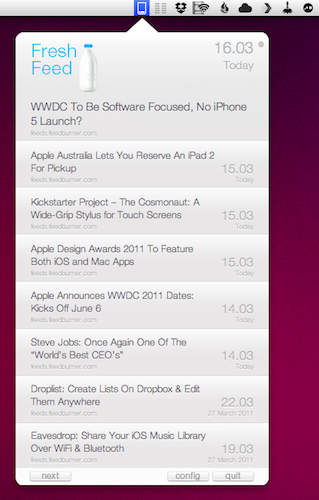
There are many ways to consume RSS feeds on the Mac platform: when it comes to syndicating content from your favorite websites, apps like NetNewsWire and the Reeder beta come to mind, although many people simply prefer to keep an eye on Google Reader (the most used service nowadays to subscribe and follow feeds) in their desktop browser.
Over the years several alternatives have surfaced that enable users to read RSS feeds in different ways on the desktop. Fresh Feed, a free utility in the Mac App Store, does what many other apps have tried, but in a very elegant way: it puts RSS items in the menubar, and allows you to open them as new tabs in the browser. Where Fresh Feed really shines, in my opinion, is the user interface: it looks like a bigger iPhone app placed in the menubar, yet it doesn’t feel “weird” as several other Mac apps that try to resemble their iOS counterparts. Its “cells” for new RSS entries look sweet and polished. They’re chronologically ordered, but you can scroll with your trackpad to load as many articles as you can. A click on the “more” button loads the item in your desktop browser, automatically leaving Fresh Feed. To add new RSS feeds, you have to open the Preferences and paste a website’s feed URL.
There’s no option to set refresh times or auto-import feeds from Google Reader, unfortunately. If you just want to use Fresh Feed to stay up to date with the articles from a specific website, however, and not your entire Google Reader list, this might just be the app you need.
Looking forward to future updates with more features, Fresh Feed is a free download in the Mac App Store.
#MacStoriesDeals - Friday

If you didn’t already know, we’ve set up a new twitter account for Deals, it’s @MacStoriesDeals. We’ll tweet the daily deals there as well as exclusive weekend deals too. Help spread the word! Here are today’s deals on iOS, Mac, and Mac App Store apps that are on sale for a limited time, so get ‘em while they’re hot!
Keep Your Files Safe! Two Copies Of Disk Drill Pro Up For Grabs
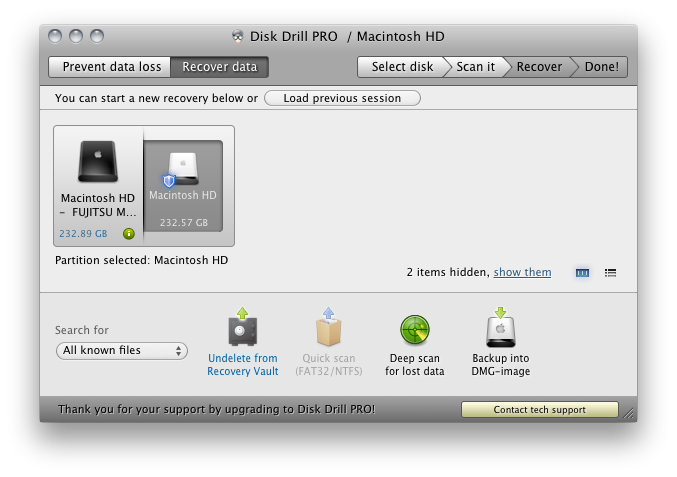
Your Mac can be kind of a jerk sometimes ya know? I mean, it’s totally not your fault that you accidentally dropped that school report in the bucket then emptied the trash the day before it was due. But not to fear: Disk Drill for the Mac knows right where’s it been marked for deletion, and yanks it right from our hard drive (without boring any holes). And if you’re just buying Disk Drill, a deep scan should uncover just what you’re looking for. You need Disk Drill as assurance against unfortunate mishaps, lost files, and damaging deletions. Not only will Disk Drill protect your home folder, but it’ll keep an eye on your hard drive’s health so you’ll never have to worry about a dying disk. And if all goes haywire: just back up your documents to a disk image! It’s that simple, and Disk Drill comes in free and pro versions so you can decide what’s right for you. Super easy to use, we’re giving away two licenses to a couple lucky readers.
Samurai II For Mac: Good, Bloody Fun

For fans of the original Samurai: Way of the Warrior, we ended on quite the cliffhanger. Confronting your demons, things hadn’t turned out exactly as planned. In Samurai II: Vengeance (now on the Mac App Store), the quest for revenge will leave no prisoners. Cel-shaded environments mix with 3D combatants for a hack & slash adventure that takes you through the second chapter of the Samurai story line.
Heads up: there are some graphic screenshots behind the break (those swords can be pretty sharp), where we take a look at how well Samurai II fares with a keyboard or mouse.
Embraceware’s Awaken 5 Now Available

Awaken, Embraceware’s very popular alarm clock (and more) app, has just been updated to version 5. It’s available in the Mac App Store or if you’re an existing customer, you can “Check for Updates” within the app. New customers may purchase the app via the Mac App Store for $9.99, or download a demo version via Embraceware’s Awaken page. Read more
#MacStoriesDeals - Thursday

If you didn’t already know, we’ve set up a new twitter account for Deals, it’s @MacStoriesDeals. We’ll tweet the daily deals there as well as exclusive weekend deals too. Help spread the word! Here are today’s deals on iOS, Mac, and Mac App Store apps that are on sale for a limited time, so get ‘em while they’re hot!
Flare: Photo Editing with Style

The Iconfactory, makers of apps such as Twitterrific, CandyBar, xScope, IconBuilder, iPulse, and Frenzic, are the “World leaders in icon design, custom design services, software, royalty-free stock icons and much more.”
So what app niche could they fill next? How about photo editing. Unless you’re a pixel pro who uses Photoshop, Lightroom or Aperture, there are few options for the semi-pro and amateur out there to dabble in image effects. That’s where Iconfactory’s new app, Flare, comes into play. The Iconfactory worked together with ARTIS Software to bring Flare to the Mac. Read more
Skype 5.1 for Mac Released, Design Competition Launched
Skype, the popular VoIP and video calling service, released earlier today an update for its official Mac client, adding a number of fixes, new features and design improvements following feedback received by users in the past months since the release of Skype 5 for Mac.
The latest update, version 5.1, includes “improvements to the group video calling interface” as participants in group calls can now easily identify and focus on active speakers. Another addition to the app is the possibility to select recent numbers in the dial pad – which was redesigned in Skype 5. Among other bug fixes, one for iSight FireWire webcam detection. Skype 5.1 for Mac is available for download here.
Together with the new release, Skype is also launching a design competition with many Apple-related prizes (iPads, a MacBook Air, Apple TV) to redesign the look of chat in Skype for Mac:
When we first launched our new Mac app, we were delighted to see so many custom styles emerge from the design community, so we thought we’d make it official.
Between now and the 14th April, we’re inviting you to design your own chat style for Skype for Mac. We’ve assembled a team of experts to choose the very best, and if you’re the winner, we’ll include your design in a future version of Skype for Mac so that it can be enjoyed by millions of people around the world (as well as giving you a brand new MacBook Air, an iPad 2 and a year’s subscription to Unlimited World Extra).
When Skype 5 for Mac came out, many people were indeed disappointed by the new UI and created custom “themes” for the app. Skype noticed, and is now giving designers a chance to be included into the next major release of the app and win gadgets and development books. Not a bad deal, right? Check out the details here, and a demo video of Skype 5 for Mac below.
Read more