Posts tagged with "mac"

Oldie but Goodie: Play External Audio Thru Your Mac With LineIn

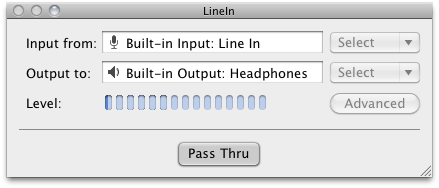
If you’re one of my crazy Twitter followers, you’re already well aware that I’ve significantly reduced the role of iTunes in my life thanks to Instacast, which has been reviewed by everyone from Shawn Blanc, to Michael Hurley on Macgasm, and myself on MacStories. Though I could talk about Instacast for ages, the problem I had to solve next was figuring out how to get the audio off my iPod touch and into my office speakers. The big issue is that my setup can’t accommodate more than two audio inputs, and while audio over AirPlay is probably possible with AirFoil, I notice a significant battery drain as I stream both audio from the web and broadcast it to my local speakers in the bedroom. I wanted to avoid this in the office since outlets are scarce, so I needed a way to pipe audio from my iPod touch thru my Mac. Enter an old Rogue Amoeba goodie: LineIn. Not only is it free (who doesn’t love free), but it requires nothing more than a button press to set up and pass my iPod touch audio through the audio line in to the audio line out. There isn’t a close button for LineIn, but you can simply press ⌘H to hide the app when you don’t need it.

It’s a great find, and something that might come in handy for at least one of our dear readers down the road. Download it (and check out other Rogue Amoeba freebies) here.



#MacStoriesDeals - Thursday

If you didn’t already know, we’ve set up a new twitter account for Deals, it’s @MacStoriesDeals. We’ll tweet the daily deals there as well as exclusive weekend deals too. Help spread the word! Here are today’s deals on iOS, Mac, and Mac App Store apps that are on sale for a limited time, so get ‘em while they’re hot!

Read more


Boxcar Beta for Mac Now Available

Popular notification service Boxcar is taking a huge step forward in delivering a continuous stream of updates and notifications to millions of users with the release of a desktop client, specifically built for the Mac. As reported by MG Siegler at TechCrunch, the Mac version of Boxcar follows the steps of the iOS and web apps: once logged in with your Boxcar account and configured the online services you’d like to keep an eye on, the app will sit in the background and “listen” for changes that interest you happening across Twitter, Facebook, RSS feeds, your Gmail account and more. As new things happen while you’re busy working or browsing the web on your computer, Boxcar will “push” a notification to your desktop alerting you of what’s new.

The Mac app sits in the menubar and has support for Growl, a customizable notification service Mac users know and love. One of the biggest advantages of Boxcar over its iOS competitors is the unified dashboard that gives you instant access to your favorite services with just a few taps; the iOS interface got lost in the transition to the Mac, with the developers adopting a cleaner and simpler list of notifications you can scroll with your trackpad. Of course, there are buttons to open notifications in the browser, but it’d be nice to have deeper integration with other native Mac apps such as the official Twitter one. This is a first beta anyway, so I guess more updates will come soon with features and enhancements. The Mac app has also an option to “mute” notifications.

The Boxcar beta for Mac is available as a free download here. More screenshots below. Read more


Review: Take Five…For Mac!


Now I will admit, I never bought Iconfactory’s Take Five for iOS. Don’t get me wrong it’s a beautiful app but I didn’t see myself using it that much on my iPhone. I’m so use to just using the volume controls or multitasking tray. The point of the app makes a lot of sense though: it’s aimed at letting you restart music that you paused and forgot to turn back on. I received an email a few weeks ago with the subject “Take Five for the Mac Beta,” I knew right away that this would fit into my workflow on my iMac because I get more sidetracked at home with my wife, kids and the television. So now when I want to pause music, I use Take Five for the Mac. Read more


#MacStoriesDeals - Exclusive Wednesday

If you didn’t already know, we’ve set up a new twitter account for Deals, it’s @MacStoriesDeals. We’ll tweet the daily deals there as well as exclusive weekend deals too. Help spread the word! Here are today’s deals on iOS, Mac, and Mac App Store apps that are on sale for a limited time, so get ‘em while they’re hot!

Read more


#MacStoriesDeals - Tuesday

If you didn’t already know, we’ve set up a new twitter account for Deals, it’s @MacStoriesDeals. We’ll tweet the daily deals there as well as exclusive weekend deals too. Help spread the word! Here are today’s deals on iOS, Mac, and Mac App Store apps that are on sale for a limited time, so get ‘em while they’re hot! Read more


WWDC ‘11 Sold Out In Less Than 10 Hours

The WWDC 2011, announced earlier today, is already sold out, as you can see on Apple’s official webpage for the event. This year’s conference sets a new record for Apple and the developers community: last year, WWDC tickets sold out in 8 days. For the 2011 edition, Apple managed to sell all tickets (which start at $1,599) in less than half a day since the announcement this morning – which saw developers from all around the globe quickly buy tickets to secure their presence in San Francisco from June 6 to June 10.

As a quick recap, the WWDC 2011 will focus on “the future of iOS and Mac OS” with:

  • more than 100 technical sessions presented by Apple engineers on a wide range of technology-specific topics for developing, deploying and integrating the latest iOS and Mac OS technologies;
  • over 1,000 Apple engineers providing developers with code-level assistance, insight into optimal development techniques, and guidance on how they can make the most of iOS and Mac OS technologies in their apps;
  • the opportunity to connect with thousands of fellow iPad®, iPhone® and Mac developers from around the world;
  • Apple Design Awards which recognize iPad, iPhone and Mac apps that demonstrate technical excellence, innovation and outstanding design.


LogMeIn for iOS: Remote File Transfer Made Easy

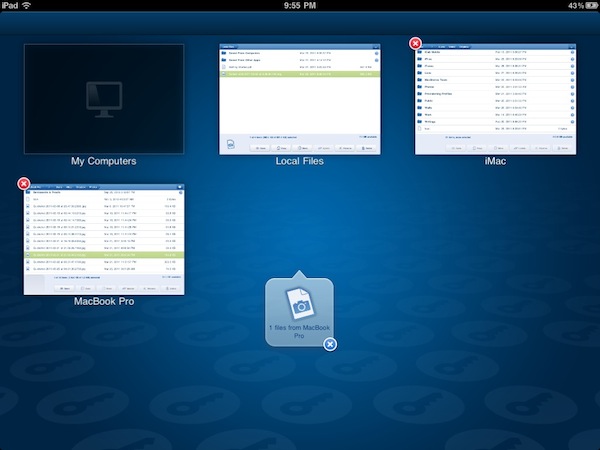
Reviewed a couple of times in the past by our editor Cody Fink, LogMeIn Ignition for iOS has been around for a while in the App Store. In fact, in spite of popular apps like Edovia Screens and iTeleport allowing users to remotely access their computers’ screens, thousands of users installed LogMeIn’s software for the iPhone (and later, iPad) on day one and never thought of going back to another app. That’s what Cody did, whilst I settled with Screens as my go-to app for displaying my Mac’s desktop on iOS devices. Recently, however, I decided to take LogMeIn Ignition for a spin, and I was surprised to find out the new features introduced in the latest update are exactly what I was looking for.

LogMeIn comes with VNC functionalities, but I will keep on using Screens for that. It’s a matter of a personal preference, and you can read more in my Screens review. Edovia’s elegant and simple solution to remotely connect to a Mac’s screen has incredibly useful, reliable and easy to configure for me, so I won’t switch over to LogMeIn as far as screensharing is concerned. Rather, I’ve been intrigued by LogMeIn “file transfer” option added in version 2.0, which aims at offering users a simple way to copy and move files across computers and iOS devices using LogMeIn’s desktop companion. Best of all, once you spend your 30 bucks to purchase LogMeIn Ignition in the App Store, screensharing and file transfer will be offered as free services with no need to buy an additional LogMeIn Pro subscription. Read more


Rediscovering A Must-Have Movie Utility: Air Video

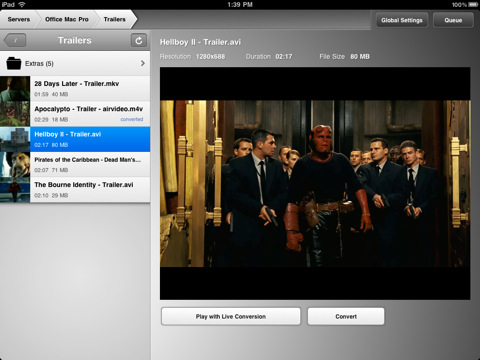
In the sea of App Store releases and updates, it’s easy to get lost and forget about that great app you used to love. New apps come around, better alternatives for just about anything are provided by developers and, especially if you’re geek, you know what it means to constantly tweaking your workflow to accomodate the latest offering in the iOS or OS X panorama. In the past week, I’ve rediscovered an app I had for a long time, but somehow managed to leave unused in my iTunes app library: Air Video.

I’ve always been a fan of Air Video and have been following the development (and updates) closely. Yet, for the reasons mentioned above, during the past months I kind of forgot how useful this app used to be, and how greatly it could improve my media consumption experience. So when the iPad 2 showed up at my doorstep and the thinner design made it crystal clear that it was easier (for me) to hold with one hand, I remembered about Air Video. And I’ve fallen in love with it all over again. Read more