Posts tagged with "mac"

iOS Developers Making Leap to the Mac

iOS Developers Making Leap to the Mac

Chris Foreman at Ars Technica reports about several iOS developers porting their apps to the Mac App Store:

These developers warned, however, that it wasn’t fair to make direct comparisons with the iOS App Store at this early stage. For one, every iOS device has access to the iOS App Store, while only those who applied the Mac OS X 10.6.6 update can access the Mac App Store. And, as Crawford pointed out, there are more iOS devices in active use than there are Macs.

Frampton compared initial sales volumes to the early days of the App Store on the iPhone. “The overall size of the market seems very similar to the early days of the iOS App Store, and in fact I get a very distinct feeling of déjà vu,” he said. “The Mac App Store market may never catch up, but it certainly has a lot of room to grow.”

“Sales tend to eventually level out and that’s yet to happen on the Mac App Store,” Comi agreed.

As more users upgrade to 10.6.6 (a friend of mine ran Software Update a week ago, almost a month after the Mac App Store introduction), there will still be a considerable userbase stuck on previous versions of Snow Leopard. That’s the problem with the Mac App Store coming as an “add-on” to the OS. However, I believe that, in the end, apps will be the reason why these people will be “forced” to upgrade to the latest SL version. The more great apps are released in the Mac App Store, the more people will say “Hey, maybe I really need to update”.

It’s not the Mac App Store as a “feature” by itself, it’s the ecosystem of a platform for great software.

Permalink

Manuals on Amazon Suggest Late July Launch for Lion

Several manuals for the upcoming Mac OS X 10.7 Lion have been spotted by 9to5 Mac on the Amazon.UK website and all are set to be released sometime around late July, hinting that the OS will also launch around that time. WWDC is expected to be from July 5 to July 9 and it would make sense for Lion to be released shortly after WWDC as these manuals seem to suggest.

Whilst the release date of these guidebooks don’t confirm a late July launch it makes a late July launch likely because there have been several previous cases of Amazon guidebooks effectively revealing a products launch date, such as Office 2011 last year.

Some of the manual covers include references to the already known features of Launchpad, Mission Control and changes to the dock, all of which were revealed in the ‘Back to the Mac’ event late last year.

[Via 9to5 Mac]


Nokia Borrows iMovie Loop For Microsoft Partnership Announcement

If Nokia’s recent announcement to partner with Microsoft wasn’t enough to stir up the #fail hashtags on Twitter, leave it to the Apple geeks to point out that Nokia is using their biggest competitor’s theme in their recent announcement. While Apple’s audio loops are royalty free, it’s still amusing to see a competitor using the Macbook theme (Pendulum) in their Microsoft get-together. Check out what Adrian Boioglu from Boio.ro has dug up after the break.

Read more


Bejeweled 3 for iPhone and iPad Coming, Eventually

If you’re a loyal Bejeweled fan (dare we say “addicted”), then you must be happy to know that, eventually, Bejeweled 3 will “probably” come to the iPhone and iPad. Why the “eventually” and “probably”? The game, developed by PopCap Games, was released as a digital download for Windows and Mac last December and, especially on the Mac side of things, several gamers decided to put the download on hold, waiting for a mobile iOS counterpart. Good news is, hope isn’t lost as PopCap Games’ Garth Chouteau hints at the porting in a recent interview with Pocketful of Megabytes, which you can read here.

When asked about an iOS version, Chouteau says:

As mentioned above, we’re traditionally somewhat slow to adapt our games to other platforms after launching them on PC/Mac… Bejeweled 3 for iPhone/iPad is probably something we’ll do…eventually…!

Bejeweled 3 for iOS, if priced correctly and made universal in the App Store, would undoubtedly jump the charts in a matter of a few days. The game is popular, people want to play, PopCap wants as many downloads as possible – sounds like a plan, right? Yes, but we have to wait. Eventually, it will come. Hopefully sooner than later. [via TUAW]


#MacStoriesDeals - Friday

In case you missed the last two days of deals, check them out here and here, the iOS deals are still good! Here’s today’s deals on iOS, Mac, and Mac App Store apps that are on sale for a limited time, so get ‘em while they’re hot!

Read more


Space Gremlin Is A Simple App To Free Up Space On Your Mac

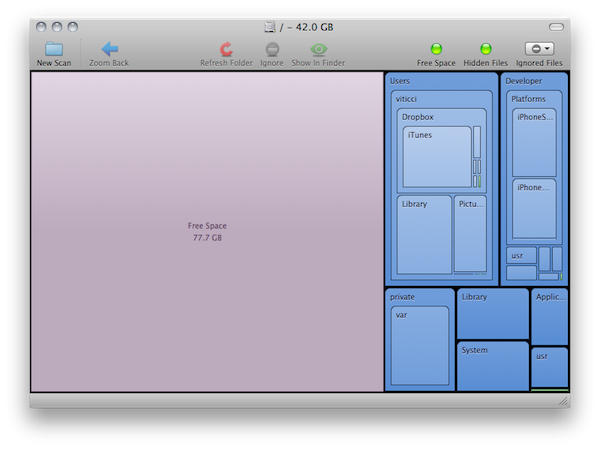
I stumbled upon Space Gremlin for Mac today when browsing new releases and top paid categories in the Mac App Store. Not as sexy and shiny as Daisy Disk, Space Gremlin can scan any drive connected to your Mac (external, internal Mac HD, network drive through AirPort Extreme station) and provide an easy solution to visualize files that are eating space on your computer.

Space Gremlin doesn’t allow you to delete files and folders in-app like Daisy Disk does with the recent 2.0 update, however it comes with a more standard grid view that reminds me of the popular cleaning tool WinDirStat for Windows. From this grid view (scan took a few seconds on my 120 GB SSD), you can select folders to reveal them in Finder, navigate to deeper levels, zoom back and hide free space / hidden files. What’s cool is that you can also add specific folders (like system ones) to an ignore list because you know they’re there and you can’t delete them. You can access and modify the ignore list at any time from the toolbar, which also happens to have buttons to refresh folders and perform a new scan. I really, really appreciate the fact that, together with my FireWire drive, the app also recognized the USB one attached to my AirPort extreme and shared on my local network. From the “begin a new scan” window, you also have shortcuts to popular Places like the Desktop, Documents and Applications folders.

Space Gremlin doesn’t have the most beautiful interface you’ve ever seen, but gets the job done. I would like to see the possibility to delete files within the app in a future update, and smoother animations when switching between folders in the filesystems. Overall, Space Gremlin is a well-realized utility that you can get at $3.99 in the Mac App Store.


IconBox for Mac: 50% Off Today Only

IconBox for Mac: 50% Off Today Only

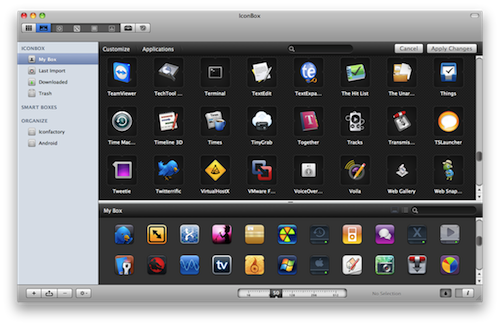
IconBox, icon organizer and customization tool for Mac, is available at $12.49 (50% off) at MacUpdate today only. From our review:

I really like IconBox. It’s akin to what LittleSnapper did for me for Flickr photos; IconBox is a library chock-full of considerate features that helps me organize interesting findings. While it may look intimidating at first glance due to its large feature set, there’s nothing to be afraid of. IconBox provides icon lovers new and old with a great toolset that’s persuaded me to use it over Panic’s own CandyBar 3.

If you’re that kind of user who customizes his Mac a lot, you should give IconBox a try.

Permalink


PropEdit Brings Simple Permission Editing to OS X

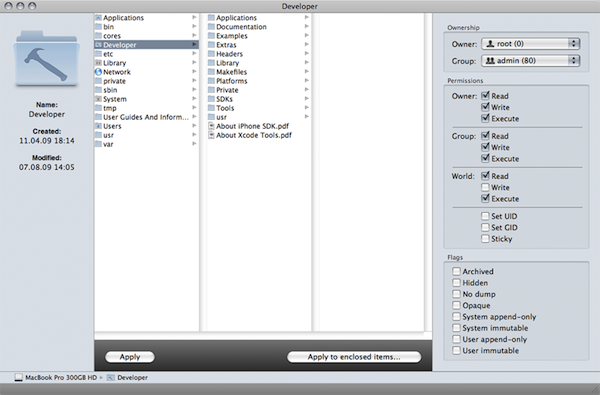
PropEdit, a new free app by eosgarden, aims at making the process of editing file and folder permissions on your Mac super-easy. Instead of relying on contextual menus in the Finder or the Terminal to modify owner and group permissions, PropEdit offers a graphical user interface inspired by the Finder’s column view that allows you easily find your way through the system and act on files that need a permission fix.

PropEdit features an additional sidebar that contains all the options you might need to change permissions; instead of chmod in the command line, you can simply check off items to modify a file’s ownership, and so forth. It’s all very simple and strightforward.

Terminal junkies will of course stick to their insane command line skills when it comes to permission editing, but PropEdit is really good. It’s not available in the Mac App Store, but you can download it for free here.