

Posts tagged with "mac"
#MacStoriesDeals - Tuesday

PhotoToMac Is The Fastest Way To Transfer Photos to OS X
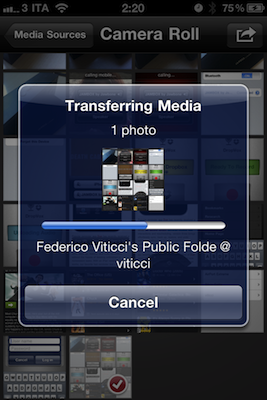
I share a lot of screenshots and photos between my iPhone and Mac every day. Up until today, I’ve relied on third-party apps like iFiles to import pictures into its library and get them on my Mac using Cyberduck, which can connect to iFiles’ built-in WebDAV server. PhotoToMac, a $1.99 app by Galarina, improved my workflow with a system that allows me to import photos and videos without using additional Mac apps. Files shared with PhotoToMac, in fact, end up directly in the Finder. Read more
Google’s OS X Software Deployment Solution Now Open Source

As noted by The Register, Google has open sourced its enterprise-class Mac OS X software deployment solution, Simian. The software can distribute applications and software updates across a network of a dozens or thousands of Macs, it can handle security patches and optional installations, it even provides a way to deal with updates issued by Apple. Simian is entirely based on OS X, as Google decided to move to Apple’s operating system after the vulnerabilities found in its previous Windows-based environment that allowed a Chinese hacker to enter Google’s internal secure network in 2009.
The tool uses a client based on Munki, a set of Mac deployment tools previously open sourced under an Apache 2.0 license. Munki lets you install software that uses not only the Apple package format but also Adobe CS3/CS4/CS5 Enterprise Deployment packages, and you can drag and drop disk images as installer sources. What’s more, it can be configured to install Apple Software Updates, either from Apple’s servers or your own.
Last, Simian is built on top of Google’s own App Engine, an infrastructure that allows to deploy and manage online applications. More information about Simian are available here.
Nottingham 2.0 Beta Available, Simplenote Client For The Desktop

Nottingham is a note taking application for the Mac we first reviewed more than a year ago, and lots of things have changed since then. The application went under a private beta testing stage, and Nottingham 2.0 is now finally available as a public beta. Nottingham, for those who missed it, is a desktop app that plugs into the popular service Simplenote (which we love here at MacStories) to retrieve notes stored online and continuously backed up through the cloud.
Version 2.0 of the app, released a few minutes ago, adds a completely redesigned user interface that’s heavily inspired by the iOS Notes app with yellow notebook-like background and the possibility to switch between landscape and portrait mode. The notepaper design can be disabled in the Preferences and you can switch to the Notational Velocity-like vertical layout using a button in the top toolbar. Not very intuitive at first, as it looks like a “sharing” button. The app can sync with Simplenote and pick any folder to read notes from – put the folder in your Dropbox and you have cross-platform syncing with Simplenote and Dropbox at the same time. Similarly to Notational Velocity, the app can read multiple file types and be assigned a keyboard shortcut. The app is entirely keyboard-friendly and the developers promise more features will be added in the final release.
You can download Nottingham 2.0 public beta for free here.
#MacStoriesDeals - Monday

Here’s today’s deals on iOS, Mac, and Mac App Store apps that are on sale for a limited time, so get ‘em while they’re hot! Read more
Mac App Store: Miro Converts Videos for iOS, For Free
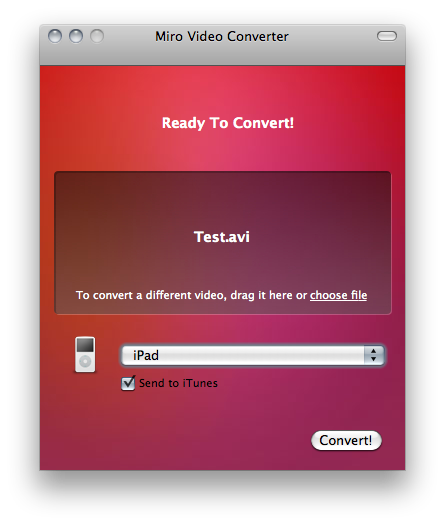
Available for free in the Mac App Store, Miro Video Converter is a little utility that converts almost any kind of video to formats compatible with iOS and other Apple devices, Android handsets, WebM, Theora and a variety of other platforms. As you can guess, Miro Video Converter comes from the creators of Miro, video player and torrent downloader.
The app doesn’t offer all the control and customization possibilities seen, for example, in the popular Handbrake video conversion tool, but it’s got a nice and simple interface where all you have to do is drop a file, select the output and hit Convert.
Miro Video Converter is available here. Check out the list of supported formats and devices below. Read more
Mac App Store: Developers Make App Free, Gain 24,000 Downloads in 48 Hours
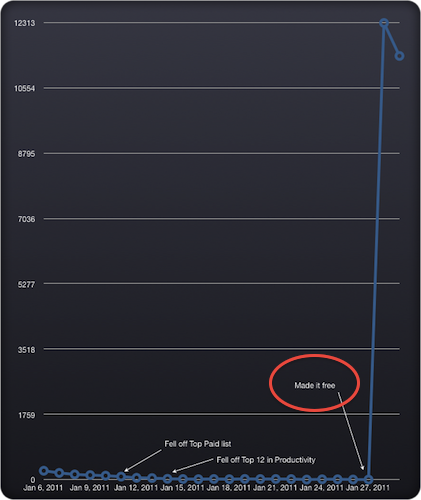
Todolicious is a neat todo app for the Mac we originally previewed ahead of the Mac App Store launch. The app was priced at $4.99 and, since the new Store’s grand opening, has been selling hundreds of copies, slowly sliding to lower sales numbers due to new apps taking over the Top Paid and Category charts. That’s what usually happens after the launch of a new app, when new apps are released and you’re not Angry Birds.
The Mustacheware developers, however, tried to make the app free for two days to see how would the experiment play out. It turns out, making a simple and useful app like Todolicious free for 48 hours over the weekend brought in more than 24,000 downloads. See the graph above to see the difference between paid vs. price drop.
We have heard several stories of success in the Mac App Store in the past weeks. Autodesk announced the new Store doubled a year’s sales of Sketchbook Pro in just 20 days, Pixelmator grossed $1 million in the same amount of time and another developer went from 7 sales a day to 1,500. Given the youth of the Mac App Store, it’s too early to say “free apps do better than paid apps”, because Pixelmator and Sketchbook Pro are here to remind us paid software can do great as well. It also needs to be mentioned, though, that Todolicious was sold at $4.99, not exactly the “premium” $29.99 you would spend for a graphic editing app. As strange as it sounds, many users are willing to pay a premium to download a pro app rather than “yet other 5 bucks” to download a simple Mac app. Still, the numbers are in and they are surprising: 24,000 downloads aren’t bad for a small indie development studio that’s seeking to build a user base for the future iPhone version of the app, and whether or not these 24,000 people will stick around the exposure provided by the Mac App Store and Top Free charts is incredible.
A Beautiful Google Analytics Widget for OS X
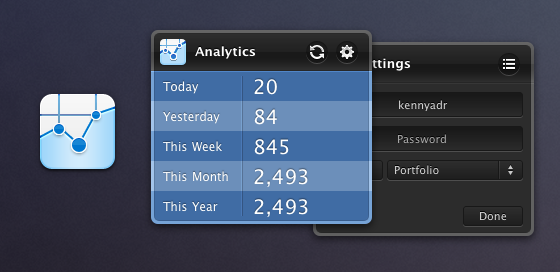
Created by designer Adrian Kenny and developer Adam Aganou, this one is a beautiful and unobtrusive widget for Google Analytics you might find useful if you’re the Dashboard kind of user. Once authorized with your Google account, it will display visits for the current day, the past day, week, month and year. It’s minimal and elegant. The icon is sweet and the color choice attractive.
There are many Google Analytics widgets out there, but none of them is as sexy as Adrian Kenny’s design. Free download here.
Macworld 2011: The Future of the Mac [Video]
Here’s a 48-minute video for your typical Sunday morning: at Macworld Expo 2011, Daring Fireball’s John Gruber, Macworld’s Jason Snell and Dan Moren and Tidbits’ Adam Engst talk about the future of the Mac, the Mac App Store as the biggest innovation happening to the platform, the iOS influences on OS X and much more.
One argument that really made me think after watching the video is the idea of two kinds of Macs in the future: a “simplified Mac” with a closed system similar to iOS, and a Mac for advanced users. I don’t know how I would react to a closed, straightforward and really simple Mac personally, but I do know that I would appreciate a new system for managing and deleting apps. Perhaps Launchpad will bring some fresh air on Lion. But then again, should Apple just make the Mac as simple as possible and let “power users” enable the features they want (like, say, the Finder) in the machine’s preferences? And how does the Mac App Store fit in all this? Great discussion in the video above.