Posts tagged with "mac"

Omni Group’s Huge 2011: OmniFocus 2, New OmniPlan, OmniOutliner for iPad


Stronger than ever thanks to an incredibly successful launch of OmniFocus for iPad, the constantly increasing OmniFocus userbase on all platforms and the hype surrounding all their products, Omni Group’s CEO Ken Case gave some details of the company’s roadmap for 2011 at Macworld Expo. The three key products seem to be OmniFocus 2 for Mac, coming later this year and highly inspired by the iPad app, a brand new OmniPlan with cloud sync and collaboration features, a version of OmniOutliner for iPad. Personally, I’m really excited about the overhaul of OmniPlan, which will also get OmniFocus integration:

The new syncing back-end is also designed to work with OmniFocus, which will let individual team members sync tasks assigned to them with either the desktop, iPhone, or iPad versions. “All three versions use the same underlying engine, so once we have that update in place, we’ll be able to roll out OmniPlan syncing to all versions of OmniFocus,” Case told Ars.

The current version of OmniPlan allows syncing via CalDAV, but the new engine will offer much better integration with OmniFocus. For project team members who don’t need to see what all other team members are working on, they’ll be able to see just the tasks assigned to them. When tasks are marked as complete in OmniFocus, the project manager will get a notification of the change in OmniPlan.

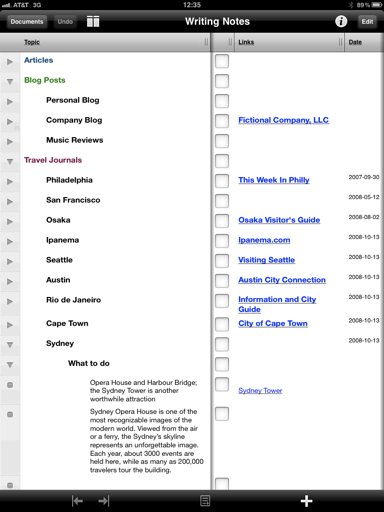
We can’t wait to see what will the new OmniPlan look like, and the two-way sync with OmniFocus sounds like a killer feature to me. Not to mention OmniOutliner for iPad, which will be demoed for the first time at Macworld today and is set to ship sometime in the next few months. What you see above is a screenshot of an early build Ars Technica was provided, but I guess the UI will change come the final release (remember the first mockups of OmniFocus for iPad?).

Last, OmniFocus 2 for Mac will be released “later this year”, although the Omni Group (as usual) doesn’t set any deadline. When it’s ready, it’s ready. We just know the feedback for the iOS apps (especially the iPad version) has been huge, and OmniFocus 2 will be built on top of that.

Looks like the Omni Group is off to a great start in 2011.
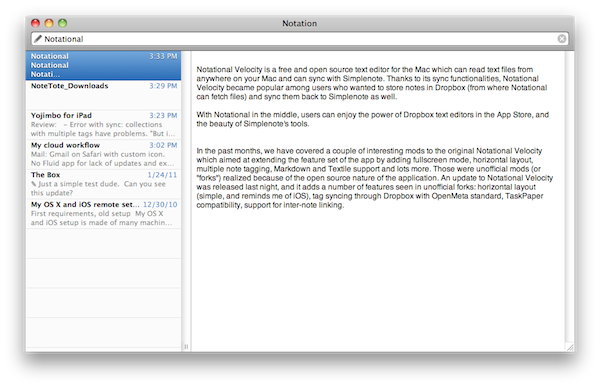

Notational Velocity Update: Horizontal Layout, Tag Sync, New Icon

Notational Velocity is a free and open source text editor for the Mac that can read text files from anywhere on your computer and syncs with Simplenote. Thanks to its sync functionalities, Notational Velocity became popular among users who wanted to store notes in Dropbox (from where Notational can fetch files) and sync them back to Simplenote as well. With Notational in the middle, users can enjoy the power of Dropbox text editors in the App Store, and the beauty of Simplenote’s tools.

In the past months, we have covered a couple of interesting mods to the original Notational Velocity which aimed at extending the feature set of the app by adding fullscreen mode, horizontal layout, multiple note tagging, Markdown and Textile support and lots more. Those were unofficial mods (or “forks”) realized because of the open source nature of the application. An update to Notational Velocity was released last night, and it adds a number of features seen in unofficial forks: horizontal layout (simple, reminds me of iOS), tag syncing through Dropbox with OpenMeta standard, TaskPaper compatibility, support for inter-note linking. Tags can be entered in a dedicated column of the vertical view, but I haven’t found a way to show tags while in horizontal mode. These tags have full Spotlight support as they’re based on  OpenMeta (which means they’ll also work with other Mac apps like Tags and Leap). Lots of changes and small fixes are included in this update – I appreciate the fact that notes can now be created with the “nv://make/” URL syntax and AppleScript search support. I also find the new icon more elegant and unobtrusive than the previous one.

Overall, it’s the same Notational you know and love only with a few changes, a new layout and lots of minor improvements you can check out below. Download here. Read more


The AppSumo “Unleash The Beast!” Bundle Giveaway

The month of OS X has to come to an end, but not without a spectacular bang from the vaults of AppSumo awesomeness. Digging deep, they came up blazing with heavy hitters that’ll send non-power users crying over their slow Windows keyboards. The Beast will only strike once, and in its claws you can obtain Yummy FTP, deep discounts on Arq and ScreenFlow, as well as a one year subscription to the magical Skitch. We’re not done just yet: MacStories readers have a chance to win one of five copies of this final bundle in a month of OS X (and don’t forget that AppSumo’s MEGA bundle is still up for grabs).

Read more


Tip Of The Day: Check for App Store Updates With Keyboard Shortcut

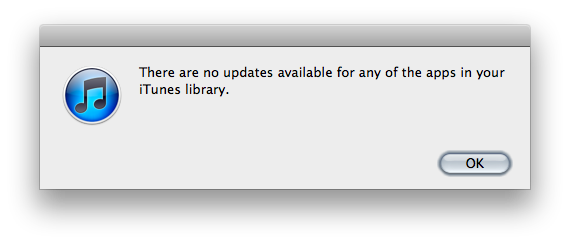
For me, the most annoying thing in iTunes is that to check for app updates I’m forced to mouse to the “Check for Updates” button in the lower right corner, and most of the times I miss the little arrow next to it with my cursor. I used to hate this. I’m saying “used to” because thanks to this tip I found over at Finer Things in Mac, now I can check for app updates with a keyboard shortcut.

The shortcut is the usual Command-R. What’s interesting is that the shortcut is used to refresh the web view in the iTunes Store, and Command-R isn’t documented in the iTunes menu.

So, there you have it. Command-R to check for updates. A little trick that’s incredibly useful for me.


Key Codes, Free App To Display Unicode Values

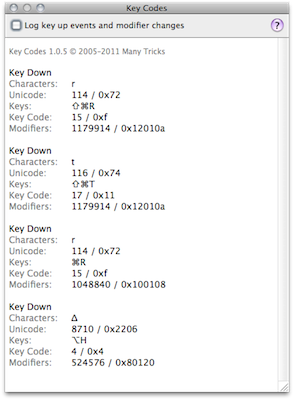
If you’re a developer that always needs access to unicode values and modifier keys state or you simply want to quickly paste keys like ⌘ and ⌥ to your clipboard because you don’t know the proper keyboard shortcut, Key Codes may come in handy. A free download in the Mac App Store and developed by Many Tricks (the same guys behind Witch, Name Mangler and Desktop Curtain), Key Codes displays key code, unicode value “and modifier keys state for any key combination you press.”

A little utility for sure, but useful. Get it here.


The Mac App Store and “Half-Available” Updates

Panic, the developers of popular software for the Mac like Coda, Transmit and Candybar, wrapped up a critical update to their FTP client / file manager / all-in-one solution Transmit 4 on January 6th to fix “important bugs” and correct issues with the Transmit Disk feature and Amazon S3 connection. As they explain in a post on the company’s blog, their original plan was to submit the update to Apple and release it on their website as well once the Mac App Store version got approved.

Apple didn’t approve the update after two weeks, so Panic went ahead and posted the update on the application’s website so that users who didn’t buy the app through the Mac App Store didn’t have to wait any longer to have the bugs fixed. In their own words, Transmit 4.1.5 is now “half-available” as the app in still “in review” for Mac App Store approval. Read more


Autodesk: Mac App Store Doubled Sketchbook Pro Sales in 20 Days

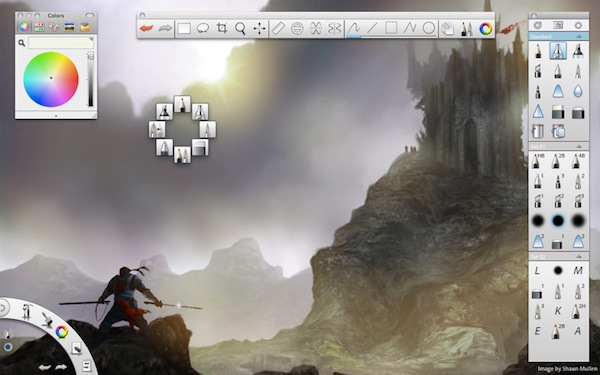
The Mac App Store isn’t even one month old and we have already heard several stories of success from Mac developers. The most notable one comes from Pixelmator, which grossed $1 million in less than 20 days into the new store; we have covered other experiences from developers in our Mac App Store hub. Autodesk (makers of AutoCAD) announced in a private event in San Francisco that the Mac App Store version of Sketchbook Pro, a painting and drawing application, has sold twice as many copies as the regular version did in the entire year. In 20 days. That’s quite an achievement, I would say.

The Loop reports Autodesk also had to ship a different version of Sketchbook Pro in order to be approved by Apple:

For example, Mac App Store apps aren’t supposed to use private APIs, can’t incorporate their own end user licensing agreements, and can’t employ separate copy protection. As a result, sharing code with the iOS version made the process easier, though SketchBook Pro is scaled up to take advantage of the increased processing power and memory footprint of the Mac.

Last year, Autodesk also released a new version of AutoCAD for Mac with an entirely redesigned interface and graphic engine, and shipped a mobile counterpart called “AutoCAD WS” for iPhone and iPad.