Posts tagged with "mac"

Notificant Delivers Notifications To All Your Macs, Through The Cloud

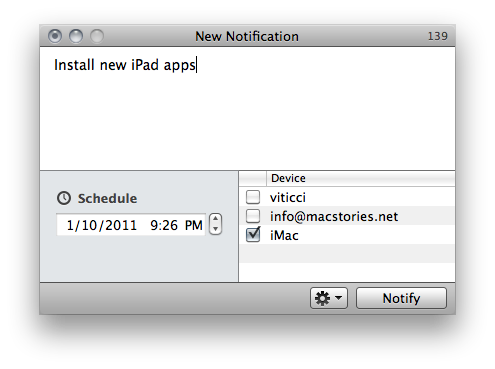
Notificant by Caramel Cloud is a new app available exclusively on the Mac App Store that provides an easy, fast and reliable solution to create and send notifications to all your personal Macs and a selected email address. The app is deeply tied to a cloud infrastructure – as the developers’ name suggests – and it allows you to forward as many notifications you want, at any given time. It’s one of those apps that doesn’t reinvent anything (notification apps have been around for a while, and we recently reviewed Alarms for Mac) but takes a simple approach and throws the advantages and speed of the cloud in the mix.

Basically, Notificant is a simple tool to sync reminders in the cloud. The app takes care of all the sync stuff and forwarding to your personal devices, you just need to write down entries, hit save and forget about it.


Read more


Apple Launching “Custom Configure” Service for Macs

As noted by 9to5mac, a new service has been recently introduced in a number of Apple Stores: “personal setup” for Mac computers. The personal setup service for iOS devices has been around for a quite a while now; to better introduce customers to the OS X ecosystem, Apple is now rolling out this new service to help new users get around the basics of a Mac, the Mac App Store, iTunes and email accounts.

This is minor news for Mac aficionados but will be very helpful for people new to the Mac and for the wider range of consumers. The service will go live in some stores as soon as Tuesday but we’ve heard that other stores will be launching the service in the next few weeks. The new service is very similar to the “setup room” that is currently featured at Apple’s Covent Garden store in London.

The service was actually launched a few days after Christmas in some Apple Stores, we’ve been told from a separate source. The internal name for the service is “Custom Configure” – “personal setups” are actually One to One data transfers. It is unclear whether or not the service will be branded “Personal Setup” in the future. As part of the equation, Apple is also going to feature dedicated “Mac stations” to better help customers through this Mac setup process and Stores will soon replace some iPod and iPod touch tables for “personal setup tables”, we’re told.

This new personal setup service for Macs is going to be a big part of the experience at Apple Stores. Just like the Genius Bar for customer support, Apple wants to offer easy and immediate help to people who just bought a new Mac. We think it’s a great idea.


What The Mac App Store Effect Looks Like

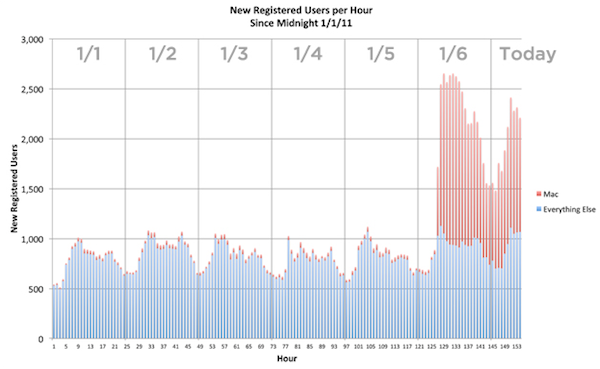
The Mac App Store is off to a great start. More than 1,000 apps already available, some of them ports of old and popular Mac applications, some of  them new ones specifically built and designed for the new Store. Some long-time Mac developers even decided to ditch their previous distribution systems and go Mac App Store-exclusive. More than 1 million downloads happened on the Mac App Store’s first day, and the first sales numbers show that the effect on the popularity of existing Mac apps has been incredible.

The developers of Alfred, an application launcher and Spotlight replacement for OS X, reported thousands of new downloads in the first 24 hours, while Evernote, a cross-platform “memory tool” and digital assistant, announced a 1800% increase of sign-ups through the Mac client, released for free in the Mac App Store. But a picture, as they say, is worth a thousand words, so here’s the Mac App Store effect visualized in a simple graph. Read more


Happy Birthday! iTunes Turns 10

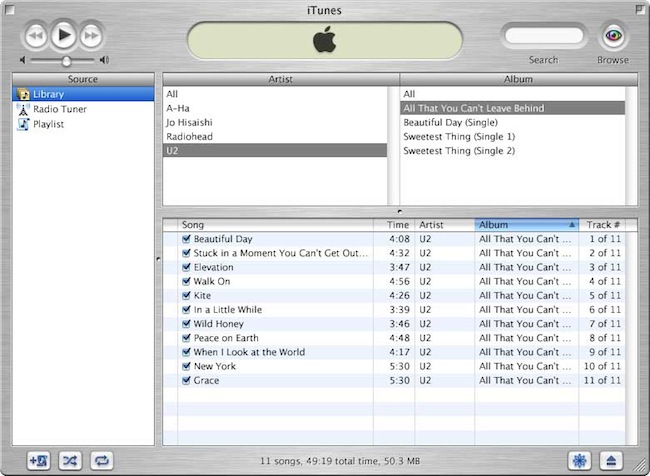
On January 9, 2001 Steve Jobs announced the first version of a new music player and organizer called iTunes at the Macworld Expo. Ten years later, iTunes has reached version 10.1.1 and it has evolved into media organizer and aggregator capable of storing music, movies, podcasts, apps, books, radio stations and playlists. Some say iTunes is bloated, and maybe it is. But truth is, it looks nothing like the brushed metal, young and tiny version we first saw 10 years ago.

iTunes has become the center of our “digital lifestyle”, a strategy Apple CEO Steve Jobs started in 2001 with the “Digital Hub” revolution. And looking back at those promises, there’s no doubt a single software running on our Macs has become the most important part of our workflow. We sync iPhones, iPods and iPads to iTunes, we store media in it, we stream content from iTunes to a variety of speakers and devices. Feature-rich or bloated, it’s undoubtedly deeply integrated with the Mac and iOS ecosystem.

So here’s to iTunes, and the digital lifestyle that’s now synced and stored on our computers and mobile devices. It’s been 10 incredible years, and we look forward to what’s next. Happy Birthday, iTunes. Read more


CoverSutra: A Fistful of Dollars


Developer Sophia Teutschler is having a hard time trying to deal with her most popular application for the Mac, CoverSutra, becoming a Mac App Store exclusive. As we discussed here, the latest CoverSutra 2.5 version is only available in the Mac App Store at $4.99, instead of the $20 it used to be on Sophia’s website. The problem is, years ago Sophia promised to customers who bought a license for CoverSutra 2.0 that they would get the 3.0 upgrade for free; CoverSutra’s development slowed down, Sophia got involved in more projects and won an Apple Design Award in the meantime, Apple introduced the Mac App Store. CoverSutra 3.0 isn’t out yet, but the 2.5 version is a paid app in the Mac App Store. Clearly, that is not the free upgrade until 3.0 Sophia once promised.

This is a very serious issue that doesn’t originate specifically from Sophia, but provides a good example when looking at CoverSutra because of the way Sophia decided to handle things. As you may be aware of, Apple is not offering trials, upgrade policies and existing customer migration on the Mac App Store. You can release apps, for a price or for free. That’s it. You have been selling apps on your website all this time? Good for you. But there’s no way to migrate people who already bought a license to the new Store. Read more


Mac App Store’s First 24 Hours: Developers Post Sales Numbers

The Mac App Store was released as part of the Mac OS X 10.6.6 update earlier than expected. The new Store to discover and download Mac software opened its doors a few hours earlier than many initially thought, which means it’s been out for more than 24 hours now. Still, several developers were waiting anxiously this morning to check the sales numbers of their apps in the first day of the Mac App Store, as provided by Apple’s iTunes Connect service. And while many are still experiencing issues when trying to generate reports from IC’s “Sales & Trends” section, the first numbers are in. And they’re pretty interesting. Read more


Mac App Store Review: Unretina, Simple Utility for iOS Designers

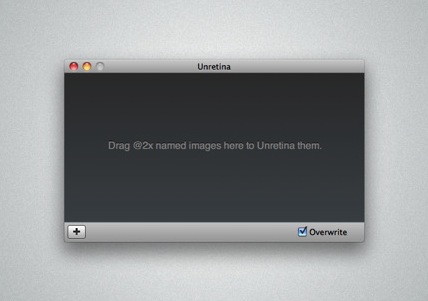
Released for free in the Mac App Store and developed by Bonobo Labs, Unretina is an OS X utility specifically geared towards iOS designers and developers. What this app does is very simple: it provides a way to easily resize “2x” images built for the Retina Display in order to make them compatible for artworks on older Apple devices.

Unretina takes graphic files designed for the iPhone 4 and iPod touch 4th gen and resizes them to a resolution compatible with, say, the iPhone 3GS and older iPod touches. It should work for all devices that don’t come with a Retina Display. Through a simple drag & drop interface, Unretina looks like a straightforward utility for designers that does one thing well.

Looking at the reviews in the Mac App Store description page, it appears that the app uses Bicubic resampling to resize graphic files. This may lead to a tiny sharpness loss, and a few pixels off. Something that, apparently, most designers won’t care about.

Unretina is available for free in the Mac App Store.