Posts tagged with "mac"

Get Lion’s Launchpad On Your Mac Now with QuickPick

One of the most intriguing features of Lion that Apple previewed at its “Back to the Mac” event in October was, in my opinion, the Launchpad. In pure iPad fashion, Launchpad will be “a home for your apps”, with fast and easy access to software downloaded from the Mac App Store, or folders created to better organize these apps. It all looks like an iPad’s Springboard brought to the Mac, with pages and iOS-like folders.

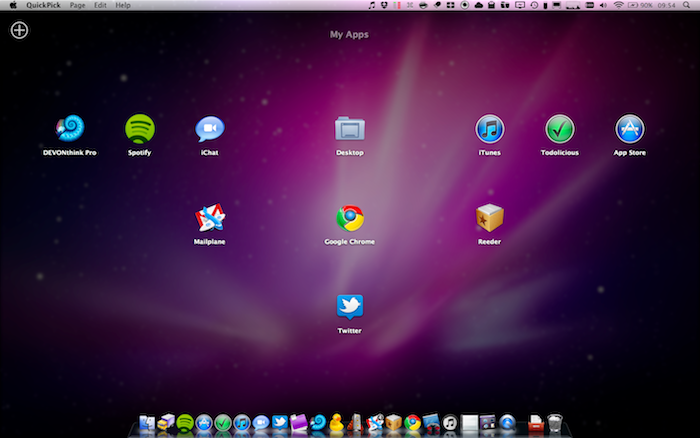
QuickPick, a $9.99 app available on the Mac App Store, brings some of the features we’ll see on Lion’s Launchpad this summer to OS X now. QuickPick lets you access apps and folders through an overlay interface that will sit on top of your currently opened apps, Finder windows and Spotlight searches. Once installed, QuickPick can be invoked either through a keyboard shortcut, a click on its dock icon or an active OS X corner. As QuickPick’s grid comes in the foreground, you’ll be able to arrange apps and create pages for your most used apps, folders or documents. Almost any file that can be dragged out of the Finder can be taken into QuickPick’s grid. In the app, you can adjust the grid’s spacing and text size. You can even create multiple pages of apps / documents thanks to a “Page Dock” that allows you to set up as many “grids” as you want. Alternatively, you can move between pages with a three-finger swipe. Again, just like the Launchpad in Lion.

QuickPick, of course, doesn’t bring all the features and details we saw demoed in Launchpad, such as the iOS folders or page indicators. If you drag a folder from the Finder to QuickPick, in fact, that folder won’t open in-app but will launch a new Finder window instead. I guess it’s a fair trade-off, considering that this app is running on Snow Leopard and we haven’t seen enough of Launchpad anyway. Still, everything’s smooth and works just as advertised.

QuickPick is available at $9.99 in the Mac App Store, and it gives us a taste of things to come in Lion by providing an alternative solution for OS X 10.6. Will Launchpad be different and more refined come Lion’s public release? For sure. But until then, you should give QuickPick a try. Check out our brief demo video of the app below.
Read more



Translator Free Translates Webpages & Text On The Fly

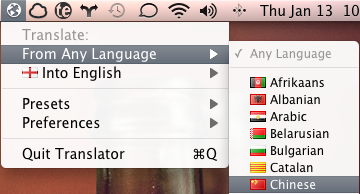
When you run across a piece of text that you can’t translate, do you find yourself in Google Translate, copying & pasting the text, before trying to determine what was exactly said? Why not cut out the middle-man and download Translator Free for OS X? Available on the Mac App Store, Translator Free is a menubar application that allows you to drag and drop websites and text for immediately translation. If you’re visiting our friends at iSpazio for example, you can simply drag the favicon from Google Chrome into the menubar icon, and a new tab will open with the translated page. It’s very cool.

If you’re throwing Chinese insults at me, watch out! Never before have friends on Facebook Chat been caught off guard so quickly now that I suddenly have language-esque superpowers. You can highlight a piece of text, hold your mouse button down, and simply drag it to Translator Free for instant translation. A window will pop-up allowing you to compare the original and translated texts.

Free in the Mac App Store, students, researchers, and anyone coming across foreign text they’re not familiar with can find Translator Free useful without having to go through the web browser. You can catch some great tutorials on Translator Free’s homepage, and download it here on the Mac App Store.


#MacStoriesDeals - Wednesday

Soon we will have a better rotation of Mac App Store sales once I find an easier way to look for deals. Anyway, here’s today’s deals on iOS & Mac (Store) apps that are on sale for a limited time, so get ‘em while they’re hot! Read more


Twitter for Mac Bookmarklet

Twitter for Mac Bookmarklet

This one’s a useful bookmarklet you can use in your default browser to send the current webpage title and link to Twitter for Mac. Works great – too bad Twitter for Mac doesn’t offer a way to wrap links in your own shortener instead of the not-so-popular t.co.

Install here.

Permalink

#MacStoriesDeals - Tuesday

So are you loyal AT&T iPhone people switching over to Verizon after the big announcement today? I really doubt I leave AT&T. Anyway, here’s today’s deals on iOS & Mac (Store) apps that are on sale for a limited time, so get ‘em while they’re hot! Read more


Solar Walk for Mac Now Available

Winner of an Apple Design Award in the iPad category in June 2010, Vito Technologies today released a Mac version of Solar Walk, available now in the Mac App Store at $2.99. Pretty much like Star Walk for the iPhone and iPad (which Cody originally reviewed here), Solar Walk for Mac is a full-featured 3D solar system model that allows you to move between stars and planets with your mouse, zoom in to check on the planets’ details and read accurate descriptions about them. You can zoom out to view the entire galaxy (well, at least through what’s known of this galaxy), see a planet’s inner structure and learn about its history of exploration. The 3D graphics aren’t breathtaking but they get the job done, the popover menus with descriptions seem to be taken out of the iPad app.

The app also allows you to move in time to see the position of planets and satellites in a certain day, month and year. There’s even a 3D mode that will require you to wear cyan-red glasses – too bad I don’t have them here right now. Neat stuff anyway.

Solar Walk is available in the Mac App Store at $2.99. A demo video of the iPad version, very similar to the Mac counterpart, is embedded below. Read more


There’s a 3D Kinect Viewer In The Mac App Store

We have talked about the coolness and the hacking possibilities offered by Microsoft’s Kinect before. First we heard Apple almost bought the technology from its original creators in 2008 (the rest is history, it got sold to Redmond), then we saw Kinect connected and displaying stuff on OS X and also somehow hooked up to a computer and an iPad with…futuristic cubes.

Now, thanks to the Mac App Store, we have a free 3D viewer for Kinect. When connected to a Mac via USB, the app can visualize tridimensional images of the depth data, and map RGB values onto this depth image. You can zoom, rotate and, of course, take a good screenshot with your Mac to show to your friends on Twitter.

Kinect 3D Viewer for Mac is free and available here.